Show character count even when user has ability to bypass the limit. #3

Description

The problem, in my opinion, is that it's very easy to mistake the "bypass maxlength setting" for a setting to enable usage. I made this mistake and spent about an hour trying to debug why the admin was unable to see the character count, despite having permission to use this feature.
In fact, they had permission to bypass the feature. I see how it makes sense for the default to be counting characters and to give certain roles the ability to exceed the limit. But, I wasn't thinking that way at the time.
It would be great to have something in the user interface to help make it clear what is going on.
-
Continue to show the character count for those with permissiont to bypass it, just allow them to exceed it. That way they know the feature exists, they just are not constrained. Even better would be to include some text next to the charater count that says "This user has permission to exceed count."
-
Another idea would be to change text from "Bypass maxlength settings" to "Bypass/ignore maxlength settings." Maybe "Bypass" not clear enough on a superficial scan?
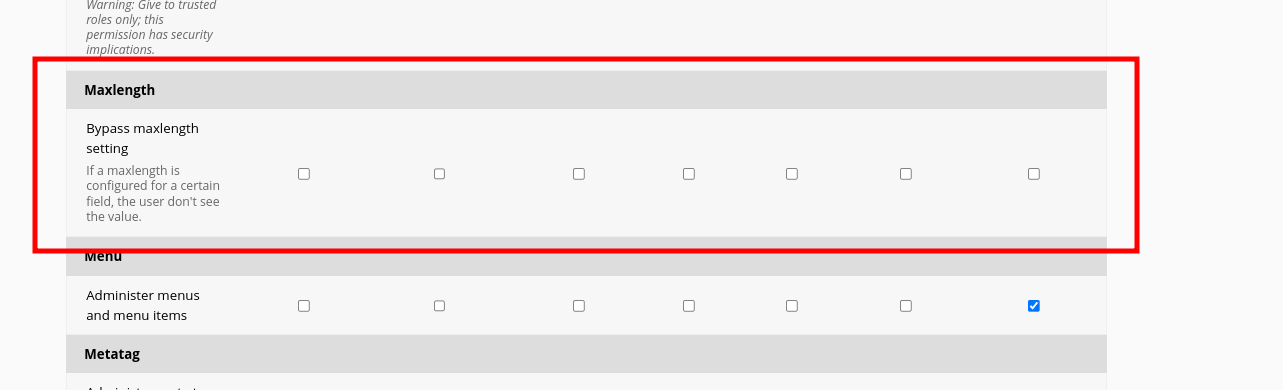
I think the problem is that it is counter intuitive that an editor can see a feature and an admin with special permissions can't see it?