Node builtin模块加载源码分析 #2


Description

本章代码基于node v6.11.5
这篇文章主要讲了 Node 中 builtin 模块加载的原理。
- 建议1:看完官网文档再来看源码剖析,一些知识点比如模块的查找等等并没有在此提及。
- 建议2:以朴灵老师著作《深入浅出node.js》为主系统学习,以此系列文章为辅剖析最新的源码
Node模块分类
严格来讲,Node 里面主要分以下几种模块:
- builtint C++ module(也称内建模块):
Node中以c++形式提供的模块,如tcp_wrap、contextify等 - constants module:
Node中定义常量的模块,用来导出如signal,openssl库、
文件访问权限等常量的定义。如文件访问权限中的O_RDONLY,O_CREAT、signal中的SIGHUP,SIGINT等。 - native JS module(也称原生模块):
Node中以JavaScript形式提供的模块,如http,https,fs等。有
些native module需要借助于builtin module实现背后的功能。如对于native
模块buffer, 还是需要借助builtin node_buffer.cc中提供的功能来实现大容量
内存申请和管理,目的是能够脱离V8内存大小使用限制。 - 3rd-party module: 以上模块可以统称
Node内建模块,除此之外为第三方模
块,典型的如express模块。
builtint C++ 模块有三个兄弟,都是通过 C++ 编写的,内建(builtint)、扩展(addon)、已链接的扩展(linked),,分别含义为:
| 模块分类 | 储存位置 | 后缀 | 描述 |
|---|---|---|---|
| 内建模块(builtint) | src | .cc | Node.js的内建C++模块 |
| 扩展模块(addon) | build/Release | .node | 用户扩展的C++模块,无需写进node命名空间,也不需要提供头文件,而是通过dlopen()方法动态加载,需要将.cc文件编译为node |
| 已链接的扩展模块(linked) | src | .cc | 在src目录下的非Node内建模块,是用户编写的,在node初始化之前链接到了node命名空间中 |
| 内部模块(internal) | - | - | Node-v8.9.0新增 |
builtin module 和 native module
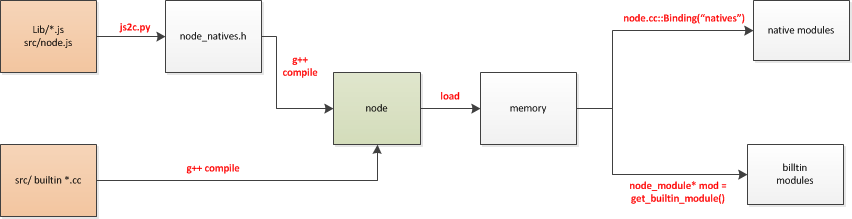
builtin C++ module 编译过程
问题引入 以
net.js为例const TCP = process.binding('tcp_wrap').TCP;这句话是如何取得内置的 builtin C++ module 的?
在 Node 中, builtin C++ module 的内部结构定义如下:
node_module定义
// node.h  399
struct node_module {
  // 表示node的ABI版本号,node本身导出的符号极少,所以变更基本上由v8、libuv等依赖引起
  // 引入模块时,node会检查ABI版本号
  int nm_version;
  // 暂时只有NM_F_BUILTIN和0 NM_F_LINKED
  unsigned int nm_flags;
  // 存动态链接库的句柄
  void* nm_dso_handle;
  const char* nm_filename;
  // 下面俩函数指针,一个模块只会有一个,用于初始化模块
  node::addon_register_func nm_register_func;
  node::addon_context_register_func nm_context_register_func;
  const char* nm_modname;
  void* nm_priv;
  struct node_module* nm_link;
};而node_module在组织上是通过链表的形式:
// node-v8.9.0/src/node.cc
static node_module* modpending;
static node_module* modlist_builtin;
static node_module* modlist_internal;
static node_module* modlist_linked;
static node_module* modlist_addon;
- modpending: 主要用于加载
C++ addon时传递当前加载的模块 - modlist_builtin: 存储内建模块的链表,
process.binding函数会查找这个链表来获取模块并初始化 - modlist_internal:
- modlist_linked: 存储已链接模块,
process._linkedBinding函数查此表 - modlist_addon: 存储用户扩展模块。
这五个静态变量分别表示四个链表,通过node_module_register函数将传进的node_module结构体链接到不同的链表上(判断不同的类型),比如:get_builtin_module()会遍历查找modlist_builtin链表来查找我们需要的builtin模块。node_module_register的源码如下
node_module_register
//node.cc 2408
extern "C" void node_module_register(void* m) {
  struct node_module* mp = reinterpret_cast<struct node_module*>(m);

  //如果有 NM_F_BUILTIN 标志(在宏封装的时候传入了NM_F_BUILTIN参数,具体看下文宏的源码)
  if (mp->nm_flags & NM_F_BUILTIN) {

    //插入链表中
    mp->nm_link = modlist_builtin;
    modlist_builtin = mp;


  } else if (mp->nm_flags & NM_F_INTERNAL) {
    mp->nm_link = modlist_internal;
    modlist_internal = mp;

   //如果node还没初始化
  } else if (!node_is_initialized) {
    // "Linked" modules are included as part of the node project.
    // Like builtins they are registered *before* node::Init runs.
    //(译)Linked 模块作为 node 的一部分,像builtins 模块一样在 node::Init 运行之前被注册
    mp->nm_flags = NM_F_LINKED;
    mp->nm_link = modlist_linked;
    modlist_linked = mp;
  } else {
    modpending = mp;
  }
}
宏的作用
每个 builtin C++ 模块都会通过下列其中一个宏定义到node命名空间中:
- NODE_MODULE: 普通的模块
- NODE_MODULE_CONTEXT_AWARE: 具备识别情境的能力的普通模块
- NODE_MODULE_CONTEXT_AWARE_BUILTIN:具备识别情境的能力的
builtin模块
#define NODE_MODULE(modname, regfunc)                                 \
  NODE_MODULE_X(modname, regfunc, NULL, 0)

#define NODE_MODULE_CONTEXT_AWARE(modname, regfunc)                   \
  NODE_MODULE_CONTEXT_AWARE_X(modname, regfunc, NULL, 0)

#define NODE_MODULE_CONTEXT_AWARE_BUILTIN(modname, regfunc)           \
  NODE_MODULE_CONTEXT_AWARE_X(modname, regfunc, NULL, NM_F_BUILTIN)   \
识别情境是什么意思?Node.js V0.12新特性之在单进程中跑多个实例
简单的说就是在单进程中能够跑多个 v8 实例,而每个实例都能识别自己运行时所处环境的上下文,所以将会在下面看到加载每个模块的时候都会加入当前v8实例所处的上下文。
介绍完了模块的储存结构,说回模块的编译
拿 tcp_wrap.cc 举例,该模块文件的最后一行如下所示
// tcp_wrap.cc 364
NODE_MODULE_CONTEXT_AWARE_BUILTIN(tcp_wrap, node::TCPWrap::Initialize)
NODE_MODULE_CONTEXT_AWARE_BUILTIN的源码
宏 NODE_MODULE_CONTEXT_AWARE_BUILTIN的源码如下所示:
// node.h 485

/**
* 编译一个 builtin C++ 模块
* @param modname 模块名称(如tcp_wrap)
* @param regfunc Initialize函数(每个模块的初始化函数)
* @param priv    暂不清楚(private ?)
* @param flags   暂不清楚(似乎作为BUILTIN模块和LINKED模块的标识)
*/
#define NODE_MODULE_CONTEXT_AWARE_X(modname, regfunc, priv, flags)    \
  extern "C" {                                                        \
    static node::node_module _module =                                \
    {                                                                 \
      NODE_MODULE_VERSION,                                            \
      flags,                                                          \
      NULL,                                                           \
      __FILE__,                                                       \
      NULL,                                                           \
      (node::addon_context_register_func) (regfunc),                  \
      NODE_STRINGIFY(modname),                                        \
      priv,                                                           \
      NULL                                                            \
    };                                                                \
    NODE_C_CTOR(_register_ ## modname) {                              \
      node_module_register(&_module);                                 \
    }                                                                 \
  }
...

#define NODE_MODULE_CONTEXT_AWARE_BUILTIN(modname, regfunc)           \
NODE_MODULE_CONTEXT_AWARE_X(modname, regfunc, NULL, NM_F_BUILTIN) \宏NODE_MODULE_CONTEXT_AWARE_BUILTIN将模块名称(如tcp_wrap)和该模块注册函数(如node::TCPWrap::Initialize)等参数封装成一个 node::node_module 类型的结构体_module,并定义到node命名空间中。 node_module_registerr(&_module)函数上文介绍过了,作用是把传进的node_module结构体插入到相应的链表中,看下NODE_C_CTOR宏:
node.h 436
#define NODE_C_CTOR(fn)                                               \
  NODE_CTOR_PREFIX void fn(void) __attribute__((constructor));        \
  NODE_CTOR_PREFIX void fn(void)
#endif
该宏给传进来的函数加上 attribute((constructor)) 修饰,例如对于 tcp_wrap 模块而言,会被扩展为函数 static void _register_tcp_wrap (void) attribute((constructor))。该函数以及该函数体内的node_module_register函数会在 node 的 main() 函数之前被执行,也就是说,我们的 builtin C++ 模块会在 main() 函数之前被加载进 modlist_builtin 链表
attribute((constructor))是gcc的一个函数属性声明。来自gcc文档的说明:(地址:https://gcc.gnu.org/onlnedocs/gcc/Common-Function-Attributes.html#Common-Function-Attributes)
The constructor attribute causes the function to be called automatically before execution enters main ().
综上所述: C++内建模块完成了封装模块为结构体保存到链表的功能
builtin C++ module 导出过程
通常不推荐文件模块直接调用 builtin C++ 模块,如需调用直接调用 native JS 模块,因为 native JS 模块基本都封装了 builtin C++ 模块,那么 builtin C++ 模块是怎么将内部变量或方法导出,供外部 native JS 模块调用的呢?
Binding()源码
Node 在启动时,会生成一个全局变量process,并提供Binding()方法来协助加载 builtin 模块。当我们的应用或者 node 内建的模块调用 require() 来引用另一个模块时,背后的支撑者即是这里提到的 Binding() 函数,源码如下所示:
//node.cc 2664
static void Binding(const FunctionCallbackInfo<Value>& args) {
  //获取当前运行环境
  Environment* env = Environment::GetCurrent(args);
  /*
  * Isolate代表了一个v8引擎的实例。每一个Isolate维护自己内部的状态。
  * Isolate内创建的js对象无法在另一个Isolate中使用
  * v8允许创建多个Isolate并使它们并行运行在多个线程中。
  * 同一个Isolate同一时间只能在单个线程内运行。并且要求使用Locker/Unlocker使他们同步执行
  */

  //获取传入的参数在当前v8实例的字符串表示,即模块名称
  Local<String> module = args[0]->ToString(env->isolate());
  node::Utf8Value module_v(env->isolate(), module);

  // 获取当前执行环境中的缓存
  Local<Object> cache = env->binding_cache_object();
  //声明exports对象
  Local<Object> exports;

  //如果缓存在当前执行环境上下文中找到了该模块
  if (cache->Has(env->context(), module).FromJust()) {
    //这句的意思是 `exports = module.exports`
    exports = cache->Get(module)->ToObject(env->isolate());
    args.GetReturnValue().Set(exports);
    return;
  }

  // Append a string to process.moduleLoadList
  char buf[1024];
  snprintf(buf, sizeof(buf), "Binding %s", *module_v);

  Local<Array> modules = env->module_load_list_array();
  uint32_t l = modules->Length();
  modules->Set(l, OneByteString(env->isolate(), buf));

  //从modlist_builtin链表中获取该结构体
  node_module* mod = get_builtin_module(*module_v);

  //如果结构体不为空,可以从modlist_builtin链表中获取到(即属于builtin模块)
  if (mod != nullptr) {

    //根据当前v8实例创建一个 v8::Local<v8::Object> 对象赋值给exports
    exports = Object::New(env->isolate());
    // Internal bindings don't have a "module" object, only exports.
    // (译)内置绑定对象没有module.exports 只有 exports
    CHECK_EQ(mod->nm_register_func, nullptr);
    CHECK_NE(mod->nm_context_register_func, nullptr);
    Local<Value> unused = Undefined(env->isolate());

    //调用上文介绍的module结构体中的nm_context_register_func函数,将该模块对应的结构体注册到执行环境的上下文中。
    mod->nm_context_register_func(exports, unused,
      env->context(), mod->nm_priv);

    //将exports对象按模块名缓
    cache->Set(module, exports);

  //如果传入的模块名称是常量模块
  } else if (!strcmp(*module_v, "constants")) {

    exports = Object::New(env->isolate());

    //定义常量模块
    DefineConstants(env->isolate(), exports);
    cache->Set(module, exports);

  //如果传入的模块名称是native 模块
  } else if (!strcmp(*module_v, "natives")) {
    exports = Object::New(env->isolate());

    //定义native模块
    DefineJavaScript(env, exports);
    cache->Set(module, exports);

  //如果都不是,就该报错了
  } else {
    char errmsg[1024];
    snprintf(errmsg,
             sizeof(errmsg),
             "No such module: %s",
             *module_v);
    return env->ThrowError(errmsg);
  }

  args.GetReturnValue().Set(exports);
}
在加载bulitin模块时,我们先创建一个exports空对象,然后调用get_builtin_module()取出该模块对应的结构体,如果能获取到,模块的注册函数会先被执行,且将一个重要的数据 exports对象返回,即为bulitin模块,就调用上文介绍的node_module结构体中的nm_context_register_func()函数,将该模块对应的结构体注册到执行环境的上下文中并得到该有的 module和module.exports。然后将exports对象按模块名缓存。
再回想开头引入的问题 在net.js中const TCP = process.binding('tcp_wrap').TCP;这句话取得内置的 builtin C++ module的原理已经清楚了吧?
如果不能从modlist_builtin链表中获取到,则表示该模块是常量模块或者native JS 模块。判断传入Binding()的参数中是否含有constans或者natives。接下来看下导出这两个模块的核心方法。
DefineJavaScript源码
DefineJavaScript源码:
// node-v6.11.5/out/Release/obj/gen/node_javascript.cc  55434

void DefineJavaScript(Environment* env, v8::Local<v8::Object> target) {
  CHECK(target->Set(env->context(),
                  internal_bootstrap_node_key.ToStringChecked(env->isolate()),
                  internal_bootstrap_node_value.ToStringChecked(env->isolate())).FromJust());
CHECK(target->Set(env->context(),
                  _debug_agent_key.ToStringChecked(env->isolate()),
                  _debug_agent_value.ToStringChecked(env->isolate())).FromJust());
CHECK(target->Set(env->context(),
                  buffer_key.ToStringChecked(env->isolate()),
                  buffer_value.ToStringChecked(env->isolate())).FromJust());

...
}
// 处理node_native.h源码返回v8::Handle类型的数据可供编译
v8::Local<v8::String> (Environment* env) {
  return internal_bootstrap_node_value.ToStringChecked(env->isolate());
}


//buffer_key的结构体
static struct : public v8::String::ExternalOneByteStringResource {
  const char* data() const override {
    return reinterpret_cast<const char*>(raw_buffer_key/*划重点*/);
  }
  size_t length() const override { return arraysize(raw_buffer_key/*划重点*/); }
  void Dispose() override { /* Default calls `delete this`. */ }
  v8::Local<v8::String> ToStringChecked(v8::Isolate* isolate) {
    return v8::String::NewExternalOneByte(isolate, this).ToLocalChecked();
  }
} buffer_key;

//下面会提到JavaScript核心文件被转为数组存储

static const uint8_t raw_buffer_key[] = { 98,117,102,102,101,114 };
static const uint8_t raw_buffer_value[] = { 39,117,115,101,32,115,116,114,105,99,116,39,59,10,10,99,111,110,115,116,
32,98,105,110,100,105,110,103,32,61,32,112,114,111,99,101,115,115,46,98,
105,110,100,105,110,103,40,39,98,117,102,102,101,114,39,41,59,10,99,111,
110,115,116,32,123,32,99,111,109,112,97,114,101,58,32,99,111,109,112,97,
...

}可以看到DefineJavaScript的原理是把传入的exports对象进行扩展,即把当前运行环境上下文(context),还有被js2c.py工具转换为字符串数组的JavaScript核心文件取出、重新生成的普通字符串,扩展到exports对象中,以对JavaScript核心模块进行编译和执行。仍然会将exports对象按模块名缓存。
// node_constants.cc 1145
void DefineConstants(v8::Isolate* isolate, Local<Object> target) {
  Local<Object> os_constants = Object::New(isolate);
  Local<Object> err_constants = Object::New(isolate);
  Local<Object> sig_constants = Object::New(isolate);
  Local<Object> fs_constants = Object::New(isolate);
  Local<Object> crypto_constants = Object::New(isolate);

  DefineErrnoConstants(err_constants);
  DefineWindowsErrorConstants(err_constants);
  DefineSignalConstants(sig_constants);
  DefineUVConstants(os_constants);
  DefineSystemConstants(fs_constants);
  DefineOpenSSLConstants(crypto_constants);
  DefineCryptoConstants(crypto_constants);

  os_constants->Set(OneByteString(isolate, "errno"), err_constants);
  os_constants->Set(OneByteString(isolate, "signals"), sig_constants);
  target->Set(OneByteString(isolate, "os"), os_constants);
  target->Set(OneByteString(isolate, "fs"), fs_constants);
  target->Set(OneByteString(isolate, "crypto"), crypto_constants);
}
DefineConstants也是把传入的exports对象进行了扩展,只不过是将常量模块扩展到了exports对象中。
小结
builtin C++ 模块通过宏NODE_MODULE_CONTEXT_AWARE_BUILTIN将模块名和该模块注册函数等参数封装成一个 node::node_module 类型的结构体_module并插入相应的modlist_builtin链表,并定义到node命名空间中。 Node初始化时会将 builtin C++ 模块 加载进内存中,通过Binding()->get_builtin_module()的调用关系,可以从modlist_builtin链表中取出相应的模块结构体,将该结构体注册到执行环境的上下文中并得到该有的 module和module.exports。然后将exports对象按模块名缓存。这样就可以在*.js文件中使用process.binding('tcp_wrap')得到该builtin C++ 模块。

native JS module
问题引入 : 拿http模块举例
var http = require('http');require()从哪里来? 为什么我们在node中require一个模块就可以引入http模块?
node.js使用了V8附带的js2c.py工具,把所有主程序src/node.js和模块程序lib/*.js中的每一个字符转换成对应的 ASCII 码,并存放在相应的C++数组里面,生成node_natives.h直接include到程序中,成了C++源码的一部分。这样做能提高内置js模块的编译效率。
大致结构如下:
namespace node {
  const char node_native[] = {47, 47, 32, 67, 112 …}
const char console_native[] = {47, 47, 32, 67, 112 …}
const char buffer_native[] = {47, 47, 32, 67, 112 …}

…

}

struct _native {const char name;  const char* source;  size_t source_len;};
static const struct _native natives[] = {{ “node”, node_native, sizeof(node_native)-1 },
{“dgram”, dgram_native, sizeof(dgram_native)-1 },
{“console”, console_native, sizeof(console_native)-1 },
{“buffer”, buffer_native, sizeof(buffer_native)-1 },
…

}上文提到过的node_javascript.js文件有两个函数:
MainSource()处理node_native源码返回v8::Handle类型的数据可供编译。DefineJavaScript(target)把其他所有模块源码变成v8::Handle类型后加载到传入的target对象上。
JavaScript核心模块的编译
在启动Node进程时,JavaScript核心代码直接加载进内存中(如图1.1所示)。
上篇提到过bootstrap_node.js文件,在 Node 初始化的时候被编译执行。那么它究竟是一个什么样的JavaScript文件呢?
bootstrap_node.js 源码
// node-v6.11.5/lib/internal/bootstrap_node.js

// Hello, and welcome to hacking node.js!
// This file is invoked by node::LoadEnvironment in src/node.cc, and is
// responsible for bootstrapping the node.js core. As special caution is given
// to the performance of the startup process, many dependencies are invoked lazily.
//(译)这个文件被src/node.cc下的node::LoadEnvironment函数调用,它的职责是引导node.js核心
//特别需要慎重的是启动过程的性能,许多依赖是懒调用的(invoked lazily)

(function(process) {

  function startup(){ ... };
  function setupProcessObject(){...};
  function setupGlobalVariables(){...};
  function setupGlobalTimeouts(){...};
  function setupGlobalConsole(){...};
  function installInspectorConsoleIfNeeded(){...};
  function setupProcessFatal(){...};
  function evalScript(){...};
  function preloadModules(){...};
  function run(){...};
  function runInThisContext(){...};
  ...


  // Below you find a minimal module system, which is used to load the node
  // core modules found in lib/*.js. All core modules are compiled into the
  // node binary, so they can be loaded faster.
  //(译)在lib/*.js 中找到一个最小的模块用于加载node核心模块
  // 所有的模块都会被编译进node二进制文件里,所以它们能加载的更快
  const ContextifyScript = process.binding('contextify').ContextifyScript;
  function runInThisContext(code, options) {
    const script = new ContextifyScript(code, options);
    return script.runInThisContext();
  }

  function NativeModule(id) {
    this.filename = `${id}.js`;
    this.id = id;
    this.exports = {};
    this.loaded = false;
    this.loading = false;
  }
  //还记得 node.cc 提供的Binding函数吗?其中有个判断就是是否是natives
  //提取存储在node_javascript.cc中被js2c.py转换生成C++数组
  //返回值为转换之后的所有javascript核心文件
  NativeModule._source = process.binding('natives');
  NativeModule._cache = {};

  NativeModule.require = function(id) {
    //如果是需要native_module,就直接返回这个构造函数
    if (id === 'native_module') {
      return NativeModule;
    }

    //如果缓存中有,从缓存中取出
    const cached = NativeModule.getCached(id);
    if (cached && (cached.loaded || cached.loading)) {
      return cached.exports;
    }

    //如果不存在这个模块,抛出异常
    if (!NativeModule.exists(id)) {
      throw new Error(`No such native module ${id}`);
    }
    //放入moduleLoadList列表中
    process.moduleLoadList.push(`NativeModule ${id}`);

    //根据模块名称创建一个NativeModule实例
    const nativeModule = new NativeModule(id);

    //缓存并执行
    nativeModule.cache();
    nativeModule.compile();

    return nativeModule.exports;
  };
  //获取缓存函数
  NativeModule.getCached = function(id) {
    return NativeModule._cache[id];
  };
  //检查是否存在此模块
  NativeModule.exists = function(id) {
    return NativeModule._source.hasOwnProperty(id);
  };

  ...

  //从所有JavaScript核心文件中取出这个模块
  NativeModule.getSource = function(id) {
    return NativeModule._source[id];
  };

  //包装获取的JavaScript文件。
  NativeModule.wrap = function(script) {
    return NativeModule.wrapper[0] + script + NativeModule.wrapper[1];
  };

  NativeModule.wrapper = [
    '(function (exports, require, module, __filename, __dirname) { ',
    '\n});'
  ];

  //编译函数
  NativeModule.prototype.compile = function() {

    //获取模块并包装
    var source = NativeModule.getSource(this.id);
    source = NativeModule.wrap(source);

    this.loading = true;

    try {
      //在当前上下文中运行这个JavaScript文件
      const fn = runInThisContext(source, {
        filename: this.filename,
        lineOffset: 0,
        displayErrors: true
      });
      fn(this.exports, NativeModule.require, this, this.filename);

      this.loaded = true;
    } finally {
      this.loading = false;
    }
  };
  //设置缓存函数
  NativeModule.prototype.cache = function() {
    NativeModule._cache[this.id] = this;
  };

  startup();
});重要的是NativeModule构造函数,注释已经加的很清楚了就不再多说了。逻辑就是通过process提供的定义在node.cc中的Binding函数调用DefineJavaScript函数(上文已经详细介绍过),将在./out/Release/obj/gen/node_javascript.cc中存储的C++数组转换为JavaScript核心文件。
综上所述 :我们的JavaScript文件已经被加载进了node命名空间以及内存中,再回头想文章开头的问题:
JavaScript的导出
var http = require('http');为什么我们在文件中require一个模块就可以引入http模块?
既然已经加载到内存空间(五指山)中了,找到它还不简单(妖猴哪里逃!)?
lib/module.js 中有如下代码:
// node-v6.11.5/lib/module.js

// Loads a module at the given file path. Returns that module's
// `exports` property.
//(译)给定一个文件路径加载模块并返回模块的 exports 属性
Module.prototype.require = function(path) {
    assert(path,'missing path');
    assert(typeof path ==='string','path must be a string');
    return Module._load(path, this);
};
注意 Module.require方法 每个模块实例都有一个 require 方法。
这里就解答了问题1:require 并不是全局性命令,而是每个模块提供的一个内部方法,也就是说,只有在模块内部才能使用 require 命令(唯一的例外是 REPL 环境)。另外,require 其实内部调用 Module._load 方法。
Module 构造函数(类)上篇已经剖析过了,这里具体看Module._load函数。
// node-v6.11.5/lib/module.js

// Check the cache for the requested file.
// 1. If a module already exists in the cache: return its exports object.
// 2. If the module is native: call `NativeModule.require()` with the
//    filename and return the result.
// 3. Otherwise, create a new module for the file and save it to the cache.
//    Then have it load  the file contents before returning its exports
//    object.
Module._load = function(request, parent, isMain) {
  if (parent) {
    debug('Module._load REQUEST %s parent: %s', request, parent.id);
  }

  var filename = Module._resolveFilename(request, parent, isMain);

  //如果在缓存中,直接返回exports对象
  var cachedModule = Module._cache[filename];
  if (cachedModule) {
    return cachedModule.exports;
  }

  //如果是原生模块,调用NativeModule.require
  if (NativeModule.nonInternalExists(filename)) {
    debug('load native module %s', request);
    return NativeModule.require(filename);
  }

  var module = new Module(filename, parent);

  if (isMain) {
    process.mainModule = module;
    module.id = '.';
  }

  Module._cache[filename] = module;

  //如果是用户扩展的模块,尝试加载它
  tryModuleLoad(module, filename);

  return module.exports;
};
翻译一下注释:
- 如果模块在缓存中,返回它的
exports对象。 - 如果是原生的模块,通过调用
NativeModule.require()返回结果。 - 否则,创建一个新的模块,并保存到缓存中。然后再返回它的
exports对象之前加载它
http是原生模块,所以就调用NativeModule.require() 返回一个exports对象。
exports对象? 等等,我好像记起来了什么,看下http大致源码
// node-v6.11.5/lib/http.js
'use strict';
const util = require('util');
const internalUtil = require('internal/util');
const EventEmitter = require('events');

exports.request = ...
exports.createServer = ...
exports.Client = ...
exports.createClient = ...仅仅定义了几个常量,没有定义exports对象啊,它是从哪里冒出来的?我们怎么可以不定义直接使用?
模块文件的包装
大家都了解CommonJS模块规范,我们知道每个模块文件中存在着require、exports、module这3个变量,但是它们在模块文件中并没有定义,甚至在Node的API文档中,我们知道每个模块中还有__filename、__dirname这两个变量的存在,它们又是从何而来的?
回头看下NativeModule,
  NativeModule.wrap = function(script) {
    return NativeModule.wrapper[0] + script + NativeModule.wrapper[1];
  };

  NativeModule.wrapper = [
    '(function (exports, require, module, __filename, __dirname) { ',
    '\n});'
];NativeModule对获取的 JavaScript 文件内容进行了包装 。在头部添加了(function (exports, require, module, __filename, __dirname) {\n,在尾部添加了\n}); 一个正常的 JavaScript 文件会被包装成如下的样子:
(function (exports, require, module, __filename, __dirname) {
    var math = require('math');
    exports.area = function (radius) {
    return Math.PI * radius * radius; };
});这样每个模块文件都进行了作用域隔离。包装之后的代码会通过runInThisContext()执行(类似eval,只是有明确上下文,不会污染全局),返回一个具体的的function对象。最后,将当前模块对象的exports属性、require()方法、module(模块自身),以及在文件定位中得到的完整文件路径和文件目录作为参数传递给这个function()执行。
这就是这些变量并没有定义在每个模块文件中却存在的原因。在执行之后,模块的exports属性被返回给了调用方。exports属性上的任何方法和属性都可以被外部调用到,但是模块中的其余变量或属性不可直接调用。
我们终于了解了require()之后的原理,
问题2就解决了。
不同的文件扩展名,不同的载入方法
这里需要注意一下,Node对于不同的文件扩展名,其载入方法也有所不同,具体如下所示:
// node-v8.9.0/lib/module.js

// Native extension for .js
Module._extensions['.js'] = function(module, filename) {

  //从本地同步读取文件
  var content = fs.readFileSync(filename, 'utf8');
  module._compile(internalModule.stripBOM(content), filename);
};


// Native extension for .json
Module._extensions['.json'] = function(module, filename) {
  var content = fs.readFileSync(filename, 'utf8');
  try {
    module.exports = JSON.parse(internalModule.stripBOM(content));
  } catch (err) {
    err.message = filename + ': ' + err.message;
    throw err;
  }
};


//Native extension for .node
Module._extensions['.node'] = function(module, filename) {
  return process.dlopen(module, path._makeLong(filename));
};- .js 文件。通过fs,模块同步读取文件后编译执行
- .node 文件。这是用C++编写的扩展文件,通过dlopen() 方法加载最后编译生成的文件
- .json 文件。通过fs模块同步读取文件后,用JSON.parse()解析返回结果
- 其余扩展名。它们都被当做.js文件载入
每一个编译成功的模块都会将其文件路径作为索引缓存在Module._cache对象上,以提高二次引入的性能。
小结
编译过程:js2c.py 会将 node 源代码中src/node.js和lib/*.js 的每一个字符转换成对应的 ASCII 码,并存放在C++数组里面。在启动Node进程时,使用上文提到过的process.binding('natives')->DefineJavaScript()就可从数组中提取出来直接加载进内存中。
导出过程:
- 原生模块:通过
Module._load函数调用NativeModule.require()返回一个exports对象,这个对象经过了NativeModule.wrap()的包装,加上了exports, require, module, __filename, __dirname参数,从而具有了exports属性。可以直接通过var http = require('http')的方式得到这个模块。例如var http = require('http') - 自定义模块:通过
_load()->tryModuleLoad()->load()->_extensions()->_compile() ->runInThisContext()和
var content = fs.readFileSync(filename, 'utf8');从本地同步读取文件,经过Module.wrap(content)包装之后,runInThisContext()在当前上下文执行这个代码。例如node app.js形式和var myfile = require('./myfile')形式。

总结
- builtin C++模块属于最底层的模块,主要提供API给JavaScript核心模块和第三方JavaScript文件模块调用。
- nvative JS模块主要扮演的职责有两类:一类是作为builtin C++模块的封装层和桥接层,供文件模块调用,一类是纯粹的功能模块,它不需要直接跟底层打交道,但是又十分重要。
- 文件模块通常由第三方编写,包括普通的JavaScript模块和C++扩展模块,主要调用方向为普通JavaScript模块调用扩展模块。

感谢
- 《深入浅出node.js》朴灵老师著作,建议以此书为主系统学习,以此篇文章为辅剖析最新的源码
- Node 原生模块杂谈 renaesop/blog#21
- http://www.cnblogs.com/kazetotori/p/6150216.html
- https://www.gitbook.com/book/yjhjstz/deep-into-node/details
- https://luzeshu.com/tech
- https://xidui.github.io
- http://www.ruanyifeng.com/blog/2015/05/require.html
精选面试题
问题: 如何在不重启 node 进程的情况下热更新一个 js/json 文件? 这个问题本身是否有问题?
情景 :老板让王二狗写一个限时抢购页面,王二狗熬夜赶出一个
server.js文件,其中一段返回客户端$ 11.11,在主文件app.js中引入了require('./server.js'),服务器跑起来之后,老板打电话来劈头盖脸骂一顿怎么把人民币写成美元了,王二狗终于意识到这是中英文输入法的锅,不过还是得自己背。改完之后发现并没有反应,还是扎眼的$,王二狗终于想起来Node缓存机制。重启服务器?抢购页面能耽误一秒?用户立即就会投诉。怎么办呢?
答: 可以清除掉 require.cache 的缓存重新 require(xxx), 视具体情况还可以用 VM 模块重新执行。
当然这个问题可能是典型的 X-Y Problem, 使用 js 实现热更新很容易碰到 v8 优化之后各地拿到缓存的引用导致热更新 js 没意义。当然热更新 json 还是可以简单一点比如用读取文件的方式来热更新, 但是这样也不如从 redis 之类的数据库中读取比较合理。
解析:看下文档中对require.cache的定义:
require.cache
被引入的模块将被缓存在这个对象中。从此对象中删除键值对将会导致下一次 require 重新加载被删除的模块。注意不能删除 native addons(原生插件),因为它们的重载将会导致错误。
//删除指定模块的缓存
delete require.cache[require.resolve('/*被缓存的模块名称*/')]

// 删除所有模块的缓存
Object.keys(require.cache).forEach(function(key) {
     delete require.cache[key];
})
这样王二狗终于挽回了自己的饭碗,他下定决心要把 Node 文档读透。
如果 a.js require 了 b.js, 那么在 b 中定义全局变量 t = 111 能否在 a 中直接打印出来?
每个 .js 能独立一个环境只是因为 node 帮你在外层包了一圈自执行, 所以你使用 t = 111 定义全局变量在其他地方当然能拿到. 情况如下:
// b.js
(function (exports, require, module, __filename, __dirname) {
  t = 111;
})();

// a.js
(function (exports, require, module, __filename, __dirname) {
  // ...
  console.log(t); // 111
})();如果想避免,加上use strict就可以了
// b.js
(function (exports, require, module, __filename, __dirname) {
  'use strict'
  t = 111;
})();
a.js 和 b.js 两个文件互相 require 是否会死循环? 双方是否能导出变量? 如何从设计上避免这种问题?
不会, 先执行的导出空对象, 通过导出工厂函数让对方从函数去拿比较好避免. 模块在导出的只是 var module = { exports: {} }; 中的 exports, 以从 a.js 启动为例, a.js 还没执行完 exports 就是 {} 在 b.js 的开头拿到的就是 {} 而已.详见Node文档循环加载
exports 和 moudle.exports 的区别?
一句话:exports 变量是在模块的文件级别作用域内有效的,它在模块被执行前被赋予 module.exports 的值。
require() 的假设实现:
function require(/* ... */) {
  const module = { exports: {} };
  ((module, exports) => {
    // 模块代码在这。在这个例子中,定义了一个函数。
    function someFunc() {}
    exports = someFunc;
    // 此时,exports 不再是一个 module.exports 的快捷方式,
    // 且这个模块依然导出一个空的默认对象。
    module.exports = someFunc;
    // 此时,该模块导出 someFunc,而不是默认对象。
  })(module, module.exports);
  return module.exports;
}
module.exports 与 exports 的区别解释
Node文档module.exports定义
更多面试题请看:
饿了么Node面试干货