

-
|
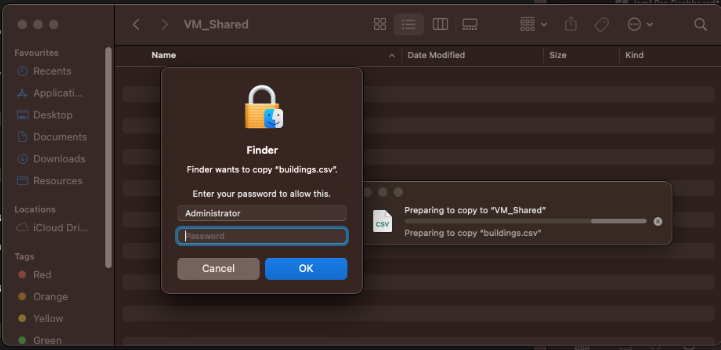
I have mounted the shared folder, and my main Macs folder is showing up. The files in that folder can be copied to the desktop in the VM (Ventura). But if I copy something from the VM to the shared folder, Finder asks for admin privileges and even using that it fails. (I tried chmod -R 777 on the VirtualBuddyShared folder, but that was not permitted either). This is VirtualBuddy 1.2.2. (Now I just read about using file sharing, so I'm happy). |
Beta Was this translation helpful? Give feedback.
Replies: 3 comments 8 replies
-
|
How it looks: |
Beta Was this translation helpful? Give feedback.

-
|
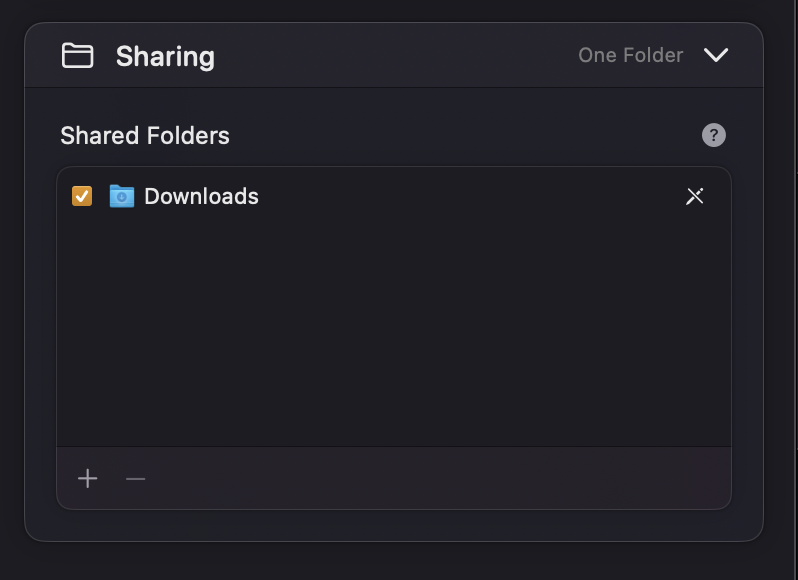
Shared folders are read-only by default. In the VM settings where you set up sharing, there's a little pencil icon that toggles writing on/off. It's definitely not obvious though, and I think we could probably change the default to be read/write.
|
Beta Was this translation helpful? Give feedback.

-
|
I was never been able to see my shared folder ... where does it appear? |
Beta Was this translation helpful? Give feedback.

-
I'm on 13.2 and I've needed to enter this every time I open the VM (same instance). Is this a known issue? Is it possible to make it permanent? |
Beta Was this translation helpful? Give feedback.

-
|
It must be mounted every time the VM is restarted. For now you can add a script to run at login (using a launchd plist, for example), but a release that's coming out soon will make this easier with the VirtualBuddyGuest app. |
Beta Was this translation helpful? Give feedback.

-
|
I created : http://bit.ly/ghvitby ( GitHubVIrtualBuddy) who is pointing to this thread ... so when I setup a VM, I type this to Safari and copy past the command line ... not the best but it's a workaround until the new version is released :-> |
Beta Was this translation helpful? Give feedback.
-
|
Thanks @insidegui appreciate the response. Would also like to say thank you for all your work developing this, it's a great product, extremely useful, and you should be proud of what you're creating! 😁 |
Beta Was this translation helpful? Give feedback.

-
|
Thank you @insidegui !! Appreciate all your work |
Beta Was this translation helpful? Give feedback.


Shared folders are read-only by default. In the VM settings where you set up sharing, there's a little pencil icon that toggles writing on/off.
It's definitely not obvious though, and I think we could probably change the default to be read/write.