| title | excerpt | products | content_group | |||
|---|---|---|---|---|---|---|
Try the key features in Tiger Data products |
Improve database performance with hypertables, time bucketing, compression and continuous aggregates. |
|
Getting started |
import HASetup from 'versionContent/_partials/_high-availability-setup.mdx'; import IntegrationPrereqs from "versionContent/_partials/_integration-prereqs.mdx"; import OldCreateHypertable from "versionContent/_partials/_old-api-create-hypertable.mdx"; import HypercoreIntroShort from "versionContent/_partials/_hypercore-intro-short.mdx"; import HypercoreDirectCompress from "versionContent/_partials/_hypercore-direct-compress.mdx"; import NotAvailableFreePlan from "versionContent/_partials/_not-available-in-free-plan.mdx"; import NotSupportedAzure from "versionContent/_partials/_not-supported-for-azure.mdx"; import SupportPlans from "versionContent/_partials/_support-plans.mdx";
$CLOUD_LONG offers managed database services that provide a stable and reliable environment for your applications.
Each $SERVICE_LONG is a single optimised $PG instance extended with innovations such as $TIMESCALE_DB in the database engine, in a cloud infrastructure that delivers speed without sacrifice. A radically faster $PG for transactional, analytical, and agentic workloads at scale.
$CLOUD_LONG scales $PG to ingest and query vast amounts of live data. $CLOUD_LONG provides a range of features and optimizations that supercharge your queries while keeping the costs down. For example:
- The $HYPERCORE row-columnar engine in $TIMESCALE_DB makes queries up to 350x faster, ingests 44% faster, and reduces storage by 90%.
- Tiered storage in $CLOUD_LONG seamlessly moves your data from high performance storage for frequently accessed data to low cost bottomless storage for rarely accessed data.
The following figure shows how $TIMESCALE_DB optimizes your data for superfast real-time analytics:
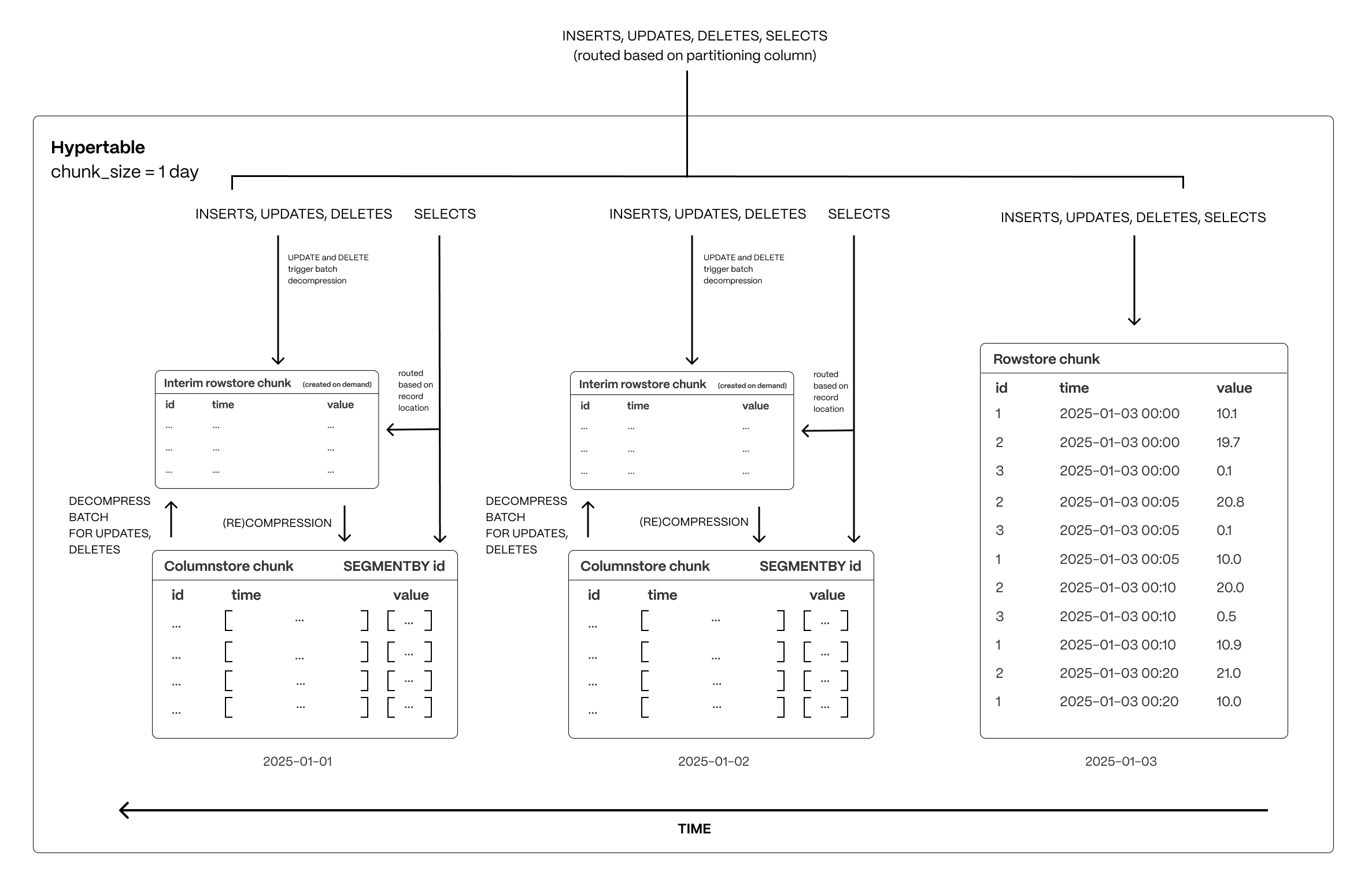
This page shows you how to rapidly implement the features in $CLOUD_LONG that enable you to ingest and query data faster while keeping the costs low.
Time-series data represents the way a system, process, or behavior changes over time. $HYPERTABLE_CAPs are $PG tables that help you improve insert and query performance by automatically partitioning your data by time. Each $HYPERTABLE is made up of child tables called $CHUNKs. Each $CHUNK is assigned a range of time, and only contains data from that range. When you run a query, $TIMESCALE_DB identifies the correct $CHUNK and runs the query on it, instead of going through the entire table. You can also tune $HYPERTABLEs to increase performance even more.
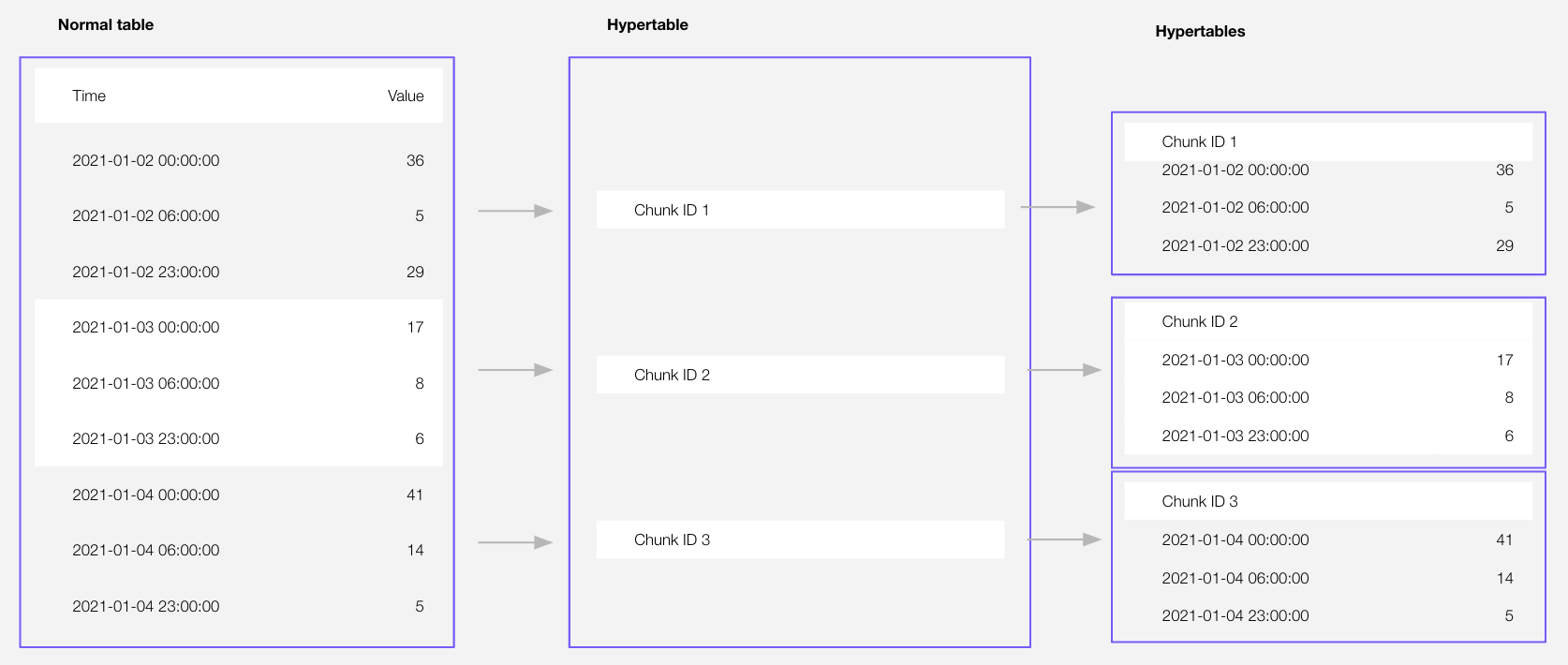
$HYPERTABLE_CAPs exist alongside regular $PG tables. You use regular $PG tables for relational data, and interact with $HYPERTABLEs and regular $PG tables in the same way.
This section shows you how to create regular tables and $HYPERTABLEs, and import relational and time-series data from external files.
-
Import some time-series data into $HYPERTABLEs
-
Unzip crypto_sample.zip to a
<local folder>.This test dataset contains:
- Second-by-second data for the most-traded crypto-assets. This time-series data is best suited for optimization in a hypertable.
- A list of asset symbols and company names. This is best suited for a regular relational table.
To import up to 100 GB of data directly from your current $PG-based database, migrate with downtime using native $PG tooling. To seamlessly import 100GB-10TB+ of data, use the live migration tooling supplied by $COMPANY. To add data from non-$PG data sources, see Import and ingest data.
-
Upload data into a $HYPERTABLE:
To more fully understand how to create a $HYPERTABLE, how $HYPERTABLEs work, and how to optimize them for performance by tuning $CHUNK intervals and enabling chunk skipping, see the $HYPERTABLEs documentation.
The $CONSOLE data upload creates $HYPERTABLEs and relational tables from the data you are uploading:
-
In $CONSOLE, select the $SERVICE_SHORT to add data to, then click
Actions>Import data>Upload .CSV. -
Click to browse, or drag and drop
<local folder>/tutorial_sample_tick.csvto upload. -
Leave the default settings for the delimiter, skipping the header, and creating a new table.
-
In
Table, providecrypto_ticksas the new table name. -
Enable
hypertable partitionfor thetimecolumn and clickProcess CSV file.The upload wizard creates a $HYPERTABLE containing the data from the CSV file.
-
When the data is uploaded, close
Upload .CSV.If you want to have a quick look at your data, press
Run. -
Repeat the process with
<local folder>/tutorial_sample_assets.csvand rename tocrypto_assets.There is no time-series data in this table, so you don't see the
hypertable partitionoption.
-
In Terminal, navigate to
<local folder>and connect to your $SERVICE_SHORT.psql -d "postgres://<username>:<password>@<host>:<port>/<database-name>"You use your connection details to fill in this $PG connection string.
-
Create tables for the data to import:
-
For the time-series data:
-
In your sql client, create a $HYPERTABLE:
Create a $HYPERTABLE for your time-series data using CREATE TABLE. For efficient queries, remember to
segmentbythe column you will use most often to filter your data. For example:CREATE TABLE crypto_ticks ( "time" TIMESTAMPTZ, symbol TEXT, price DOUBLE PRECISION, day_volume NUMERIC ) WITH ( tsdb.hypertable, tsdb.partition_column='time', tsdb.segmentby = 'symbol' );
-
-
For the relational data:
In your sql client, create a normal $PG table:
CREATE TABLE crypto_assets (
 symbol TEXT NOT NULL,
 name TEXT NOT NULL
);
-
-
Speed up data ingestion:
-
Upload the dataset to your $SERVICE_SHORT:
\COPY crypto_ticks from './tutorial_sample_tick.csv' DELIMITER ',' CSV HEADER;
\COPY crypto_assets from './tutorial_sample_assets.csv' DELIMITER ',' CSV HEADER;
-
-
-
Have a quick look at your data
You query $HYPERTABLEs in exactly the same way as you would a relational $PG table. Use one of the following SQL editors to run a query and see the data you uploaded:
- Data mode: write queries, visualize data, and share your results in $CONSOLE for all your $SERVICE_LONGs.
- SQL editor: write, fix, and organize SQL faster and more accurately in $CONSOLE for a $SERVICE_LONG.
- psql: easily run queries on your $SERVICE_LONGs or self-hosted $TIMESCALE_DB deployment from Terminal.
$HYPERCORE_CAP is the $TIMESCALE_DB hybrid row-columnar storage engine, designed specifically for real-time analytics and powered by time-series data. The advantage of $HYPERCORE is its ability to seamlessly switch between row-oriented and column-oriented storage. This flexibility enables $TIMESCALE_DB to deliver the best of both worlds, solving the key challenges in real-time analytics.
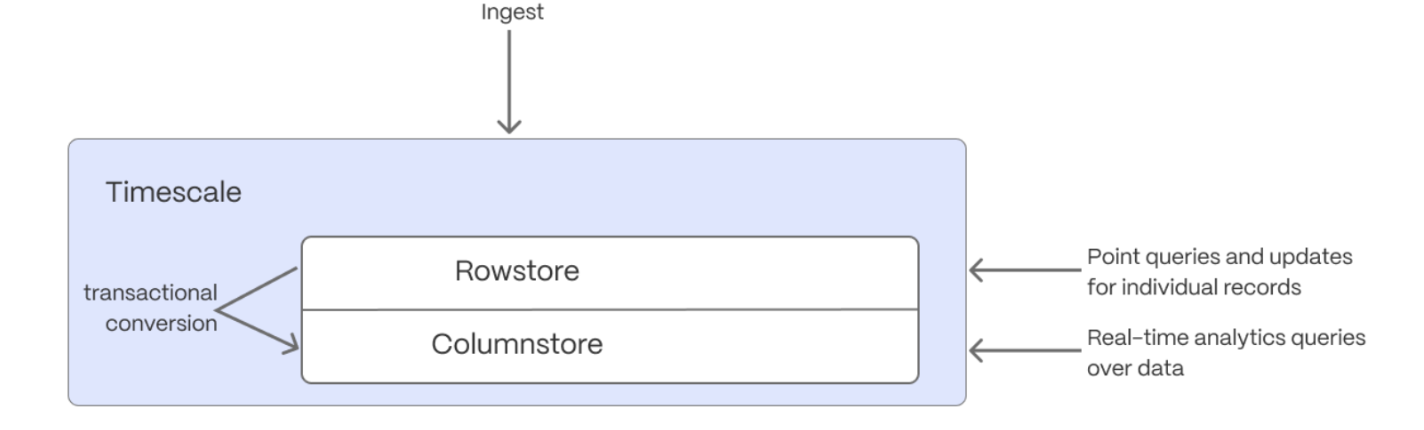
When $TIMESCALE_DB converts $CHUNKs from the $ROWSTORE to the $COLUMNSTORE, multiple records are grouped into a single row. The columns of this row hold an array-like structure that stores all the data. Because a single row takes up less disk space, you can reduce your $CHUNK size by up to 98%, and can also speed up your queries. This helps you save on storage costs, and keeps your queries operating at lightning speed.
$HYPERCORE is enabled by default when you call CREATE TABLE. Best practice is to compress data that is no longer needed for highest performance queries, but is still accessed regularly in the $COLUMNSTORE. For example, yesterday's market data.
-
Add a policy to convert $CHUNKs to the $COLUMNSTORE at a specific time interval
For example, yesterday's data:
CALL add_columnstore_policy('crypto_ticks', after => INTERVAL '1d');
If you have not configured a
segmentbycolumn, $TIMESCALE_DB chooses one for you based on the data in your $HYPERTABLE. For more information on how to tune your $HYPERTABLEs for the best performance, see efficient queries. -
View your data space saving
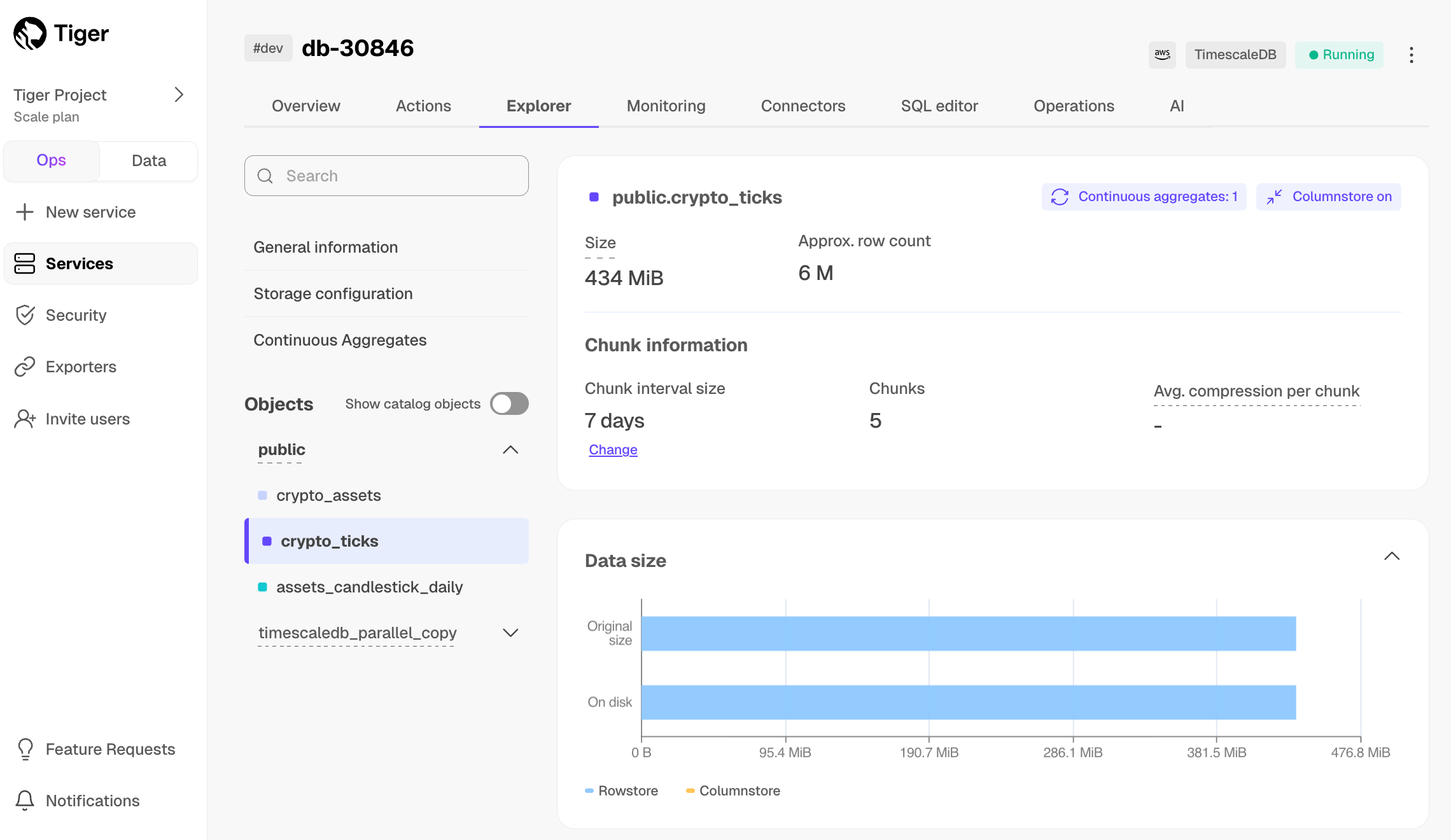
When you convert data to the $COLUMNSTORE, as well as being optimized for analytics, it is compressed by more than 90%. This helps you save on storage costs and keeps your queries operating at lightning speed. To see the amount of space saved, click
Explorer>public>crypto_ticks.
Aggregation is a way of combing data to get insights from it. Average, sum, and count are all examples of simple aggregates. However, with large amounts of data, aggregation slows things down, quickly. $CAGG_CAPs are a kind of $HYPERTABLE that is refreshed automatically in the background as new data is added, or old data is modified. Changes to your dataset are tracked, and the $HYPERTABLE behind the $CAGG is automatically updated in the background.
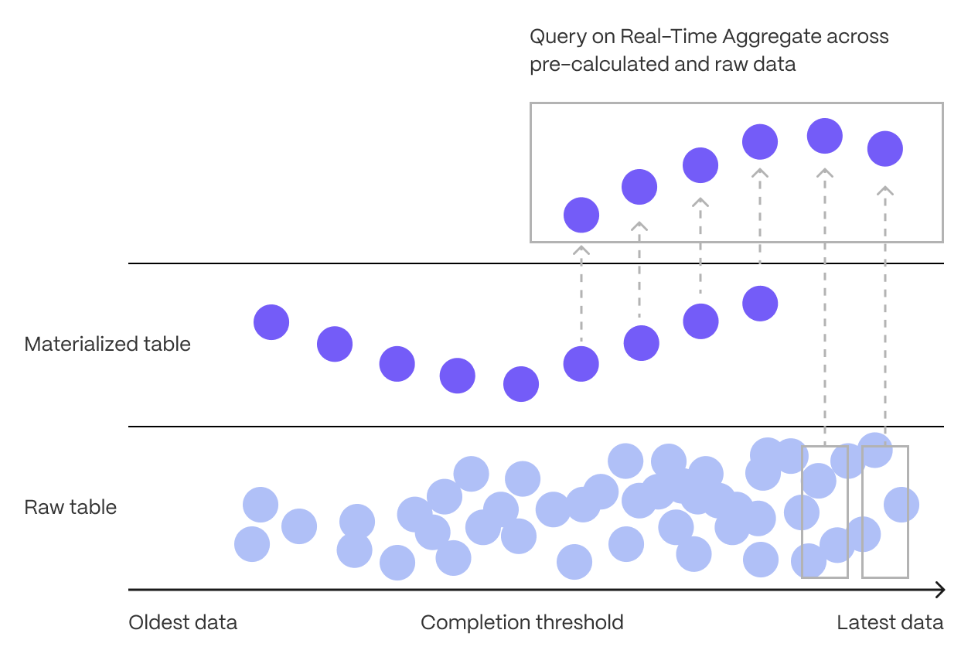
You create $CAGGs on uncompressed data in high-performance storage. They continue to work on data in the $COLUMNSTORE and rarely accessed data in tiered storage. You can even create $CAGGs on top of your $CAGGs.
You use $TIME_BUCKETs to create a $CAGG. $TIME_BUCKET_CAPs aggregate data in $HYPERTABLEs by time interval. For example, a 5-minute, 1-hour, or 3-day bucket. The data grouped in a $TIME_BUCKET uses a single timestamp. $CAGG_CAPs minimize the number of records that you need to look up to perform your query.
This section shows you how to run fast analytical queries using $TIME_BUCKETs and $CAGG in $CONSOLE. You can also do this using psql.
-
Connect to your $SERVICE_SHORT
In $CONSOLE, select your $SERVICE_SHORT in the connection drop-down in the top right.
-
Create a $CAGG
For a $CAGG, data grouped using a $TIME_BUCKET is stored in a $PG
MATERIALIZED VIEWin a $HYPERTABLE.timescaledb.continuousensures that this data is always up to date. In data mode, use the following code to create a $CAGG on the real-time data in thecrypto_tickstable:CREATE MATERIALIZED VIEW assets_candlestick_daily WITH (timescaledb.continuous) AS SELECT time_bucket('1 day', "time") AS day, symbol, max(price) AS high, first(price, time) AS open, last(price, time) AS close, min(price) AS low FROM crypto_ticks srt GROUP BY day, symbol;
This $CAGG creates the candlestick chart data you use to visualize the price change of an asset.
-
Create a policy to refresh the view every hour
SELECT add_continuous_aggregate_policy('assets_candlestick_daily',
start_offset => INTERVAL '3 weeks',
end_offset => INTERVAL '24 hours',
schedule_interval => INTERVAL '3 hours');
-
Have a quick look at your data
You query $CAGGs exactly the same way as your other tables. To query the
assets_candlestick_daily$CAGG for all assets:
- In $CONSOLE, select the $SERVICE_SHORT you uploaded data to
- Click
Explorer>Continuous Aggregates>Create a Continuous Aggregatenext to thecrypto_tickshypertable - Create a view called
assets_candlestick_dailyon thetimecolumn with an interval of1 day, then clickNext step - Update the view SQL with the following functions, then click
RunCREATE MATERIALIZED VIEW assets_candlestick_daily WITH (timescaledb.continuous) AS SELECT time_bucket('1 day', "time") AS bucket, symbol, max(price) AS high, first(price, time) AS open, last(price, time) AS close, min(price) AS low FROM "public"."crypto_ticks" srt GROUP BY bucket, symbol;
- When the view is created, click
Next step - Define a refresh policy with the following values:
How far back do you want to materialize?:3 weeksWhat recent data to exclude?:24 hoursHow often do you want the job to run?:3 hours
- Click
Next step, then clickRun
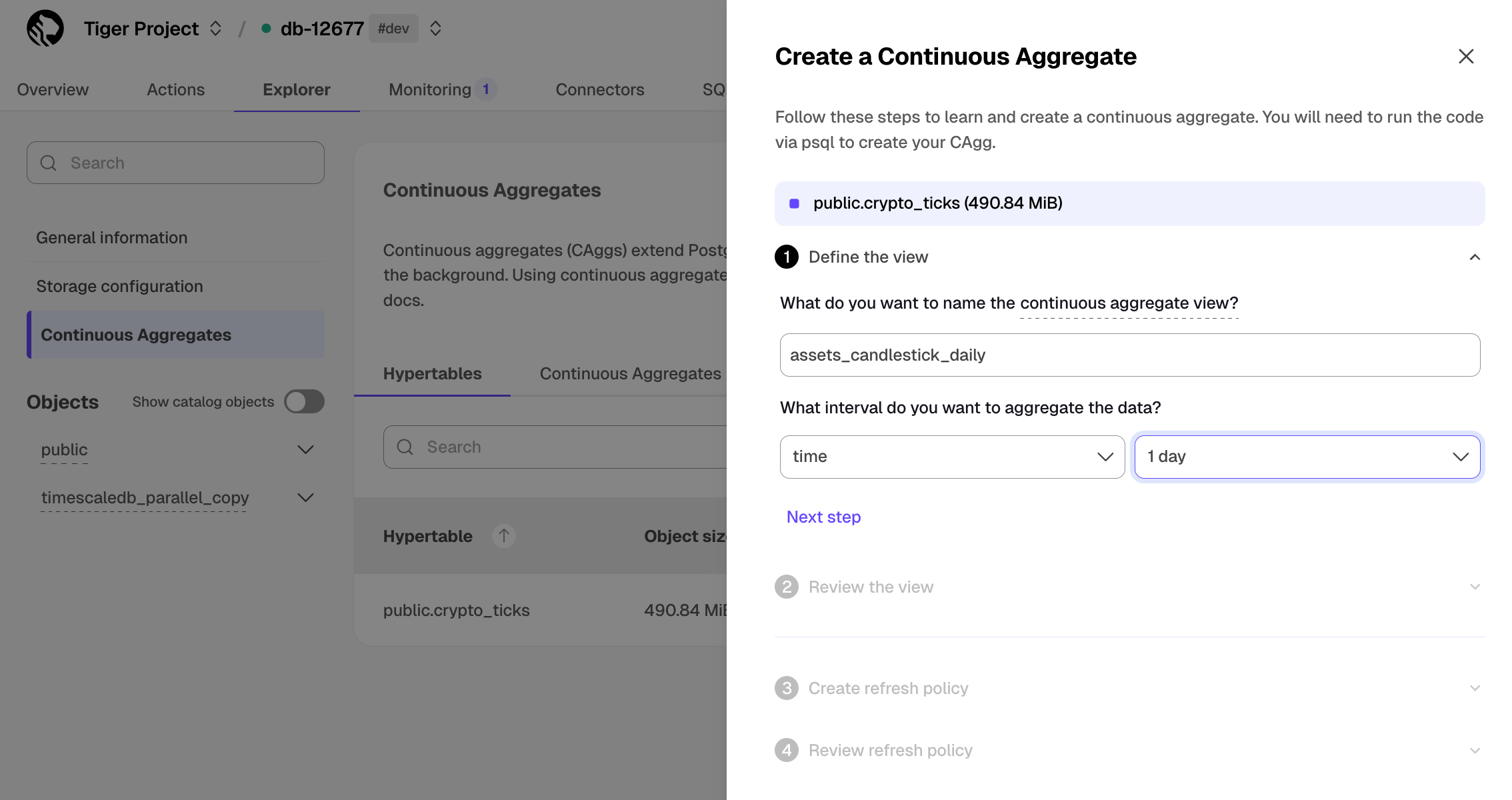
$CLOUD_LONG creates the $CAGG and displays the aggregate ID in $CONSOLE. Click DONE to close the wizard.
To see the change in terms of query time and data returned between a regular query and
a $CAGG, run the query part of the $CAGG
( SELECT ...GROUP BY day, symbol; ) and compare the results.
<Availability products={['cloud']} price_plans={['enterprise', 'scale']} />
In the previous sections, you used $CAGGs to make fast analytical queries, and $HYPERCORE to reduce storage costs on frequently accessed data. To reduce storage costs even more, you create tiering policies to move rarely accessed data to the object store. The object store is low-cost bottomless data storage built on Amazon S3. However, no matter the tier, you can query your data when you need. $CLOUD_LONG seamlessly accesses the correct storage tier and generates the response.
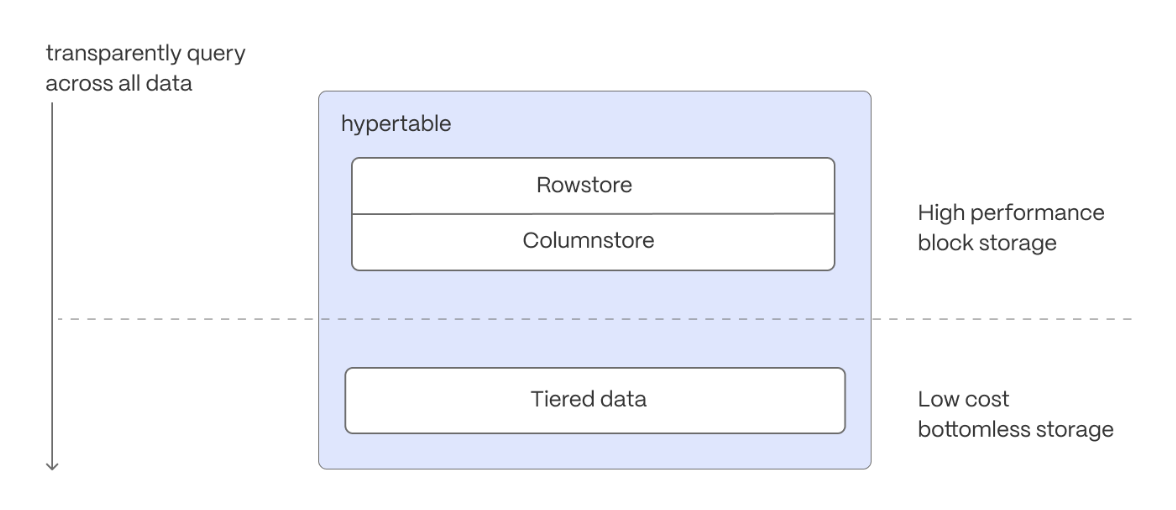
To set up data tiering:
-
Enable data tiering
-
In $CONSOLE, select the $SERVICE_SHORT to modify.
-
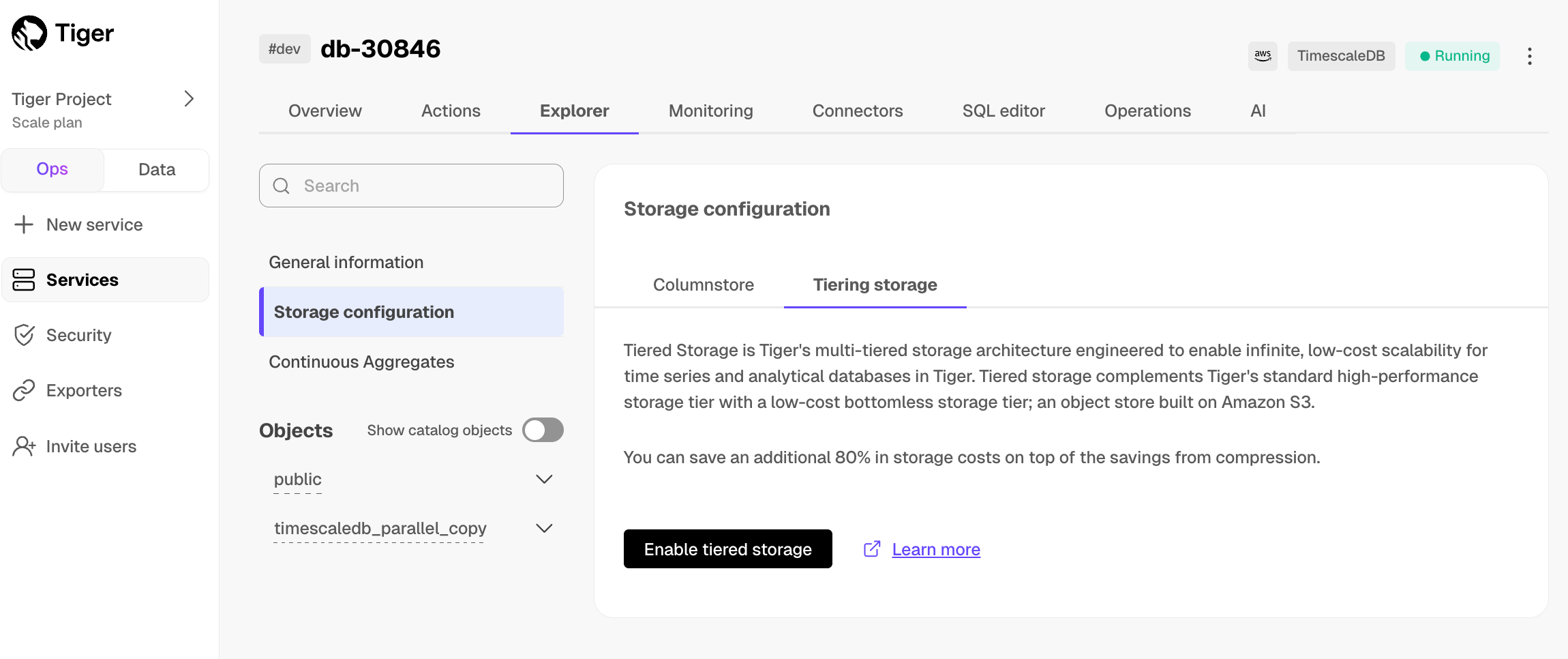
In
Explorer, clickStorage configuration>Tiering storage, then clickEnable tiered storage.When tiered storage is enabled, you see the amount of data in the tiered object storage.
-
-
Set the time interval when data is tiered
In $CONSOLE, click
Datato switch to the data mode, then enable data tiering on a $HYPERTABLE with the following query:SELECT add_tiering_policy('assets_candlestick_daily', INTERVAL '3 weeks');
-
Query tiered data
You enable reads from tiered data for each query, for a session or for all future sessions. To run a single query on tiered data:
- Enable reads on tiered data:
set timescaledb.enable_tiered_reads = true
- Query the data:
SELECT * FROM crypto_ticks srt LIMIT 10
- Disable reads on tiered data:
set timescaledb.enable_tiered_reads = false;
For more information, see Querying tiered data.
<Availability products={['cloud']} price_plans={['enterprise', 'scale']} />
By default, all $SERVICE_LONGs have rapid recovery enabled. However, if your app has very low tolerance for downtime, $CLOUD_LONG offers $HA_REPLICAs. HA replicas are exact, up-to-date copies of your database hosted in multiple AWS availability zones (AZ) within the same region as your primary node. HA replicas automatically take over operations if the original primary data node becomes unavailable. The primary node streams its write-ahead log (WAL) to the replicas to minimize the chances of data loss during failover.
For more information, see High availability.
What next? See the use case tutorials, interact with the data in your $SERVICE_LONG using your favorite programming language, integrate your $SERVICE_LONG with a range of third-party tools, plain old Use $COMPANY products, or dive into the API.