
Plugin.Maui.Health provides the ability to access personal health data in your .NET MAUI application.


Available on NuGet.
Install with the dotnet CLI: dotnet add package Plugin.Maui.Health, or through the NuGet Package Manager in Visual Studio.
Plugin.Maui.Health provides the HealthDataProvider class that has a single property Property that you can get or set.
You can either use it as a static class, e.g.: Health.Default.Property = 1 or with dependency injection: builder.Services.AddSingleton<IHealth>(Health.Default);
| Platform | Minimum Version Supported |
|---|---|
| iOS | 14.0+ |
| Android | currently not supported |
Before you can start using Health, you will need to request the proper permissions on each platform.
You need to add permissions in your Info.plist file to read/write to the HealthKit store.
<key>NSHealthShareUsageDescription</key>
<string>We need access to your health data to read your steps and other metrics.</string>
<key>NSHealthUpdateUsageDescription</key>
<string>We need access to write your steps and other metrics.</string>
Add ´Entitlements.plist´ to you iOS platform project.
<?xml version="1.0" encoding="UTF-8"?>
<!DOCTYPE plist PUBLIC "-//Apple//DTD PLIST 1.0//EN" "http://www.apple.com/DTDs/PropertyList-1.0.dtd">
<plist version="1.0">
	<dict>
		<key>com.apple.developer.healthkit</key>
		<true/>
	</dict>
</plist>You will first need to register the Health with the MauiAppBuilder following the same pattern that the .NET MAUI Essentials libraries follow.
builder.Services.AddSingleton(Health.Default);You can then enable your classes to depend on IHealth as per the following example.
public class HealthViewModel
{
    readonly IHealth Health;

    public HealthViewModel(IHealth Health)
    {
        this.Health = Health;
    }
}Alternatively if you want to skip using the dependency injection approach you can use the Health.Default property.
public class HealthViewModel
{
    public async Task<double> ReadStepsCountAsync()
    {
        	var hasPermission = await health.CheckPermissionAsync(Health.Enums.HealthParameter.StepCount, Health.Enums.PermissionType.Read | Health.Enums.PermissionType.Write);
			if (hasPermission)
			{
				return await health.ReadCountAsync(Enums.HealthParameter.StepCount, DateTime.Now.AddDays(-1), DateTime.Now);
			}
    }
}Once you have registered the Health plugin you can interact with it in the following ways:
IsSupportedGets a value indicating whether reading the Health is supported on this device.
SampleRepresents a health-related sample, containing information such as time range, value, source, unit and description.
CheckPermissionAsyncChecks and requests the specified permissions for a given health parameter.ReadCountAsyncReads the cumulative count of a specified "HealthParameter" within a given date range.ReadLatestAsyncReads the latest health data value for a specified "HealthParameter" within a given date range.ReadLatestAvailableAsyncReads the latest health data available value for a specified "HealthParameter" within a given date range and returns aSampleobject.ReadAverageAsyncReads the average value of a specified "HealthParameter" within a given date range.ReadMinAsyncReads the min value of a specified "HealthParameter" within a given date range.ReadMaxAsyncReads the max value of a specified "HealthParameter" within a given date range.ReadAllAsyncReads all health data for a specified "HealthParameter" within a given date range and returns them as a list ofSampleobjects.WriteAsyncWrites a value for a specified "HealthParameter" to the HealthKit store.
	// check if user granted permission for reading and writing the step count
var hasPermission = await health.CheckPermissionAsync(Health.Enums.HealthParameter.StepCount, Health.Enums.PermissionType.Write); // reading the steps count from the health kit
var hasPermission = await health.CheckPermissionAsync(Health.Enums.HealthParameter.StepCount, Health.Enums.PermissionType.Write);
if (hasPermission)
{
var stepsCount = await health.ReadCountAsync(Enums.HealthParameter.StepCount, DateTime.Now.AddDays(-1), DateTime.Now);
} // writing the body mass into the health kit
var hasPermission = await Health.CheckPermissionAsync(HealthParameter.BodyMass, PermissionType.Read | PermissionType.Write);
if (hasPermission)
{
await Health.WriteAsync(HealthParameter.BodyMass, DateTime.Now, NewBodyMass, Units.Mass.Kilograms);
}

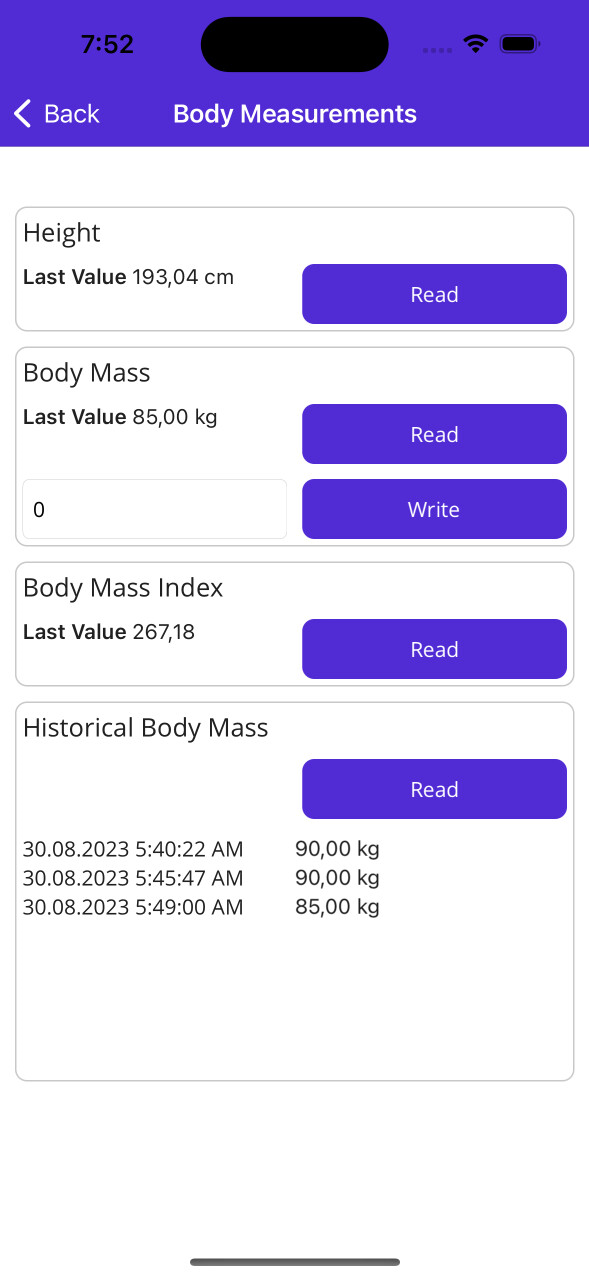

Try the sample app to test the plugin by your own.
When using the Plugin, make sure that you pass the correct HealthParameter with the corresponding unit to the methods. There is a utility class called Constants.Units that contains the supported units.
This project could not have came to be without these projects and people, thank you! <3
- We thank Gerald Versluis (@jfversluis) for his excellent template Plugin.Maui.Template