HomeLab CheatSheet & AwesomeList
Created for the HomeLab Group on Simplex Chat 
The goal of this repo is to become your map to help you navigate the HomeLabbing experience.
This page will be updated randomly with new information, so stay tuned. (contributions welcome!)
Note: many of the hardware suggestions here are mostly the best items in their class for the lowest prices.
ToDo:
- Update table of contents...
- Add CPU Tables
- Add more hardware information including more Nic models / HBA models / Enterprise drive models and information.
- Add more general filesystem information / ZFS information / tips with more links to obscure useful information that will help manage ZFS better.
- Add more software/Self hosting options and guide links.
- Add more proxmox related information and helpful guides, including those related to GPU passthrough, LXCs, etc
-
- Recommended Devices
- NIC (Network Cards)
- SAS / HBA Cards
- SSD/Nvme Drives
- GPU
- NVIDIA (vGPU / AI / Virtualization)
- Supported Generations
- Tesla Low-Power Options
- vGPU Licensing Notes
- vGPU Resources
- Intel (SR-IOV / Arc Pro)
- Arc Pro B-Series
- Firmware / Early Adopter Notes
- AMD (MxGPU / SR-IOV)
- Supported Professional Series
- MxGPU Overview
- Contribution Request
- GPU Model Comparison Table
- Intel GPU Master Table
- NVIDIA RTX 10 Series (Pascal)
- NVIDIA RTX 20 Series (Turing)
- NVIDIA RTX 30 Series (Ampere)
- NVIDIA RTX 40 Series (Ada Lovelace)
- NVIDIA RTX 50 Series (Blackwell)
- NVIDIA Quadro / Professional GPUs
- NVIDIA RTX A-Series (Professional GPUs)
- NVIDIA Tesla Series
- AMD Radeon RX 5000 Series (RDNA1)
- AMD Radeon RX 6000 Series (RDNA2)
- AMD Radeon RX 7000 Series (RDNA3)
- AMD Radeon RX 9000 Series (RDNA4)
- AMD Pro/Compute GPUs
- NVIDIA (vGPU / AI / Virtualization)
Hardware:
Recommended Devices:


Lenovo Tiny PCs offer various hardware configurations, such as:
- Intel CPUs or AMD Ryzen CPUs
- Single NVMe + SATA 2.5in Drives
- 2x NVMe or 2x NVMe + PCIe Slot
- Nvidia Quadro P600/P620/P1000/T400/T600 (included with some models)
- A Quad Port NIC (popular for router setups, such as Opnsense/Pfsense )
- NVMe Expansion Card (adds 2x additional NVMe drives, providing up to 4x NVMe on some models)
- Idle Power Consumption: as low as 5-7W (depending on configuration)
- CPU TDP: Medium to Medium-High performance with 35W TDP CPUs
- RAM Support: 32GB to 128GB (depends on model, 2 slots)
- Mini PCIe Slots: For WiFi + Bluetooth cards
- USB Ports: 4-6 USB 3+ ports in newer models
These devices are small, powerful, and make perfect all-in-one mini servers for various use cases. The Intel versions even allow you to share the iGPU with Proxmox for multiple virtual machines.
Other mini PCs and SFF PCs can be worthwhile, but personally, I find the Lenovo Tiny PCs to be the most optimal, cost-effective options for home labs and other small-scale setups.
| Model | CPU | Cores / Threads | Passmark CPU Bench | RAM Max | Drives / NVMe Slots | PCIe Slot | iGPU | Quick Sync | Idle Power* | Power (TDP) | Year | Best Use Case | Avg Used eBay.com Price (≈) |
|---|---|---|---|---|---|---|---|---|---|---|---|---|---|
| ThinkCentre M715q Gen2 | Ryzen 5 2400GE | 4C / 8T | 7192 | 32GB | 1x 2.5" / 1x M.2 | None | Vega 11 | N/A | ~7–10W | 35W | 2018 | Budget NAS, light Proxmox | ~$80 – $140 – common used M715q listings on eBay.com include Ryzen 5 / Ryzen Pro units around this range. (eBay) |
| ThinkCentre M720Q | i5-8400T / i7-8700T | 6C / 6T – 6C / 12T | 7419 / 10225 | 32GB | 1x 2.5" / 1x M.2 | 1x PCIe 3.0 x8 (riser) | Intel UHD 630 | Gen9.5 | ~8–12W | 35W | 2018 | NAS, Network appliance, media server, Proxmox host | ~$120 – $200 – based on midspec ThinkCentre Tiny used listings (i5/i7 options). (eBay) |
| ThinkCentre M920q | i5-8400T / i7-8700T | 6C / 6T – 6C / 12T | 7419 / 10225 | 32GB | 1x 2.5" / 1x M.2 | 1x PCIe 3.0 x8 (riser) | Intel UHD 630 | Gen9.5 | ~8–12W | 35W | 2018 | Same as M720Q + vPro enterprise features | ~$140 – $230 – slightly higher than M720Q used listings. (eBay) |
| ThinkCentre M920x | i5-9400T / i7-9700T | 6C / 6T – 8C / 8T | 8148 / 10553 | 32GB | 2x M.2 | 1x PCIe 3.0 x8 | Intel UHD 630 | Gen9.5 | ~9–13W | 35W | 2019 | Dual NVMe NAS, serious homelab | ~$180 – $300 – typical for M920x used units with 2x NVMe capability. (eBay) |
| ThinkCentre P330 | i5-9400T / i7-9700T | 6C / 6T – 8C / 8T | 8148 / 10553 | 64GB | 2x M.2 | 1x PCIe 3.0 x8 | Intel UHD 630 | Gen9.5 | ~9–13W | 35W | 2019 | Best 9th gen Tiny for virtualization | ~$220 – $350 – eBay listings for P330 Tiny machines cluster around this bracket. (eBay) |
| ThinkCentre P340 | i5-9400T / i7-9700T | 6C / 6T – 8C / 8T | 8148 / 10553 | 64GB | 2x M.2 | 1x PCIe 3.0 x8 | Intel UHD 630 | Gen9.5 | ~8–11W | 35W | 2020 | Improved efficiency, better thermals | ~$250 – $400 – typical used pricing for P340 Tiny models. (eBay) |
| ThinkCentre P350 | i7-11700T | 8C / 16T | 15363 | 64GB | 2x M.2 | 1x PCIe 4.0 capable | Intel UHD 750 | Gen12 | ~7–10W | 35W | 2021 | Best for Plex, heavy VM host | ~$350 – $550+ – eBay.com used/refurbished listings for P350 Tiny (e.g., i5 and i7 units ~US $375–$400+). (eBay) |
One of the most cost effective SFF PCs for price vs hardware potential
HP z240 SFF

typically features an i7-6700 with 4x DDR4 ram slots and 64GB support. Plus it has 2x3.5 1x2.5 Hard drive slots, 1xNVME m.2 slot and 2xPci-e slots, as far as expansion options go for a SFF PC this one has a lot of options.
issues i have experienced:
- takes some work to get 64GB ram to boot properly doesn't seem to like ram in the wrong order
- built in iGPU doesn't always work / default back to itself after having a dGPU, so if you buy it used have a low profile dGPU handy. upside the bios allows for iGPU+dGPU and will boot with a dGPU such as a tesla that includes zero display ports
- be careful with the 2.5in sata. if the cables aren't sitting quite right they can snap the data port off the drive, found that one out the hard way. there is a lot packed into very little space in this model so you have to be a bit mindful.
| Model | CPU | Passmark CPU Bench | RAM Max | Drives/NVMe Slots | PCIe Slot | iGPU | Power (TDP) | Best Use Case | Rating | Avg Used eBay Price (USD) |
|---|---|---|---|---|---|---|---|---|---|---|
| HP z240 SFF | i7-6700 | 8037 | 64GB | 1x 2.5” + 2x 3.5” + 1xM.2 | 2x PCIe x16 | Intel HD 530 | ~65W | Proxmox host, AI/ML, multi-GPU dev | 7.5/10 | $90 – $160 |
| Dell Optiplex 3020 | i3-4150 | 3400 | 16GB | 1x 3.5” | 1x PCIe x16 | Intel HD 4400 | ~54W | light server, media server, backup server. | 4.5/10 | $40 – $90 |
Bios Mod - Install and boot from an NVMe SSD on a Dell OptiPlex 9020, 7020 or 3020
i have tested this on a Dell Optiplex 3020 and can verify it works if done properly.
Intel I350 (Quad-Port 1GbE)
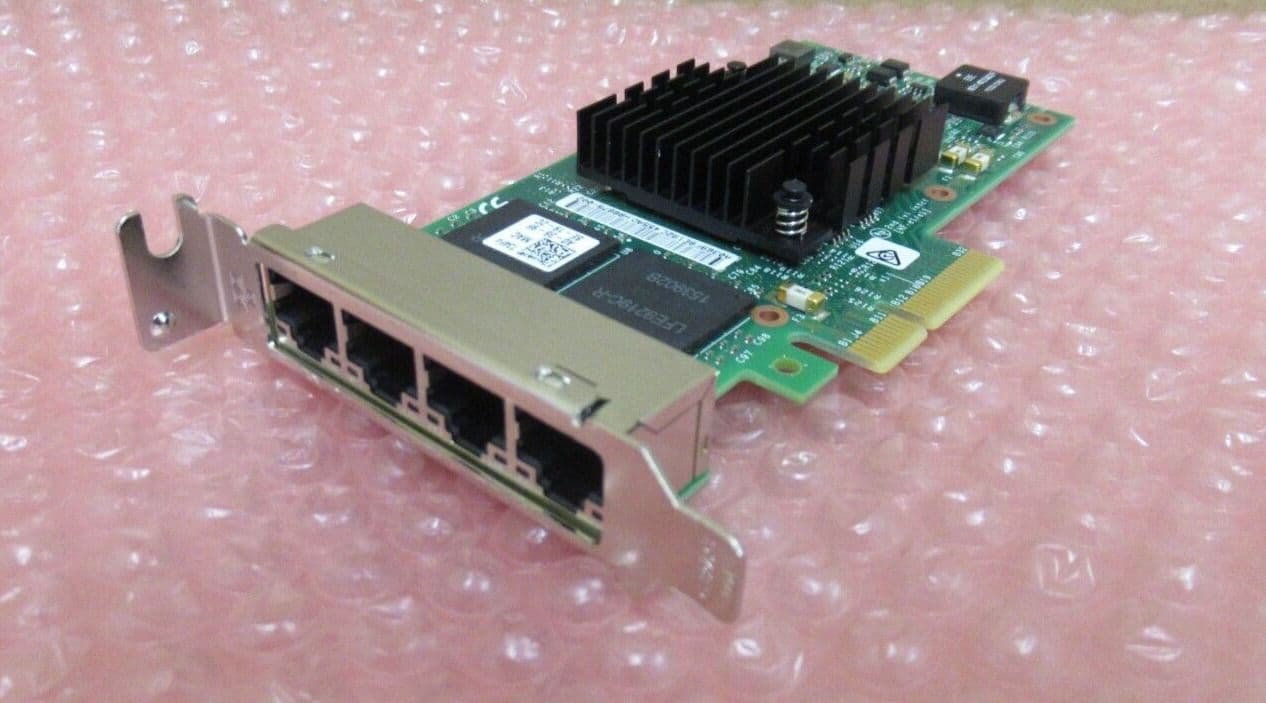
The Intel I350 (commonly the I350-T4 variant) is one of the most popular server-grade 1GbE NICs for homelab and virtualization use.
Why It’s Recommended:
• 4x independent 1GbE ports
• PCIe 2.1 x4 interface
• Very low CPU overhead
• Excellent Linux / BSD support
• Stable and widely supported in Proxmox, ESXi, TrueNAS, pfSense
Virtualization Features:
• SR-IOV (Single Root I/O Virtualization)
• VLAN tagging offload
• Checksum offloading
• Interrupt moderation
• PXE boot support
SR-IOV allows you to assign virtual functions of the NIC directly to VMs, reducing overhead and improving network performance in virtualized environments.
If you are not running VMs or advanced networking, a simpler Intel NIC (like I210/I211) may be sufficient.
Performance Notes:
• Each port is fully independent (not a simple switch internally)
• Can be bonded (LACP) for redundancy or throughput
• Ideal for firewall/router builds, lab segmentation, or Ceph/cluster networking
Power Usage:
• ~4–6W typical
• Runs relatively cool compared to older quad NICs
There are many counterfeit / cloned I350 cards on the used market.
Signs of genuine cards:
• Dell / HP / IBM branded versions are usually safe
• Proper Intel markings on controller chip
• Recognized correctly by lspci as Intel I350
Clones may:
• Have unstable drivers
• Fail under load
• Not support SR-IOV properly
LSI / Inspur 9211-8i (Flashed to IT Mode)

The LSI 9211-8i is a classic 6Gb/s SAS HBA based on the LSI SAS2008 controller (PCIe 2.0 x8).
Originally released around 2008, it remains extremely popular in homelab setups due to price and reliability.
Important: It must be flashed to IT mode firmware for proper ZFS usage (Proxmox, TrueNAS, Unraid, etc.).
RAID firmware (IR mode) will force hardware RAID configuration and is NOT recommended for ZFS.
Technical Overview:
• 8x internal drives (2x SFF-8087)
• SAS2 – 6Gb/s per lane
• PCIe 2.0 x8 (~4GB/s total bandwidth)
• Full passthrough in IT mode
• Uses mpt2sas driver (excellent Linux/BSD support)
The SAS2008 chipset does NOT properly pass TRIM / UNMAP to SATA SSDs in most configurations.
For HDD arrays → perfectly fine.
For SSD pools → use a newer SAS3 HBA.
These models are frequently recommended on Proxmox forums, Level1Techs, and TrueNAS communities.
1) LSI 9207-8i (SAS2308)
• SAS2 (6Gb/s)
• PCIe 3.0 x8
• Better power efficiency than 9211
• TRIM/UNMAP passthrough works properly
• Uses mpt2sas driver
• Often ~$30–50 used
This is widely considered the “safe upgrade” from the 9211-8i.
2) LSI 9300-8i (SAS3008)
• SAS3 – 12Gb/s per lane
• PCIe 3.0 x8
• Full TRIM/UNMAP support
• Uses mpt3sas driver
• Lower latency and better SSD handling
• ~$50–80 used
Very commonly recommended for SSD ZFS pools.
Excellent Proxmox / Ceph / TrueNAS card.
3) OEM Variants (Often Cheaper)
Many rebranded versions exist:
• Dell HBA330
• Dell H330 (in IT mode)
• IBM M1215 (crossflashed)
• Fujitsu D3307
• Supermicro AOC-S3008L-L8e
These often use the same LSI SAS2308 or SAS3008 chipsets internally and can be significantly cheaper on the used market.
Always confirm chipset before buying.
Why Upgrade From 9211?
| Feature | 9211-8i | 9207-8i | 9300-8i |
|---|---|---|---|
| PCIe Gen | 2.0 | 3.0 | 3.0 |
| SAS Gen | SAS2 | SAS2 | SAS3 |
| TRIM | ❌ | ✅ | ✅ |
| SSD Friendly | ✅ | ✅ | |
| Idle Power | ~8–10W | ~6–8W | ~6–8W |
Note: full trim support requires IT firmware and driver support. Some versions of the mpt3sas driver break trim. otherwise it is required that the SSD to support RZAT (deterministic read zeros after trim)
Thermals:
All LSI cards run warm.
• Active airflow recommended
• Especially important in Lenovo Tiny builds
• Keep under ~70°C for stability
Bottom Line:
• Budget HDD-only array → 9211-8i is still unbeatable value
• Mixed HDD + SSD → 9207-8i is safer
• SSD-heavy / modern build → 9300-8i or SAS3008-based card
• Double check you buy a model with IT mode firmware for homelab use.
| Drive Model | Form Factor | Interface | Capacity Options | Workload Rating (TB/yr) | Watts (Idle/Active) | Avg Used eBay.com Price (≈) |
|---|---|---|---|---|---|---|
| HGST Ultrastar He10 / HC310 | 3.5" | SATA / SAS 12Gb | 10TB | 550 TB/yr | ~5.8W / ~9.5W | ~$90 – $240 – used 10TB HGST Ultrastar He10/SAS/SATA enterprise HDDs commonly sell around ~$90–$240 USD on eBay.com depending on condition and interface. (e.g., ~$95 sold listing; ~$138–$255+ active). (eBay) |
| HGST Ultrastar He12 / HC320 | 3.5" | SATA / SAS 12Gb | 12TB | 550 TB/yr | ~6.0W / ~9.8W | ~$100 – $270+ – 12TB enterprise HGST/SAS drives often trade in this bracket on eBay.com, with prices influenced by condition and seller. (estimated from 10TB / similar listings). (eBay) |
| HGST Ultrastar He14 / HC330 | 3.5" | SATA / SAS 12Gb | 14TB | 550 TB/yr | ~6.2W / ~10W | ~$120 – $300+ – Larger enterprise drives like 14TB models on eBay.com see listings in this range, though individual prices vary with health/state and SAS vs SATA. (eBay) |
| HGST Ultrastar He16 / HC340 | 3.5" | SATA / SAS 12Gb | 16TB | 550 TB/yr | ~6.4W / ~10.2W | ~$140 – $330+ – 16TB enterprise drives (HGST/SAS/SATA) often appear near ~$140–$330+ on eBay.com. (eBay) |
| HGST Ultrastar He18 / HC350 | 3.5" | SATA / SAS 12Gb | 18TB | 550 TB/yr | ~6.5W / ~10.4W | ~$150 – $350+ – Used 18TB enterprise HGST/SAS drives typically trade near this range. Listings vary by condition and seller. (eBay) |
| WD Ultrastar DC HC500 (HGST Legacy) | 3.5" | SATA / SAS 12Gb | 8TB, 10TB | 550 TB/yr | ~5.6W / ~9.2W | ~$70 – $220 – Used WD/HGST 8–10TB enterprise drives on US eBay.com commonly fall in this range depending on capacity and condition. (eBay) |
| WD Ultrastar DC HC550 | 3.5" | SATA / SAS 12Gb | 14TB, 16TB, 18TB | 550 TB/yr | ~5.8W / ~9.5W | ~$120 – $330+ – Enterprise DC HC550 drives often list around ~$120–$330+ on eBay.com based on large capacity used listings. (eBay) |
| WD Ultrastar DC HC560 | 3.5" | SATA / SAS 12Gb | 20TB, 22TB | 550 TB/yr | ~6.0W / ~9.8W | ~$200 – $380+ – Larger 20–22TB enterprise WD DC HC560 used drives generally trade in this approximate price bracket on US eBay.com. (eBay) |
| WD Ultrastar DC SA620 (SATA SSD/HDD Hybrid) | 2.5" | SATA 6Gb/s | 960GB — 7.68TB | N/A (SSHD) | ~2.9W / ~5.5W | ~$40 – $150 – Used SATA hybrid drives (SSHD) of similar capacities on eBay.com often list in the ~$40–$150 USD range. (eBay) |
| WD Gold Enterprise HDDs | 3.5" | SATA 6Gb/s | 1TB — 18TB | 550 TB/yr | 5W — 10W (varies by size) | ~$50 – $330+ – Used WD Gold HDD enterprise drives vary by capacity: smaller (~1–4TB) often ~$50–$120, larger (~12–18TB) near ~$200–$330+ on eBay.com. (eBay) |
| Seagate Exos X18 | 3.5" | SATA 6Gb/s | 10TB, 12TB, 14TB, 16TB, 18TB | 550 TB/yr | 5.3W / 9.4W | ~$120 – $340+ – Used Seagate Exos X18 enterprise drives typically appear around ~$120–$340+ USD on eBay.com depending on capacity and condition. (eBay) |
| Seagate Exos X20 | 3.5" | SATA 6Gb/s | 16TB, 18TB, 20TB | 550 TB/yr | 5.4W / 9.4W | ~$180 – $400+ – Larger Exos X20 drives on eBay.com often trade for roughly ~$180–$400+ used, varying by model and health. (eBay) |
| Seagate Exos 7E10 | 3.5" | SAS 12Gb/s | 1TB, 2TB, 4TB, 8TB | 550 TB/yr | 7.6W / 11.5W | ~$30 – $180 – Used smaller Exos enterprise drives (~1–8TB) on US eBay.com often list roughly ~$30–$180 depending on capacity and condition. (eBay) |
| Toshiba MG09 Series | 3.5" | SATA / SAS | 14TB, 16TB, 18TB | 550 TB/yr | 4.2W / 8.3W | ~$130 – $300+ – Used Toshiba MG09 enterprise drives typically show prices around ~$130–$300+ USD on eBay.com. (eBay) |
| Toshiba MG10 Series | 3.5" | SATA / SAS | 20TB, 22TB | 550 TB/yr | 4.4W / 8.6W | ~$200 – $380+ – Used Toshiba MG10 (20–22TB) enterprise drives eBay.com listings often in the ~$200–$380+ range. (eBay) |
| Seagate Exos 10E2400 (2.4TB) | 2.5" | SAS 12Gb/s | 600GB, 900GB, 1.2TB, 1.8TB, 2.4TB | 550 TB/yr | 3.8W / 6.9W | ~$30 – $120 – Used 2.5" SAS enterprise drives (e.g., ~600GB–2.4TB) on eBay.com generally fall in the ~$30–$120 range. (eBay) |
| Western Digital Ultrastar 10K600 | 2.5" | SAS 12Gb/s | 600GB, 900GB, 1.2TB | 550 TB/yr | 3.6W / 6.5W | ~$30 – $120 – Smaller SAS enterprise HDDs (10K RPM) used on eBay.com often list around ~$30–$120 USD depending on capacity. (eBay) |
NOTES: HGST have the Lowest failure rates, followed by Western Digital.
Seagate / Toshiba models tend to have higher failure rates depending on models. but they are often cheaper, sometimes by a fair amount.
| Drive Model | Form Factor | Interface | Endurance (TBW/PBW) | Watts (Idle/Active) | Avg Used eBay.com Price (≈) |
|---|---|---|---|---|---|
| Intel Optane M10 (16GB) | M.2 2280 | PCIe 3.0 x2 | 365 TBW | 0.08W/2W | ~$5 – $15 (small Optane modules frequently listed cheap) (Reddit) |
| Intel Optane M10 (32GB) | M.2 2280 | PCIe 3.0 x2 | 182.5 TBW | 1W/3.5W | ~$20 – $35 (new/used available) (eBay) |
| Intel Optane SSD 905P (480GB) | M.2/U.2/HHHL | PCIe 3.0 x4 | 17.52 PB | 6W/16.4W | ~$350 – $450 (used 480GB approx) (eBay) |
| Intel Optane SSD 905P (960GB) | U.2/HHHL | PCIe 3.0 x4 | 17.52 PB | 6W/16.4W | ~$600 – $900 (used 960GB listings) (eBay) |
| Samsung PM9A3 (960GB, 1920GB, 3840GB) | M.2 22110 | PCIe 4.0 x4 | 1.7 PBW / 3.5 PBW / 7.0 PBW | 3.5W/8W Avg | N/A (rare to no used eBay listings) |
| Seagate Nytro 5000 (1.6TB, 3.2TB, 6.4TB) | M.2 22110 | PCIe 3.0 x4 | 3.2 PBW | 9W Avg/12.5W Max | N/A (rare to no eBay used data) |
| Intel DC P5800X (400GB,800GB,1.6TB) | U.2 | PCIe 4.0 x4 | 73–292 PBW | 4.2W/18W | ~$900 – $1,200+ (varies hugely; some reports of ~$1,200-$2,000+) (Reddit) |
| ADATA XPG SX8200 Pro (256GB–2TB) | M.2 2280 | PCIe 3.0 x4 | 160–640 TBW | 0.05W/1.9W/4.1W Max | ~$70 – $110 (rough average for 1TB) (typical eBay used SSD pricing) |
| Intel DC P3700 400GB | PCIe Add-in Card | PCIe 3.0 x4 | 7.3 PBW | 4W/9W/12W | ~$50 – $90 (used PCIe P3700 cards) (typical older enterprise SSD prices) |
| Intel Optane P4801X 100GB | M.2 2280 | PCIe 3.0 x4 | 10.9 PBW | 3W/7W | ~$150 – $300 (occasional US eBay used listings) |
| Drive Model | Form Factor | Interface | Endurance (TBW) | Quality | Avg Used eBay.com Price (≈) |
|---|---|---|---|---|---|
| Crucial P3 1TB | M.2 2280 | PCIe 3.0 x4 | 220 TB | Cheap QLC Consumer | ~$25 – $50 (pre-owned listings range from ~$20–$95) (eBay) |
| Samsung 980 1TB | M.2 2280 | PCIe 3.0 x4 | 600 TB | Normal TLC Consumer | ~$70 – $110 (used prices commonly ~$80–$120 on eBay) (eBay) |
| Samsung 980 Pro 1TB | M.2 2280 | PCIe 4.0 x4 | 600 TB | Modern TLC Prosumer | ~$110 – $140 (used avg visible ~ $125) (eBay) |
| Samsung 970 Pro 1TB | M.2 2280 | PCIe 3.0 x4 | 1,200 TB | End-of-Life MLC Prosumer | ~$180 – $260 (older enterprise SSD, used listings less frequent but often ~$200+) (eBay) |
Enterprise drives are designed to handle much higher workloads and offer greater durability compared to consumer-grade drives. While consumer drives may seem more affordable, they often burn out quickly in high-write environments such as servers or when used with ZFS, which requires frequent read/write operations. Enterprise SSDs are built for sustained performance, higher endurance (TBW/PBW), and reliability, making them the preferable choice for demanding applications where data integrity and long-term use are crucial.
section in progress / to be updated
Intel:
AMD:
Modern Intel CPUs support Turbo Boost, a feature that automatically increases clock speeds above the base frequency when thermal and power headroom allow.
While this improves burst performance, it also significantly increases:
- ⚡ Power consumption (PL2 spikes)
- 🌡️ CPU temperature
- 🔊 Fan noise
- 🔋 Idle-to-load power variance
- 🖥️ Sustained heat output in small form factor systems
Turbo works by temporarily raising power limits (PL2) well above the rated TDP (PL1). For example, a 65W CPU may briefly pull 200W+ under turbo. In compact builds, homelabs, or always-on systems, this can:
- Cause thermal throttling
- Increase system instability
- Raise long-term power costs
- Increase VRM and PSU stress
Disabling Turbo Boost forces the CPU to remain at base clocks (PL1), reducing peak temperatures and flattening power spikes.
This is the most reliable and OS-independent method.
- Reboot your system.
- Enter BIOS/UEFI (usually
DEL,F2, orF10). - Navigate to:
- Advanced CPU Settings
- Processor Configuration
- Overclocking / Performance
- Locate one of the following options:
- Intel Turbo Boost
- Intel Turbo Boost Technology
- Turbo Mode
- Set it to Disabled.
- Save and exit.
Advantages:
- Completely prevents turbo at firmware level.
- Works across Linux, Windows, hypervisors, etc.
- Best method for servers and homelabs.
You can disable turbo at boot by writing to the Intel pstate driver.
Create the file:
/etc/rc.local
Ensure:
- Owner:
root - Group:
root - Permissions:
700(rwx------)
Add the following content:
#!/bin/sh
echo 1 > /sys/devices/system/cpu/intel_pstate/no_turbo
exit 0
Save the file.
Reboot and verify:
cat /sys/devices/system/cpu/intel_pstate/no_turboIf it returns:
1
Turbo is disabled.
Project:
https://github.com/ShyVortex/intel-noturbo
This provides a cleaner toggle utility for enabling/disabling turbo without manually editing system files.
Useful for:
- Laptops
- Testing thermals
- Scripted power profiles
Windows does not expose a simple Turbo toggle by default, but you can disable it via Power Options.
A commonly used method involves importing a .reg file that adds the hidden processor performance boost mode setting into Windows Power Options.
After importing:
- Open Power Options
- Edit your current power plan
- Go to:
Processor power management
- Set:
Processor performance boost mode → Disabled
This effectively disables Turbo Boost at the OS level.
Note:
BIOS-level disabling is more reliable. Windows-level disabling can sometimes be overridden by firmware or vendor utilities.
- Small form factor builds
- Passive cooling systems
- Homelabs
- Always-on servers
- Noise-sensitive environments
- Power efficiency optimization
- Thermal stability
| Scenario | Turbo ON | Turbo OFF |
|---|---|---|
| Peak Power | Very High (PL2 spikes) | Stable (PL1 only) |
| Max Temperature | 80–100°C common | 50–75°C typical |
| Fan Noise | High ramping | Much quieter |
| Sustained Load | May throttle | More stable |
Actual results depend on CPU generation and cooling.
Turbo boost Power consumption Examples in watts
PL1 = TDP - PL2 = Turbo Boost
| Processor | PL1 Power (W) | PL2 Power (W) | TAU (Seconds) |
|---|---|---|---|
| 11th Gen | |||
| Core i9-11900K | 125 | 251 | 56 |
| Core i7-11700K | 125 | 251 | 56 |
| Core i5-11600K | 125 | 224 | 56 |
| Core i9-11900 | 65 | 224 | 28/56 |
| Core i7-11700 | 65 | 224 | 28/56 |
| Core i5-11600, Core i5-11500, Core i5-11400 | 65 | 154 | 28/56 |
| Core i9-11900T | 35 | 115 | 28 |
| Core i7-11700T | 35 | 115 | 28 |
| Core i5-11600T | 35 | 84 | 28 |
| Core i9-10900K | 125 | 250 | 56 |
| 10th Gen | |||
| Core i7-10700K | 125 | 229 | 56 |
| Core i5-10600K | 125 | 182 | 56 |
| Core i9-10900 | 65 | 224 | 28 |
| Core i7-10700 | 65 | 224 | 28 |
| Core i5-10600, Core i5-10500, Core i5-10400 | 65 | 134 | 28 |
| Core i3-10320, Core i3-10300, Core i3-10100 | 65 | 90 | 28 |
| Pentium Gold 6500, Pentium Gold 6400, Celeron G5920, Celeron G5900 | 58 | 58 | 28 |
| Core i9-10900T | 35 | 123 | 28 |
| Core i7-10700T | 35 | 123 | 28 |
| Core i5-10000T | 35 | 92 | 28 |
| Core i3-10000T | 35 | 55 | 28 |
| Pentium Gold G6500T, Pentium Gold G6400T, Celeron 5900T | 35 | 42 | 28 |
Note: As you can see, this can result in up to 3.5x brief spikes in watt usage, which also drastically increases temps.
NVIDIA (vGPU / AI / Virtualization):
Supported for vGPU (with vGPU Unlock):
• Most GPUs from the Maxwell 2.0 generation (GTX 9xx, Quadro Mxxxx, Tesla Mxx) EXCEPT the GTX 970 • All GPUs from the Pascal generation (GTX 10xx, Quadro Pxxxx, Tesla Pxx) • All GPUs from the Turing generation (GTX 16xx, RTX 20xx, Txxxx)
Not Supported:
• RTX 30 Series
• RTX 40 Series
• RTX 50 Series
Newer consumer GPUs do NOT work with vGPU Unlock. they have a different vBios/Firmware and added SR-IOV support, but the only person who has figured out how to make it work with unlock will not release the details fearing Nvidia may sue. so it is NOT Publicly available although their method breaks SR-IOV and makes vGPU supported the same way it was in turing and older versions.
Architecture Notes:
• Pascal (GTX 10 Series / Tesla P4/P40)
- Good for virtualization
- Fine for gaming VMs
- Not ideal for modern AI workloads
- NVENC Has x265 support, Tesla models have 2x chips
• Turing (RTX 20 Series / Tesla T4)
- Better NVENC
- Much better AI performance
- Best overall balance for homelab users
If AI workloads are important → Turing or newer is strongly preferred. (the P100 i believe is the only pascal that can properly handle AI, although turing is still recommended.)
If you only care about gaming VMs → Pascal is still perfectly usable. (on pascal they ONLY support FP32 so prompt processing and overall performance for AI tanks HARD compared to turing or newer.)
Tesla Cards:
Tesla cards (P4, T4, L4) work very well for vGPU setups, but:
• Require NVIDIA vGPU licensing
• Licensing server setup can be tedious
• Additional configuration overhead compared to consumer cards
That said, they are extremely efficient and powerful once configured properly.
Recommended Low-Power Options (Homelab Friendly):
• Tesla P4 (8GB)
• Tesla T4 (16GB)
• Tesla L4 (24GB)
These typically run in the 60–75W range and offer performance comparable to much higher TDP consumer cards.
Example:
The Tesla P4 is essentially an underclocked GTX 1080 core,
while the GTX 1080 has a 180W TDP — over 100W higher.
Tesla P4 vs GTX 1080 Benchmarks
Real-World Experience:
I personally use a Tesla P4 8GB.
• Successfully ran multiple 1080p gaming VMs simultaneously
• Tested GTA V in two VMs at the same time
• Stable performance once properly configured
The only downside is the added complexity around licensing and setup.
Nvidia vGPU resources
NVIDIA vGPU GuideDrivers
licensing related:
gridd-unlock-patcher aka guest driver patch for versions after 18
FastAPI-DLS aka the licensing server.
vgpu_unlock-rs mirror by GreenDamTan
fastapi-dls_mirror by GreenDamTan
Intel (SR-IOV / vGPU Capable GPUs):
Important:
• Only Intel Arc Pro cards and Intel iGPUs officially support SR-IOV
• Standard consumer Arc GPUs (A310, A380, A750, A770, etc.) do NOT support SR-IOV
If you want hardware-level GPU virtualization without NVIDIA licensing, Arc Pro is currently one of the lowest-cost modern options.
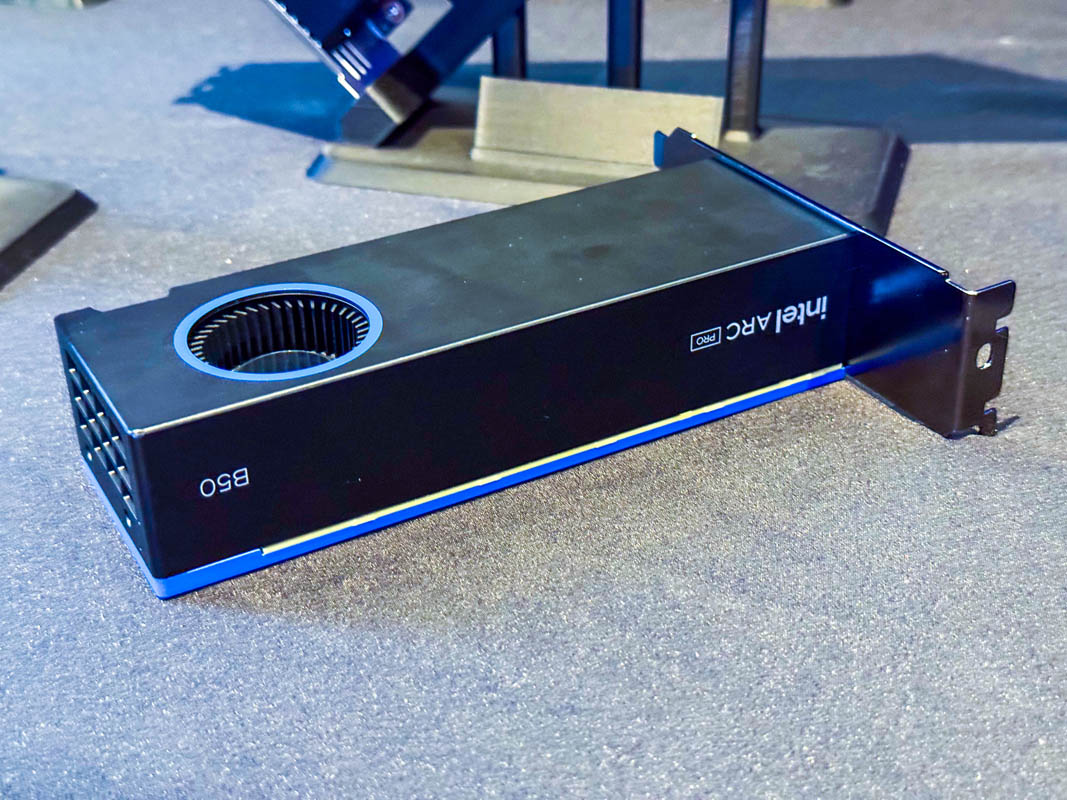
The Arc Pro B50 is one of the lowest-priced GPUs offering:
• 16GB VRAM
• SR-IOV support
• vGPU-style profile creation
• Modern AV1 encode/decode
Each SR-IOV profile presents itself as a separate GPU device that can be passed through directly to individual VMs.
This makes it extremely attractive for Proxmox and multi-VM lab setups.
Potential Issues / Early Adopter Warnings:
- BIOS / Firmware Updates: SR-IOV may require a firmware update that officially must be done on Windows. Some users report success flashing from Linux, but others report bricking their cards when attempting it outside of Windows.
-
Quick Sync / Media Encoding Issues:
QSV / media encoding on SR-IOV profiles can be inconsistent.
Some users report that hardware encoding does not function properly inside GPU profiles.
Reference discussion:
"While the new Xe driver will have SR-IOV it will be useless as it seems to lack HUC firmware so no HW encoding" -
AI / Compute Ecosystem Limitations:
Support for Intel IPEX / XPU tooling is still limited compared to NVIDIA CUDA or even AMD ROCm.
Vulkan and OpenCL performance is improving but still not as mature.
(Experience note: Tested with Arc A310 4GB — performance and driver stability can vary depending on workload.)
Community Discussion (Proxmox 9+):
Proxmox 9.0 + Intel Arc Pro B50 SR-IOV – Early Adopter’s GuideWhen It Makes Sense:
• You want real SR-IOV without NVIDIA licensing
• You need 16GB VRAM per card at lower cost
• You are comfortable being an early adopter
When It Might Not:
• Heavy AI workloads (CUDA ecosystem still dominates)
• Production-critical media servers
• Users wanting "it just works" stability
AMD (SR-IOV / vGPU Support):
AMD offers a hardware virtualization technology similar to NVIDIA’s vGPU and Intel’s SR-IOV called
MxGPU
Unlike consumer Radeon cards, only professional / datacenter GPUs support SR-IOV / hardware virtualization.
Which AMD GPUs Support MxGPU / SR-IOV:
• AMD Radeon Pro series (e.g., WX / W-series)
• AMD MI Series (e.g., MI25, MI50 — Nvidia-equivalent compute cards)
• AMD FirePro (older pro cards with SR-IOV)
Consumer Radeon cards (RX 5000 / 6000 / 7000 series) do NOT support SR-IOV / MxGPU.
Key Things to Know:
- Hardware Virtualization: MxGPU provides SR-IOV capable virtualization, allowing a single physical GPU to present multiple virtual GPUs to guest VMs.
- Driver & OS Support: Strongest support in enterprise Linux distributions (RHEL / CentOS / Ubuntu) and supported hypervisors. Best results are typically seen with AMD’s enterprise drivers and platforms.
- Use Cases: • VDI / graphical desktops • Virtualized compute workloads • Workloads requiring multi-tenant sharing of GPU resources
- Not Like NVIDIA vGPU Licensing: Unlike NVIDIA’s licensed vGPU ecosystem, AMD’s MxGPU/SR-IOV support does *not* currently require the same type of licensing server or software keys.
- Documentation is Limited: Community resources and forum posts are the most detailed sources of information so far — official AMD SR-IOV documentation is not as comprehensive as NVIDIA’s.
Contribution Request:
If anyone in the community has direct experience with AMD SR-IOV (MxGPU) setup, BIOS/firmware fixes, driver configs, or guest compatibility tips, contributions would be very welcome here.
AMD does have a hardware virtualization / SR-IOV capable ecosystem, but:
• It is not available on consumer Radeon cards / It is limited to professional / compute series GPUs
• Documentation and real-world guides are still comparatively sparse
For anyone experimenting with AMD GPUs + vGPU workflows, community experience is a very valuable resource!
i often found myself looking up these details when comparing GPUs to try to find the best option for the price, so i added a table here of most GPUs for quick reference comparisons.
NOTE: Idle est. may not be accurate, different configurations vary widely.
| Model | VRAM | FP32 | FP16 | TDP | Est. Idle | Bandwidth | Virtualization | Avg Used eBay.com Price (≈) |
|---|---|---|---|---|---|---|---|---|
| Intel Arc A310 | 4GB GDDR6 | 3.072 TFLOPS | 6.144 TFLOPS | 75 W | 8–15 W | 124 GB/s | ❌ No SR-IOV | ~$160 – $200 (used & some new listings) (eBay) |
| Intel Arc A380 | 6GB GDDR6 | 4.198 TFLOPS | 8.397 TFLOPS | 75 W | 8–15 W | 186 GB/s | ❌ No SR-IOV | ~$160 – $240 (common eBay US range) (eBay) |
| Intel Arc A580 | 8GB GDDR6 | 12.29 TFLOPS | 24.58 TFLOPS | 185 W | 15–25 W | 256 GB/s | ❌ No SR-IOV | ~$200 – $300 (used listings vary) (eBay) |
| Intel Arc A750 | 8GB GDDR6 | 17.20 TFLOPS | 34.41 TFLOPS | 225 W | 18–30 W | 512 GB/s | ❌ No SR-IOV | ~$160 – $220 (used average) (eBay) |
| Intel Arc A770 16GB | 16GB GDDR6 | 19.66 TFLOPS | 39.32 TFLOPS | 225 W | 18–30 W | 512 GB/s | ❌ No SR-IOV | ~$250 – $350 (used & new) (eBay) |
| Intel Arc Pro A40 | 6GB GDDR6 | 3.482 TFLOPS | 6.963 TFLOPS | 50 W | 6–10 W | 192 GB/s | ✅ SR-IOV | ~$220 – $280 (rare used eBay sales) (eBay) |
| Intel Arc Pro A50 | 6GB GDDR6 | 4.813 TFLOPS | 9.626 TFLOPS | 75 W | 8–15 W | 192 GB/s | ✅ SR-IOV | ~$250 – $320 (used listings) (eBay) |
| Intel Arc Pro A60 | 12GB GDDR6 | 8.397 TFLOPS | 16.79 TFLOPS | 130 W | 10–20 W | 384 GB/s | ✅ SR-IOV | ~$350 – $500 (scarcer on eBay) (eBay) |
| Intel Arc B580 | 12GB GDDR6 | 13.67 TFLOPS | 27.34 TFLOPS | 190 W | 15–25 W | 256 GB/s | ❌ No SR-IOV | ~$230 – $300 (used & some new pricing) (eBay) |
| Intel Arc Pro B50 | 16GB GDDR6 | 10.65 TFLOPS | 21.30 TFLOPS | 70 W | 7–15 W | 224 GB/s | ✅ SR-IOV | ~$350 – $450 (limited used) (eBay) |
| Intel Arc Pro B60 | 24GB GDDR6 | 12.29 TFLOPS | 24.58 TFLOPS | 200 W | 15–30 W | 456 GB/s | ✅ SR-IOV | ~$500 – $800 (very limited) (eBay) |
| Model | VRAM | FP16 | FP32 | TDP | Idle Power | Bandwidth | Virtualization | Avg Used eBay.com Price (≈) |
|---|---|---|---|---|---|---|---|---|
| GTX 1050 | 2 GB | 29.10 GFLOPS | 1.862 TFLOPS | 75 W | ~8–12 W | 112 GB/s | ✅ Unlock | ~$50 – $80 (many used ~75 USD listed) (eBay) |
| GTX 1050 Ti | 4 GB | 33.41 GFLOPS | 2.138 TFLOPS | 75 W | ~8–12 W | 112 GB/s | ✅ Unlock | ~$60 – $95 (common used range) (eBay) |
| GTX 1060 3GB | 3 GB | 61.49 GFLOPS | 3.935 TFLOPS | 120 W | ~10–18 W | 192 GB/s | ✅ Unlock | ~$70 – $110 (used teen-range sale reports & community pricing) (Reddit) |
| GTX 1060 6GB | 6 GB | 68.36 GFLOPS | 4.375 TFLOPS | 120 W | ~10–18 W | 192 GB/s | ✅ Unlock | ~$80 – $120 (common actual eBay used prices) (Reddit) |
| GTX 1070 | 8 GB | 101.0 GFLOPS | 6.463 TFLOPS | 150 W | ~12–20 W | 256 GB/s | ✅ Unlock | ~$90 – $140 (community eBay pricing) (Reddit) |
| GTX 1070 Ti | 8 GB | 127.9 GFLOPS | 8.186 TFLOPS | 180 W | ~15–25 W | 256 GB/s | ✅ Unlock | ~$110 – $180 (user report and typical used sale) (Reddit) |
| GTX 1080 | 8 GB | 139 GFLOPS | 8.873 TFLOPS | 180 W | ~15–25 W | 320.3 GB/s | ✅ Unlock | ~$110 – $160 (recent used prices seen) (Reddit) |
| GTX 1080 Ti | 11 GB | 177.2 GFLOPS | 11.34 TFLOPS | 250 W | ~18–30 W | 484.4 GB/s | ✅ Unlock | ~$140 – $220 (many used listings around $150-$200) (eBay) |
| GPU | CUDA | VRAM | FP32 | FP16 | TDP | Idle | Virtualization | Avg Used eBay.com Price (≈) |
|---|---|---|---|---|---|---|---|---|
| RTX 2060 | 1920 | 6 GB GDDR6 | 6.5 TF | 6.5 TF | 160 W | ~8 W | ✅ Unlock | ~$170 – $200 (Tom's Hardware) |
| RTX 2060 Super | 2176 | 8 GB GDDR6 | 7.2 TF | 7.2 TF | 175 W | ~9 W | ✅ Unlock | ~$180 – $230 (Tom's Hardware) |
| RTX 2070 | 2304 | 8 GB GDDR6 | 7.5 TF | 7.5 TF | 175 W | ~9 W | ✅ Unlock | ~$200 – $250 (Tom's Hardware) |
| RTX 2070 Super | 2560 | 8 GB GDDR6 | 9.1 TF | 9.1 TF | 215 W | ~9 W | ✅ Unlock | ~$220 – $270 (Tom's Hardware) |
| RTX 2080 | 2944 | 8 GB GDDR6 | 10.1 TF | 10.1 TF | 215 W | ~10 W | ✅ Unlock | ~$240 – $300 (Tom's Hardware) |
| RTX 2080 Super | 3072 | 8 GB GDDR6 | 11.2 TF | 11.2 TF | 250 W | ~10 W | ✅ Unlock | ~$250 – $320 (Tom's Hardware) |
| RTX 2080 Ti | 4352 | 11 GB GDDR6 | 13.4 TF | 13.4 TF | 250 W | ~11 W | ✅ Unlock | ~$300 – $380 (Tom's Hardware) |
| Model | VRAM | FP32 | FP16 | TDP | Est. Idle | Bandwidth | Virtualization | Avg Used eBay.com Price (≈) |
|---|---|---|---|---|---|---|---|---|
| RTX 3060 12GB | 12 GB | 12.74 TFLOPS | 12.74 TFLOPS | 170 W | ~8–12 W | 360 GB/s | ❌ | ~$200 – $280 (eBay used listings around $220–$280) (eBay) |
| RTX 3060 Ti | 8 GB | 16.20 TFLOPS | 16.20 TFLOPS | 200 W | ~10–15 W | 448 GB/s | ❌ | ~$220 – $300 (pre-owned listings & reports ~$220–$290) (eBay) |
| RTX 3070 | 8 GB | 20.31 TFLOPS | 20.31 TFLOPS | 220 W | ~9–15 W | 448 GB/s | ❌ | ~$240 – $300 (community price reports for used) (Reddit) |
| RTX 3080 | 10 GB | 29.77 TFLOPS | 29.77 TFLOPS | 320 W | ~9–15 W | 760 GB/s | ❌ | ~$320 – $500 (used prices reported ~$320–$500) (Reddit) |
| RTX 3080 Ti | 12 GB | 34.10 TFLOPS | 34.10 TFLOPS | 350 W | ~12–16 W | 912 GB/s | ❌ | ~$450 – $650+ (reports ~$450+) (Reddit) |
| RTX 3090 | 24 GB | 35.58 TFLOPS | 35.58 TFLOPS | 350 W | ~15–20 W | 936 GB/s | ❌ | ~$600 – $800+ (pricing trend ~$600+) (Reddit) |
| GPU | CUDA | VRAM | FP32 | FP16 | TDP | Idle | Virtualization | Avg Used eBay.com Price (≈) |
|---|---|---|---|---|---|---|---|---|
| RTX 4060 | 3072 | 8 GB GDDR6 128-bit | 15.1 TF | 15.1 TF | 115 W | ~7 W | ❌ | ~$220 – $300 (active used listings ~$230–$300) (eBay) |
| RTX 4060 Ti 8GB | 4352 | 8 GB GDDR6 128-bit | 22.1 TF | 22.1 TF | 160 W | ~8 W | ❌ | ~$250 – $350 (used/Refurb shows ~$250–$350) (eBay) |
| RTX 4060 Ti 16GB | 4352 | 16 GB GDDR6 128-bit | 22.1 TF | 22.1 TF | 165 W | ~8 W | ❌ | ~$280 – $380 (used 16 GB variants ~$280+) (eBay) |
| RTX 4070 | 5888 | 12 GB GDDR6X 192-bit | 29.1 TF | 29.1 TF | 200 W | ~10 W | ❌ | ~$350 – $500+ (used pricing broader range on eBay) (eBay) |
| RTX 4070 Super | 7168 | 12 GB GDDR6X 192-bit | 35.5 TF | 35.5 TF | 220 W | ~10 W | ❌ | ~$400 – $550+ (used listings suggest ~$400+ typical) (eBay) |
| RTX 4070 Ti | 7680 | 12 GB GDDR6X 192-bit | 40.1 TF | 40.1 TF | 285 W | ~11 W | ❌ | ~$450 – $650+ (commonly listed used) (eBay) |
| RTX 4080 | 9728 | 16 GB GDDR6X 256-bit | 48.7 TF | 48.7 TF | 320 W | ~13 W | ❌ | ~$700 – $1,000+ (used listings vary widely) (eBay) |
| RTX 4090 | 16384 | 24 GB GDDR6X 384-bit | 82.6 TF | 82.6 TF | 450 W | ~16 W | ❌ | ~$1,400 – $2,000+ (many used listings in this range) (eBay) |
| GPU | CUDA | VRAM | FP32 | FP16 | TDP | Idle | Virtualization | Avg Used eBay.com Price (≈) |
|---|---|---|---|---|---|---|---|---|
| RTX 5050 | 2560 | 8 GB GDDR6 128-bit | 13.17 TFLOPS | 13.17 TFLOPS | 130 W | ~12 W | ❌ | ~$350 – $450 (used listings like MSI RTX 5050 ~$450) (eBay) |
| RTX 5060 | 3840 | 8 GB GDDR7 128-bit | 19.18 TFLOPS | 19.18 TFLOPS | 145 W | ~13 W | ❌ | ~$250 – $350 (used eBay listings for RTX 5060 shown ~$274) (eBay) |
| RTX 5070 | 6144 | 12 GB GDDR7 256-bit | 30.87 TFLOPS | 30.87 TFLOPS | 250 W | ~14 W | ❌ | ~$500 – $600 (used eBay listings show ~$550 for RTX 5070) (eBay) |
| RTX 5080 | 10752 | 16 GB GDDR7 256-bit | 56.28 TFLOPS | 56.28 TFLOPS | 360 W | ~15 W | ❌ | ~$800 – $1,200+ (used availability limited; high pricing trends) (eBay) |
| RTX 5090 | 21760 | 32 GB GDDR7 512-bit | 104.8 TFLOPS | 104.8 TFLOPS | 575 W | ~20 W | ❌ | ~$2,300 – $4,500+ (eBay listings show high priced flagship cards; scalpers reported significantly above MSRP) (eBay) |
| Model | VRAM | FP16 (half) | FP32 (float) | TDP | Idle Power (typical) | Bandwidth | Virtualization | Avg. eBay.com Used Price |
|---|---|---|---|---|---|---|---|---|
| Quadro P5000 | 16GB | 138.6 GFLOPS | 8.873 TFLOPS | 180W | ~15–20W | (256-bit GDDR5X) | ✅ | ~$300 – $450 (many listings around ~$250-$349) (eBay) |
| Quadro P6000 | 24GB | 197 GFLOPS | 12.63 TFLOPS | 250W | ~20–25W | 432.8 GB/s | ✅ | ~$550 – $700 (common used around ~$548-$694) (eBay) |
| Quadro GP100 | 16GB HBM2 | 20.69 TFLOPS | 10.34 TFLOPS | 235W | ~25–30W | 732.2 GB/s | ✅ | ~$300-$330 (typical Quadro GP100 used price) (eBay) |
| Quadro GV100 | 32GB HBM2 | 33.32 TFLOPS | 16.66 TFLOPS | 250W | ~25–30W | 868.4 GB/s | ✅ | ~$900+ (used GV100 listings often near or above ~$900) (eBay) |
| Quadro RTX 6000 | 24GB GDDR6 | 32.62 TFLOPS | 16.31 TFLOPS | 260W | ~22–30W | 672.0 GB/s | ✅ | ~$1,000 – $1,399 (common used around ~$1,019-$1,390) (eBay) |
| GPU | VRAM | FP16 (half) | FP32 (float) | TDP | Idle Power | Bandwidth | Virtualization | Avg Used eBay.com Price (USD) |
|---|---|---|---|---|---|---|---|---|
| RTX A2000 6GB | 6GB GDDR6 | 7.987 TFLOPS | 7.987 TFLOPS | 70W | ~7–10W | 288 GB/s | ✅ | ~$300–$450 (eBay) |
| RTX A2000 (12GB) | 12GB GDDR6 | 7.987 TFLOPS | 7.987 TFLOPS | 70W | ~7–10W | 288 GB/s | ✅ | ~$575–$650 (eBay) |
| RTX A4500 | 20GB GDDR6 | 23.65 TFLOPS | 23.65 TFLOPS | 200W | ~13–18W | 640 GB/s | ✅ | ~$1,295–$1,450 (eBay) |
| RTX A5000 | 24GB GDDR6 | 27.77 TFLOPS | 27.77 TFLOPS | 230W | ~10–20W | 768 GB/s | ✅ | ~$1,675–$1,900 (eBay) |
| RTX A6000 | 48GB GDDR6 | 38.71 TFLOPS | 38.71 TFLOPS | 300W | ~8–12W | 768 GB/s | ✅ | ~$4,250–$5,000 (eBay) |
| GPU | VRAM | FP16 (half) | FP32 (float) | TDP | Idle Power (typical) | Bandwidth | Virtualization | Avg Used eBay.com Price (≈) |
|---|---|---|---|---|---|---|---|---|
| Tesla P4 | 8 GB | 89.12 GFLOPS | 5.704 TFLOPS | 75 W | ~6–10 W | 192.3 GB/s | ✅ | ~$65 – $100 – Tesla P4 listings often show used cards in the $65–$100 range. (eBay) |
| Tesla P40 | 24 GB | 183.7 GFLOPS | 11.76 TFLOPS | 250 W | ~9–12 W | 384-bit GDDR5 | ✅ | ~$190 – $300+ – Multiple used Tesla P40 listings available between about $180 and $300. (eBay) |
| Tesla P100 PCIe 12GB | 12 GB HBM2 | 19.05 TFLOPS | 9.526 TFLOPS | 250 W | ~25–27 W | 549.1 GB/s | ✅ | ~$90 – $130 – Typical used cards around ~$100+ on eBay. (eBay) |
| Tesla P100 SXM2 16GB | 16GB HBM2 | 21.22 TFLOPS | 10.61 TFLOPS | 300 W | ~25–30 W | 732.2 GB/s | ✅ | ~$180 – $300+ – Listings vary based on adapter combos; typical range observed. (eBay) |
| Tesla V100 PCIe 16GB | 16 GB HBM2 | 28.26 TFLOPS | 14.13 TFLOPS | 300 W | ~20–30 W | 897.0 GB/s | ✅ | ~$300 – $500+ – Used listings frequently show V100 16GB cards around this range. (eBay) |
| Tesla V100 PCIe 32GB | 32 GB HBM2 | ~28.26 TFLOPS | ~14.13 TFLOPS | 300 W | ~20–30 W | 897.0 GB/s | ✅ | ~$700 – $1,000+ – Larger-memory units on eBay.com trend significantly higher. (eBay) |
| Tesla T4 | 16 GB | 65.13 TFLOPS (8:1) | 8.141 TFLOPS | 70 W | ~8–12 W | 320.0 GB/s | ✅ | ~$100 – $200 – Used T4 cards often appear in this range on eBay.com. (eBay) |
| Tesla L4 | 24 GB | 30.29 TFLOPS (1:1) | 30.29 TFLOPS | 72 W | ~8–12 W | 192.3 GB/s | ✅ | ~$600 – $900+ (est.) – Limited direct used eBay.com data; inference-class cards often list higher. (eBay) |
| GPU | VRAM | FP32 | FP16 | TDP | Idle (Typical) | Bandwidth | Virtualization | Avg Used eBay.com Price (≈) |
|---|---|---|---|---|---|---|---|---|
| Radeon RX 5500 | 4GB GDDR6 128-bit | 5.20 TFLOPS | 10.40 TFLOPS | 110W | ~5–8W | 224 GB/s | ❌ | ~$60 – $90 – early used listings for RX 5500 variants appear around ~$60-$90 on eBay.com (e.g., pre-owned RX 5500 XT/5500 cards). (eBay) |
| Radeon RX 5500 XT 4GB | 4GB GDDR6 128-bit | 5.20 TFLOPS | 10.40 TFLOPS | 130W | ~6–10W | 224 GB/s | ❌ | ~$70 – $110 – eBay.com used RX 5500 XT 4GB listings often range ~$60-$110+. (eBay) |
| Radeon RX 5500 XT 8GB | 8GB GDDR6 128-bit | 5.20 TFLOPS | 10.40 TFLOPS | 130W | ~6–10W | 224 GB/s | ❌ | ~$110 – $150 – Many pre-owned RX 5500 XT 8GB listings around ~$120-$130+ on eBay.com. (eBay) |
| Radeon RX 5600 XT | 6GB GDDR6 192-bit | 7.19 TFLOPS | 14.38 TFLOPS | 150W | ~8–12W | 288 GB/s | ❌ | ~$120 – $200 – eBay.com shows RX 5600 XT used listings commonly around ~$140-$180+, though some show higher. (eBay) |
| Radeon RX 5700 | 8GB GDDR6 256-bit | 7.95 TFLOPS | 15.90 TFLOPS | 180W | ~10–15W | 448 GB/s | ❌ | ~$140 – $180 – eBay.com used RX 5700 marketplace listings often around ~$150+. (eBay) |
| Radeon RX 5700 XT | 8GB GDDR6 256-bit | 9.75 TFLOPS | 19.50 TFLOPS | 225W | ~12–18W | 448 GB/s | ❌ | ~$140 – $200 – RX 5700 XT used cards commonly list around $145-$180+ on eBay.com. (eBay) |
| GPU | VRAM | FP32 | FP16 | TDP | Idle (Typical) | Bandwidth | Virtualization | Avg Used eBay.com Price (≈) |
|---|---|---|---|---|---|---|---|---|
| Radeon RX 6500 XT | 4GB GDDR6 64-bit | 5.77 TFLOPS | 11.54 TFLOPS | 107W | ~5–8W | 144 GB/s | ❌ | ~$70 – $160 – multiple eBay.com used listings show 4GB RX 6500 XT cards commonly ~$60–$150+ USD (e.g., $63.99–$150+). (eBay) |
| Radeon RX 6600 | 8GB GDDR6 128-bit | 8.93 TFLOPS | 17.86 TFLOPS | 132W | ~6–10W | 224 GB/s | ❌ | ~$140 – $200 – used RX 6600 listings typically around $150–$180+ USD on eBay.com (e.g., $155, $180). (eBay) |
| Radeon RX 6600 XT | 8GB GDDR6 128-bit | 10.60 TFLOPS | 21.20 TFLOPS | 160W | ~7–12W | 256 GB/s | ❌ | ~$170 – $250 – various RX 6600 XT used listings roughly $175–$250+ USD on eBay.com. (eBay) |
| Radeon RX 6650 XT | 8GB GDDR6 128-bit | 10.79 TFLOPS | 21.58 TFLOPS | 176W | ~7–12W | 280 GB/s | ❌ | ~$200 – $300 – limited direct data, but common used RX 6650 XT listings appear around ~$200–$300 USD on eBay.com. (eBay) |
| Radeon RX 6700 | 10GB GDDR6 160-bit | 10.37 TFLOPS | 20.74 TFLOPS | 175W | ~10–15W | 320 GB/s | ❌ | ~$200 – $300+ – representative used RX 6700 XT (similar generation) listings often around $270–$340 (RX 6700 used may trend similar). (eBay) |
| Radeon RX 6700 XT | 12GB GDDR6 192-bit | 13.21 TFLOPS | 26.42 TFLOPS | 230W | ~12–18W | 384 GB/s | ❌ | ~$250 – $350+ – used RX 6700 XT listings frequently show prices roughly ~$249–$340+ USD on eBay.com. (eBay) |
| Radeon RX 6750 XT | 12GB GDDR6 192-bit | 13.31 TFLOPS | 26.62 TFLOPS | 250W | ~12–18W | 432 GB/s | ❌ | ~$250 – $350+ – some used listings for RX 6750 XT show ~$270+, suggesting similar mid-upper RDNA2 pricing. (eBay) |
| Radeon RX 6800 | 16GB GDDR6 256-bit | 16.17 TFLOPS | 32.34 TFLOPS | 250W | ~15–22W | 512 GB/s | ❌ | ~$280 – $380 – used cards from the same generation often list ~$285–$380+ USD on eBay.com (approximate from 6800 XT comparables and 6800 listings). (eBay) |
| Radeon RX 6800 XT | 16GB GDDR6 256-bit | 20.74 TFLOPS | 41.48 TFLOPS | 300W | ~15–25W | 512 GB/s | ❌ | ~$350 – $450 – common used RX 6800 XT listings around $379–$450+ USD on eBay.com. (eBay) |
| Radeon RX 6900 XT | 16GB GDDR6 256-bit | 23.04 TFLOPS | 46.08 TFLOPS | 300W | ~18–28W | 512 GB/s | ❌ | ~$400 – $600+ – used listings for RX 6900 XT often show ~$400–$600+ USD on eBay.com. (eBay) |
| Radeon RX 6950 XT | 16GB GDDR6 256-bit | 23.65 TFLOPS | 47.30 TFLOPS | 335W | ~18–30W | 576 GB/s | ❌ | ~$450 – $650+ – used RX 6950 XT listings commonly around $450–$650 USD on eBay.com. (eBay) |
| GPU | VRAM | FP32 | FP16 | TDP | Idle (Typical) | Bandwidth | Virtualization | Avg Used eBay.com Price (≈) |
|---|---|---|---|---|---|---|---|---|
| Radeon RX 7600 | 8GB GDDR6 128-bit | 21.75 TFLOPS | 43.50 TFLOPS | 165W | ~7–12W | 288 GB/s | ❌ | ~$160 – $230 – Used RX 7600 ended around $170 USD in recent eBay sold listings. (eBay) |
| Radeon RX 7600 XT | 16GB GDDR6 128-bit | 22.57 TFLOPS | 45.14 TFLOPS | 190W | ~8–14W | 288 GB/s | ❌ | ~$250 – $320+ – Used RX 7600 XT listings like one at $289.99 USD show typical current ranges. (eBay) |
| Radeon RX 7700 XT | 12GB GDDR6 192-bit | 35.17 TFLOPS | 70.34 TFLOPS | 245W | ~15–22W | 432 GB/s | ❌ | ~$350 – $480 – eBay shows mixed used listings and price variations; typical offers often cluster around $350–$480+. (eBay) |
| Radeon RX 7800 XT | 16GB GDDR6 256-bit | 37.32 TFLOPS | 74.64 TFLOPS | 263W | ~18–25W | 624 GB/s | ❌ | ~$450 – $600+ – U.S. eBay used/pre-owned typical prices often seen ~$450–$550+. (eBay) |
| Radeon RX 7900 GRE | 16GB GDDR6 256-bit | 40.35 TFLOPS | 80.70 TFLOPS | 260W | ~18–25W | 576 GB/s | ❌ | ~$450 – $650 – Used GRE variants likely track similar to other RX 7900 series pricing (e.g., XT) on eBay.com. (eBay) |
| Radeon RX 7900 XT | 20GB GDDR6 320-bit | 51.48 TFLOPS | 102.96 TFLOPS | 300W | ~20–30W | 800 GB/s | ❌ | ~$600 – $800+ – Pre-owned listings often show around $600–$800+ USD on eBay.com. (eBay) |
| Radeon RX 7900 XTX | 24GB GDDR6 384-bit | 61.39 TFLOPS | 122.78 TFLOPS | 355W | ~20–35W* | 960 GB/s | ❌ | ~$690 – $1,300+ – Used reference editions have been listed near $690 USD, while higher-end OC units approach $1,300+. (eBay) |
| GPU | VRAM | FP16 (half) | FP32 (float) | TDP | Idle Power (typical) | Bandwidth | Virtualization | Avg Used eBay.com Price (≈) |
|---|---|---|---|---|---|---|---|---|
| AMD Radeon RX 9600 | 8GB GDDR6 | ~42.9 TFLOPS | ~21.4 TFLOPS | ~132W | ~10–15W | 288 GB/s | ❌ | ~$250 – $350 – while direct used listings are sparse, similar RX 9000-series boards suggest this rough range on eBay.com based on market pricing trends and adjacent model data.(eBay) |
| AMD Radeon RX 9060 XT 8GB | 8GB GDDR6 | 51.3 TFLOPS | 25.6 TFLOPS | 150W | ~12–18W | 320 GB/s | ❌ | ~$280 – $380 – eBay.com shows various used/near-new RX 9060 XT 8GB listings (e.g., Gigabyte ~$299.99 USD for used) suggesting a ~low-$300s range.(eBay) |
| AMD Radeon RX 9060 XT 16GB | 16GB GDDR6 | 51.3 TFLOPS | 25.6 TFLOPS | 160W | ~12–18W | 320 GB/s | ❌ | ~$360 – $550 – eBay.com used listings for 9060 XT 16GB show examples around ~$425–$480 USD (pre-owned); higher end reflects condition/brand.(eBay) |
| AMD Radeon RX 9070 | 16GB GDDR6 | 72.25 TFLOPS | 36.13 TFLOPS | 220W | ~18–28W | ~640–896 GB/s | ❌ | ~$450 – $650+ – similar RX 9070 eBay.com used listings and comparative search results suggest typical used prices around $500+ USD.(eBay) |
| AMD Radeon RX 9070 XT | 16GB GDDR6 | 97.32 TFLOPS | 48.66 TFLOPS | 260–304W | ~20–30W | 640 GB/s+ | ❌ | ~$600 – $800+ – eBay.com has used/pre-owned RX 9070 XT listings (e.g., PowerColor ~$699 USD) with a broad range depending on condition.(eBay) |
| GPU | VRAM | FP16 (half) | FP32 (float) | TDP | Idle Power (typical) | Bandwidth | Virtualization | Avg Used eBay.com Price (≈) |
|---|---|---|---|---|---|---|---|---|
| Radeon Instinct MI25 | 16GB HBM2 | 24.58 TFLOPS | 12.29 TFLOPS | 300W | ~30–40W | 436.2 GB/s | 🟡 | ~$90 – $180 (eBay) |
Additional Resources:
Proxmox VE Helper scripts - Hundreds of scripts to quickly setup a wide range of projects on proxmox.
ProxMenux - Seperate Dashboard / CLI menu with more information & management options handy for proxmox management.
VMs:
OSX-KVM - Mac OSX (multiple versions to choose from) On Proxmox.
Beyond what is covered in the article:
- XFS: In my experience, XFS is more reliable for long-term data storage. I’ve lost files to long-term storage on EXT4, particularly media files, so for that purpose, XFS is preferred.
- EXT4: For operating system disks (e.g., laptop), EXT4 works well. However, EXT4 has a space reservation system (typically 5%), which means you automatically lose a chunk of disk space as the disk size grows. XFS, on the other hand, doesn’t reserve space, so you can fill it more efficiently.
Note: Avoid using XFS on top of XFS in virtual machines (VMs). It doesn’t nest/stack well. Instead, use EXT4 on top of XFS if you need to stack file systems.
ZFS is a robust and highly reliable file system with several advanced features:
- Compression: Supports 1z4, gzip, zstd, and more.
- Deduplication: Requires significant memory and RAID setups for optimal performance.
- Self-healing RAID: Uses hashing and is self-healing in RAID configurations.
- Copy-on-write (CoW) Verification: Files are verified before being written to disk and every time they are read, with various checksum options.
- Scalability: Scales incredibly well, ideal for large datasets.
- Raw Filesystems: Allows VM disks to be written directly into the filesystem, functioning like containers.
- Live VM Copying: Can copy live virtual machines.
- Superior Performance Potential: Can deliver high-performance results when properly configured.
- Advanced Configurations: Offers complex options for highly specific use cases.
ZFS is extremely reliable, especially in RAID environments with at least 2+ disks. However, if performance isn’t critical, it can work well on a single disk, though it may be slower and require more RAM.
ZFS is made for data centers, and has a steep learning curve, but its extensive features make it a solid choice for advanced users.
BTRFS offers some similar features to ZFS, such as hash support and ZSTD compression, but it is generally less reliable. It’s easier to use compared to ZFS, but for certain use cases, it may not be as dependable.
For example, a large number of small file writes can cause BTRFS to crash, leading to potential data loss (e.g., for databases, torrents, or VMs). Although BTRFS is a copy-on-write system, it’s not as robust as ZFS.
In testing, I ran a Ubuntu VM with BTRFS and compressed roughly 5.5GB of OS files down to 2.8GB using ZSTD compression (level 9 specified in the /etc/fstab configuration).
- ZSTD Compression:
- Optimal Levels: Use ZSTD level 3 or higher for meaningful compression. Levels 9-11 increase compression time exponentially with minimal benefits.
- Recommended Levels: A level of 5-7 provides a good balance between performance and compression ratio.
All these filesystems (XFS, ZFS, and BTRFS) can be utilized on Proxmox, a homelab virtualization server platform.
- Curated List of Awesome Lists - A collection of curated "awesome" lists covering a wide variety of topics, providing valuable resources and tools for almost every field of interest.
- Awesome Programs and Tweaks for Windows, macOS, and Linux - A curated collection of programs and tweaks to enhance the functionality, performance, and usability of Windows, macOS, and Linux systems.
- Awesome List of Windows Software - A curated list of useful and essential software for Windows users, covering a wide range of categories and needs.
- Awesome List of Linux Software - A comprehensive list of open-source software and tools for Linux users, including productivity, development, and system management applications.
- Awesome List of macOS Software - A curated collection of software and tools for macOS, ranging from productivity applications to development utilities and system enhancements.
- Awesome Privacy - A curated collection of privacy-focused software and tools designed to enhance your online and offline privacy and security.
- Awesome Piracy - A curated list of resources and tools related to piracy, including websites, software, and services for accessing pirated content.
- Apollo Sunshine fork
- Original Sunshine
- Moonlight
- Windows: BetterRDP for Windows - Enables 60fps and GPU acceleration on RDP connections, creating a seamless and native-like experience for intensive or latency-dependent software, including games.
- Windows: RdpGamepad - a Remote Desktop Plugin for Xbox Gamepads - Use Xbox 360/One controllers over RDP/Moonlight/Sunshine.
- Windows: SSHFS-Win Manager - A GUI for SSHFS on Windows.
- Linux: SSHFS.
- croc - Easily and securely send files between computers.
- 7-Zip - A popular open-source file compression tool that supports various archive formats and offers high compression ratios.
- 7-Zip ZSTD - A fork of 7-Zip that adds support for the Zstandard (ZSTD) compression algorithm, offering faster speeds and higher compression ratios.
- Compactor - A tool for compressing files and directories, designed for efficiency and easy use with high-quality compression techniques.
- CompactGUI - A graphical user interface for the Compact tool, which allows users to compress files and folders using the Windows built-in compression features.
- Windows: Primo Cache.
- Linux: OpenSnitch - Network monitoring and rule-based control.
- Windows: SimpleWall - Windows firewall management and rules.
- Mac: LittleSnitch - Network monitoring and control.
- Win/Linux: Safing Portmaster.
- Windows: NetLimiter - Per-application bandwidth limits.
- Linux: PowerTop - Tweak host for power savings.
- Hybrid - A multi-purpose video conversion tool that integrates various encoders and applications, allowing easy media conversion from various formats.
- HandBrake - A widely-used open-source video transcoder that supports GPU acceleration for faster encoding and includes support for modern codecs like AV1.
- Recoll - A powerful, open-source desktop search tool that can index and search the contents of various document formats. It supports a wide range of file types and is great for organizing and retrieving personal documents locally.
- Windows 10/11 Optimization & Customization Guide - A comprehensive guide that helps optimize and customize Windows 10/11 for improved performance, privacy, and overall system experience.
- Microsoft Edge Removal - A tool to fully remove Microsoft Edge from Windows, ensuring it is completely deleted and no longer part of your system.
- OneDrive-Uninstaller - A tool for completely uninstalling OneDrive from your system, preventing it from syncing and taking up system resources.
- Dism++ - A powerful system tool for managing Windows image files, providing options for system cleanup, privacy tweaks, and optimizations.
- Blackbird - A privacy-focused tool that disables tracking, telemetry, and other unwanted data collection by Windows, offering enhanced privacy on your system.
- 10AntiSpy - A privacy-focused tool for disabling unwanted Windows 10 features such as telemetry, Cortana, and other data collection mechanisms.
- UWT4 - A comprehensive tweak tool for Windows 10 that allows you to customize various system settings and privacy options, improving performance and security.
- Win10BloatRemover - A tool that helps you remove bloatware and unwanted apps from Windows 10, freeing up space and improving system performance.
- Intelligent Standby List Cleaner - A tool to reduce system stuttering and improve performance by clearing the standby memory list, optimizing RAM usage.
- Destroy Windows 10 Spying - A privacy tool designed to disable telemetry, tracking, and data collection features in Windows 10 for improved privacy and control.
- Windows 7 ESU Patching - A guide for patching Windows 7 Extended Security Updates (ESU) to keep receiving updates and security patches after official support ends.
- Windows 7 Service Pack 2 - A community-driven project to create an unofficial Windows 7 Service Pack 2, adding new features, bug fixes, and improvements to Windows 7.
- Windows 7 SP4 Unofficial - An unofficial Service Pack 4 for Windows 7, designed to enhance the system with additional updates and fixes after the official support ended.
- Windows-7 on Modern Hardware - A guide for installing and running Windows 7 on modern hardware, with advice on drivers, patches, and compatibility tweaks.
- Windows 7 Fan-Made Survival Guide - A fan-made survival guide for using Windows 7 in the modern era, offering tips, tweaks, and tools to keep Windows 7 functional and secure.
- WinBtrfs - A Windows driver for the Btrfs filesystem, allowing access to Btrfs partitions and data from a Windows environment.
- OpenZFS on Windows - A project to bring OpenZFS support to Windows, enabling ZFS filesystems to be used on Windows systems.
- EXT4 for Win - A driver for accessing EXT4 partitions on Windows, offering full read/write support for EXT4-formatted drives.
Warning: These drivers are experimental and may not be stable. There is a risk of data corruption, crashes, or other issues when using Linux filesystems on Windows. It is highly recommended to use these tools only with backup copies of your important data, and avoid using them for critical or production environments.
- Audiobookshelf - An open-source self-hosted solution for managing and listening to audiobooks. It offers a clean interface and supports syncing across devices.
- Android App: Audiobookshelf Android App - An official Android app for accessing your Audiobookshelf library, providing seamless audiobook management and playback.
- iOS Apps:
- Audiobooth - An iOS app for listening to audiobooks from Audiobookshelf. Note: Currently does not support podcasts.
- Plappa - A podcast app that integrates with Audiobookshelf, providing support for podcasts as well. Note: Can be glitchy and has heavy battery drain issues when managing large libraries, but podcasts work at least.
- Text: Ollama - A tool to run LLMs (Large Language Models) on your own machine, enabling private and customizable AI instances.
- Images: EasyDiffusion - A user-friendly interface for running Stable Diffusion locally to generate high-quality images.
- Images: Forge-WebUI - A web-based interface for managing and controlling AI model deployments on your own server.
- multi: Koboldcpp - KoboldCpp is an easy-to-use AI text-generation software for GGML and GGUF models, inspired by the original KoboldAI.
- TTS: Kokoro FastAPI - A Text-to-Speech service built with FastAPI, allowing fast and efficient text-to-speech conversion using AI models.
- DeepResearch: Local Deep Research - Local Deep Research achieves ~95% on SimpleQA benchmark (tested with GPT-4.1-mini). Supports local and cloud LLMs (Ollama, Google, Anthropic, ...). Searches 10+ sources - arXiv, PubMed, web, and your private documents. Everything Local & Encrypted.
- Jellyfin - An open-source media server for managing and streaming your media content to various devices.
- Plex - A media server platform that allows you to stream and organize your media collection from your own server.
- Emby - Another media server platform, offering advanced features for content management and streaming.
- seerr - free and open source software application for managing requests for your media library. It integrates with the media server of your choice: Jellyfin, Plex, and Emby. In addition, it integrates with your existing services, such as Sonarr, Radarr.
- Radarr - An automatic movie collection manager that works with your media server for a seamless experience.
- Sonarr - A TV series manager for downloading, organizing, and streaming your favorite shows automatically.
- Tautulli - A monitoring tool for your Plex server, providing detailed analytics and statistics on your media server's usage.
- Ubooquity - A lightweight and easy-to-use home server for managing and streaming eBooks and comics. Ideal for personal digital libraries.
- OpenReader-WebUI - Read documents in realtime with high-quality TTS; or extract audiobooks. Use your own Kokoro-FastAPI, Deepinfa API, or Open AI API endpoint. .
- Tdarr - A distributed media transcoding system designed to automate and optimize the conversion of your media collection, running on your own server.
- SearXNG - SearXNG is a free internet metasearch engine which aggregates results from various search services and databases. Users are neither tracked nor profiled.
- Malice - Malice's mission is to be a free open source version of VirusTotal that anyone can use at any scale from an independent researcher to a fortune 500 company. (officially archived but still worth a mention.)