DVR-Scan v1.7

·
66 commits
to main
since this release
Release Notes
DVR-Scan 1.7 ships with a completely new UI, and supports faster video decoders (up to 50% better scanning performance):
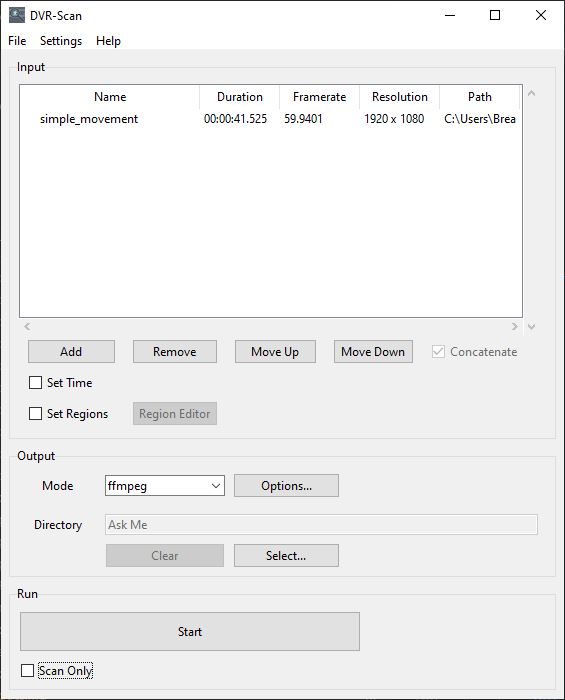
The UI can be started by running dvr-scan-app, and is installed alongside the existing command line interface dvr-scan. Config settings and region files can be shared seamlessly between both. Feedback on the new UI is welcome.
1.7.0.1 (March 11, 2025)
Re-release of Windows distribution that fixes program hanging when starting scan (#209). This was caused due to the way the program was built. There are no code changes, so the Python distribution has not been re-released.
1.7.1 (February 28, 2025)
- [feature] New GUI now available across all platforms, can be launched via
dvr-scan-app- Has UI elements for all settings, supports editing motion regions
- Shows scan progress in real-time
- [feature] Add ability to control video decoder via
input-modeconfig option (opencv,pyav,moviepy)- Allows switching between
OpenCV(default),PyAV, andMoviePyfor video decoding - Certain backends provide substantial performance benefits, up to 50% in some cases (let us know which one works best!)
- Allows switching between
- [bugfix] Fix crash on headless systems that don't have
pillowinstalled - [general] The region editor no longer prompts for a save path if one was already specified via the
-s/--save-regionsoption - [general] A size-limited logfile is now kept locally, useful for filing bug reports
- Can be controlled with config file options
save-log(default: yes),max-log-size(default: 20 kB),max-log-files(default: 4) - Path can be found under help entry for
--logfileby runningdvr-scan --helpordvr-scan-app --help
- Can be controlled with config file options
- [general] Minimum supported Python version is now 3.9