By Karel Cermak | Karlosoft.
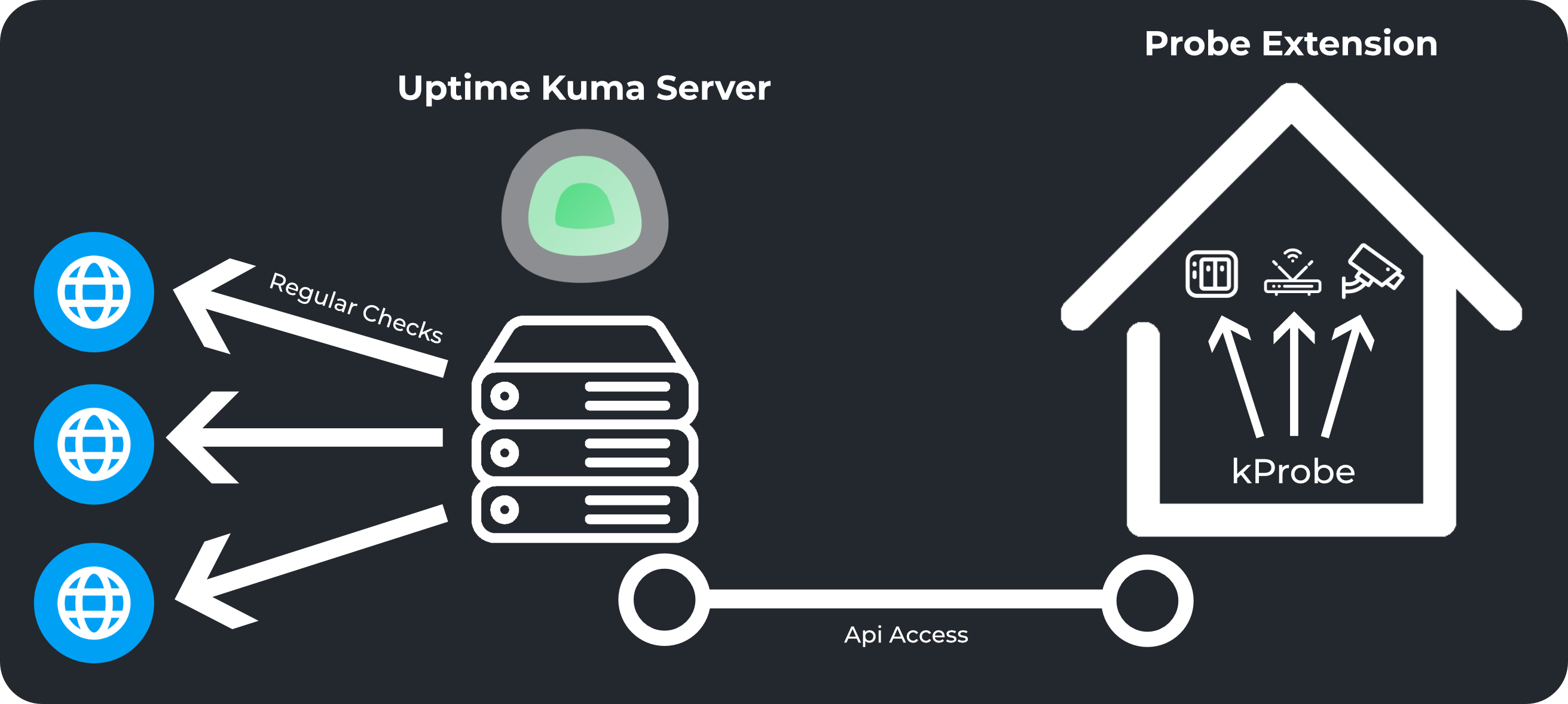
- Uptime Kuma excels at service monitoring and notifications, but it cannot reach devices hidden behind your internal network or VPN.
- This extension fills that gap by running inside your LAN, checking local devices (Wi-Fi access points, cameras, internal services, etc.) and exposing their status through an HTTP API that your main Uptime Kuma instance can query.
- It is lightweight, easy to deploy, and works independently of your primary Uptime Kuma installation.
- Set up a small Linux machine (Ubuntu Server recommended) inside your local network.
- Install this extension following the steps in the FAQ.md.
- Configure the scans you want to run.
- In Uptime Kuma, create a standard HTTP monitor pointing to the Probe API endpoint.
- The API returns a success or failure response depending on the scan results, allowing Uptime Kuma to monitor internal services without direct access to that network.
- ICMP ping checks with configurable timeouts
- HTTP requests with timeout, expected status code validation, and optional keyword matching
- Simple configuration editor and CLI tools
- Dedicated API server for integration with Uptime Kuma or other systems
-
Yes — the API can be queried directly if you just need a simple, local monitoring tool.
-
Keep in mind:
- This extension does not send notifications.
- There are no plans to add notification features.
- Installation, uninstallation, and other tips are available in the FAQ.md.