





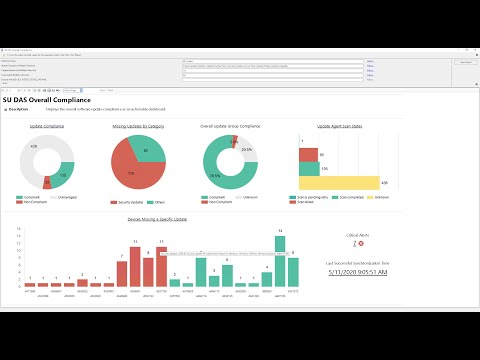
This is a solution of dashboards and reports, for Microsoft Endpoint Configuration Manager.
_Dashboard - Software Updatesdashboard is navigable, independent ofSoftware Update Groupsand comes with an array of filtering options and sub-reports.Application - Compliance by Collectionstandalone report is used to monitor application compliance by collection.Baseline - Compliance by Collectionstandalone report is used to monitor baseline compliance by collection.Bitlocker - Compliance by Collection (MBAM)standalone report is used to monitor Bitlocker (MBAM) compliance and non-compliance reasons.Bitlocker - Compliance by Collectionstandalone report is used to monitor Bitlocker compliance, key upload and non-compliance reasons.Operating System - Version Compliance by Collectionstandalone report is used to monitor Feature Update or Windows Version Compliance.Operating System - Windows 11 Readiness by Collectionstandalone report is used to check Windows 11 Upgrade Readiness.Package - Compliance by Collectionstandalone report is used to monitor package compliance by collection.Package - Compliance by Deploymentstandalone report is used to monitor package compliance by deployment.Site - Alertssub-report is used to monitor critical alerts.Software Update - Compliance by Collectionsub-report is used to monitor software update compliance by collection.Software Update - Compliance by Devicesub-report is used to monitor software update compliance by device.Software Update - Scan Status by Collectionsub-report is used to monitor software update scan status by collection.Software Update - Update Point Sync Statussub-report is used to monitor software update update point sync status.Software Update - CU Compliance by Collectionstandalone report is used to monitor software update compliance by collection.
Notes All sub-reports can be run standalone. The installation can be done manually or via the included PowerShell installer.
See main.
See releases.
See changelog.
See help.
- Adam Weigert
ufn_CM_GetNextMaintenanceWindow
- _Dashboard - Software Updates (Main Dashboard Report)
- Application - Compliance by Collection
- Baseline - Compliance by Collection
- Bitlocker - Compliance by Collection (MBAM)
- Bitlocker - Compliance by Collection
- Operating System - Version Compliance by Collection
- Operating System - Windows 11 Readiness by Collection
- Package - Compliance by Collection
- Package - Compliance by Deployment
- Site - Alerts
- Software Update - CU Compliance by Collection
- Software Update - Compliance by Collection
- Software Update - Compliance by Device
- Software Update - Scan Status by Collection
- Software Update - Update Point Sync Status
.
+-- (D) _Dashboard - Software Updates
    +-- (C) Device Update Compliance
    |   +-- (R) Software Update - Compliance by Collection
    |       +-- (R) Software Update - Compliance by Device
    |
    +-- (C) Missing updates by Classification
    |   +-- (R) Software Update - Compliance by Collection
    |       +-- (R) Software Update - Compliance by Device
    |
    +-- (C) Device Update Agent Scan States
    |   +-- (R) Software Update - Scan Status by Collection
    |
    +-- (C) Overall Update Groups Compliance
    |
    +-- (C) Top 5 Devices with Missing Updates by Classification
    |   +-- (R) Software Update - Compliance by Collection
    |       +-- (R) Software Update - Compliance by Device
    |
    +-- (T) Critical Alerts
    |   +-- (R) Site - Alerts
    |
    +-- (T) Last Successful Synchronization Time
        +-- (R) Software Update - Update Point Sync Status
+-- (R) Application - Compliance by Collection
+-- (R) Baseline - Compliance by Collection
+-- (R) Bitlocker - Compliance by Collection * Bitlocker (MBAM)
+-- (R) Bitlocker - Compliance by Collection * Bitlocker
+-- (R) Operating System - Version Compliance by Collection
+-- (R) Operating System - Windows 11 Readiness by Collection
+-- (R) Package - Compliance by Collection
+-- (R) Package - Compliance by Deployment
+-- (R) Software Update - CU Compliance by Collection

## Legend
'()'  - 'to' or 'from' navigation element
'(D)' - Dashboard
'(R)' - Report
'(C)' - Chart
'(T)' - TextThis preview is not up-to-date, it represents version 2.0.0. A new preview will be available shortly.
ladditional user and device discovery attributecoadditional user and device discovery attribute
Notes Run the user and device discovery after adding the
landcoattributes.
- Microsoft Endpoint Management Configuration Manager (ConfigMgr) with Windows Update Services (WSUS) integration.
- Microsoft SQL Server Reporting Services (SSRS) 2017 or above.
- Microsoft SQL Compatibility Level 130 or above.
ufn_CM_GetNextMaintenanceWindowhelper function (Optional)
ufn_CM_GetNextMaintenanceWindowufn_CM_GetNextMaintenanceWindowForDeviceufn_CM_GetNextMaintenanceWindowForCollectionufn_CM_DeviceIPAddressufn_CM_DeviceOSInfofnListAlertsvSMS_ServiceWindowvSMS_SUPSyncStatus
Notes You can find the code that automatically grants SELECT rights to the functions and tables above in the
perm_CMDatabase.sqlfile.
Use the provided PowerShell installer. You can find the standalone repository for the installer here.
## Get syntax help
Get-Help .\Install-SRSReport.ps1

## Typical installation example
#  With extensions
.\Install-SRSReport.ps1 -ReportServerUri 'http://CM-SQL-RS-01A/ReportServer' -ReportFolder '/ConfigMgr_XXX/SRSDashboards' -ServerInstance 'CM-SQL-RS-01A' -Database 'CM_XXX' -Overwrite -Verbose
#  Without extensions (Permissions will still be granted on prerequisite views and tables)
.\Install-SRSReport.ps1 -ReportServerUri 'http://CM-SQL-RS-01A/ReportServer' -ReportFolder '/ConfigMgr_XXX/SRSDashboards' -ServerInstance 'CM-SQL-RS-01A' -Database 'CM_XXX' -ExcludeExtensions -Verbose
#  Extensions only
.\Install-SRSReport.ps1 -ServerInstance 'CM-SQL-RS-01A' -Database 'CM_XXX' -ExtensionsOnly -Overwrite -Verbose
Notes If you don't use
Windows Authentication(you should!) in your SQL server you can use the-UseSQLAuthenticationswitch. PowerShell script needs to be run as administrator. If you have problems installing the SQL extensions run the script on the SQL server directly and specify the-ExtensionsOnlyswitch. If this still doesn't work check out theManual Installation Steps.
Upload reports to SSRS, update the datasource, grant the necessary permissions and optionally install the helper function.
- Start Internet Explorer and navigate to
http://<YOUR_REPORT_SERVER_FQDN>/Reports - Choose a path and upload the three report files.
Notes Reports must be placed in the same folder on the report server.
- Replace the
DataSourcein the reports.
The ufn_CM_GetNextMaintenanceWindow is needed in order to display the next maintenance window.
- Copy paste the
ufn_CM_GetNextMaintenanceWindowinSSMS - Uncomment the
SMS regionand change the<SITE_CODE>in theUSEstatement to match your Site Code. - Click
Executeto add theufn_CM_GetNextMaintenanceWindowfunction to your database. - Copy paste the
perm_CMDatabase.sqlin [SSMS](https://docs.microsoft.com/en-us/sql/ssms/ - Click
Executeto add the necessary permissions to your database.
Notes You need to have access to add the function and grant SELECT on
ufn_CM_GetNextMaintenanceWindow,fnListAlerts,vSMS_ServiceWindowandvSMS_SUPSyncStatusfor thesmsschm_users(ConfigMgr reporting). If theufn_CM_GetNextMaintenanceWindowis not present you will get a 'Missing helper function!' instead of the next maintenance window. To resolve the error codes, or get more info, just hover over the table cell.
This repository includes a build script that automates the process of preparing the dashboards and reports for distribution
- PowerShell 5.0 or later
- Internet connection (for downloading latest
Install-SRSReport.ps1andDependencies)
build/Build-Script.ps1- The main build scriptbuild/Build-Config.json- Configuration file with build settings
This uses the default Build-Config.json configuration file and creates a versioned zip file in the output/ directory.
.\Build-Script.ps1

## Build with Custom Version override
.\Build-Script.ps1 -Version '6.2.0'- Downloads
Install-SSRSReport.ps1andDependenciesfrom the latest release - Cleans sensitive data from reports and SQL files
- Updates version information in all report files and zip file
- Copies the docs folder
- Generates zip distribution file with format
MEM.Zone-Dashboards_v[Version].zip
MEM.Zone-Dashboards/- Distribution filesoutput/MEM.Zone-Dashboards_v[Version].zip- Compressed distribution package