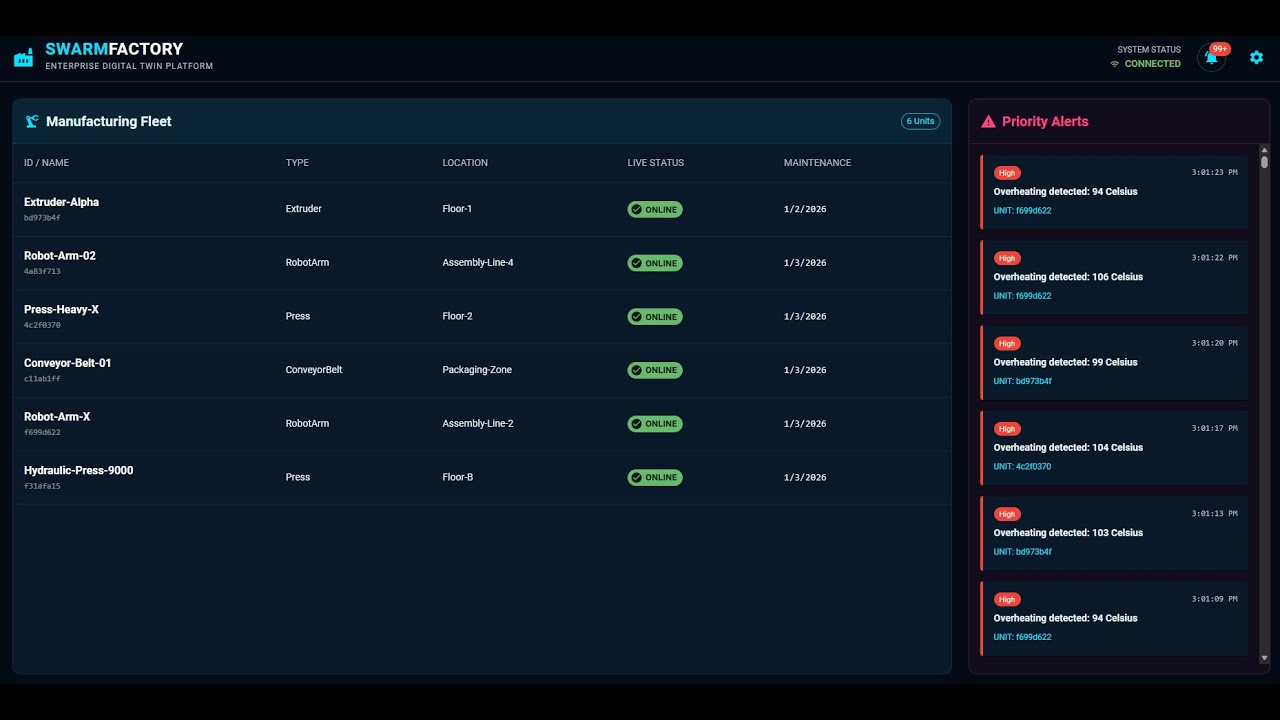
📺 Watch the Architectural Demo featuring real-time telemetry processing, Serverless scale-out, and Mission Control visualization.

-blueviolet?style=for-the-badge)


Swarm-Factory is a cloud-native Reference Architecture for Industrial IoT (IIoT). It demonstrates how to decouple high-velocity data ingestion from user-facing dashboards using an Event-Driven Architecture (EDA) on Azure.
This platform addresses the core challenge of "Industry 4.0": Bridging the gap between Operational Technology (OT) and Information Technology (IT).
| KPI | The Problem | Swarm-Factory Solution |
|---|---|---|
| Data Latency | SQL databases lock up when ingesting 10k+ sensor readings/sec. | Event Hubs + Serverless decoupling allows ingestion of millions of events without impacting dashboard performance. |
| Scalability | Monolithic backends crash during "shift changes" or spikes. | Azure Functions scale horizontally (0 to N instances) based on event pressure, paying only for compute used. |
| Governance | IoT payloads drift over time, breaking downstream apps. | Spec-Driven Development (OpenAPI + AsyncAPI) enforces rigid data contracts before code is written. |
We use the C4 model to illustrate the "Hot Path" (Telemetry) vs. the "Cold Path" (State Management).
The boundary between the physical factory floor and the Azure Cloud.
graph LR
    Factory[Physical Factory] -- "AMQP / MQTT (High Velocity)" --> Ingress[Azure Event Hubs]
    User[Plant Manager] -- "HTTPS" --> Dash[Mission Control Dashboard]

    subgraph "Azure Cloud Boundary"
        Ingress --> Proc[Stream Processor]
        Proc --> DB[(Cosmos DB NoSQL)]
        Dash --> API[Digital Twin API]
        API --> DB
    end

    style Factory stroke:#333,stroke-width:2px
    style User stroke:#333,stroke-width:2px
    style Ingress stroke:#333,stroke-width:2px
    style DB stroke:#333,stroke-width:2px
The solution uses a Cloud-Native, Event-Driven Architecture (EDA) optimized for Azure PaaS.
graph TD
    Sim[IoT Simulator] -->|Telemetry Stream AMQP| EH[Azure Event Hubs]
    EH -->|Trigger| Func[Azure Function Processor]
    Func -->|JSON Analysis| Cosmos[Azure Cosmos DB]

    API[TwinAPI .NET 8] -->|Read State| Cosmos

    User[React Dashboard] -->|Polls| API
Strategic technology choices for high-throughput scenarios.
| Component | Decision | Alternatives Considered | Justification (The "Why") |
|---|---|---|---|
| Ingestion | Azure Event Hubs | RabbitMQ, HTTP REST | Throughput: Event Hubs is built for log-based streaming (millions/sec) with partitioning, whereas RabbitMQ is better for complex routing. HTTP is synchronous and would couple the sensors to the backend. |
| Database | Cosmos DB (NoSQL) | Azure SQL (Relational) | Write Speed: We need sub-10ms writes for telemetry. The schema-less nature allows sensors to add new metrics (e.g., "Vibration_Z") without running database migrations. |
| Compute | Azure Functions (Isolated) | Kubernetes (AKS) | Ops Burden: For a sporadic workload (factories turn off at night), Serverless offers "Scale-to-Zero" cost efficiency without the overhead of managing K8s nodes. |
Cloud cost projection for a medium-sized factory (100 Machines, 1Hz frequency).
Scenario: 100 machines sending 1 message/sec = 8.6M messages/day.
| Resource | Unit Cost | Monthly Est. | Optimization Strategy |
|---|---|---|---|
| Event Hubs | $0.03/million events | ~$10.00 | Used "Basic" tier; can upgrade to "Standard" only if >1 Consumer Group is needed. |
| Azure Functions | $0.20/million executions | ~$2.00 | Batch Processing: Configured function to grab batch_size=100 events per execution, reducing billable invocations by 99%. |
| Cosmos DB | 400 RU/s (Autoscale) | ~$24.00 | TTL (Time-To-Live): Telemetry data auto-deletes after 7 days to keep storage costs flat. |
- Poison Messages: If a telemetry packet is malformed, the Azure Function does not crash. It moves the packet to a "Dead Letter Queue" (DLQ) blob storage for manual inspection, ensuring the stream never blocks.
- Throttling: The API implements "Rate Limiting" to prevent the Dashboard from consuming too many RUs (Request Units) from the database during high traffic.
- Connection Strings: No secrets in code. Uses
local.settings.jsonfor dev and Azure Key Vault references for production. - Network Security: Event Hub is configured to only accept traffic from whitelisted IP ranges (Simulating a Factory VPN Gateway).
This project utilized an Agentic Swarm workflow to generate boilerplate code from contracts.
- Spec-First: We defined
specs/factory-api.yaml(OpenAPI) andspecs/iot-events.yaml(AsyncAPI) first. - Agent Generation: AI Agents generated the C# DTOs and TypeScript interfaces directly from these YAML files, ensuring the Frontend and Backend never drifted out of sync.
- Core: .NET 8 (C#), ASP.NET Core
- Serverless: Azure Functions V4 (Isolated Worker)
- Data: Azure Cosmos DB, Event Hubs
- Frontend: React (Vite), Material UI v6
- IaC: Azure Bicep
Follow these steps to run the full Swarm-Factory platform on your local machine.
- Azure Account (Free tier works)
- Azure CLI (
az login) - .NET 8 SDK
- Node.js 18+
- Azure Functions Core Tools v4 (
npm install -g azure-functions-core-tools@4) - Make (Optional, but recommended for orchestration)
First, provision the Azure resources. The Bicep templates will create the Event Hub and Database.
# Login to Azure
az login

# Deploy Infrastructure (Auto-creates Resource Group 'rg-swarm-factory')
make resource-group
make infraThe project follows strict security practices. Secrets are not stored in Git. You must create local configuration files based on the Azure outputs.
A. Backend Secrets (src/SwarmFactory.TwinAPI/appsettings.Development.json)
{
  "Logging": {
    "LogLevel": {
      "Default": "Information",
      "Microsoft.AspNetCore": "Warning"
    }
  },
  "CosmosConnection": "<YOUR_COSMOS_CONNECTION_STRING>"
}
B. Simulator Secrets (src/SwarmFactory.Simulator/appsettings.json)
{
  "EventHubConnection": "<YOUR_EVENTHUB_CONNECTION_STRING>",
  "EventHubName": "telemetry"
}
C. Processor Secrets (src/SwarmFactory.Processor/local.settings.json)
{
  "IsEncrypted": false,
  "Values": {
    "AzureWebJobsStorage": "UseDevelopmentStorage=true",
    "FUNCTIONS_WORKER_RUNTIME": "dotnet-isolated",
    "CosmosConnection": "<YOUR_COSMOS_CONNECTION_STRING>",
    "EventHubConnection": "<YOUR_EVENTHUB_CONNECTION_STRING>"
  }
}
Tip: You can retrieve connection strings using make get-cosmos-conn and make get-evh-conn.
The platform requires 5 separate terminal windows to run all components concurrently.
Starts the local Azure Storage emulator (required for Azure Functions).
make run-azuriteServes the REST API for Machine State and Alerts.
make run-api
# Runs on: http://localhost:5182Processes the high-speed telemetry stream.
make run-processorGenerates realistic load (Temperature/Vibration data). Note: The simulator is "Smart"—it fetches real machine IDs from the API before generating data.
make run-simulatorLaunches the Mission Control Dashboard.
make run-frontend
# Opens: http://localhost:5173swarm-factory/
├── specs/ # The Contracts (OpenAPI / AsyncAPI)
├── infra/ # Infrastructure as Code (Bicep)
├── src/
│ ├── SwarmFactory.TwinAPI/ # .NET 8 Web API (State Management)
│ ├── SwarmFactory.Processor/ # Azure Function (Event Processing)
│ └── SwarmFactory.Simulator/ # Console App (Load Generator)
├── frontend/ # React + Vite + MUI Dashboard
└── Makefile # Orchestration Scripts
1. Simulator crash: "No machines found" The Simulator requires real machines to exist in the database.
- Fix: Open Swagger (
http://localhost:5182/swagger) and usePOST /machinesto register at least one machine (e.g., "Extruder-Alpha").
2. Frontend: "Network Error" The React app cannot reach the .NET API.
- Fix: Ensure
run-apiis running and the port infrontend/src/App.tsx(API_URL) matches the output of Terminal 1 (usuallyhttp://localhost:5182).
3. Azure Function: "Listener validation failed" The function cannot connect to the local storage emulator.
- Fix: Ensure you ran
make run-azuriteor have the Azurite extension running in VS Code.
Architected by Nahasat Nibir Senior AI & Cloud Solutions Architect