
A CLI tool that generates production-ready MLOps project templates for Scikit-learn, PyTorch, and TensorFlow.
This stack supports the full MLOps lifecycle:
Data → Train → Track → Orchestrate → Deploy → Monitor → Improve- 🔧 Framework Support: Scikit-learn, PyTorch, TensorFlow/Keras
- 📊 Task Types: Classification, Regression, Time-Series, NLP, Computer Vision
- 🔬 Experiment Tracking: MLflow, W&B, Custom solutions
- 🎯 Orchestration: Airflow, Kubeflow, None
- 🚀 Deployment: FastAPI, Docker, Kubernetes, Cloud platforms
- 📈 Monitoring: Evidently AI, Custom solutions
- 🛠️ Production-Ready: CI/CD, monitoring, best practices by default
- 🤖 CI/CD Automation: Non-interactive mode for DevOps pipelines
- 🔍 Project Validation: Comprehensive project structure and configuration validation
- ⚙️ Configuration Management: Save, load, and reuse project presets
- 🎨 Template Customization: Create and manage custom templates
- 📊 Analytics & Metrics: Track project generation and usage patterns
- ☁️ Cloud Deployment: Multi-cloud deployment templates (AWS, GCP, Azure)
- 🔍 Project Browser: Interactive project exploration and management
- Save/Load Presets: Store and reuse project configurations across teams
- Built-in Templates: Quick-start, production-ready, research, and enterprise presets
- Import/Export: Share configurations as JSON files
- Validation: Ensure configuration integrity and compatibility
# Save current configuration as a preset
mlops-project-generator save-preset my-team-config --description "Team standard setup"

# List all available presets
mlops-project-generator list-presets

# Load a preset for new project
mlops-project-generator load-preset production-ready- Custom Templates: Create templates based on existing frameworks
- File Management: Add/remove custom files from templates
- Template Validation: Check template integrity and Jinja2 syntax
- Import/Export: Share custom templates with your team
# Create a custom template
mlops-project-generator create-template my-custom sklearn --description "Custom sklearn setup"

# Add custom files to template
mlops-project-generator add-template-file my-custom src/custom_utils.py --content "# Custom utilities"

# List all custom templates
mlops-project-generator list-templates- Usage Tracking: Automatic tracking of all project generations
- Statistics: Framework usage, deployment patterns, complexity analysis
- Project Analysis: Detailed analysis of generated projects (files, lines, structure)
- Smart Recommendations: Get suggestions based on project configuration
# View generation statistics
mlops-project-generator stats

# Analyze a specific project
mlops-project-generator analyze /path/to/project

# Interactive project browser
mlops-project-generator browse- AWS Support: SageMaker, ECS, Lambda deployment templates
- GCP Support: Vertex AI, Cloud Run, AI Platform templates
- Azure Support: Azure ML, Container Instances, Functions templates
- Auto-Generation: Create cloud-specific deployment files automatically
# List available cloud services
mlops-project-generator cloud-services

# Generate cloud deployment templates
mlops-project-generator cloud-deploy aws sagemaker --project ./my-project
mlops-project-generator cloud-deploy gcp vertex-ai --project ./my-project
mlops-project-generator cloud-deploy azure ml-studio --project ./my-project- Project Navigation: Browse and explore generated projects
- Search & Filter: Find projects by framework, task type, deployment
- Project Comparison: Compare multiple projects side-by-side
- Export/Import: Share project lists with team members
# Launch interactive browser
mlops-project-generator browse

# Export project list
mlops-project-generator export-projects team-projects.json

# Import project list
mlops-project-generator import-projects team-projects.json- Comprehensive validation: Checks project structure, configuration, and deployment readiness
- Framework-specific validation: Validates sklearn, PyTorch, and TensorFlow projects
- Smart framework detection: Automatically detects ML framework from project files
- Beautiful Rich UI: Professional terminal output with pass/warn/fail status
- CI/CD integration: Proper exit codes for automation pipelines
- Extensible design: Easy to add new validation checks
# Validate current directory
mlops-project-generator validate

# Validate specific project
mlops-project-generator validate --path /path/to/project

# CI/CD integration
mlops-project-generator validate --path . || exit 1- One-liner project generation with command-line flags
- Perfect for automation and CI/CD pipelines
- Enterprise-ready with clean, log-friendly output
- Zero prompts when flags are provided
- Smart defaults for unspecified options
# Generate a complete project in one command
mlops-project-generator init \
  --framework pytorch \
  --tracking mlflow \
  --deployment docker \
  --monitoring evidently \
--project-name my-ml-project- Automatic system check for Python, Git, Docker, Conda
- Real-time status indicators (✅/❌) with visual feedback
- System information display (OS, Python version, architecture)
- Early validation to prevent setup issues
- Smart project naming based on framework and task type
- Framework comparison table with complexity indicators
- Project size estimation (files, lines of code, storage)
- Impact analysis for each configuration choice
- Beautiful progress indicators with real-time updates
- Interactive framework recommendations with use cases
- Comprehensive project summary before generation
- Step-by-step next steps after project creation
- Dynamic .gitignore generation based on tools selected
- Framework-specific patterns (PyTorch: *.pth, TensorFlow: *.pb)
- Tool-specific configurations (MLflow, W&B, Airflow, Kubeflow)
- Comprehensive MLOps artifact management
pip install mlops-project-generatorgit clone https://github.com/NotHarshhaa/MLOps-Project-Generator.git
cd MLOps-Project-Generator
pip install -e .git clone https://github.com/NotHarshhaa/MLOps-Project-Generator.git
cd MLOps-Project-Generator
pip install -e ".[dev]"
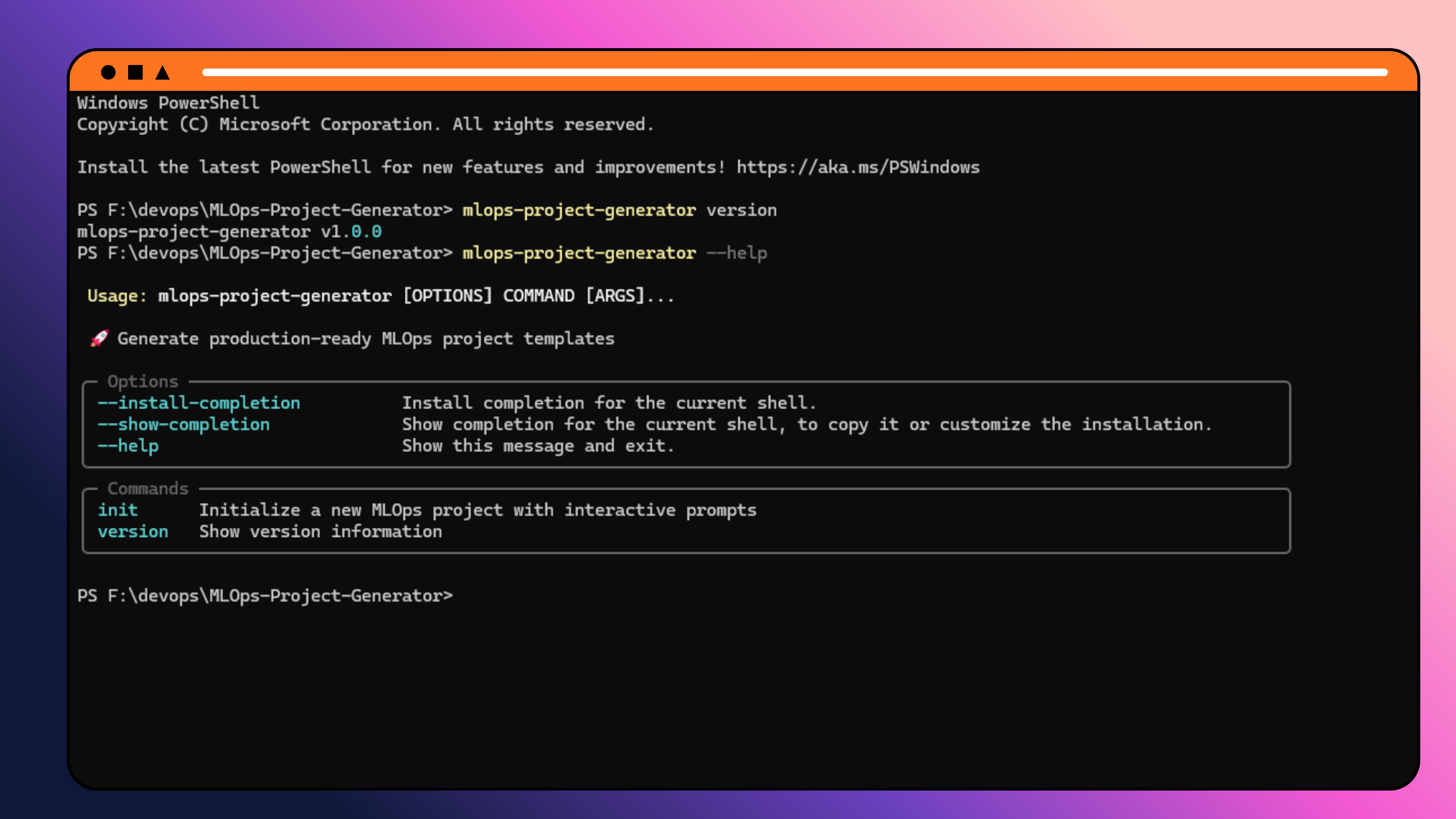
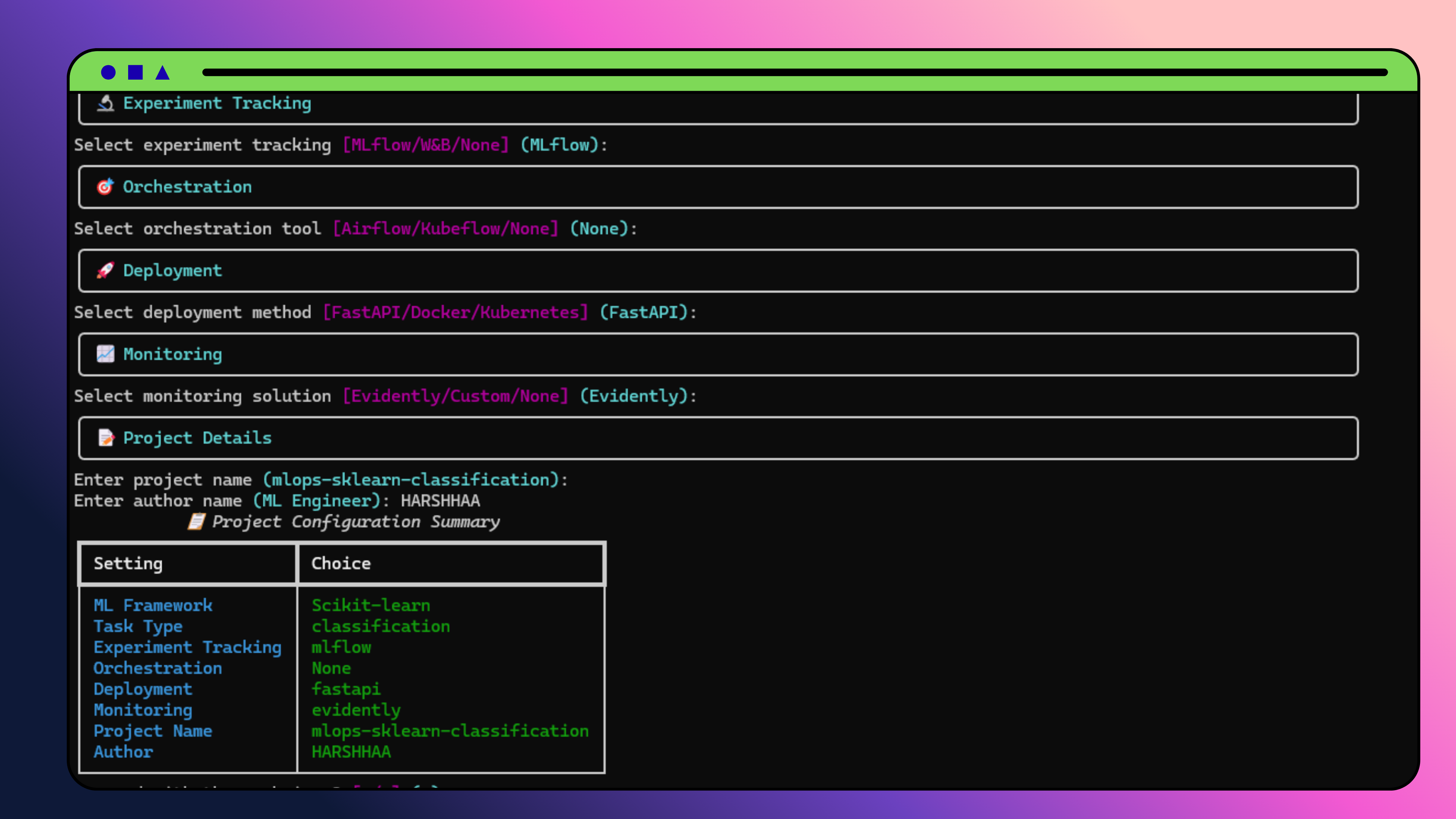
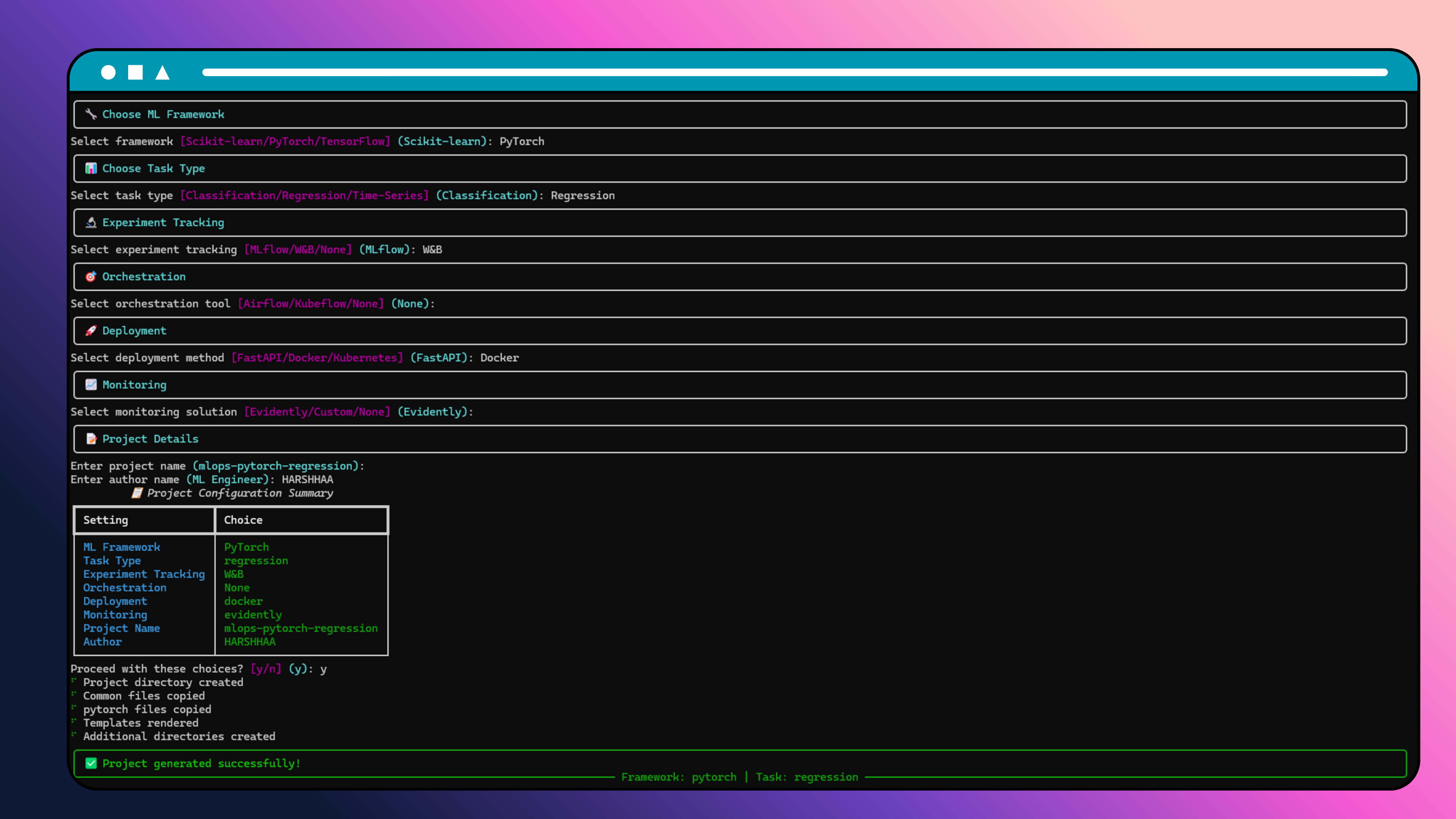
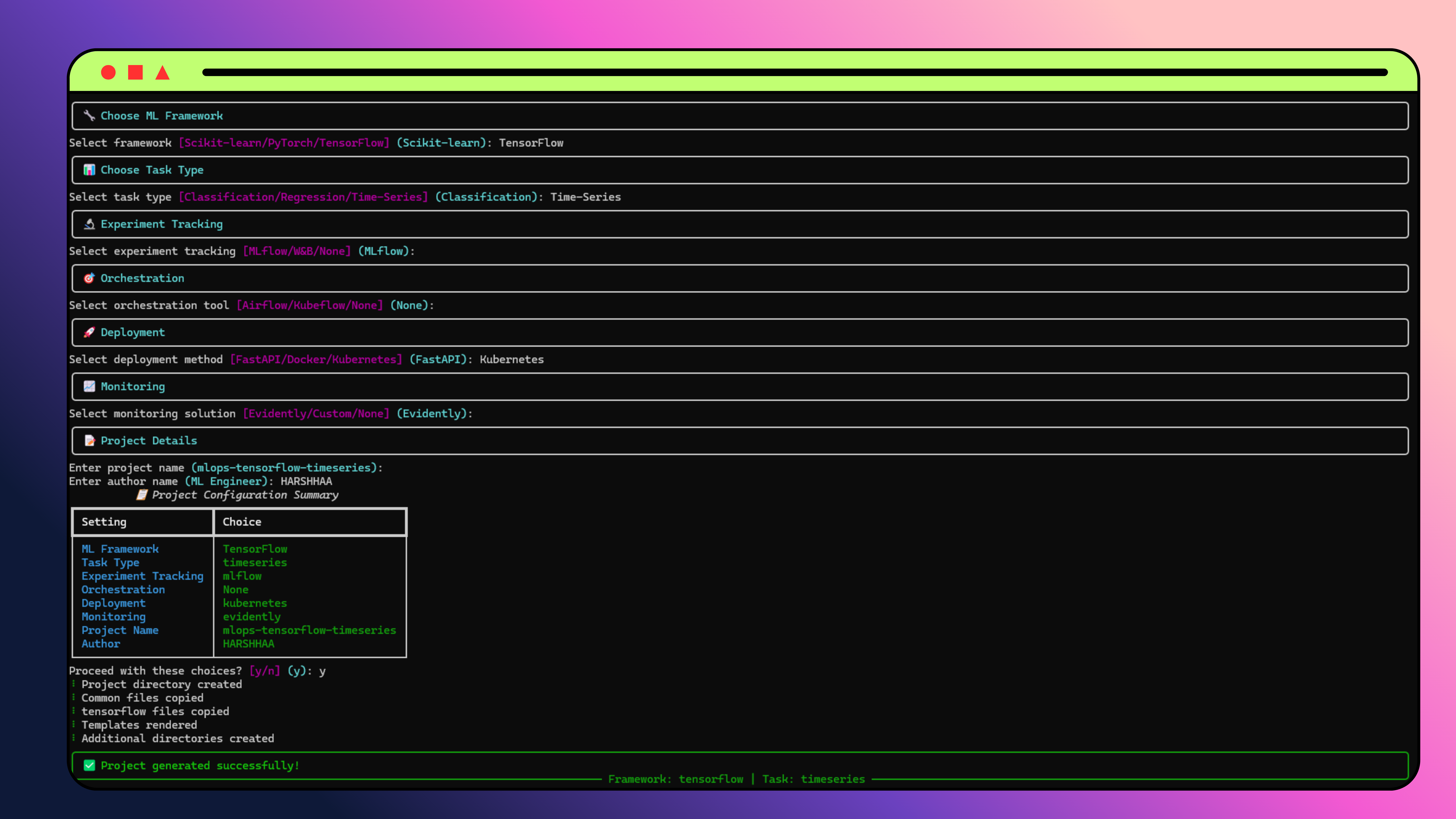
mlops-project-generator init# Quick start with defaults
mlops-project-generator init --framework sklearn --project-name my-project
# Full configuration
mlops-project-generator init \
--framework pytorch \
--task-type classification \
--tracking mlflow \
--orchestration airflow \
--deployment docker \
--monitoring evidently \
--project-name enterprise-ml \
--author-name "ML Team" \
--description "Production ML pipeline"| Command | Description | Options |
|---|---|---|
init |
Generate new MLOps project | Framework, task type, tracking, deployment flags |
validate |
Validate existing project structure | --path to specify project directory |
version |
Show version information | None |
| Command | Description | Options |
|---|---|---|
save-preset |
Save project configuration as preset | --config, --description |
list-presets |
List all available presets | None |
load-preset |
Load a preset configuration | --output to save to file |
delete-preset |
Delete a preset | Preset name |
| Command | Description | Options |
|---|---|---|
create-template |
Create custom template | Framework, --description |
list-templates |
List custom templates | None |
delete-template |
Delete custom template | Template name |
add-template-file |
Add file to template | --content for file content |
| Command | Description | Options |
|---|---|---|
stats |
Show project generation statistics | None |
analyze |
Analyze a generated project | Project path |
| Command | Description | Options |
|---|---|---|
cloud-services |
List available cloud services | None |
cloud-deploy |
Generate cloud templates | Provider, service, --project |
| Command | Description | Options |
|---|---|---|
browse |
Interactive project browser | None |
export-projects |
Export project list | Output file |
import-projects |
Import project list | Input file |
| Flag | Short | Description | Options |
|---|---|---|---|
--framework |
-f |
ML framework | sklearn, pytorch, tensorflow |
--task-type |
-t |
Task type | classification, regression, time-series, nlp, computer-vision |
--tracking |
-r |
Experiment tracking | mlflow, wandb, custom, none |
--orchestration |
-o |
Orchestration | airflow, kubeflow, none |
--deployment |
-d |
Deployment | fastapi, docker, kubernetes |
--monitoring |
-m |
Monitoring | evidently, custom, none |
--project-name |
-p |
Project name | Any valid name |
--author-name |
-a |
Author name | Any string |
--description |
--desc |
Project description | Any string |
| Flag | Short | Description | Default |
|---|---|---|---|
--path |
-p |
Path to project to validate | . (current directory) |
mlops-project-generator init \
  --framework sklearn \
  --task-type classification \
  --tracking mlflow \
--project-name fraud-detectionmlops-project-generator init \
--framework pytorch \
--deployment docker \
--monitoring evidently \
--project-name image-classifiermlops-project-generator init \
--framework tensorflow \
--orchestration kubeflow \
--deployment kubernetes \
--tracking mlflow \
--project-name enterprise-ml# In GitHub Actions, GitLab CI, or Jenkins
mlops-project-generator init \
--framework $FRAMEWORK \
--deployment $DEPLOYMENT \
--project-name $PROJECT_NAME \
--author-name "CI/CD Pipeline"This will launch an enhanced interactive CLI that guides you through:
- Automatic system check for required tools
- Visual status indicators (✅/❌)
- System information display
- Early problem detection
- Interactive comparison table with use cases
- Complexity indicators (Low/Medium/High)
- Smart recommendations based on your needs
- Framework guidance for better decisions
- Task type selection (Classification/Regression/Time-Series)
- Experiment tracking (MLflow/W&B/Custom)
- Orchestration (Airflow/Kubeflow/None)
- Deployment (FastAPI/Docker/Kubernetes)
- Monitoring (Evidently/Custom/None)
- Intelligent project naming suggestions
- Directory validation to prevent conflicts
- Project size estimation (files, lines, storage)
- Impact analysis of your choices
- Comprehensive project overview
- Next steps preview before generation
- Real-time progress tracking
- Step-by-step guidance after creation
- Framework-specific code ready to run
- Production-ready structure
- Comprehensive documentation
- Next steps checklist
# Generate a Scikit-learn classification project with MLflow tracking
mlops-project-generator init

# Follow the prompts:
# ✔ ML Framework: Scikit-learn
# ✔ Task Type: Classification
# ✔ Experiment Tracking: MLflow
# ✔ Orchestration: None
# ✔ Deployment: FastAPI
# ✔ Monitoring: Evidently
# ✔ Project Name: ml-classification-project
# ✔ Author Name: Your Nameyour-project/
├── data/ # Data files
│ ├── raw/ # Raw data
│ ├── processed/ # Processed data
│ └── external/ # External data
├── models/ # Model files
│ ├── checkpoints/ # Model checkpoints
│ └── production/ # Production models
├── notebooks/ # Jupyter notebooks
├── scripts/ # Utility scripts
├── src/ # Source code
│ ├── data/ # Data loading utilities
│ ├── models/ # Model implementations
│ ├── features/ # Feature engineering (sklearn)
│ └── utils/ # Training utilities (pytorch/tensorflow)
├── configs/ # Configuration files
├── tests/ # Test files
├── requirements.txt # Dependencies
├── pyproject.toml # Project configuration
├── Makefile # Build commands
├── .gitignore # Git ignore rules
└── README.md # Project documentation
- Models: RandomForest, LogisticRegression, SVM, etc.
- Feature Engineering: Scaling, selection, PCA
- Evaluation: Cross-validation, comprehensive metrics
- Deployment: Joblib serialization, FastAPI integration
- Models: Neural networks with residual connections, attention mechanisms
- Training: Advanced optimizers, learning rate schedulers, early stopping
- Utilities: Gradient clipping, data augmentation, model profiling
- Deployment: TorchScript, FastAPI integration
- Models: Keras models with batch normalization, attention mechanisms
- Training: Callbacks, custom loss functions, gradient clipping
- Utilities: Model profiling, data augmentation, custom schedulers
- Deployment: SavedModel format, FastAPI integration
# Automatically logged metrics
mlflow.log_metrics({
    "train_loss": 0.123,
    "val_accuracy": 0.95,
    "learning_rate": 0.001
})

# Model artifacts
mlflow.log_artifact("models/production/model.joblib")# Automatic logging with W&B callback
wandb.init(project="my-project")
wandb.log({"loss": 0.123, "accuracy": 0.95})# Start the API server
uvicorn src.inference:app --reload
# API documentation at http://localhost:8000/docs# Build and run
docker build -t my-ml-project .
docker run -p 8000:8000 my-ml-project# Deploy to Kubernetes
kubectl apply -f k8s/# Data drift monitoring
from evidently.report import Report
from evidently.metric_preset import DataDriftPreset
report = Report(metrics=[DataDriftPreset()])
report.run(current_data=current, reference_data=reference)# Custom monitoring implementation
class ModelMonitor:
def check_performance(self, predictions, ground_truth):
# Custom performance checks
pass# Run tests
pytest tests/ -v
# Run with coverage
pytest tests/ --cov=src --cov-report=html# Clone repository
git clone https://github.com/NotHarshhaa/MLOps-Project-Generator.git
cd MLOps-Project-Generator
# Install in development mode
pip install -e ".[dev]"
# Run tests
pytest tests/
# Run linting
black generator/ tests/
isort generator/ tests/
flake8 generator/ tests/
mypy generator/mlops-project-generator/
├── generator/ # CLI tool source code
│ ├── cli.py # Main CLI interface
│ ├── prompts.py # Interactive prompts
│ ├── renderer.py # Template rendering
│ └── validators.py # Input validation
├── templates/ # Project templates
│ ├── common/ # Common files across frameworks
│ ├── sklearn/ # Scikit-learn specific templates
│ ├── pytorch/ # PyTorch specific templates
│ └── tensorflow/ # TensorFlow specific templates
├── tests/ # Test files
├── docs/ # Documentation
├── pyproject.toml # Project configuration
└── README.md # This file
The generated projects use YAML configuration files:
# configs/config.yaml
project:
  name: "my-project"
  author: "Your Name"
  version: "0.1.0"

model:
  type: "RandomForestClassifier"
  n_estimators: 100
  max_depth: 10

training:
  batch_size: 32
  learning_rate: 0.001
  epochs: 100

experiment_tracking:
  tool: "mlflow"
  tracking_uri: "http://localhost:5000"

deployment:
  method: "fastapi"
  host: "0.0.0.0"
port: 8000name: Generate ML Project
on:
workflow_dispatch:
inputs:
framework:
type: choice
options: [sklearn, pytorch, tensorflow]
default: sklearn
project_name:
type: string
default: ml-project
jobs:
generate:
runs-on: ubuntu-latest
steps:
- uses: actions/checkout@v4
- name: Set up Python
uses: actions/setup-python@v4
with:
python-version: '3.11'
- name: Install MLOps Generator
run: pip install mlops-project-generator
- name: Generate ML Project
run: |
mlops-project-generator init \
--framework ${{ github.event.inputs.framework }} \
--project-name ${{ github.event.inputs.project_name }} \
--tracking mlflow \
--deployment docker
- name: Upload generated project
uses: actions/upload-artifact@v3
with:
name: ${{ github.event.inputs.project_name }}
path: ${{ github.event.inputs.project_name }}/stages:
- generate
generate_ml_project:
stage: generate
image: python:3.11
script:
- pip install mlops-project-generator
- mlops-project-generator init \
--framework $FRAMEWORK \
--project-name $PROJECT_NAME \
--tracking mlflow \
--deployment docker
artifacts:
paths:
- $PROJECT_NAME/
expire_in: 1 weekpipeline {
agent any
parameters {
choice(name: 'FRAMEWORK', choices: ['sklearn', 'pytorch', 'tensorflow'], description: 'ML Framework')
string(name: 'PROJECT_NAME', defaultValue: 'ml-project', description: 'Project Name')
}
stages {
stage('Generate ML Project') {
steps {
sh 'pip install mlops-project-generator'
sh """
mlops-project-generator init \
--framework ${params.FRAMEWORK} \
--project-name ${params.PROJECT_NAME} \
--tracking mlflow \
--deployment docker
"""
archiveArtifacts artifacts: "${params.PROJECT_NAME}/**/*", fingerprint: true
}
}
}
}FROM python:3.11-slim
WORKDIR /app
RUN pip install mlops-project-generator
# Copy project generation script
COPY generate-project.sh .
RUN chmod +x generate-project.sh
# Generate project on container start
CMD ["./generate-project.sh"]# Using environment variables in CI/CD
export FRAMEWORK=pytorch
export DEPLOYMENT=kubernetes
export PROJECT_NAME=prod-ml
mlops-project-generator init \
--framework $FRAMEWORK \
--deployment $DEPLOYMENT \
--project-name $PROJECT_NAME \
--author-name "CI/CD Pipeline"We welcome contributions! Please see our Contributing Guide for details.
- Fork the repository
- Create a feature branch
- Make your changes
- Add tests for new functionality
- Run the test suite
- Submit a pull request
This project is licensed under the MIT License - see the LICENSE file for details.
- Typer - For the beautiful CLI interface
- Jinja2 - For powerful template rendering
- Rich - For stunning terminal output
- Cookiecutter - For project template inspiration
- 📧 Email: contact@example.com
- 🐛 Issues: GitHub Issues
- 💬 Discussions: GitHub Discussions
- Configuration management system with presets
- Template customization and management
- Project analytics and metrics tracking
- Multi-cloud deployment templates (AWS, GCP, Azure)
- Interactive project browser
- Enhanced CLI with 15+ new commands
- v1.1: Additional frameworks (XGBoost, LightGBM, CatBoost)
- v1.2: Enhanced cloud monitoring and observability
- v1.3: Advanced monitoring solutions integration
- v2.0: GUI interface for project generation
- v2.1: Template marketplace and sharing platform
- v2.2: Real-time collaboration features
- v2.3: Enterprise SSO and team management
⭐ If you find this tool helpful, please give us a star on GitHub!
Generated with ❤️ by MLOps Project Generator