Quake 3 VR (a.k.a. q3vr) is a PCVR port of Quake 3 Arena game based on:
- ioquake3 - community maintained fork of idTech3 engine,
- Quake3Quest - port of
ioquake3to Quest 2/3 mobile headsets by Team Beef.
It includes several bugfixes, improvements and QoL features built specifically for VR.
- Full Single-Player campaign
- including full 6DoF support
- Multiplayer support
- including crossplay with PC and Quest players
- support for playing on servers with simpler mods like OSP, unfreeze, CA, etc.
- Custom Virtual Screen for displaying 2D content
- Lots of VR comfort and QoL features including:
- full haptic effects support
- weapon selection wheel
- zoom with reticle for railgun
- comfort options like vignette, height adjustements, weapon lasers, etc.
To download and set up the game:
- Go to Releases page and download the latest release and install (or extract, if selected portable version) to directory of your choosing,
- If you own full version of the game, place
pak0.pk3file from original game in thebaseq3/subdirectory.
then any time you want to play simply:
- Start your VR runtime (e.g. SteamVR)
- Run
q3vr.exe
Tip
It's highly recommended to go through configuration options in Setup menu -
before jumping into the game - to set controls and settings to your liking.
Note
The game has built-in update notifications. Whenever new version will be released, you will be notified about it on game startup.
If you've spotted any problems or have any improvement ideas, please open GitHub issue with details and/or reach out on Discord. For your convienience this repository comes with a pre-defined template for creating issues which should make the process easier.
Please remember to include any details that may help reproduce and analyze the problem such as logs, your computer configuration, etc.
By default the game provides default bindings for common actions based on your controlers.
Bon left hand opens/closes menu or goes one level up (likeESC)Bon right hand resets position of Virtual ScreenTriggeron active hand - cursor clickTriggeron inactive hand - makes this hand the active one
- Free cam
- Movement forward/backward/left/right is based done with left thumbstick
- The exact orientation is based on left controller's orientation
- First person spectator
Bon right hand resets the position of Virtual ScreenAon left hand changes spectate mode (free cam/first person/...)Triggeron left or right hand changes the person thay is spectated
See table below for default mapping. Some of these will be affected by changes
made in the in-game Setup configuration menus.
If you wish to change bindings, you can do so from your VR runtime's input
configuration screen (e.g. Steam VR input bindings) or manually set specific
game actions to given keys. To do so, you need to create autoexec.cfg file in
the baseq3/ subdirectory and set custom bindings with:
set vr_button_map_<key> "<action>"
These are the default mappings:
| Key | Action | Notes |
|---|---|---|
PRIMARYTRIGGER |
"+attack" |
Fire weapon |
SECONDARYTRIGGER |
"+moveup" |
Jump |
PRIMARYTHUMBSTICK |
"" |
|
SECONDARYTHUMBSTICK |
"+scores" |
Player list |
PRIMARYTRACKPAD |
"+scores" |
Player list |
SECONDARYTRACKPAD |
"togglemenu" |
Menu/back |
PRIMARYTHUMBREST |
"+alt" |
Enable alternative bindings |
SECONDARYTHUMBREST |
"+alt" |
Enable alternative bindings |
PRIMARYGRIP |
"+weapon_select" |
Opens weapon selection wheel (if enabled) |
SECONDARYGRIP |
"+weapon_stabilise" |
Triggers weapon stabilization (if enabled) |
RTHUMBLEFT |
"turnleft" |
Snap/smooth turn left |
RTHUMBRIGHT |
"turnright" |
Snap/smooth turn right |
RTHUMBFORWARD |
"" |
|
RTHUMBBACK |
"" |
|
Y |
"togglemenu" |
Menu/back |
X |
"+button2" |
Use item |
B |
"+movedown" |
Crouch |
A |
"+moveup" |
Jump |
Default controls for Valve Index:
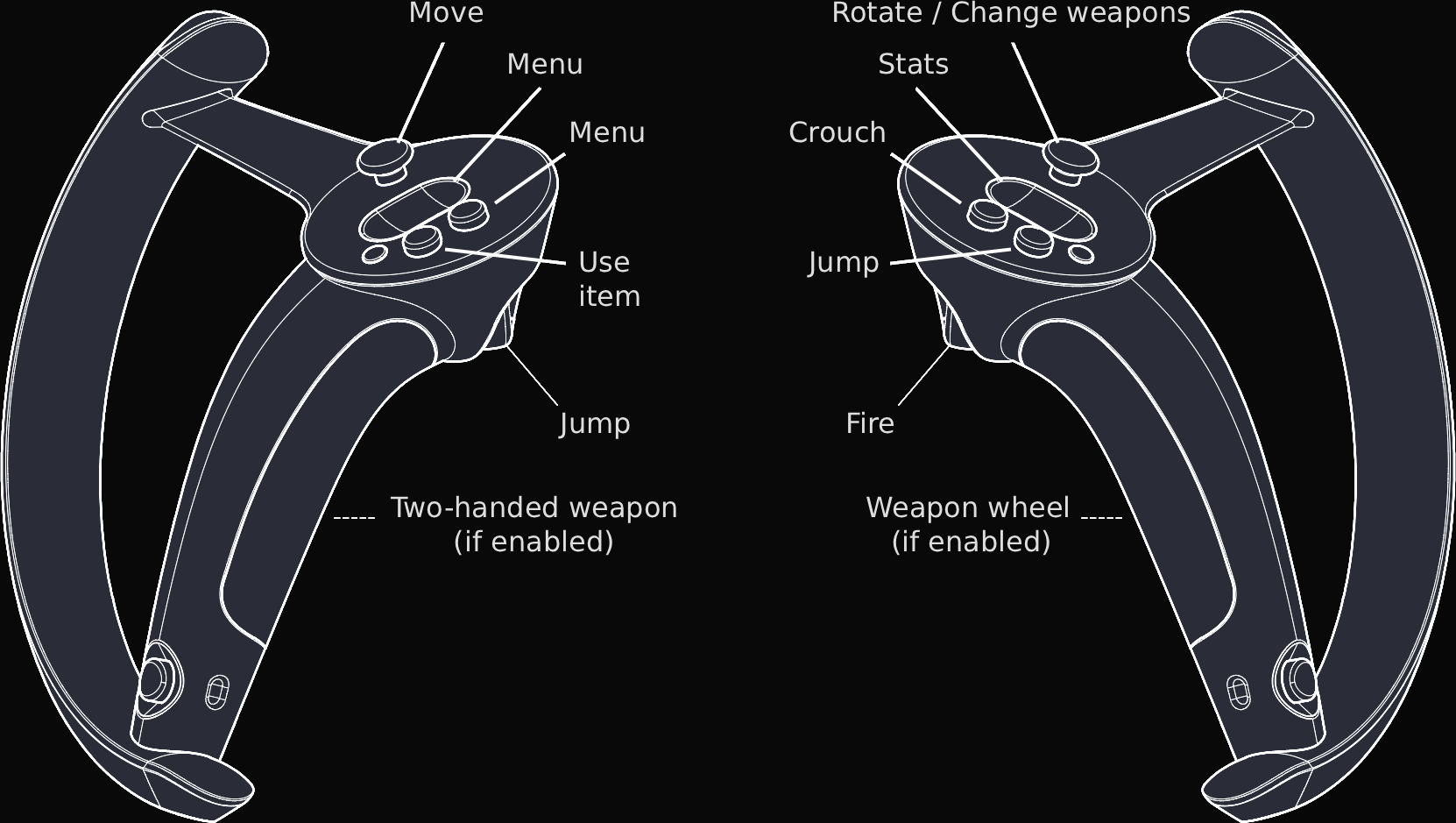
Please refer to Q3VR website for more details.
If you're having some problems consider:
- Verifying that all necessary PAK files are located in
baseq3/subdirectory, i.e.pak0.pk3, ...,pak8.pk3andpakQ3VR.pk3 - Removing all user config files from your profile's directory
- On Windows this will be
%appdata%\Quake3\(usuallyC:\Users\$user\AppData\Roaming\Quake3) - NOTE: this will remove your local configuration along with all the mods and map files you downloaded. Consider making a backup
- On Windows this will be
- Checking if the problem occurs only in Single Player campaign, Skirmish mode, Multiplayer or in all of these modes
- Checking previous issue reports
- Updating drivers for your GPU, etc.
- Checking if there isn't a newer verions of
Q3VRavailable which may already have a fix for your problem- You can also check older versions to see if it worked before
If you're unable to find solution to your problem yourself, please reach out to the community (see section below) or create an issue in this repository. Please remember to provide as much details as you can which will help us understand the problem and find a solution for it.
If you want to reach out to other Quake 3 Arena players - either desktop or VR - consider these joining these communities:
- Quake 3 community
ioquake3discord -#ioquake3channelioquake3discourse forum
- Quake3 VR-specific community
Quake3Questdiscord -#q3-pcvrchannel
This project uses CMake so building it on supported platforms should be straightforward, e.g. on Windows with MSVC you can build it with:
cmake -S . -B build
cmake --build build --config Release
Check out GitHub Actions workflow for reference and GitHub Actions for recent builds.
Any contributions are welcome! Before making bigger changes, please discuss them first to ensure that they align with our goals.
If you like what I'm working on and would like to support me or my future work on VR games, ports or tools you can do so via:
Please also consider supporting authors of ioquake3 and Quake3Quest
projects.
This port is based on work of:
- id Software (creators of idTech3 and Quake 3 Arena)
- ioquake3 team (creators and maintainers of ioquake3 fork)
- Team Beef (creators of Quake3Quest port)
I would also like to personally thank everyone who helped working specifically on this port with special thanks to:
- Royd0
- @ernie
- XQuader
- Dteyn
