Releases: SpeyTech/c-sentinel
v0.6.0 - Enterprise Authentication

🔐 Enterprise Authentication Release
This release transforms C-Sentinel's dashboard into a fully-featured multi-user platform with enterprise-grade security controls.
✨ New Features
Multi-User Authentication
- Role-based access control with three roles: Admin, Operator, Viewer
- Database-backed user management with enable/disable functionality
- Secure password hashing with SHA256
Two-Factor Authentication (TOTP)
- Industry-standard TOTP support (Google Authenticator, Authy, Microsoft Authenticator)
- QR code setup for easy configuration
- Email notifications on 2FA enable/disable
Personal API Keys
- Per-user API keys for automation and CI/CD pipelines
- Named keys with optional expiration dates
- Enable/disable without deleting
- Last-used tracking for auditing
- Keys inherit user's role permissions
Session Management
- View all active sessions across users
- Device and browser detection
- Revoke individual sessions or force logout all
- Automatic cleanup of expired sessions
Admin Audit Log
- Complete audit trail of all user actions
- Filterable by user, action type, and time range
- Tracks logins, password changes, user management, and more
User Email Notifications
- Login alerts with IP address and browser detection
- Password change confirmations
- Account creation notifications
- 2FA status change alerts
🎨 UI Improvements
- Modern toast notifications (goodbye 1990s JavaScript alerts!)
- Real client IP detection behind reverse proxies (X-Forwarded-For)
- Consistent navigation across all admin pages
📦 Installation
# Run database migration for new tables
sudo -u postgres psql -d sentinel -f migrate_users.sql

# Install 2FA dependencies
sudo /opt/sentinel-dashboard/venv/bin/pip install pyotp qrcode pillow

# Restart dashboard
sudo systemctl restart sentinel-dashboard
🔄 Backward Compatible
Existing single-password deployments continue to work. Multi-user mode activates automatically when users exist in the database.
📸 Screenshots
See the README for full screenshot gallery.
Full Changelog: v0.5.8...v0.6.0
v0.5.8 - Security Dashboard with Auth, Alerts & Intelligence
What's New
🔐 Dashboard Authentication - Password-protected access with secure session management
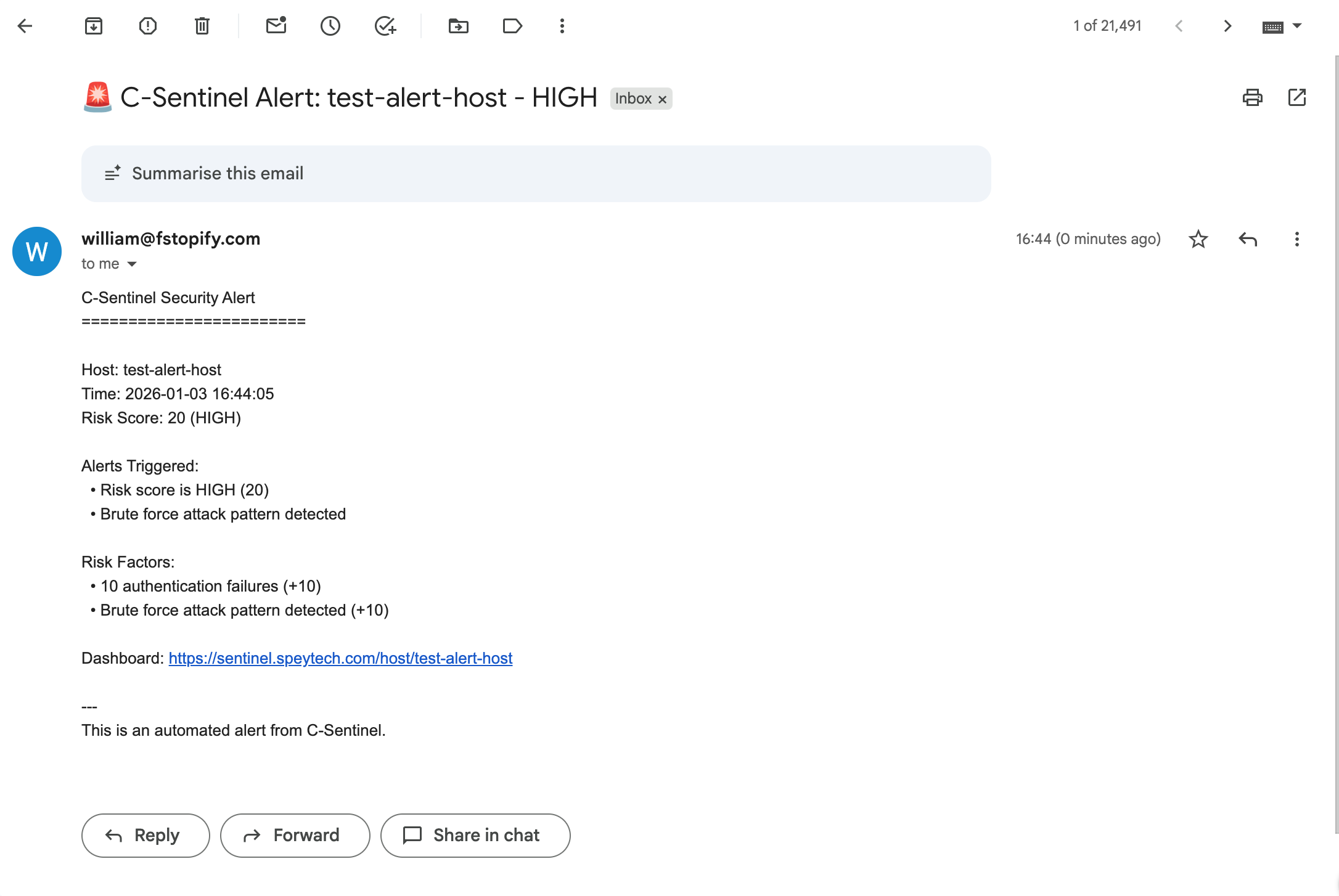
📧 Email Alerts - Get notified on high-risk events and brute force detection
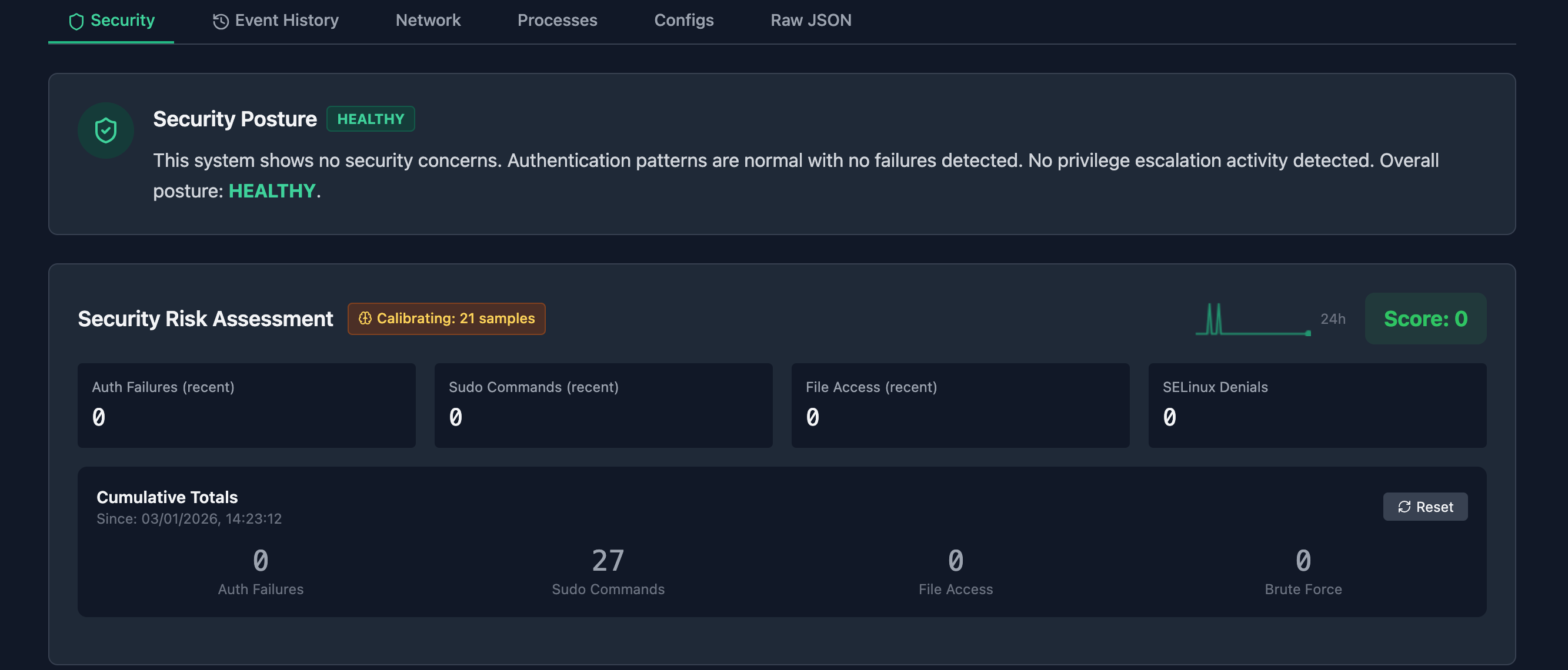
🧠 Security Posture Summary - Natural language assessment: "This system shows no security concerns..."
📊 Risk Trend Sparkline - 24-hour mini chart showing risk score history
❓ "Why This Score?" - Explainable risk factors with weighted contributors
📜 Event History Tab - Filterable audit log with timestamps and acknowledge functionality
⏱️ Confidence Indicator - Learning/Calibrating badge shows baseline maturity
🔄 Cumulative Totals - Counters persist across probe windows with reset option
Screenshots
Screenshots
Upgrade Notes
- Run database migrations:
   sudo -u postgres psql -d sentinel -f dashboard/migrate_audit_totals.sql
sudo -u postgres psql -d sentinel -f dashboard/migrate_phase2.sql- Configure email alerts in
.env:
   SMTP_HOST=smtp.example.com
   SMTP_PORT=587
   SMTP_USER=alerts@example.com
   SMTP_PASS=your-app-password
   ALERT_EMAIL=admin@example.com
   ALERT_THRESHOLD=20
- Restart dashboard:
sudo systemctl restart sentinel-dashboardLive Demo
Full Changelog
See CHANGELOG.md for complete history.
v0.4.0 - Auditd Integration & Security Dashboard
What's New
🔐 Auditd Integration - Security event summarisation with semantic analysis
🚨 Brute Force Detection - Automatic detection of auth failure spikes
👤 Privacy-Preserving - Username hashing protects identity while preserving patterns
🔗 Process Attribution - Know which process accessed sensitive files
📊 Risk Scoring - Deviation-aware scoring with baseline comparison
🎯 Process Chains - Track process ancestry for context
🖥️ Dashboard Security Tab - Visual security summary with risk badges
Usage
# Quick analysis with security events
sudo ./bin/sentinel --quick --network --audit

# Learn audit baseline
sudo ./bin/sentinel --audit-learn

# Full JSON output
sudo ./bin/sentinel --json --network --audit
Binary Size
99KB - still tiny, now with full audit integration!
Requirements
- Linux with
/procfilesystem - auditd (optional, for
--auditflag) - GCC/Clang with C99 support
Live Demo
v0.3.0 - Baseline Learning & Network Monitoring
What's New
🧠 Baseline Learning - Teach Sentinel what "normal" looks like
--learnsaves current system state--baselinecompares against learned normal- Detects new ports, missing services, config changes
🌐 Network Probe - Full network visibility
- Listening ports with owning process
- Established connections
- Unusual port detection
⚙️ Config File - Customize everything
~/.sentinel/configfor thresholds and API keys- Webhook URLs for Slack/Discord alerts
- Default intervals and model selection
📊 Watch Mode - Continuous monitoring
--watch --interval 60for ongoing surveillance- Exit codes for CI/CD integration
Quick Start
```bash
Learn what's normal
./bin/sentinel --learn --network
Monitor for deviations
./bin/sentinel --baseline --network
Continuous watch
./bin/sentinel --watch --interval 300 --network
```
v0.1.0 - Initial Release
First public release of C-Sentinel.
Features:
- C-based system prober (~2,400 lines)
- Policy engine for AI command validation
- Sanitizer for PII removal
- Drift detection between systems
- Python wrapper for Claude and Ollama integration
See SAMPLES.md for real-world test results.