


XenoAtom.Terminal.UI is a modern, reactive retained-mode terminal UI framework for .NET, built on top of XenoAtom.Terminal. It provides a rich set of controls (TextBox, TextArea, lists, tables, dialogs…), a consistent layout system, a styling/theming model, and a binding system designed for smooth live UIs.
Note
This library is in early 1.0 preview. The API is mostly stable but may still see breaking changes before the final 1.0 release. Feedback welcome!
XenoAtom.Terminal.UI targets net10.0 and requires the .NET 10 SDK (C# 14).
Rationale: the library integrates into XenoAtom.Terminal using C# 14 extension members, so you can write
Terminal.Write(...), Terminal.Live(...), and Terminal.Run(...) even though Terminal is defined in the
separate XenoAtom.Terminal package.
- Two hosting models:
- Inline widgets via
Terminal.Write(...)andTerminal.Live(...) - Fullscreen apps via
Terminal.Run(...)(alternate screen + input loop)
- Inline widgets via
- Modern control library (60+ built-in controls):
- Buttons, toggles, lists, tables, tabs, menus, dialogs/popups, toasts, charts, progress, spinners, tooltips…
- Text editing: TextBox, TextArea, MaskedInput, NumberBox (undo/redo:
Ctrl+Z/Ctrl+R) - Advanced widgets: LogControl, CommandPalette, BreakdownChart, ColorPicker
- Mockup/empty-state widget: Placeholder (text + background surfaces, gradients)
- Binding-first UI:
- Bindable properties,
State<T>, automatic dependency tracking, minimal boilerplate
- Bindable properties,
- Layout system: consistent measure/arrange protocol (integer cell UI), panels and containers
- Styling, themes, and color schemes:
- Theme + per-control styles,
ColorSchemepalettes (terminal-native and RGB themes) - Brush gradients for controls such as
TextBlock,TextBox, andTextFiglet - RootLoops-powered color scheme generator (https://rootloops.sh) with many built-in schemes
- Theme + per-control styles,
- Input:
- Keyboard, mouse, resize events; focus navigation; routed events where appropriate
- Commands & key hints:
- Context-aware commands with single-stroke gestures and multi-stroke sequences
CommandBarcontrol for discoverable shortcuts
- Rendering:
- Cell-buffer renderer + diffing, efficient batched output, synchronized output (DEC 2026)
- Alpha-aware colors (
RGBA) with blending support for modern UI effects
- Debug overlay:
- Built-in performance overlay (toggle with
F12) to inspect frame timings, invalidation, and diff output
- Built-in performance overlay (toggle with
- Cross-platform + AOT-friendly:
net10.0and NativeAOT-oriented design (built on XenoAtom.Terminal)
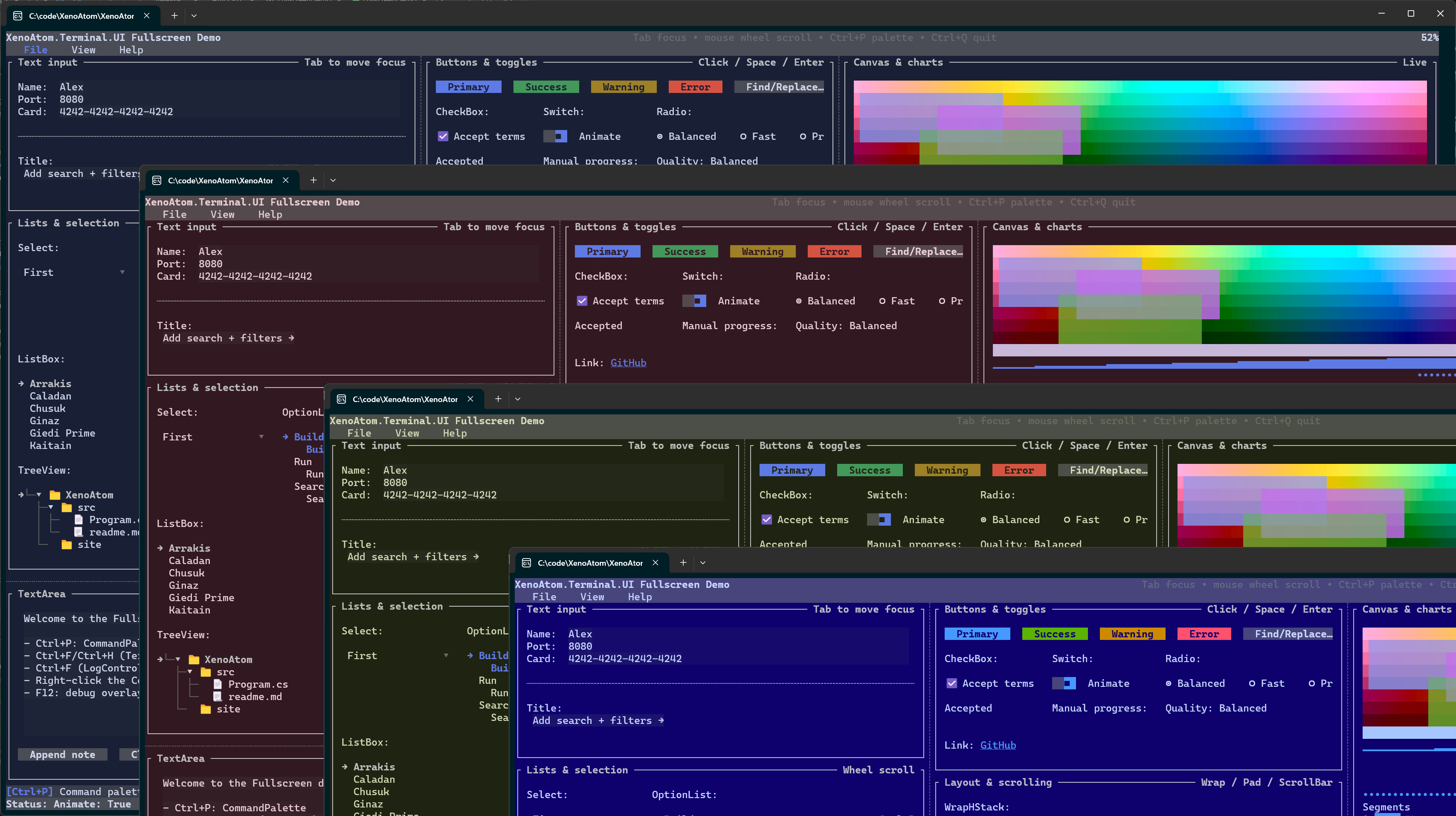
Note
XenoAtom.Terminal.UI depends on XenoAtom.Terminal. The two libraries are designed to be used together: Terminal handles safe ANSI/markup output and unified input events; Terminal.UI builds a widget/layout system on top.
using XenoAtom.Terminal;
using XenoAtom.Terminal.UI;
using XenoAtom.Terminal.UI.Controls;

Terminal.Write(new Group("Welcome")
    .Content(new VStack("Hello", "from", "Terminal.UI").Spacing(1))
);
Inline “live” widget (updates without clearing your output):
using XenoAtom.Terminal;
using XenoAtom.Terminal.UI;
using XenoAtom.Terminal.UI.Controls;

var work = new ProgressTask("Work");

Terminal.Live(
    new ProgressTaskGroup().Tasks([work]),
    onUpdate: () =>
    {
        work.Value = Math.Min(1, work.Value + 0.01);
        return work.Value < 1
            ? TerminalLoopResult.Continue
            : TerminalLoopResult.StopAndKeepVisual;
    });
Fullscreen app:
using XenoAtom.Terminal;
using XenoAtom.Terminal.UI;
using XenoAtom.Terminal.UI.Controls;

State<string?> text = new("Type here");
State<bool> exit = new(false);

Terminal.Run(
    new VStack(
        new TextBox(text),
        new TextBlock(() => $"The text typed is: {text.Value}"),
        new Button("Exit").Click(() => exit.Value = true)
    ),
    onUpdate: () => exit.Value
        ? TerminalLoopResult.StopAndKeepVisual
        : TerminalLoopResult.Continue
    );
Brush gradient example:
using XenoAtom.Terminal.UI.Styling;

var brush = Brush.LinearGradient(
    new GradientPoint(0f, 0f),
    new GradientPoint(1f, 0f),
    [new GradientStop(0f, Colors.DeepSkyBlue), new GradientStop(1f, Colors.White)]);

Terminal.Write(
    new TextBlock("Gradient title")
        .Style(TextBlockStyle.Default with { ForegroundBrush = brush })
);The library ships with a large set of built-in controls. See Controls Reference for the full reference.
Highlights:
- Text input:
TextBox,TextArea,MaskedInput,NumberBox,ValidationPresenter - Lists:
ListBox,OptionList,SelectionList,Select<T>,TreeView - Data:
Table,DataGridControl - Layout:
VStack,HStack,Grid,DockLayout,Splitters,Border,Group,Padder - Overlays:
Popup,Dialog,TooltipHost,Backdrop - Toasts:
Toast,ToastHost(overlay notifications) - Visualization:
BarChart,LineChart,Sparkline,Canvas,BreakdownChart,TextFiglet,Placeholder - Progress:
ProgressBar,ProgressTaskGroup,Spinner
For details, see the dedicated website.
samples/ControlsDemo: catalog-style demo of controls and styles.samples/FullscreenDemo: fullscreen UI showcase.samples/InlineLiveDemo: inline/live demo (interactive).
This software is released under the BSD-2-Clause license.
Alexandre Mutel aka xoofx.