- For Google login to work, you need to generate a SHA-1 certificate key. This is done by running the command
./gradlew signingReportinside theandroidfolder of the project. Copy the SHA-1 key and add it to the firebase project at the bottom where it says "Add fingerprint"
If the command doesn't work, it's because JDK 17 is not installed. You can download it from here. (and make sure it's properly added to the path)
- User favorites: Add option in card_details_page or in search results page to add a card to favorites (save image url and id in firebase of each card)
- User Collection: Add option in card_details_page to add a card to collection (save image url and id of each card in firebase) and show some graph(s) using the cardmarket hash of every card, into one/multiple graphs.
- Optimize random button to use only one api call and open the card details page instantly
- Cached network image for grid card widget and search page results for smoother performance.
- Add sort by filters to the card_grid_widget
- Optional: Add page storage to all pages to save scroll position state.
-
New options / buttons inside the user greeting page that give access to:
- Favorite Cards: Ability to save favorite cards. (Retrieves them from firebase, firebase stores only id and image url of each card per user)
- Collection: add the cards I have physically and calculate the current price of everything according to the market, maybe show statistics of my cards as well, e.g.: graph of the fluctuation of the total value of my collection in the last 30 days
How to add a card to favorites or collection?
Suggestions:
- 3-dot dropdown in the
card_details_page(next to the page title) with the options "Add to favorites" and "Add to collection". - Floating buttons in the
card_details_pagelike those on the advanced search page, one with a heart icon (favorites) and another with a box icon (collection). - In the search results (both for
search_pageandcard_grid_widget(they are similar but don't use the same widget)) when long-pressing a card, show the options "Add to favorites" and "Add to collection" in a pop-up menu. Also be able to select multiple cards simultaneously so you don't have to do it one by one if you want to add several.
The Pokémon TCG App is a mobile application developed in Flutter that allows users to explore and search for Pokémon trading cards. The app utilizes the Pokémon TCG API to fetch data about cards and sets.
To run the app, follow these steps:
- Clone the repository.
- Run
flutter pub getto install the dependencies. - Run
flutter runto start the app.
Java JDK 17Android StudioFlutter
The project follows the standard structure of a Flutter project:
lib/: Only in this folder comes all the source code, the 'android' folder is usually not touched.main.dart: The main file, configures the state management of the app using a package called Provider and defines the basic structure of the app.models/: Here the main models are defined that are used to build a card, a set and the card details page.pages/: The main views of the application, what the user uses.services/: Backend services such as API functions or user authentication.widgets/: Contains widgets that are reused in various parts of the application.
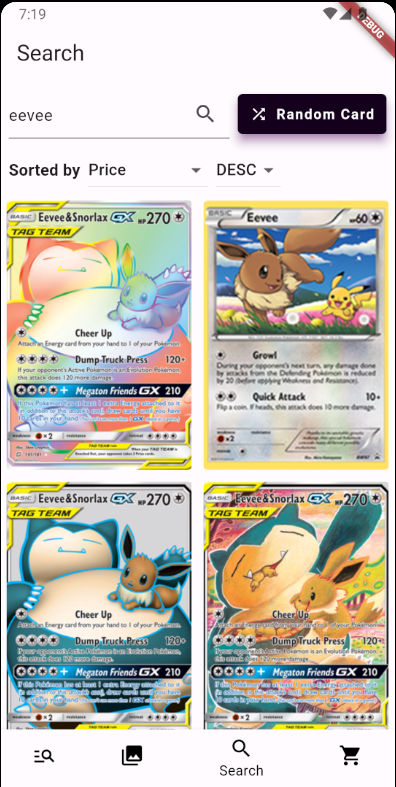
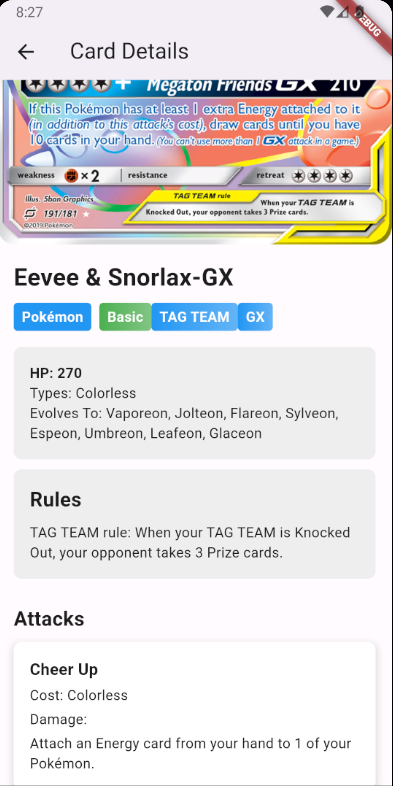
- Search: Search by name that allows sorting results by name, rarity, release date and price in ascending and descending order, also includes a button to get a random pokemon and by clicking any result on the page you can see the pokemon details. (I realized that rarity is missing in card details)
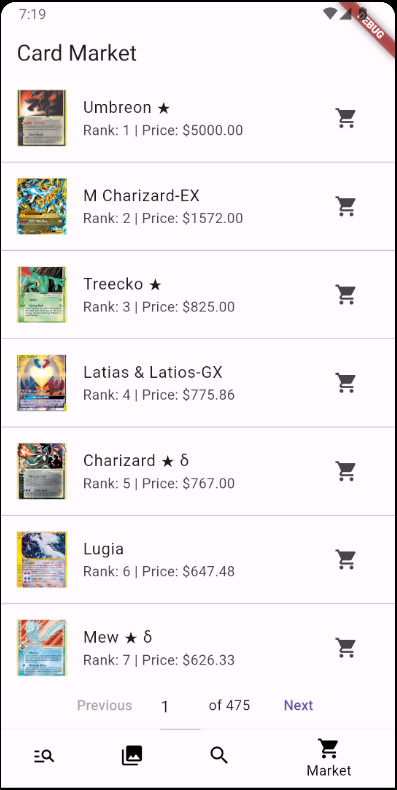
- Market: Shows all pokemons ranked by price, you can click to see details and also click on the market icon that leads to the market page link to buy the card.
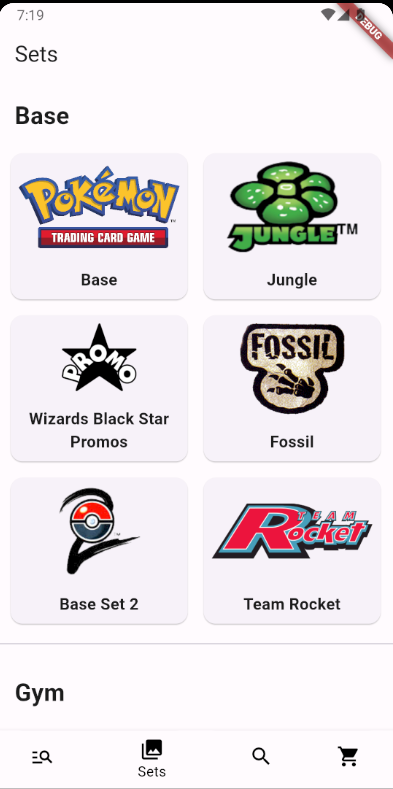
- Sets: When loading the page, all sets are obtained and sorted by series, by clicking on a set all the cards of that set are displayed.
- Advanced Search: Page where you can search by applying multiple filters simultaneously. When searching, all pokemons that meet the conditions are displayed (this is obtained in a single API call.) (See reference)
- User: Simple login with Google OAuth 2.0 that shows the user's name and profile picture
The application backend, explanation of each function:
- This function performs a card search according to a query (
query), the page (page), the page size (pageSize) and the sorting criteria (orderBy). - It uses the provided parameters to build the URL of the GET request to the API (the name that was typed in the search) and only
idandimagesare obtained. - Returns a
Futurecontaining a map with the resulting cards (cards) and the total number of cards (totalCount).
Note: A
Futureis an object that represents a value that will be available at some point in the future, allowing handling of asynchronous operations.
- This function obtains the details of a specific card according to its ID (
cardId). - Makes a GET request to the API using the endpoint corresponding to the card ID.
- Returns a
Futurecontaining aPokemonCardDetailsobject with the card details.
- This function obtains cards sorted by their market price.
- Uses the page size (
pageSize) and page number (page) parameters to build the URL of the GET request to the API. - Only requests the necessary fields to optimize the API response (id,name,images,cardmarket).
- Returns a
Futurecontaining a map with the resulting cards (cards) and the total number of cards (totalCount).
- This function obtains the ID of a random card.
- Makes a GET request to the API using a random page (
randomPage) and a page size of 1 to obtain a single card. - Returns a
Futurecontaining the ID of the random card.
- This function obtains all available card sets, it is called the first time the sets page is entered.
- Makes a GET request to the API requesting only the necessary fields to optimize the response (id,name,images).
- Returns a
Futurecontaining a list ofPokemonSetDataobjects with the data of each set.
- This function obtains the cards of a specific set according to its ID (
setId), the page (page) and the page size (pageSize). - Makes a GET request to the API using the provided parameters to build the URL (here the endpoint
/cardsandset.id:{set id}are used to get the cards that correspond to that set) - Returns a
Futurecontaining a map with the resulting cards (cards) and the total number of cards (totalCount).
All API service functions use the http package to make HTTP requests and the flutter_dotenv package to access the API Key stored in .env.
- User:
- Search:
- Market:
- Sets:
- Advanced Search:
-
Search cards: The
/cardsendpoint is used. For example, to search for cards with the name "Charizard", the URL would be https://api.pokemontcg.io/v2/cards?q=name:charizardTo return all results that contain the searched word, put a * at the end of the name, for example,
q=name:chari*would also return all charizards. -
Get card info:
/cards/{id}is used. When searching for a card by name, the ID is included in the JSON response, which is what is used for the function that obtains the card info. For example, to get the card with ID "base1-4", the URL would behttps://api.pokemontcg.io/v2/cards/base1-4and this would give me all the details of that card. -
Pagination: To avoid getting all thousands of results each call, the
pageandpageSizeparameters are used. The API already calculates these things on its side, like knowing which page we are on and what results it should give me according to pageSize etc. For example:https://api.pokemontcg.io/v2/cards?page=1&pageSize=30Returns the first page of all cards, but only the first 30. Generally in the application when cards are returned pageSize=30 is used so that it doesn't take long to load, plus it looks good. If you want to load more there is a
Load Morebutton that calls page=2&pageSize=30 and so on.This is how the random card call was implemented, there is no "random" parameter as such or anything similar, so
https://api.pokemontcg.io/v2/cards?page={random}&pageSize=1is used, random being a number between 1 and 17679, which are all the cards there are, that would return the complete data of a single card, because pageSize is 1. -
The "select": At the end of the query you can add a "select=..." specifying the fields I want to receive in the JSON response, it is useful to get only what is necessary and avoid a lot of text so that things load faster, for example, in the search by name page it is used:
https://api.pokemontcg.io/v2/cards?q=name:{name}*&select=id,imagesto obtain only the id and images of the cards being searched for, which is the minimum necessary to build the clickable component of the card.
-
Filters: See this link, but basically: you can search by combining a bunch of different parameters. For example, to search for all Charizards that are fire type and water weakness, you can do it like this:
https://api.pokemontcg.io/v2/cards?q=name:charizard* types:fire&weaknesses:waterOnce you start adding filters, you put a space, and each filter is separated with an "&" to combine them.
You can also search by rarity, series, set, attacks, abilities, etc etc. To find all cards that have "Mega" in the name and are from the "XY" series:
https://api.pokemontcg.io/v2/cards?q=name:mega* set.series:XYOr to search for cards that have "Mega" in the name AND are from the "XY" series OR have "EX" in the name:
https://api.pokemontcg.io/v2/cards?q=(name:mega* set.series:XY) OR name:EXThe API JSON response is not always the same, sometimes some fields come, sometimes not (depends on supertype), but some filterable ones could be:
- supertype: (Pokémon, Trainer, Energy).
- subtypes: (Basic, Stage 1, Stage 2, GX, etc.).
- hp
- legality
- types: (Fire, Water, Grass, etc.).
- evolvesFrom
- attacks
- resistances
- retreatCost
- artist
- rarity
Example of API call combining many filters:
https://api.pokemontcg.io/v2/cards?q=name:rayquaza* supertype:pokemon&subtypes:ex&types:dragon&hp:[100 TO 200]&weaknesses:fairy&resistances:fighting&set.id:xy6 set.series:XY&rarity:rare&legalities.standard:legalThis search finds all cards that meet the following conditions:
- The name contains "rayquaza"
- The supertype is "pokemon".
- The subtype includes "ex".
- The type is "dragon".
- The hit points (HP) are between 100 and 200.
- Has weakness to "fairy".
- Has resistance to "fighting".
- Belongs to the set with ID "xy6".
- The set series is "XY".
- The rarity is "rare".
- It is legal in the standard format.