VideoLoader
The VideoLoader component obtains the video (either by input[type="file"] or given in URL parameter) and it's meta information (height, width, duration, etc.), extracts all frames from the video at specified fps and then stores all the cached frames to Pinia.
This follows the traditional way of extracting frames from video in Browser.
- Create a
videoelement and set thesrcattribute. - Handle
onloadeddataevent to get meta information and setvideo.currentTime = 0.0to triggerseeked. - Handle
onseekedevent- Create or use an existing
canvaselement and draw the current frame from thevideoelement onto thecanvas. - Save the frame to
cachedFrameListbycanvas.toBlobmethod.
- Create or use an existing
This process is REALLY slow, here are some assumptions,
- Setting
video.currentTimearbitrarily can be time-consuming. We are using the nativevideoelement to decode the video, changing the time of the video may trigger re-allocating inside the decoder. - The video frame itself is passed through multiple elements. Especially from video to canvas and then store to memory. It well be much better from video directly to memory.
However, at the time when developing the first version of Vidat, there are just no others option for us to choose. To make the user interface a little bit more responsive when change the frame index, we introduce priority queues.
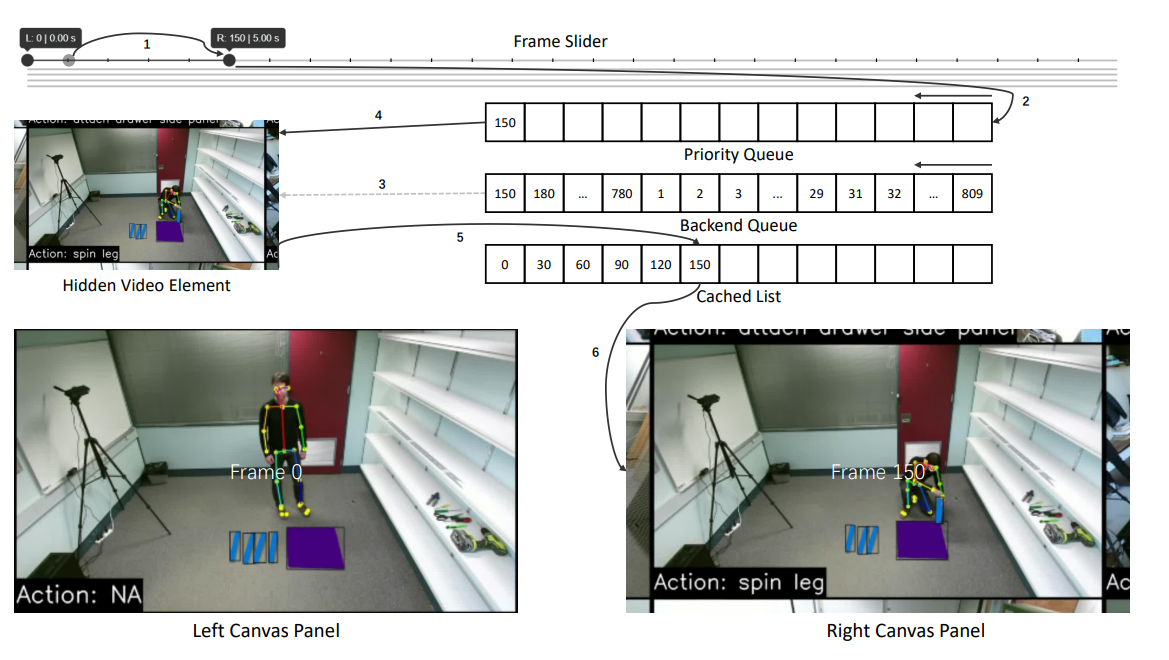
As shown in the figure above, we have a priority queue for instant cache and a backend queue for normal cache.
This is inspired by JavaScript: Extract video frames reliably.
- Demultiplex the video using MP4Box.js.
- Decode the video chunks by
WebCodecs.VideoDecoder. - Save decoded frame at given
fps.
Move everthing to a WebWorker.
The mp4 file is only a container, it consists of several different boxes. The moov box contains all the meta information, tracks, etc. The demultiplexer won't work until the moov box is detected. Unfortunately, the moov box is normally located at the end of the file, therefore, the caching process needs to wait for a long time (depending on the size of the video) before start. This is extremely wasting time especially when the video server has low bandwidth.
Inspired by the implementation of the native video element, we try to probe the moov box from both two sides.
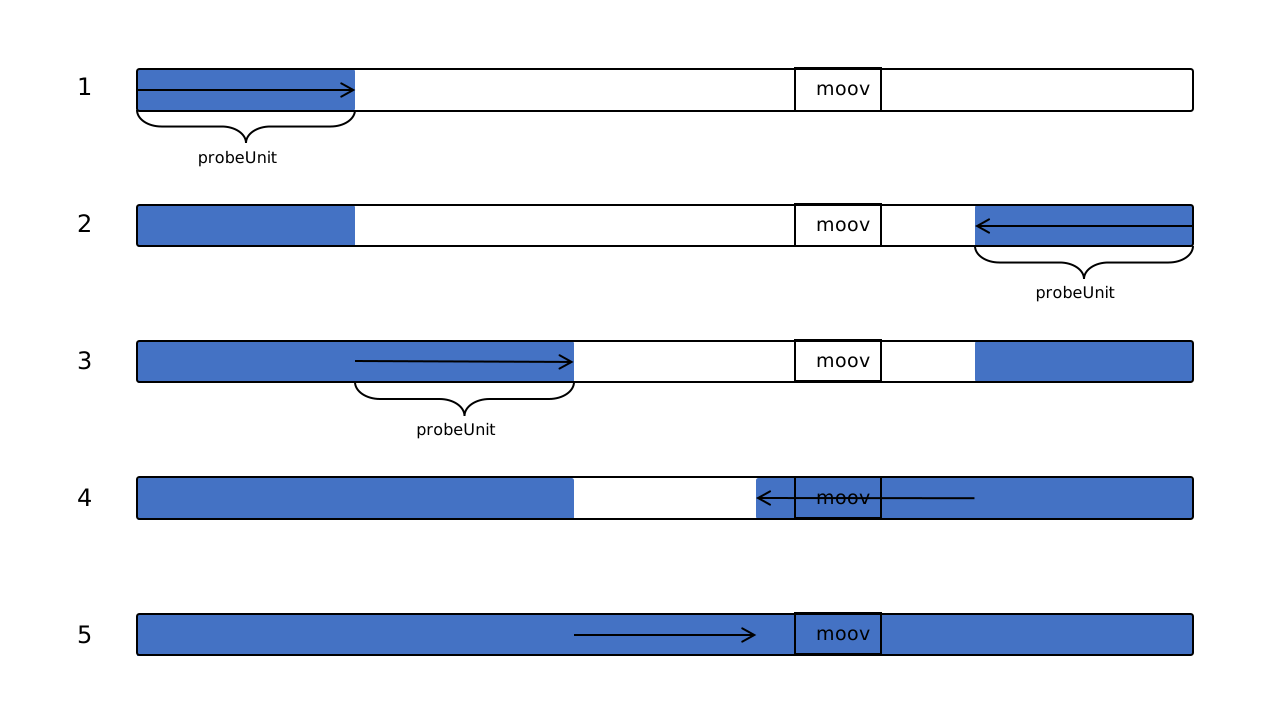
This mechanism is illustrated in the figure above. To obtain a part of the video, the video server needs to support HTTP Range. And once the moov box is detected, the loader will download all the rest parts. The probeUnit is obviously an empirical value, which is 512 * 1024 in our implementation.
During frame decoding, all the frames are obtained, but we only save some of them according to the user-specified fps. This might lead to some efficiency issue; however, it is fast enough for me to ignore it. Besides that, seeking to noncontinuous time might lead to other performance issues.
Some of the features used in Version 2 did not come up until recent years, therefore not all browsers can be benefited from it.
Apart from that, due to MP4Box.js is used to demux the video, V2 only supports what MP4Box.js supports (i.e. mp4 files only, with h264/h265/vp8/vp9/etc. codecs). You may need to refer their repo for more details.