A playground for Neuro SAN - this repo includes working examples to get started, explore, extend, and experiment with custom multi-agent networks!
Neuro SAN is the open-source library powering the Cognizant Neuro® AI Multi-Agent Accelerator, allowing domain experts, researchers and developers to immediately start prototyping and building agent networks across any industry vertical.






Neuro SAN library




Neuro SAN (System of Agent Networks) is an open-source, data-driven multi-agent orchestration framework designed to simplify and accelerate the development of collaborative AI systems. It allows users—from machine learning engineers to business domain experts—to quickly build sophisticated multi-agent applications without extensive coding, using declarative configuration files (in HOCON format).
Neuro SAN enables multiple large language model (LLM)-powered agents to collaboratively solve complex tasks, dynamically delegating subtasks through adaptive inter-agent communication protocols. This approach addresses the limitations inherent to single-agent systems, where no single model has all the expertise or context necessary for multifaceted problems.

- 🗂️ Data-Driven Configuration: Entire agent networks are defined declaratively via simple HOCON files, empowering technical and non-technical stakeholders to design agent interactions intuitively.
- 🔀 Adaptive Communication (AAOSA Protocol): Agents autonomously determine how to delegate tasks, making interactions fluid and dynamic with decentralized decison making.
- 🔒 Sly-Data: Sly Data facilitates safe handling and transfer of sensitive data between agents without exposing it directly to any language models.
- 🧩 Dynamic Agent Network Designer: Includes a meta-agent called the Agent Network Designer – essentially, an agent that creates other agent networks. Provided as an example with Neuro SAN, it can take a high-level description of a use-case as input and generate a new custom agent network for it.
- 🛠️ Flexible Tool Integration: Integrate custom Python-based "coded tools," APIs, databases, and even external agent ecosystems (Agentforce, Agentspace, CrewAI, MCP, A2A agents, LangChain tools and more) seamlessly into your agent workflows.
- 📈 Robust Traceability: Detailed logging, tracing, and session-level metrics enhance transparency, debugging, and operational monitoring.
- 🌐 Extensible and Cloud-Agnostic: Compatible with a wide variety of LLM providers (OpenAI, Anthropic, Azure, Ollama, etc.) and deployable in diverse environments (local machines, containers, or cloud infrastructures).
A number of examples that can be built using Neuro SAN:
| Agent Network | Use-Case | Description |
|---|---|---|
| 🧬 Agent Network Designer | Automated generation of multi-agent HOCON configurations. | Generates complex multi-agent configurations from natural language input, simplifying the creation of intricate agent workflows. |
| 🛫 Airline Policy Assistance | Customer support for airline policies. | Agents interpret and explain airline policies, assisting customers with inquiries about baggage allowances, cancellations, and travel-related concerns. |
| 🏦 Banking Operations & Compliance | Automated financial operations and regulatory compliance. | Automates tasks such as transaction monitoring, fraud detection, and compliance reporting, ensuring adherence to regulations and efficient routine operations. |
| 🛍️ Consumer Packaged Goods (CPG) | Market analysis and product development in CPG. | Gathers and analyzes market trends, customer feedback, and sales data to support product development and strategic marketing. |
| 🛡️ Insurance Agents | Claims processing and risk assessment. | Automates claims evaluation, assesses risk factors, ensures policy compliance, and improves claim-handling efficiency and customer satisfaction. |
| 🏢 Intranet Agents | Internal knowledge management and employee support. | Provides employees with quick access to policies, HR, and IT support, enhancing internal communications and resource accessibility. |
| 🛒 Retail Operations & Customer Service | Enhancing retail customer experience and operational efficiency. | Handles customer inquiries, inventory management, and supports sales processes to optimize operations and service quality. |
| 🧠 Six Thinking Hats | Structured decision-making and brainstorming. | Emulates Edward de Bono's methodology, assigning distinct perspectives (logical, emotional, creative) to specialized agents. |
| 🏠 Smart Home Management | Home automation and device control. | Coordinates smart home devices, allowing users to control lighting, temperature, and security via natural language. |
| 📞 Telco Network Support | Technical support and network issue resolution. | Diagnoses network problems, guides troubleshooting, and escalates complex issues, reducing downtime and enhancing customer service. |
| 📝 Kwik Memory Agent | Enhanced memory retention and retrieval. | Improves agent capability in storing and recalling information, enhancing long-term contextual awareness. |
| 📄 PDF_RAG Agent | Retrieval-Augmented Generation from PDF documents. | Processes and extracts accurate information from PDF files for analysis and summarization tasks. |
| 🚀 Agentforce Agent | Integration with Salesforce's AgentForce for enterprise workflows. | Allows Neuro-SAN agents to interact with Salesforce AgentForce, automating customer relationship management processes. |
| 🔌 Agentspace Adapter | Connecting agents across different platforms. | Acts as a communication bridge between Neuro-SAN and other agent ecosystems, enhancing interoperability. |
| 🤝 CrewAI Agent | Integration with CrewAI for collaborative tasks. | Enables seamless coordination between Neuro-SAN agents and CrewAI, facilitating cross-framework collaboration. |
| 🧰 MCP Agent | Utilization of Model Context Protocol for tool integration. | Integrates external tools and services into agent workflows, expanding capabilities using the Model Context Protocol. |
| 🔄 A2A based Agent | Agent-to-Agent communication via Google A2A protocol. | Enables efficient, decentralized agent communication and task delegation using the A2A protocol. |
| 🔄 Conscious Agent | An example agent network that is run continuously via the conscious_assistant flask app. | This is an example of how to run agents continuously, initiating them from code, and how to make tool calls to non-default packages. |
| And Many More... | ||

To dive into Neuro SAN and start building your own multi-agent networks, this repository contains a collection of demos for the neuro-san library.
You'll find comprehensive documentation, example agent networks, and tutorials to guide you through your first steps.
Clone the repo:
git clone https://github.com/cognizant-ai-lab/neuro-san-demosGo to dir:
cd neuro-san-demosEnsure you have a supported version of python (3.12 at this time):
python --versionCreate a dedicated Python virtual environment:
python -m venv venvSource it:
-
For Windows:
.\venv\Scripts\activate && export PYTHONPATH=`pwd`
-
For Mac:
source venv/bin/activate && export PYTHONPATH=`pwd`
Install the requirements:
pip install -r requirements.txtIMPORTANT: By default the server relies on OpenAI's gpt-4o model. Set the OpenAI API key, and add it to your shell configuration so it's available in future sessions.
You can get your OpenAI API key from https://platform.openai.com/signup. After signing up, create a new API key in the API keys section in your profile.
NOTE: Replace XXX with your actual OpenAI API key.
NOTE: This is OS dependent.
-
For macOS and Linux:
export OPENAI_API_KEY="XXX" && echo 'export OPENAI_API_KEY="XXX"' >> ~/.zshrc
-
For Windows:
-
On Command Prompt:
set OPENAI_API_KEY=XXX -
On PowerShell:
$env:OPENAI_API_KEY="XXX"
-
Other providers and models are supported too but will require proper setup.
There are multiple ways in which we can now use the neuro-san server with a client:
Option 1: Using nsflow as a developer-oriented web client
If you want to use neuro-san with a FastAPI-based developer-oriented client, follow these steps:
-
Start the server and client with a single command, from project root:
python -m run
-
As a default
- Frontend will be available at:
http://127.0.0.1:4173 - The client and server logs will be saved to
logs/nsflow.logandlogs/server.logrespectively.
- Frontend will be available at:
-
To see the various config options for this app, on terminal
python -m run --help
Screenshot:
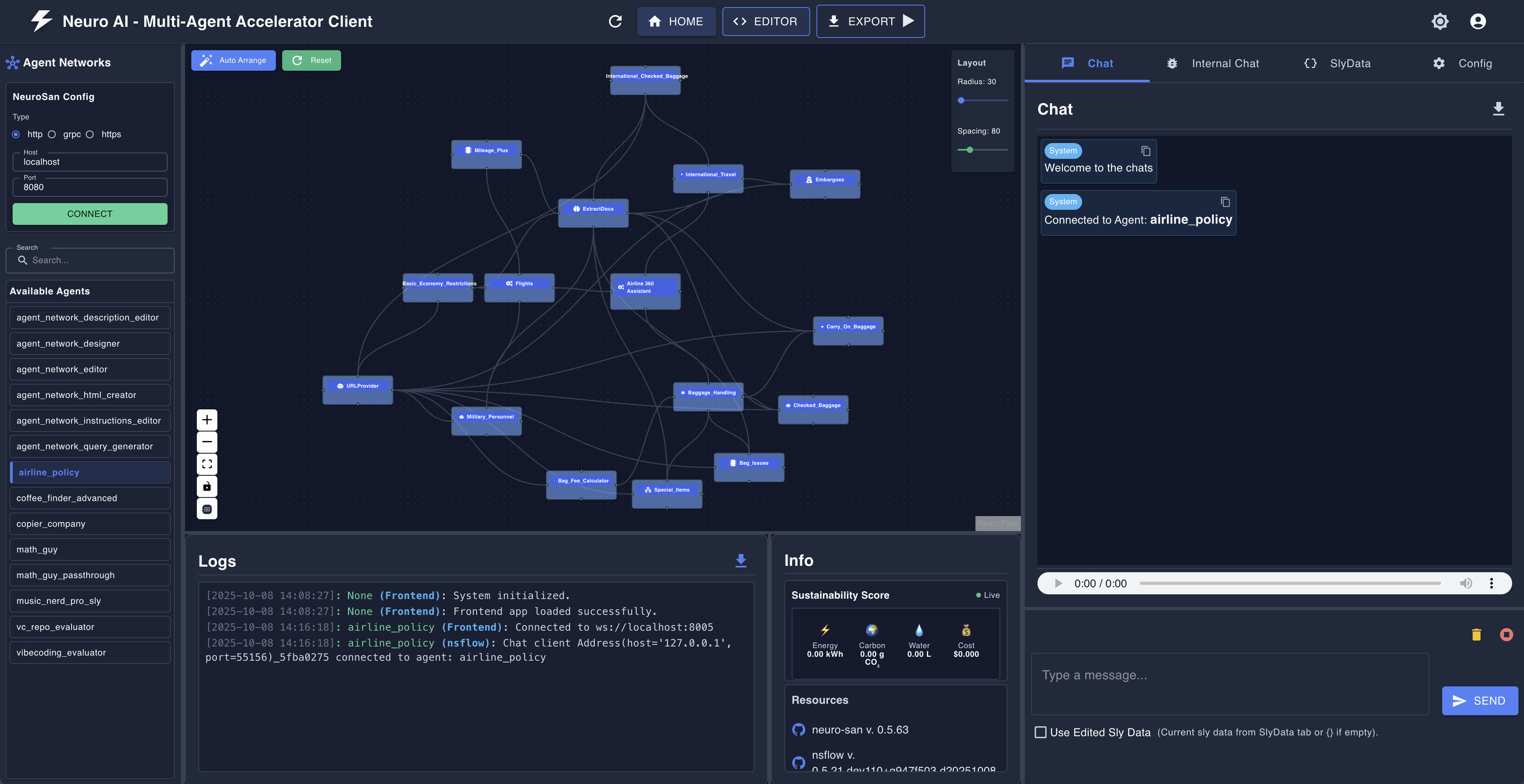
A basic web client interface is installed by default. It's a great, simple example of how to connect to a neuro-san server and interact with it. Start the server and the client in one single command:
python -m run --use-flask-web-clientThe client and server logs will show on the screen,
and will also be saved to logs/server.log and logs/client.log respectively.
As a default, on a web browser you can now navigate to http://127.0.0.1:5003/ to start using the application:

-
Expand the
Configurationtab at the bottom of the interface -
Choose an Agent Network Name, e.g. "music_nerd", click Update
💡 Hint: Check the server logs to see which agent networks are available. For instance:SERVER: {"message": "tool_registries found: ['hello_world', 'airline_policy', 'advanced_calculator', 'smart_home', 'agent_network_designer', 'agent_network_generator', 'music_nerd', 'music_nerd_pro', 'agentforce', 'banking_ops', 'cpg_agents', 'insurance_agents', 'intranet_agents', 'retail_ops_and_customer_service', 'six_thinking_hats', 'telco_network_support']", "user_id": "None", "Timestamp": "2025-04-11T11:20:22.092078", "source": "Agent Server", "message_type": "Other", "request_id": "None"}They should match the list of agent networks that are activated in the
registries/manifest.hoconfile. -
Type your message in the chat box and press 'Send' to interact with the agent network.
-
Optional: open the
Agent Network Diagramtab to visualize the interactions between the agents. -
Optional: open the
Agent Communicationstab to see the messages exchanged between the agents.
Run this command to see the various config options for the server and client:
python -m run --helpYou can also use neuro-san's command line interface (CLI) to start and interact with the server.
-
Export the following environment variables:
# Point the server to the manifest file containing the agent network configurations
export AGENT_MANIFEST_FILE="./registries/manifest.hocon"
# Point the server to the directory containing the agent Python tools
export AGENT_TOOL_PATH="./coded_tools"
-
Start the server:
python -m neuro_san.service.agent_main_loop --port 30011-
Start the client: From another terminal window, navigate to the repo's folder and activate the virtual environment:
source venv/bin/activate && export PYTHONPATH=`pwd`
Then start the client:
python -m neuro_san.client.agent_cli --connection service --agent hello_world-
Query the client:
When prompted, ask a question to the
hello_worldagent network. For example:I am travelling to a new planet and wish to send greetings to the orb.
And it should return something like:
Hello, world.
... but you are dealing with LLMs. Your results will vary!
Type quit to exit the client.
Ready to dive in? Check out the user guide for a detailed overview of the neuro-san library and its features.
For a detailed tutorial, refer to docs/tutorial.md.
For examples of agent networks, check out docs/examples.md.
For the development guide, check out docs/dev_guide.md.