-
Notifications
You must be signed in to change notification settings - Fork 1
Add Documentation #6
New issue
Have a question about this project? Sign up for a free GitHub account to open an issue and contact its maintainers and the community.
By clicking “Sign up for GitHub”, you agree to our terms of service and privacy statement. We’ll occasionally send you account related emails.
Already on GitHub? Sign in to your account
Merged
Merged
Changes from 5 commits
Commits
Show all changes
9 commits
Select commit
Hold shift + click to select a range
40e7f5d
Update README.md with overview, setup guide, quickstart, and examples
RNViththagan dd0ae83
Rename README files
RNViththagan 8d56f86
Update test documentation for PayPal Subscriptions connector with act…
RNViththagan 688de62
Update ActivateSubscription.md to use absolute URLs for images and im…
RNViththagan f5dc9b1
Refactor README.md for improved formatting and clarity in test instru…
RNViththagan f210566
Refactor README to remove environment variable setup
RNViththagan c730cd6
Update README to alias the PayPal subscriptions module for clarity
RNViththagan 4bc659a
Update README to clarify the number of test environments and improve …
RNViththagan 93f1884
Add README.md symlinks to example-specific markdown files
RNViththagan File filter
Filter by extension
Conversations
Failed to load comments.
Loading
Jump to
Jump to file
Failed to load files.
Loading
Diff view
Diff view
There are no files selected for viewing
This file contains hidden or bidirectional Unicode text that may be interpreted or compiled differently than what appears below. To review, open the file in an editor that reveals hidden Unicode characters.
Learn more about bidirectional Unicode characters
This file contains hidden or bidirectional Unicode text that may be interpreted or compiled differently than what appears below. To review, open the file in an editor that reveals hidden Unicode characters.
Learn more about bidirectional Unicode characters
| Original file line number | Diff line number | Diff line change |
|---|---|---|
| @@ -1,17 +1,124 @@ | ||
| ## Overview | ||
|
|
||
| [//]: # (TODO: Add overview mentioning the purpose of the module, supported REST API versions, and other high-level details.) | ||
| [PayPal](https://www.paypal.com/) is a global online payment platform enabling individuals and businesses to securely send and receive money, process transactions, and access merchant services across multiple currencies. | ||
|
|
||
| ## Setup guide | ||
| The `ballerinax/paypal.subscriptions` package provides a Ballerina connector for interacting with the [PayPal Subscriptions API v1](https://developer.paypal.com/docs/api/subscriptions/v1/), allowing you to create, manage, and monitor subscription-based billing plans and subscriptions in your Ballerina applications. | ||
|
|
||
| [//]: # (TODO: Add detailed steps to obtain credentials and configure the module.) | ||
| ## Setup Guide | ||
|
|
||
| To use the PayPal Subscriptions connector, you must have access to a [PayPal Developer account](https://developer.paypal.com/). | ||
|
|
||
| ### Step 1: Create a Business Account | ||
|
|
||
| 1. Open the [PayPal Developer Dashboard](https://developer.paypal.com/dashboard). | ||
|
|
||
| 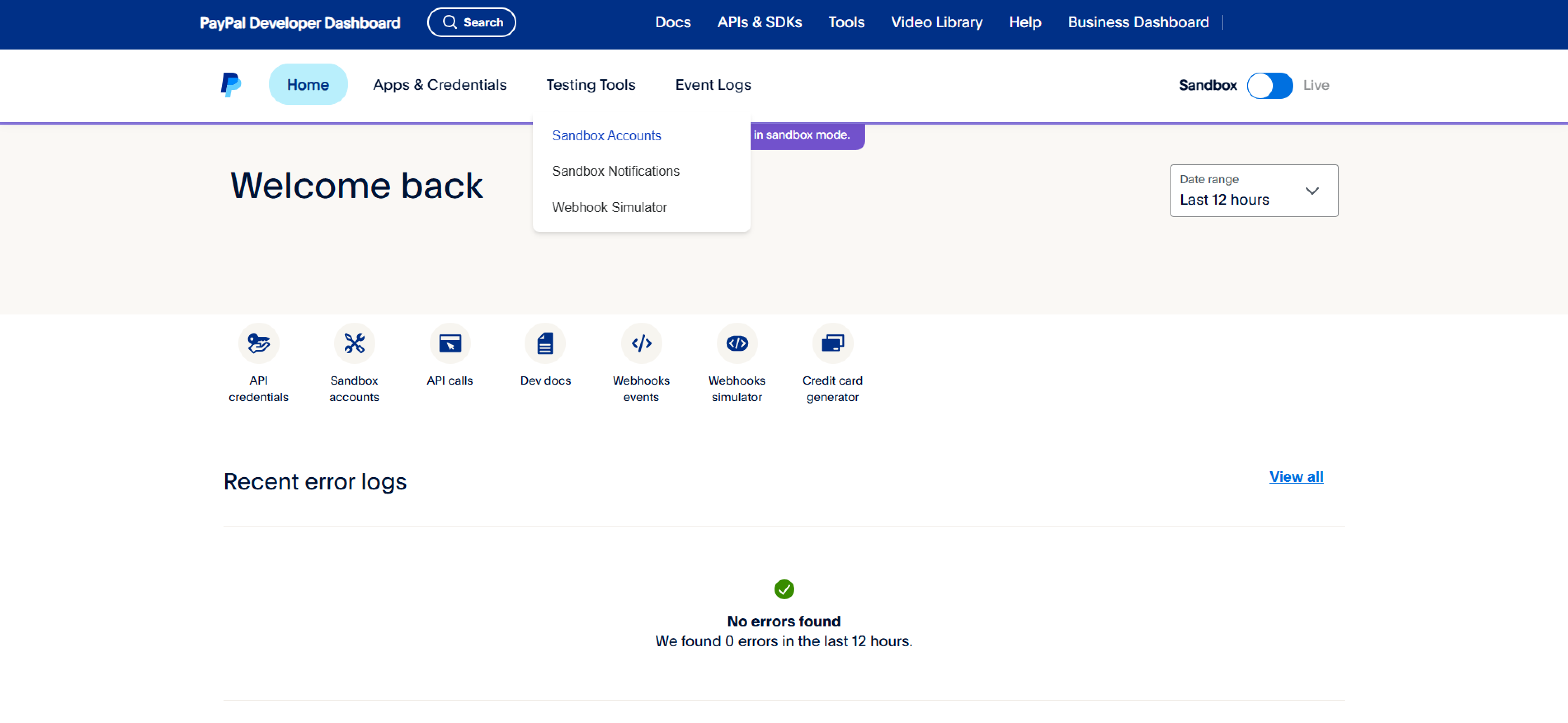 | ||
|
|
||
| 3. Create a Business account. | ||
| > Note: Some PayPal options and features may vary by region or country; check availability before creating an account. | ||
| 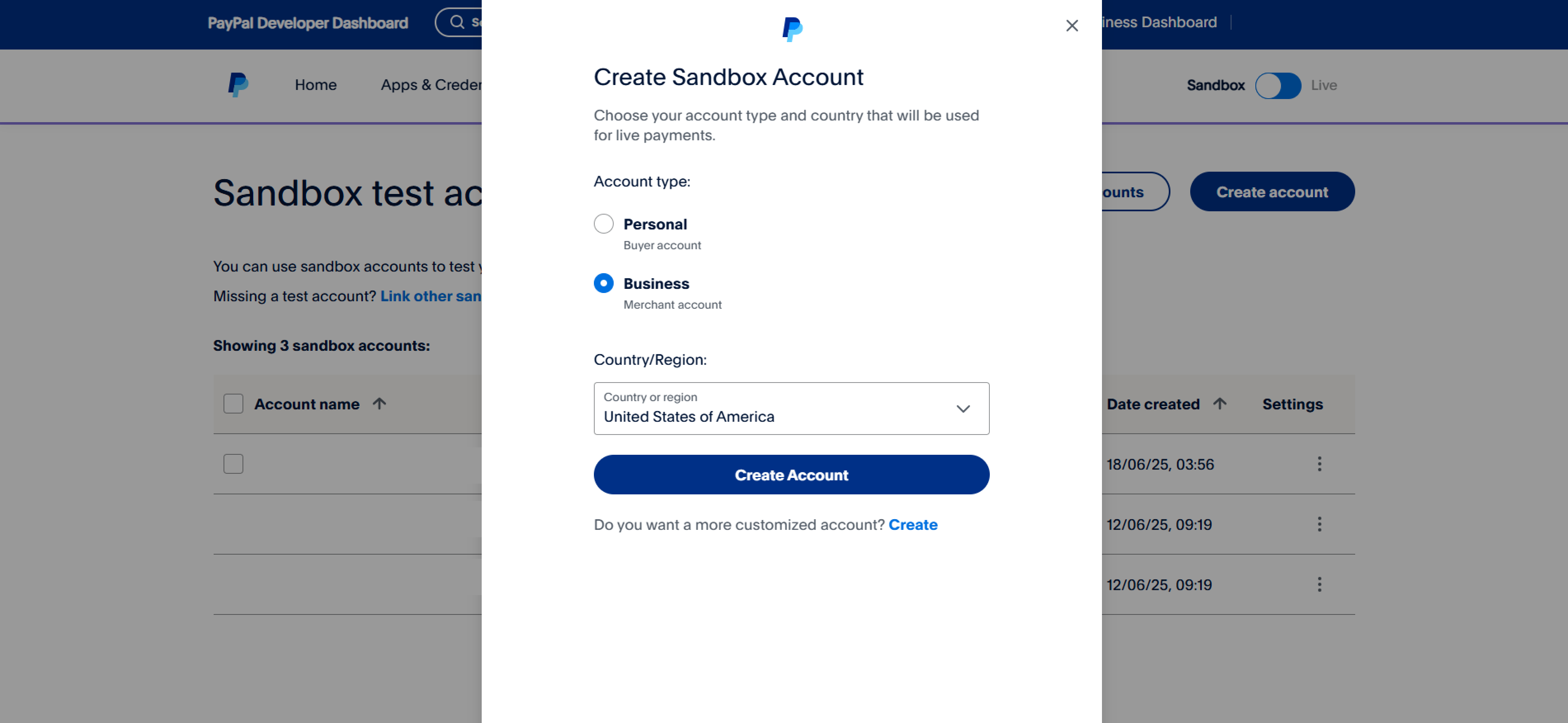 | ||
|
|
||
| ### Step 2: Create a REST API App | ||
|
|
||
| 1. Navigate to the "Apps and Credentials" tab and create a new merchant app. | ||
| 2. Provide a name for the application and select the Business account created earlier. | ||
| 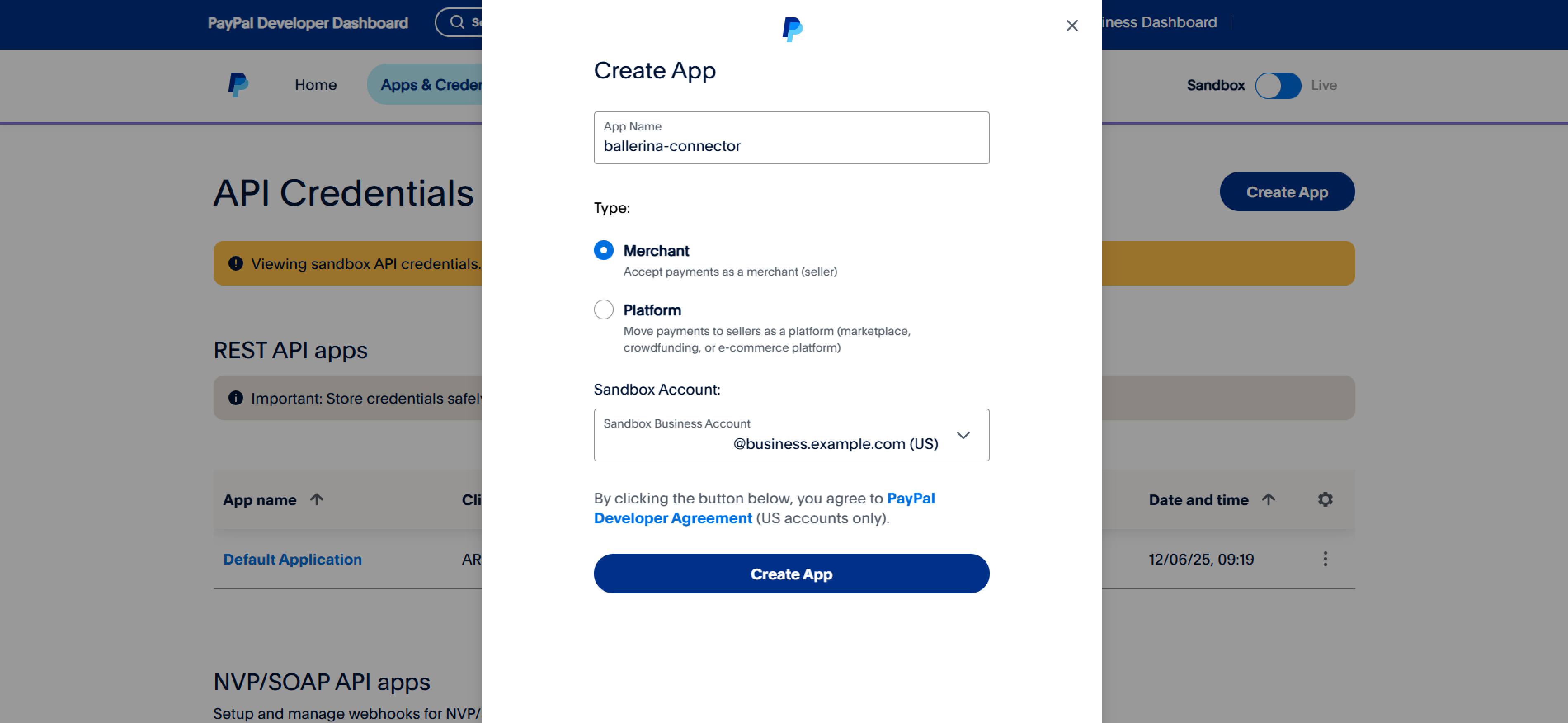 | ||
|
|
||
| ### Step 3: Obtain Client ID and Client Secret | ||
|
|
||
| 1. After creating the app, you will see your **Client ID** and **Client Secret**. Copy and securely store these credentials. | ||
|
|
||
| 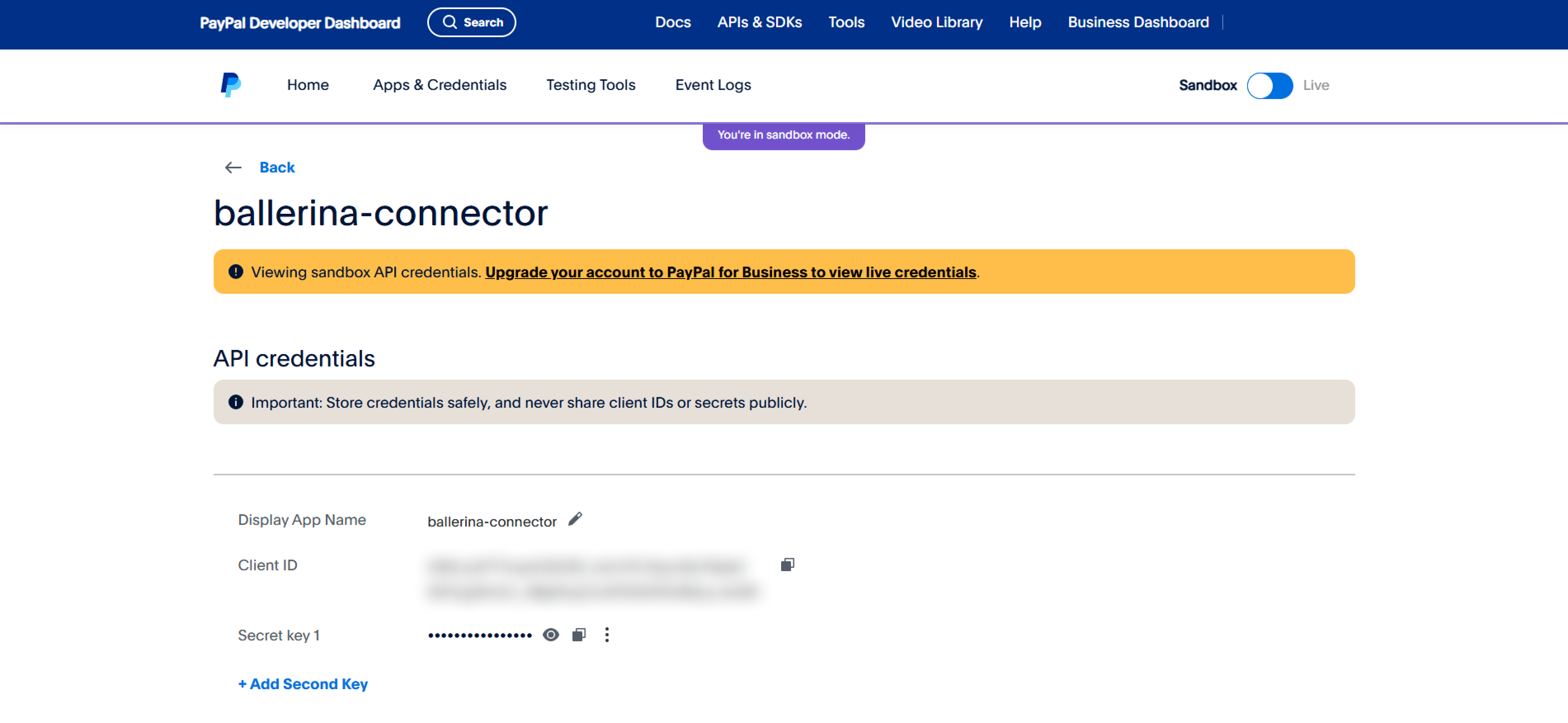 | ||
|
|
||
| ## Quickstart | ||
|
|
||
| [//]: # (TODO: Add a quickstart guide to demonstrate a basic functionality of the module, including sample code snippets.) | ||
| To use the `paypal.subscriptions` connector in your Ballerina application, update the `.bal` file as follows: | ||
|
|
||
| ### Step 1: Import the Module | ||
|
|
||
| Import the `paypal.subscriptions` module. | ||
|
|
||
| ```ballerina | ||
| import ballerinax/paypal.subscriptions; | ||
| ``` | ||
|
|
||
| ### Step 2: Instantiate a New Connector | ||
|
|
||
| 1. Create a `Config.toml` file and configure the obtained credentials and URLs: | ||
| ```toml | ||
| clientId = "<your-client-id>" | ||
| clientSecret = "<your-client-secret>" | ||
|
|
||
| serviceUrl = "<paypal-service-url>" | ||
| tokenUrl = "<paypal-token-url>" | ||
| ``` | ||
|
|
||
| 2. Create a `paypal:ConnectionConfig` with the credentials and initialize the connector: | ||
| ```ballerina | ||
| configurable string clientId = ?; | ||
| configurable string clientSecret = ?; | ||
| configurable string serviceUrl = ?; | ||
| configurable string tokenUrl = ?; | ||
|
|
||
| final paypal:Client paypal = check new ({ | ||
| auth: { | ||
| clientId, | ||
| clientSecret, | ||
| tokenUrl | ||
| } | ||
| }, serviceUrl); | ||
| ``` | ||
|
|
||
| ### Step 3: Invoke a Connector Operation | ||
|
|
||
| #### Create a Subscription Plan | ||
|
|
||
| ```ballerina | ||
| public function main() returns error? { | ||
| paypal:PlanRequestPOST plan = { | ||
| product_id: "PROD-1234567890", | ||
| name: "Basic Subscription Plan", | ||
| status: "ACTIVE", | ||
| billing_cycles: [ | ||
| { | ||
| frequency: { | ||
| interval_unit: "MONTH", | ||
| interval_count: 1 | ||
| }, | ||
| tenure_type: "REGULAR", | ||
| sequence: 1, | ||
| total_cycles: 0, | ||
| pricing_scheme: { | ||
| fixed_price: { | ||
| value: "10.00", | ||
| currency_code: "USD" | ||
| } | ||
| } | ||
| } | ||
| ], | ||
| payment_preferences: { | ||
| auto_bill_outstanding: true, | ||
| setup_fee: { | ||
| value: "0.00", | ||
| currency_code: "USD" | ||
| }, | ||
| setup_fee_failure_action: "CONTINUE", | ||
| payment_failure_threshold: 3 | ||
| } | ||
| }; | ||
| paypal:Plan response = check paypal->/plans.post(plan); | ||
| } | ||
| ``` | ||
|
|
||
| ### Step 4: Run the Ballerina application | ||
|
|
||
| ```bash | ||
| bal run | ||
| ``` | ||
|
|
||
| ## Examples | ||
|
|
||
| The `Paypal Subscriptions` connector provides practical examples illustrating usage in various scenarios. Explore these [examples](https://github.com/module-ballerinax-paypal.subscriptions/tree/main/examples/), covering the following use cases: | ||
| The `PayPal Subscriptions` connector provides practical examples illustrating usage in various scenarios. Explore these [examples](https://github.com/ballerina-platform/module-ballerinax-paypal.subscriptions/tree/main/examples/), covering the following use cases: | ||
|
|
||
| [//]: # (TODO: Add examples) | ||
| 1. [**Create and List Plans**](https://github.com/ballerina-platform/module-ballerinax-paypal.subscriptions/tree/main/examples/create-and-list-plans): Create a subscription plan and list all available plans. | ||
| 2. [**Monitor and Manage Subscription Status**](https://github.com/ballerina-platform/module-ballerinax-paypal.subscriptions/tree/main/examples/monitor-and-manage-subscription): Retrieve a subscription’s status and suspend or reactivate it based on its state. |
Oops, something went wrong.
Oops, something went wrong.
Add this suggestion to a batch that can be applied as a single commit.
This suggestion is invalid because no changes were made to the code.
Suggestions cannot be applied while the pull request is closed.
Suggestions cannot be applied while viewing a subset of changes.
Only one suggestion per line can be applied in a batch.
Add this suggestion to a batch that can be applied as a single commit.
Applying suggestions on deleted lines is not supported.
You must change the existing code in this line in order to create a valid suggestion.
Outdated suggestions cannot be applied.
This suggestion has been applied or marked resolved.
Suggestions cannot be applied from pending reviews.
Suggestions cannot be applied on multi-line comments.
Suggestions cannot be applied while the pull request is queued to merge.
Suggestion cannot be applied right now. Please check back later.
Uh oh!
There was an error while loading. Please reload this page.