-
Notifications
You must be signed in to change notification settings - Fork 3
Add Examples and Documentation #6
New issue
Have a question about this project? Sign up for a free GitHub account to open an issue and contact its maintainers and the community.
By clicking “Sign up for GitHub”, you agree to our terms of service and privacy statement. We’ll occasionally send you account related emails.
Already on GitHub? Sign in to your account
Merged
Merged
Changes from 50 commits
Commits
Show all changes
60 commits
Select commit
Hold shift + click to select a range
f12d6b6
Add generated Ballerina connector
SashenkaG 6d75d49
[Automated] Update the toml files
SashenkaG 17a1196
Add openapi spec for trello
SashenkaG c5f7cb2
Generate connector for trello
SashenkaG 1f250a4
Add test cases for trello connector
SashenkaG 63d24bf
[Automated] Update the toml files
SashenkaG d59d162
[Automated] Update the toml files
SashenkaG 1994f2a
[Automated] Update the toml files
SashenkaG 1988ead
[Automated] Update the toml files
SashenkaG 58952da
[Automated] Update the toml files
SashenkaG 8877c66
Update copyright year and refactor test functions for improved clarity
SashenkaG c12f26d
[Automated] Update the toml files
SashenkaG b44b891
Simplify resource function implementations in mock_service.bal
SashenkaG 1950eda
Update sanitation document
SashenkaG 7bc3850
Refactor mock_service.bal and tests.bal for improved clarity and cons…
SashenkaG 210d14e
[Automated] Update the toml files
SashenkaG df19790
Add keywords and icon to Ballerina.toml
SashenkaG 116a523
Add icon image to ballerina directory
SashenkaG 426d6ae
Add missing new lines in mock_service.bal and tests.bal for improved …
SashenkaG 7dcfbd9
[Automated] Update the toml files
SashenkaG db0b832
Remove unnecessary parameters from resource function documentation in…
SashenkaG 27c05a4
Fix in Ballerina.toml
SashenkaG d95e603
Fix formatting and update source link in sanitations.md
SashenkaG f471732
Update sanitations.md
SashenkaG fbec81e
Fix formatting and update command in sanitations.md
SashenkaG d586d47
Update ballerinaLangVersion to 2201.12.7 in gradle.properties
SashenkaG b4c2373
Update ballerinaGradlePluginVersion to 2.3.0 in gradle.properties
SashenkaG 4d0c72c
Regenerate client and add copyright notice and license information to…
SashenkaG 4da7fe9
Enhance README and testing documentation for Trello connector; add se…
SashenkaG f9d426d
Update README.md
SashenkaG 0471ccb
Update README.md
SashenkaG 4277fc0
Refactor README image placements
SashenkaG 5bba5c3
Merge branch 'main' of https://github.com/SashenkaG/module-ballerinax…
SashenkaG 5c974c0
Merge branch 'ballerina-platform:main' into main
SashenkaG 244ad5a
Update .gitignore, README, and test configurations; add new dependenc…
SashenkaG bfe7368
Add example for creating and retrieving a list and cards in Trello; i…
SashenkaG 1d65804
Add example for creating and managing cards in Trello; include necess…
SashenkaG b8040fd
Remove local repository reference from Ballerina.toml for Create_card…
SashenkaG 5138619
Remove local repository reference from Ballerina.toml for Create_list…
SashenkaG 49e8d04
Update README.md to use absolute URLs for images in setup instructions
SashenkaG 34e6506
Refactor README.md for clarity and consistency; update links and imag…
SashenkaG 5cfb14c
Refactor test configuration to use hardcoded values for local testing…
SashenkaG ff7010d
[Automated] Update the toml files
SashenkaG a4a8133
Remove unused devcontainer and gitignore files from Create_card and C…
SashenkaG 8162da9
Rename package in Ballerina.toml nad remove local dependency
SashenkaG eebf4ef
Rename package in Ballerina.toml to follow naming conventions and rem…
SashenkaG ab2f14d
Update configuration keys in README.md for Trello API to match naming…
SashenkaG e101b54
Fix formatting in README.md for Create_list example to enhance readab…
SashenkaG d288e54
Refactor Create_card and Create_list examples to improve error handli…
SashenkaG 04e6117
Fix: Make build scripts executable
SashenkaG 6874385
Update configuration in examples to use configurable variables
SashenkaG 9430cb9
Update README.md to clarify configuration settings
SashenkaG 7c43c51
updated tests.bal and README.md
SashenkaG 8dd1824
Add README and renamed files
SashenkaG 66cfa92
Deleted duplicate file
SashenkaG ae3033c
Remove Trello dependency from example configurations and update docum…
SashenkaG d284771
Fix example links in README to use lowercase directory names
SashenkaG ddfe419
Refactor README for clarity and formatting improvements
SashenkaG 497f086
Add example for creating a card in the README
SashenkaG f21b18f
Update configuration keys in example documentation for consistency
SashenkaG File filter
Filter by extension
Conversations
Failed to load comments.
Loading
Jump to
Jump to file
Failed to load files.
Loading
Diff view
Diff view
There are no files selected for viewing
This file contains hidden or bidirectional Unicode text that may be interpreted or compiled differently than what appears below. To review, open the file in an editor that reveals hidden Unicode characters.
Learn more about bidirectional Unicode characters
This file contains hidden or bidirectional Unicode text that may be interpreted or compiled differently than what appears below. To review, open the file in an editor that reveals hidden Unicode characters.
Learn more about bidirectional Unicode characters
This file contains hidden or bidirectional Unicode text that may be interpreted or compiled differently than what appears below. To review, open the file in an editor that reveals hidden Unicode characters.
Learn more about bidirectional Unicode characters
| Original file line number | Diff line number | Diff line change |
|---|---|---|
| @@ -1,17 +1,74 @@ | ||
| # Ballerina Trello connector | ||
|
|
||
| ## Overview | ||
|
|
||
| [//]: # (TODO: Add overview mentioning the purpose of the module, supported REST API versions, and other high-level details.) | ||
| [Trello](https://trello.com/) is a popular web-based project management and collaboration platform developed by Atlassian, allowing users to organize tasks, projects, and workflows using boards, lists, and cards. | ||
|
|
||
| The `ballerinax/trello` package provides APIs to connect and interact with [Trello's RESTful API endpoints](https://developer.atlassian.com/cloud/trello/rest/api-group-actions/), enabling developers to seamlessly manage boards, lists, cards, and other Trello resources. | ||
|
|
||
| ## Setup guide | ||
|
|
||
| [//]: # (TODO: Add detailed steps to obtain credentials and configure the module.) | ||
| To use the Trello connector, you must have access to the Trello API through a Trello account and an API key and token generated from it. If you do not have a Trello account, you can sign up for one [here](https://id.atlassian.com/signup). You can generate your Trello API key and token by following the instructions at [Trello API Keys](https://developer.atlassian.com/cloud/trello/guides/rest-api/api-introduction/). | ||
|
|
||
|
|
||
SashenkaG marked this conversation as resolved.
Outdated
Show resolved
Hide resolved
|
||
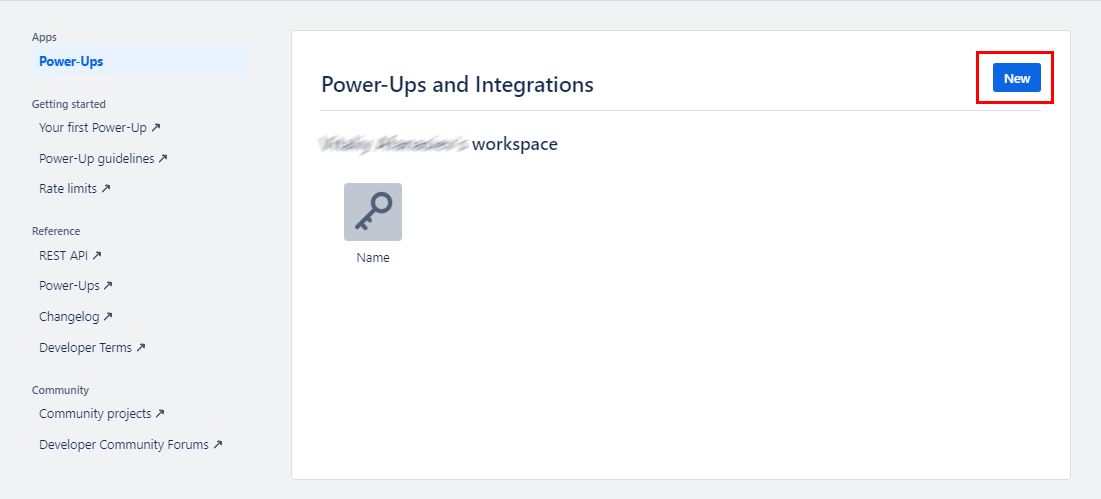
| 1. Visit https://trello.com/power-ups/admin and create a new powerup | ||
|
|
||
|  | ||
|
|
||
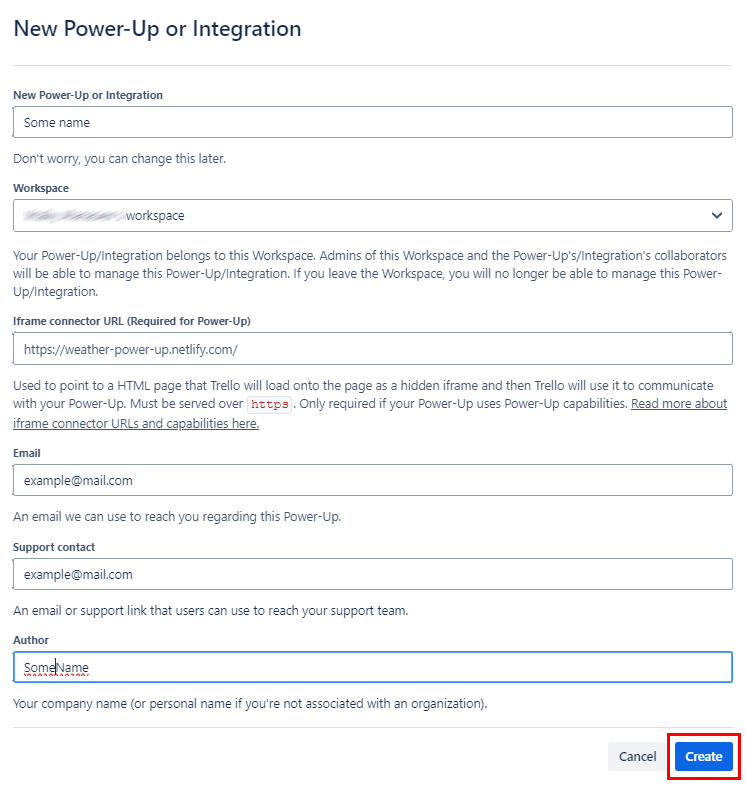
| 2. Enter the required details: | ||
| * Name of your Power-Up | ||
| * Iframe Connector URL (can be a placeholder URL during development) | ||
| Click “Create” to create your Power-Up. | ||
|
|
||
|  | ||
|
|
||
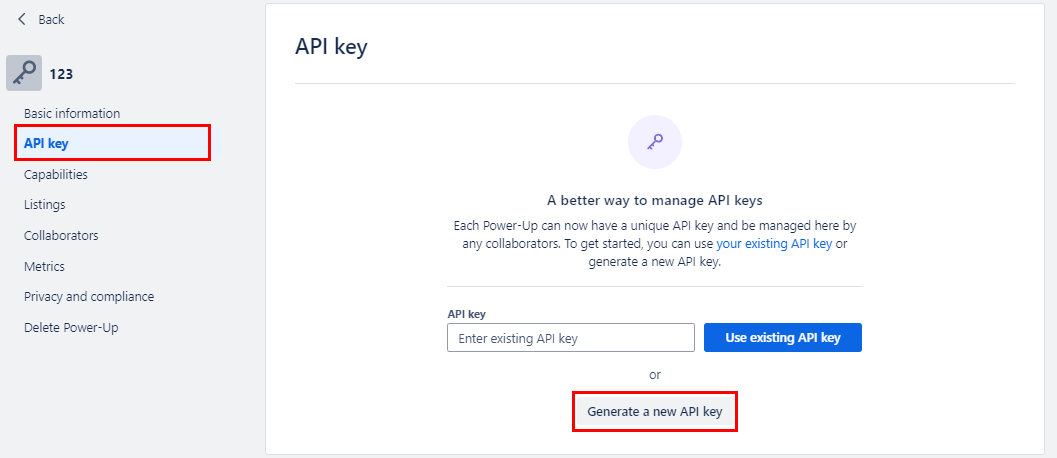
| 3. Navigate to 'API Key' and click on 'Generate' | ||
|
|
||
|  | ||
|
|
||
| Copy and securely store your API Key. | ||
|
|
||
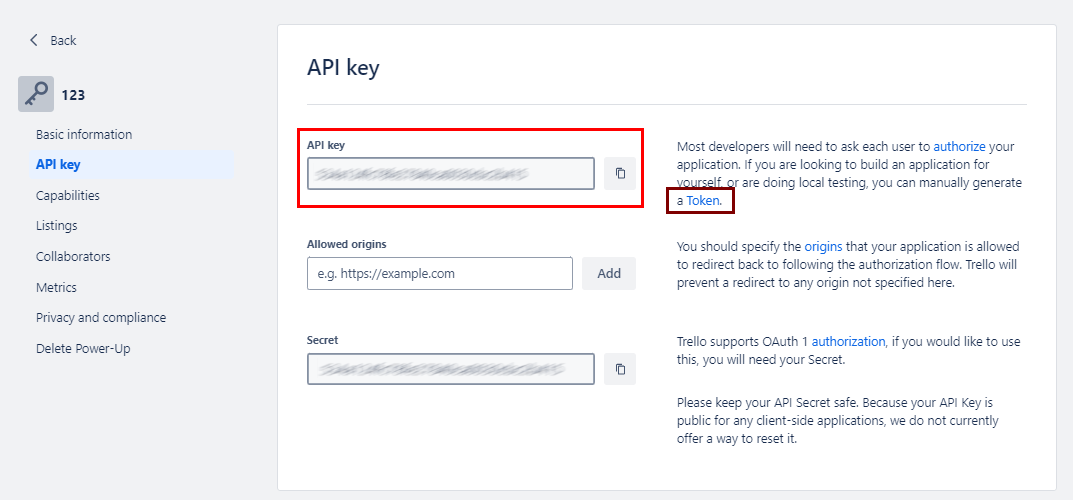
| 4. Next to the API Key description, there's a link to the token. | ||
| Click the link, authorize the Power-Up, and you’ll be redirected to a page displaying your OAuth token. | ||
|
|
||
|  | ||
|
|
||
| 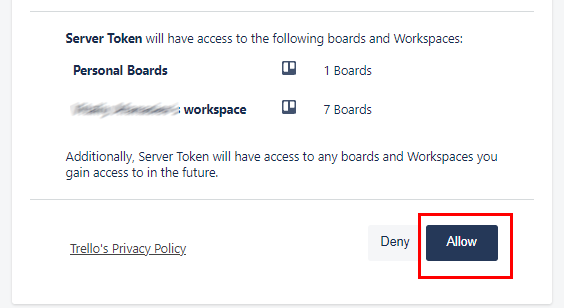 | ||
|
|
||
| Copy and securely store the Token. | ||
|
|
||
| 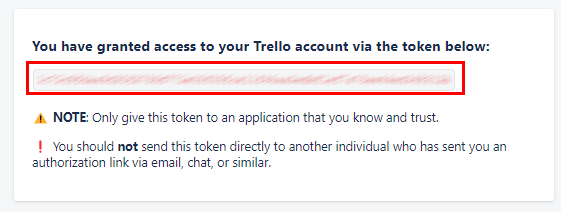 | ||
|
|
||
| ## Quickstart | ||
|
|
||
| [//]: # (TODO: Add a quickstart guide to demonstrate a basic functionality of the module, including sample code snippets.) | ||
| To use the Trello connector in your Ballerina application, update the .bal file as follows: | ||
|
|
||
| #### Step 1: Import the module | ||
|
|
||
| Import the Trello module. | ||
|
|
||
| ```bash | ||
| import ballerinax/trello; | ||
| ``` | ||
|
|
||
| #### Step 2: Instantiate a new connector | ||
|
|
||
| Create a `Config.toml` file and configure the obtained credentials as follows: | ||
|
|
||
| ```bash | ||
| key = "your_api_key" | ||
| token = "your_api_token" | ||
| ``` | ||
|
|
||
| #### Step 3: Invoke the connector operation | ||
|
|
||
| Now, utilize the available connector operations. | ||
|
|
||
| Create a card | ||
SashenkaG marked this conversation as resolved.
Show resolved
Hide resolved
|
||
|
|
||
| ## Examples | ||
|
|
||
| The `Trello` connector provides practical examples illustrating usage in various scenarios. Explore these [examples](https://github.com/module-ballerinax-trello/tree/main/examples/), covering the following use cases: | ||
|
|
||
| [//]: # (TODO: Add examples) | ||
| 1. [**Create and Retrieve a List and Cards in Trello**](examples/Create_list/) - Create a new list in a specific Trello board and retrieve its details using the list ID. | ||
| 2. [**Create, Update fetch add label to a Card in Trello**](examples/Create_card/) - Create a new card in a Trello list and update the card's name and view it. | ||
This file contains hidden or bidirectional Unicode text that may be interpreted or compiled differently than what appears below. To review, open the file in an editor that reveals hidden Unicode characters.
Learn more about bidirectional Unicode characters
| Original file line number | Diff line number | Diff line change |
|---|---|---|
| @@ -0,0 +1,105 @@ | ||
| # Running Tests | ||
|
|
||
| ## Prerequisites | ||
|
|
||
| To run tests for the Trello connector, you will need: | ||
|
|
||
| - A Trello account. | ||
| - A Power-Up created via the Trello Developer Portal. | ||
| - Your API Key and API Token, which you can obtain from the Trello API Key page. | ||
| - The Board ID, List ID, and optionally Card IDs to test live APIs. | ||
|
|
||
| ## Running Tests | ||
|
|
||
| The Trello connector supports two environments for testing: | ||
|
|
||
| | Test Group | Environment | | ||
| | ------------ | -------------------------------------- | | ||
| | `mock_tests` | Mock server for Trello API _(default)_ | | ||
| | `live_tests` | Actual Trello API | | ||
|
|
||
| Use the `isLiveServer` configuration to switch between environments. | ||
|
|
||
| Please ensure that the `boardId`, `listId`, and `cardId` values correspond to actual resources in your Trello account and boards when running tests against the live API. | ||
|
|
||
| ## Running Tests in the Mock Server | ||
|
|
||
| ### 🔹 Option 1: Using `Config.toml` in the `tests/` Directory | ||
|
|
||
| Create a file named `Config.toml` in the `tests/` folder with the following content: | ||
|
|
||
| ```toml | ||
| [ballerinax.trello] | ||
| key = "api-key" | ||
| token = "api-token" | ||
| isLiveServer = false | ||
| ``` | ||
|
|
||
| Set `isLiveServer` to false in `Config.toml` to set mock test environment | ||
|
|
||
| Then, run the following command to run the tests: | ||
|
|
||
| ``` | ||
| ./gradlew clean test | ||
|
|
||
| ``` | ||
|
|
||
| ### 🔹Option 2: Using Environment Variables | ||
|
|
||
| Linux/macOS | ||
|
|
||
| ``` | ||
| export key="api-key" | ||
| export token="api-token" | ||
| export isLiveServer = false | ||
| ``` | ||
|
|
||
| Windows | ||
|
|
||
| ``` | ||
| setx key "api-key" | ||
| setx token "api-token" | ||
| setx isLiveServer = false | ||
| ``` | ||
|
|
||
| ## Running Tests Against Trello Live API | ||
|
|
||
| **Using a Config.toml File** | ||
|
|
||
| Create a Config.toml file in the tests directory and add your authentication credentials as follows | ||
|
|
||
| ``` | ||
| token = "<your-trellor-access-token>" | ||
| key = "<your-trello-key>" | ||
| isLiveServer = true | ||
| ``` | ||
|
|
||
| Set `isLiveServer` to true in `Config.toml` to set live test environment | ||
|
|
||
| Note that you have to use your real trello Board and List IDs when testing in the live environment. | ||
|
|
||
| **Using Environment Variables** | ||
|
|
||
| Alternatively, you can set your authentication credentials as environment variables: | ||
|
|
||
| If you are using linux or mac, you can use following method: | ||
|
|
||
| ``` | ||
| export token ="<your-trello-access-token>" | ||
| export key ="<your-trello-key>" | ||
| export isLiveServeer = true | ||
| ``` | ||
|
|
||
| If you are using Windows you can use following method: | ||
|
|
||
| ``` | ||
| setx token "<your-trello-access-token>" | ||
| setx key "<your-trello-key>" | ||
| setx isLiveServer = true | ||
| ``` | ||
|
|
||
| Then, run the following command to run the tests: | ||
|
|
||
| ``` | ||
| ./gradlew clean test | ||
| ``` |
This file contains hidden or bidirectional Unicode text that may be interpreted or compiled differently than what appears below. To review, open the file in an editor that reveals hidden Unicode characters.
Learn more about bidirectional Unicode characters

Loading
Sorry, something went wrong. Reload?
Sorry, we cannot display this file.
Sorry, this file is invalid so it cannot be displayed.

Loading
Sorry, something went wrong. Reload?
Sorry, we cannot display this file.
Sorry, this file is invalid so it cannot be displayed.

Loading
Sorry, something went wrong. Reload?
Sorry, we cannot display this file.
Sorry, this file is invalid so it cannot be displayed.

Loading
Sorry, something went wrong. Reload?
Sorry, we cannot display this file.
Sorry, this file is invalid so it cannot be displayed.

Loading
Sorry, something went wrong. Reload?
Sorry, we cannot display this file.
Sorry, this file is invalid so it cannot be displayed.

Loading
Sorry, something went wrong. Reload?
Sorry, we cannot display this file.
Sorry, this file is invalid so it cannot be displayed.
This file contains hidden or bidirectional Unicode text that may be interpreted or compiled differently than what appears below. To review, open the file in an editor that reveals hidden Unicode characters.
Learn more about bidirectional Unicode characters
| Original file line number | Diff line number | Diff line change |
|---|---|---|
| @@ -0,0 +1,8 @@ | ||
| [package] | ||
| org = "wso2" | ||
| name = "create_card" | ||
| version = "0.1.0" | ||
| distribution = "2201.12.7" | ||
|
|
||
| [build-options] | ||
| observabilityIncluded = true |
SashenkaG marked this conversation as resolved.
Show resolved
Hide resolved
|
This file contains hidden or bidirectional Unicode text that may be interpreted or compiled differently than what appears below. To review, open the file in an editor that reveals hidden Unicode characters.
Learn more about bidirectional Unicode characters
| Original file line number | Diff line number | Diff line change |
|---|---|---|
| @@ -0,0 +1,37 @@ | ||
| # Create, Update fetch add label to a Card in Trello | ||
|
|
||
| This example demonstrates how to use the Trello API with Ballerina to create a card in a specific Trello list, update its name, and add a label to it. This use case is useful for automating task management workflows where card creation, modification, and labeling are performed programmatically. | ||
|
|
||
| --- | ||
|
|
||
| ## Prerequisites | ||
|
|
||
| ### 1. Trello Developer Access | ||
|
|
||
| Refer to the [Setup guide](../../README.md) to obtain necessary credentials (client Id, client secret, tokens). | ||
|
|
||
| ### 2. Board and List | ||
|
|
||
| Before running the example, make sure you have: | ||
| - A valid **Board ID** | ||
| - A **List ID** under that board where the card will be created | ||
|
|
||
| You can retrieve the list ID from the URL of the list in Trello or by calling Trello's `GET /boards/{id}/lists` endpoint. | ||
|
|
||
| --- | ||
| ## Configuration | ||
|
|
||
| Create a file named `Config.toml` in the root directory of this example with the following content: | ||
|
|
||
| ```toml | ||
| key = "<Your Trello API Key>" | ||
| token = "<Your Trello API Token>" | ||
| ``` | ||
|
|
||
| ## Run the example | ||
|
|
||
| Execute the following command to run the example: | ||
|
|
||
| ```bash | ||
| bal run | ||
| ``` |
Oops, something went wrong.
Oops, something went wrong.
Add this suggestion to a batch that can be applied as a single commit.
This suggestion is invalid because no changes were made to the code.
Suggestions cannot be applied while the pull request is closed.
Suggestions cannot be applied while viewing a subset of changes.
Only one suggestion per line can be applied in a batch.
Add this suggestion to a batch that can be applied as a single commit.
Applying suggestions on deleted lines is not supported.
You must change the existing code in this line in order to create a valid suggestion.
Outdated suggestions cannot be applied.
This suggestion has been applied or marked resolved.
Suggestions cannot be applied from pending reviews.
Suggestions cannot be applied on multi-line comments.
Suggestions cannot be applied while the pull request is queued to merge.
Suggestion cannot be applied right now. Please check back later.
Uh oh!
There was an error while loading. Please reload this page.