Live Demo. (Server connections may be slow since I uploaded the server-side to a free render account. To avoid problems that may arise due to a slow connection and to be able to use features that are not available in the demo, I recommend that you download the project to your machine and try it.)
Chess Platform is a web application (a portfolio project) that allows you to play chess against yourself, a friend, or the Stockfish engine with adjustable difficulty levels. While the project does not use advanced chess programming techniques (such as 0x88 or bitboards), it fully implements all chess rules. The application is divided into three main components: Chess Platform, Platform, and Chess. Detailed information about these parts can be found in the Architecture section. The client side is developed entirely in TypeScript and tested with Vitest, while the server side is built using Bun.js.
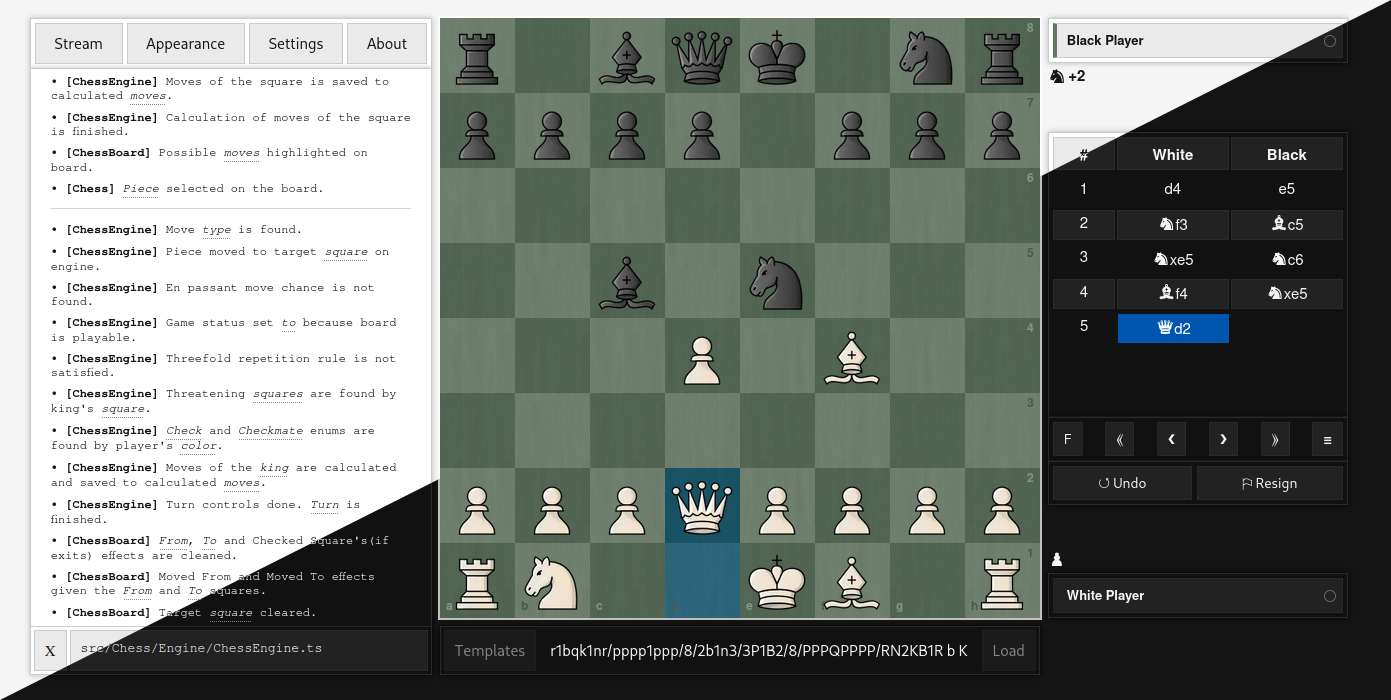
- Standard Mechanics:
- Move Calculation/Validation and special moves like Castling, Promotion, En Passant.
- Check, Checkmate, Stalemate, Threefold Repetition, Fifty-move Rule, Insufficient Material.
- Score Calculation, Fen Notation, Algebraic Notation.
- Time Control
- Extended Mechanics:
- Pre-Move for every type of move like normal, castling, en passant and promotion/promote (to any type of piece). Supports multiple pre-moves and can be canceled of course.
- Abort, Resign, Draw, Undo and Play again offers.
- Going back and forward in the move history.
- Board:
- Includes animations and sounds for normal moves and pre-moves. Can be flipped. Supports drag-and-drop on both desktop and mobile. Easily customizable and configurable.
- Game Modes:
- Play by Yourself: Play by yourself or against a friend on the same device.
- Play against Friend: Play against a friend on different devices by creating a lobby or joining an existing one.
- Play against Bot: Play against the Stockfish engine with adjustable difficulty levels.
- Components:
- Notation Table: Shows move history and provides navigation on it. Also, shows the scores, players, durations and provides actions according to the game mode like draw if it is multiplayer game or abort if it is solo game.
- Board Editor: Provides editable board for creating custom positions and starting games from them.
- Log Console: Shows the log of every operation and their details that are done
- Appearance Menu: Provides board and theme customization without changing the css file.
- Settings Menu: For changing the configurations of the board and components like closing sound effects or changing the notation style.
- Others:
- Responsive design for different devices.
- Light, Dark and System theme support.
- Cache system for saving the game, custom settings or appearance etc.
- Reconnection system for multiplayer games.
Check out ARCHITECTURE.md for more information about architecture and state diagrams.
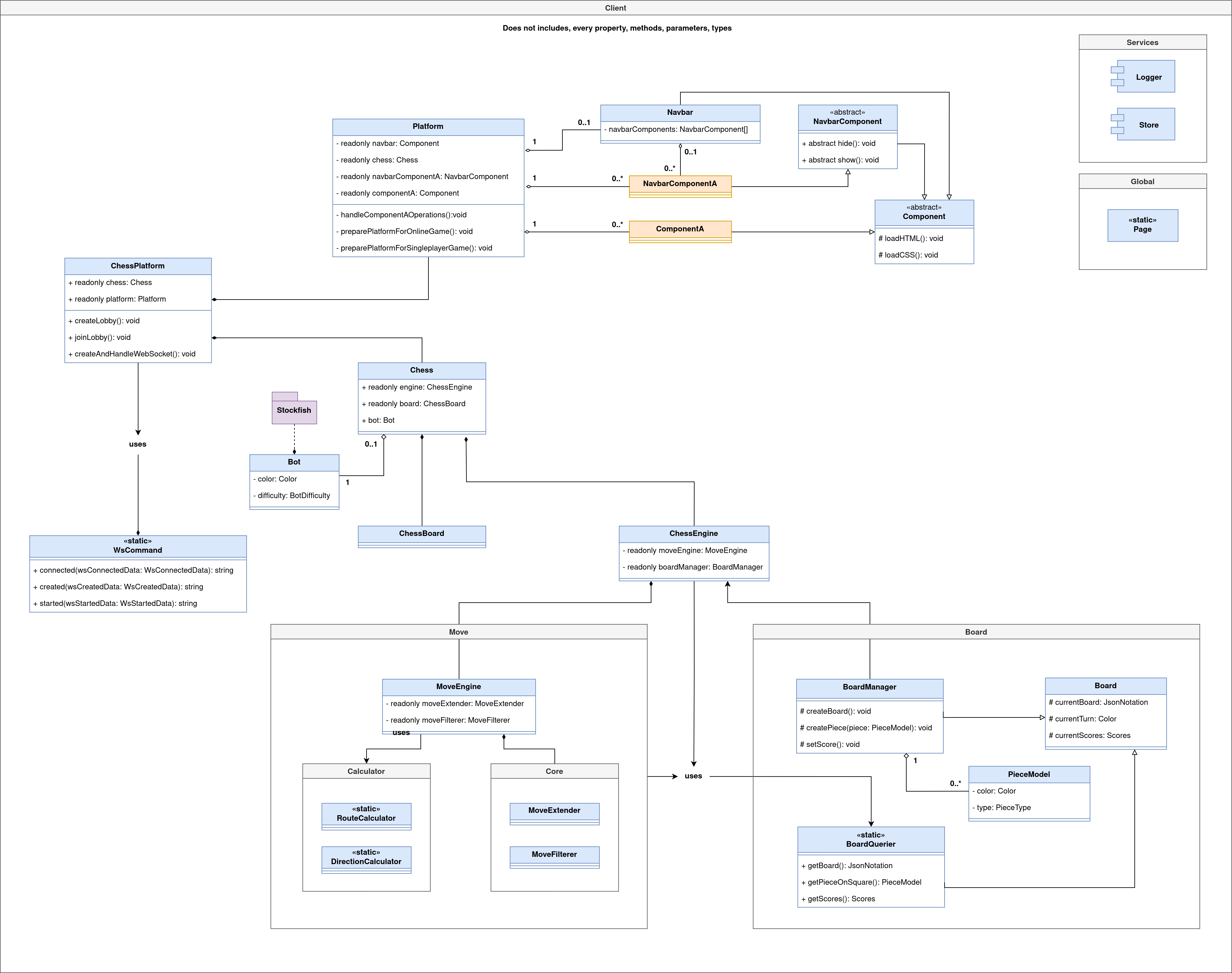
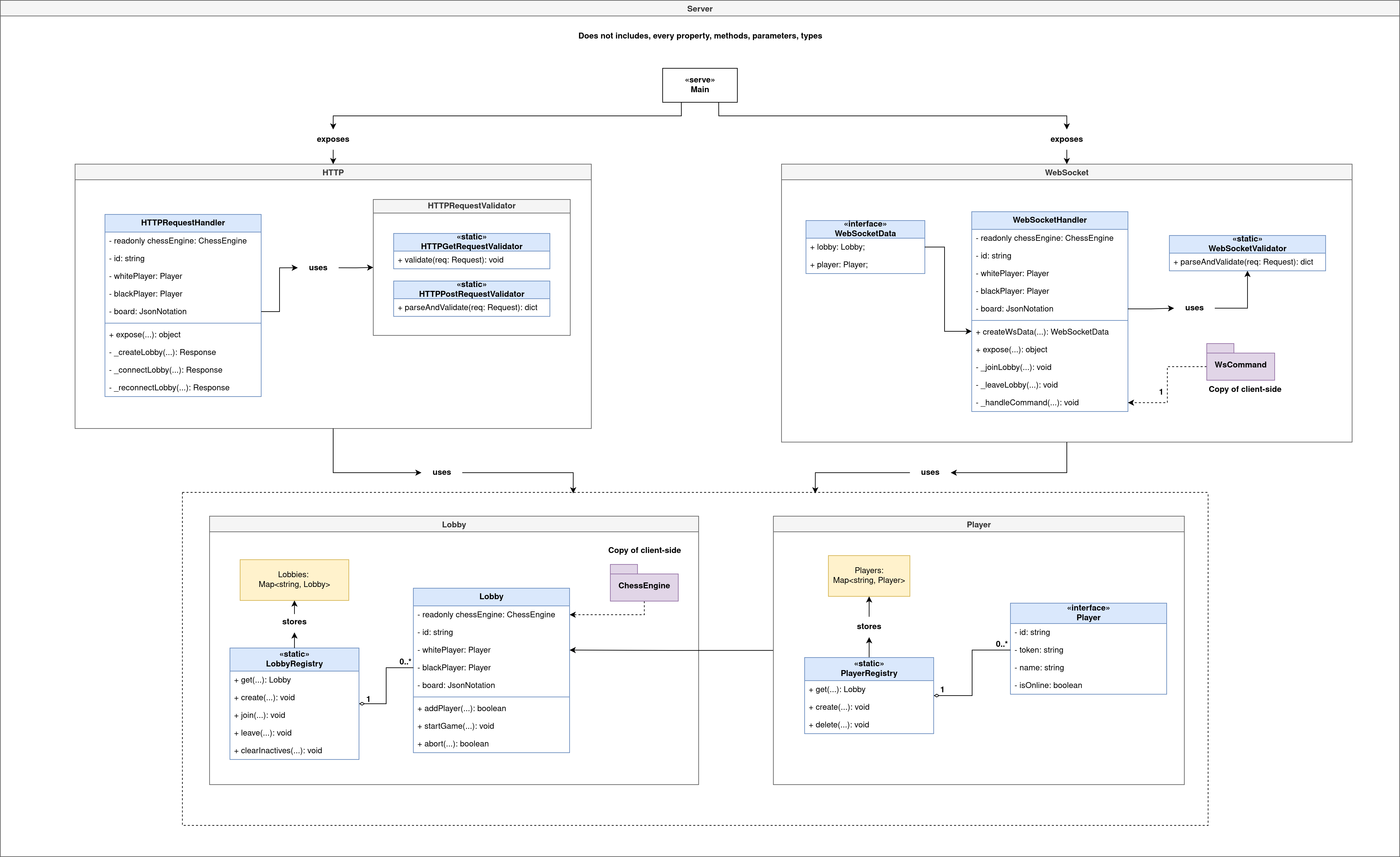
Check out INSTALLATION.md for more information about installation.
-
Clone the repository.
git clone https://github.com/bberkay/chess.git cd chess -
Set up environment variables.
cp server/.env.example server/.env
cp client/.env.example client/.env
cp server/.env.development.example server/.env.development
cp client/.env.development.example client/.env.development
-
Run with Docker Compose.
docker-compose up --build
-
Access the application
- Client: http://localhost:4173
- Server: http://localhost:3000
Check out USAGE.md for more information about usage and method list of classes.
<html>
  <head>
    <title>Chess Platform</title>
  </head>
  <body>
    <!-- Chess and Components -->
    <main>
      <div class="left">
        <div id="navbar"></div>
        <div id="log-console"></div>
        <div id="settings-menu"></div>
        <div id="appearance-menu"></div>
        <div id="about-menu"></div>
      </div>
      <div class="center">
        <div id="chessboard"></div>
        <div id="navigator-modal"></div>
        <div id="board-creator"></div>
      </div>
      <div class="right">
        <div id="notation-menu"></div>
        <div id="piece-creator"></div>
      </div>
    </main>

    <!-- Initiate Chess Platform -->
    <script type="module" async>
      import { ChessPlatform } from "./src/ChessPlatform";

      /**
       * If there is a game in cache, then platform
       * will load it. Otherwise, platform will create
       * a new standard game.
       */
      const chessPlatform = new ChessPlatform();
    </script>
  </body>
</html>
This is also current usage in index.html of the Live Demo.
Chess Platform is tested with Vitest. Both client and server tests can be found under their own dirs. Client tests mostly consist of engine tests, and there are no UI tests yet. I tried to make the server tests as comprehensive as possible.
Before running tests, make sure the environments are set up:
cp server/.env.test.example server/.env.test
cp client/.env.test.example client/.env.test
Run all tests with:
bun run test
Run a specific test:
bun test ./tests/castling.test.ts
Or a specific test case:
bun test ./tests/castling.test.ts -t="King Side Castling"
When I started this project, it was both to practice Javascript DOM and to test myself to see how I could write a chess algorithm. My main purpose was simply to write a board and a move engine that is as simple as possible, based entirely on functional programming, and contained within a single file. It was meant to be a project I could complete in 2-3 days/nights without needing much planning(and it did too).
However, some time after developing the project, I decided to switch from Javascript to TypeScript and from functional programming to OOP to practice TypeScript and OOP, as well as to add mechanics like playing online and against Stockfish, which I had been intending to implement.
But I had probably made the wrong decision, because the project's current infrastructure wasn't well-suited for implementing these features, and solving the resulting implementation issues made the project more complex than it should have been.
When I started the project, my goal was to practice, and I did. Maybe if I hadn't underestimated the project and had done the necessary planning from the start, I could have done even better, but perhaps the lack of planning worked out better because I encountered many problems and had to try and learn a lot of things to solve them.
At the end of the day, I feel that I improved my JavaScript/TypeScript skills, and no matter how big or small the project is, I have experienced the kinds of issues that can arise from not defining the requirements/goals and ignoring the need to make a plan accordingly.
If you have reviewed the project and noticed any areas that are missing, incorrect, or could be improved, please don't hesitate to reach out. Contact me, and thank you in advance for giving me the opportunity to improve myself