
A fast, lightweight, and user-friendly command-line tool written in Rust for creating and managing Minecraft servers.
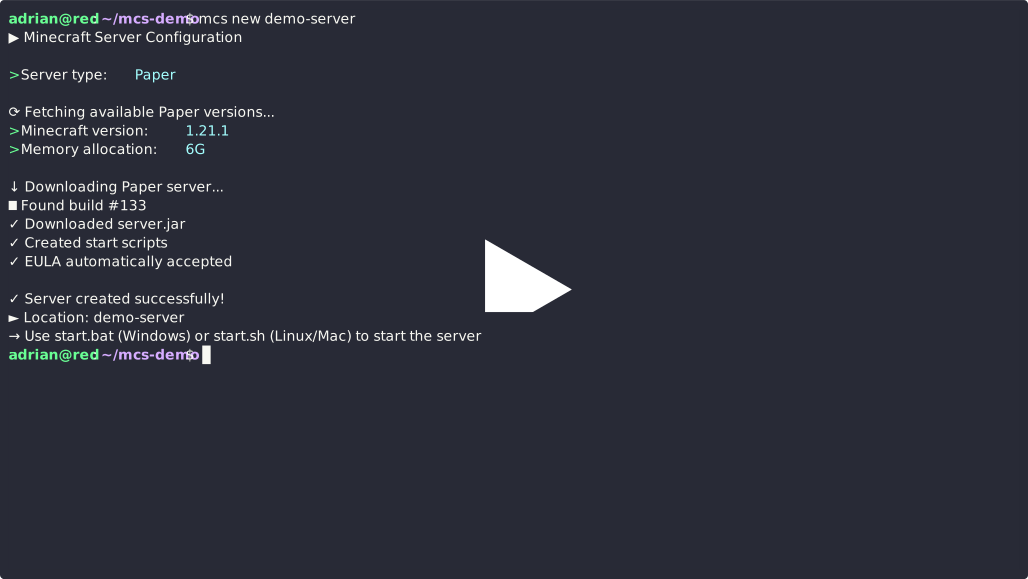
- Interactive server configuration with searchable version selection
- Automatic server JAR download from official sources
- Auto-generated start scripts for Windows and Linux/Mac
- Automatic EULA acceptance
- Configuration persistence via
mcs.toml - Supports Paper, Vanilla, Fabric, Spigot, and Forge servers
Download the latest release for your platform from the releases page:
- Windows:
mcs-windows-x86_64.exe - Linux:
mcs-linux-x86_64 - macOS (Intel):
mcs-macos-x86_64 - macOS (Apple Silicon):
mcs-macos-aarch64
- Download
mcs-windows-x86_64.exe - Rename it to
mcs.exe(optional) - Add it to your PATH or run it directly
- Download the appropriate binary for your system
- Make it executable:
chmod +x mcs-* - Move it to your PATH:
sudo mv mcs-* /usr/local/bin/mcs
git clone https://github.com/dxkyy/mcs
cd mcs
cargo install --path .Create a new Minecraft server in the specified directory:
mcs new ./my-serverThis will launch an interactive prompt asking you to configure:
- Server Type: e.g. Paper or Vanilla
- Minecraft Version: Select from all available versions using arrow keys or type to search
- Memory Allocation: Amount of RAM to allocate (e.g., 2G, 4G, 8G)
After configuration, the following files will be created:
server.jar- The Minecraft server executablestart.bat- Windows start scriptstart.sh- Linux/Mac start scripteula.txt- EULA file (automatically accepted)mcs.toml- Server configuration file
On Windows:
start.batOn Linux/Mac:
./start.shNavigate to your server directory and run:
cd my-server
mcs configure
This will prompt you to select new configuration options and re-download the server files accordingly.
If you manually edited the mcs.toml file, apply the changes with:
cd my-server
mcs apply
This will re-download the server files based on the updated configuration.
The mcs.toml file stores your server configuration:
version = "1.21.8"
memory = "2G"

[server_type]
Paper
You can manually edit this file and run mcs apply to update your server, or use mcs configure for an interactive reconfiguration.
- Paper - High-performance server with plugin support
- Vanilla - Official Minecraft server
- Fabric - Lightweight modding platform
- Spigot - Popular plugin-based server (requires Java, builds from source)
- Forge - Extensive modding platform (requires Java installer)
- Spigot: Downloads BuildTools and compiles the server on first setup. This process takes several minutes but only happens once per version. Requires Java to be installed and in PATH.
- Forge: Downloads and runs the Forge installer automatically. Requires Java to be installed and in PATH.
- Fabric & Paper: Quick setup with direct JAR downloads.
- Vanilla: Official Minecraft server from Mojang.
- Rust 1.70+ (for building from source)
- Java 21+ (for running Minecraft 1.21+)
- Java 17+ (for running Minecraft 1.18-1.20)
- Java 16+ (for running Minecraft 1.17)
Contributions are welcome! Feel free to submit issues or pull requests. Contributions would be really appreciated since I plan to keep improving this tool and expand this from just a personal project to something really awesome for the minecraft community :3
See ROADMAP.md for planned features and future versions.