




Available on JetBrains Marketplace: https://plugins.jetbrains.com/plugin/28675-spring-explyt
Explyt Spring Plugin supercharges your IntelliJ IDEA Community Edition with advanced Spring Framework features—usually only available in the Ultimate Edition. Develop Spring applications faster and smarter with enhanced tools for beans, configurations, endpoints, and more.
Plugin Status: The plugin is completely FREE for both non-commercial and commercial use.
👉 Visit the official Explyt website.
- Features
- Key Features
- Our Innovative Approach
- Built-in HTTP Client Using Swagger UI
- Two Ways to Test HTTP Requests
- Quarkus Support
- Spring Core and Boot Enhancements
- Spring Web Enhancements
- Spring Debugger
- Spring Data Support
- Spring AOP Enhancements
- Spring Initializr
- Docker Compose and Kubernetes
- Spring AI
- Additional Inspections and Features
- Tool Windows
- Inlay Hints & Code Vision
- Code Generation
- Advanced Features
- Performance
- Installation
- Usage
- Learn More
- Integrations
- Contributing
- Community and Support
- License
- Acknowledgments
- Accurate Bean Detection: Understand your Spring application with real bean data, even for complex configurations.
- Built-in HTTP Client: Test APIs using Swagger UI directly in your IDE.
- Advanced Inspections: Detect and fix issues in Spring configurations, beans, and annotations.
- Spring Boot & Web Support: Enhanced tools for Spring Boot, MVC, WebFlux, and more.
- Kotlin-Friendly: Full support for Kotlin Spring applications.
- Lightweight & Fast: Runs a lightweight version of your app for accurate insights without slowing down your IDE.
- Quarkus Support: CDI/DI navigation and inspections, JAX-RS web endpoints, AOP (interceptors/decorators), Endpoints tool window, and a Swagger UI–based HTTP client.
Explyt Spring Plugin uses a unique method to understand your Spring application thoroughly. Instead of analyzing only the source code, our plugin runs a lightweight version of your application to get accurate information about your Spring beans. This means:
Note: Behind the scenes, we use a javaagent and declarative bytecode patching to hook into Spring’s startup and extract bean metadata early, without fully starting the app. Read more:
-
Stop playing catch-up with Spring — Explyt Spring plugin for IDEA Community (EN)
-
Patching Spring bytecode to enhance application context recognition (EN)
-
Accurate Bean Detection: We can detect beans that are conditionally loaded or defined through complex configurations.
-
Better Inspections: By having real bean data, we reduce false warnings and provide more precise code inspections.
-
Improved Navigation and Completion: Navigate to beans and get code completion suggestions based on actual bean definitions.
This approach ensures that even if your application uses advanced Spring features like @Conditional, complex @ComponentScan configurations, or custom conditions, the plugin understands them correctly.
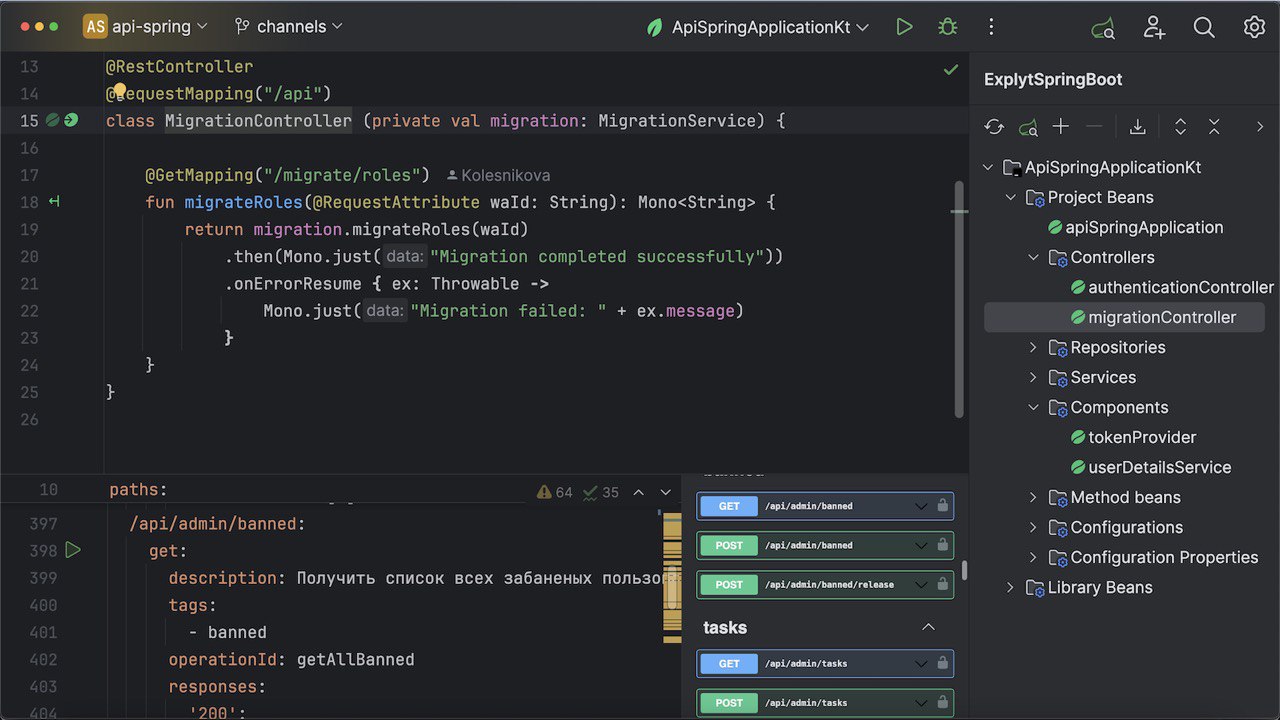
We are excited to introduce our built-in HTTP client for IntelliJ IDEA Community Edition, integrated directly into the Explyt Spring Plugin. This feature allows you to test and interact with HTTP APIs seamlessly within your IDE.
- No Custom DSL Needed: Use familiar Spring Web annotations to define HTTP requests instead of learning a new domain-specific language (DSL).
- Leverage Swagger UI: We utilize Swagger UI to provide a rich interface for executing and analyzing HTTP requests.
- Quick Setup: Write methods with Spring annotations, and the plugin generates OpenAPI specifications automatically.
- Familiar Tools: Benefit from well-known technologies like Spring Web, OpenAPI, and Swagger UI.
-
Define HTTP Methods Using Spring Annotations
Write methods in Java or Kotlin using standard Spring Web annotations to describe the HTTP requests you want to make.
@GetMapping("https://api.openweathermap.org/data/2.5/weather")
public String getWeather() {
    // Implementation is not important
}
-
Generate OpenAPI Specification
The plugin analyzes your annotated methods and generates an OpenAPI file representing the API definitions.
-
Launch Swagger UI in IntelliJ IDEA
With a simple click on the Run icon next to your method, the plugin opens Swagger UI inside the IDE using the generated OpenAPI file.
-
Execute HTTP Requests
Use Swagger UI to fill in parameters, execute the requests, and view the responses—all within the IDE.
- Simplifies API Testing: Quickly test external services or APIs without leaving your development environment.
- No Extra UI Development: By using Swagger UI, we avoid the need to create and maintain a custom user interface.
- Familiar Workflow: Developers comfortable with Spring and Swagger will find this approach intuitive.
-
Code Generators
- Spring Web Method from URL/cURL: Use the Generate menu (
Alt+Insert/⌘+N) to create a Spring Web annotated method. - HttpClient Method from URL/cURL: Generates a
java.net.http.HttpClientexample (Java 11+), useful outside of Spring. - Supports Java and Kotlin.
- Spring Web Method from URL/cURL: Use the Generate menu (
-
Supports OpenAPI Editing
- Edit OpenAPI Files: If needed, you can directly edit the generated OpenAPI files. The plugin provides code completion and validation support for OpenAPI specifications.
-
Handles Common Issues
- CORS Handling: We implemented a custom request handler to bypass CORS issues when making web requests from the embedded browser.
- Testing External APIs: Ideal for experimenting with third-party services like weather APIs, payment gateways, etc.
- Quick Prototyping: Easily create and test API calls during development without switching tools.
- Learning and Documentation: Helps new team members understand API interactions by providing a visual interface.
- Swagger UI Integration (recommended for Spring annotation workflows).
.http/.restFile Execution (ideal for users familiar with IntelliJ HTTP Client or HttpYac).
Choose the method that best fits your workflow!
Explyt Spring Plugin now brings first-class Quarkus support to IntelliJ IDEA Community Edition out of the box.
- Dependency Injection (CDI):
- Detect and navigate injections via @Inject, qualifiers, scopes.
- Supports producers (@Produces) on fields and methods with navigation both ways.
- AOP:
- Interceptors and decorators with gutter markers and navigation to/from advised targets.
- Web (JAX-RS):
- Endpoints tool window for REST resources, navigation to handlers, duplicate-path checks.
- Swagger UI–based HTTP client for methods with absolute Path URLs; OpenAPI generation and execution inside the IDE.
- Works by static code analysis, so most features are available just by opening a Quarkus project—no app run required.
If you see issues or edge cases, please open an issue in GitHub.
-
Advanced Inspections and Quick Fixes:
- Property Key Validations: Detects unused properties, duplicate keys, and keys that don't follow the kebab-case convention.
- Configuration Properties Support: Navigate, complete, and validate
@ConfigurationPropertiesclasses.- Nullable Parameters Check: Warns if constructor parameters in
@ConfigurationPropertiesclasses are not nullable. - Invalid Prefix Detection: Finds empty, duplicate, or incorrectly formatted prefixes in
@ConfigurationProperties. - Configuration Verification: Ensures
@ConfigurationPropertiesclasses are correctly registered with Spring. - Quick-Fix Improvements: Smarter suggestions and corrections for common configuration property mistakes (see changelog for demo videos).
- Nullable Parameters Check: Warns if constructor parameters in
- Bean Autowiring Checks:
- Reports if no beans are found for autowiring.
- Alerts if multiple candidate beans cause ambiguity.
- Checks for invalid use of
@Autowiredannotations.
- Proxy Method Usage Inspection: Warns about incorrect use of proxy methods when
proxyBeanMethodsis set to false. - Resource Reference Validation: Validates file and classpath resource references in annotations like
@Value. - AOP Method Call Inspection: Alerts if AOP-advised methods are called within the same class, which may not work as expected.
- Meta-Annotation Checks: Ensures custom annotations used as meta-annotations have the correct settings.
-
Code Completion and Navigation:
- Property Files: Enhanced suggestions for properties, including relaxed binding and nested properties.
- Annotation Attributes: Completion and navigation for package names in annotations like
@ComponentScan. - Bean Methods: Navigate from bean usage to their definitions, even across different configuration classes.
- Query Languages: JPQL plus basic SQL DML out of the box (no external plugin). Works in
JdbcTemplate,@Query(nativeQuery = true),@NamedNativeQuery, and inline strings;JdbcClientparameter inspections and navigation.
-
Line Markers and Gutter Icons:
- Visual markers for beans, configurations, and
@Scheduledmethods. - Easily navigate between bean definitions and their usages.
- Visual markers for beans, configurations, and
-
Other Enhancements:
- XML configuration support when using native context mode (no extra setup required).
- @Profile inlay hints: shows the computed result of Spring profile expressions inline.
- @Scheduled cron completion + hints (including
zoneattribute support). - Multi-context support: works with Spring apps that create multiple
ApplicationContexts. - Library beans DI support: autowiring/inspections/navigation also consider beans coming from dependencies.
- SPI bean navigation and line markers for SPI-produced beans.
- Search Everywhere integration: quickly find beans by name in a dedicated Beans tab (
ShiftShift). - Mark directory as Spring Application Property Folder to enable completion/validation in non-standard config locations.
- One-click converter between
.propertiesand.ymlSpring configuration files.
-
Endpoints Tool Window: Access all your Spring MVC, WebFlux, and message broker endpoints in one place. View, navigate, and analyze your controllers, router functions, and messaging listeners (e.g.
@KafkaListener,@RabbitListener). -
Inspections and Quick Fixes:
- Duplicate Endpoint Detection: Warns about duplicate
@RequestMappingpaths. - Controller Method Checks: Finds missing
@PathVariables, unsupported method signatures, and more. - OpenAPI Specification Support:
- Validates OpenAPI files (JSON and YAML).
- Provides navigation and completion for
$refreferences. - Checks OpenAPI version compatibility.
- Duplicate Endpoint Detection: Warns about duplicate
-
Code Completion and Navigation:
- WebClient and WebTestClient: Enhanced suggestions for methods, including parameters and URI templates.
- Router Functions: Support for
RouterFunctionsand KotlincoRouter. - MockMvc Integration: Improved handling of multipart requests and parameter checks.
-
Line Markers and Gutter Icons:
- Visual indicators for controller methods and router functions.
- Navigate between HTTP requests and their handling methods.
-
Execute HTTP Requests via
.httpor.restFiles
Explyt Spring Plugin now supports .http and .rest files with seamless integration for both:
- JetBrains HttpClient CLI
- HttpYac (open-source alternative)
Key Features:
- Run Line Markers: Click the
▶️ Run icon next to request sections in.http/.restfiles to execute them using your configured runner. - Minimal Setup: No complex configuration needed—just choose your preferred runner.
- Flexible Execution: Works with both JetBrains’ HttpClient (Ultimate) and HttpYac.
Example:
### Get a sample
GET https://httpbin.org/anything
Accept: application/json
Click the
-
JetBrains HttpClient CLI (Recommended for Community Edition):
- Go to Settings > Tools > Explyt Spring.
- Click Download HttpClient CLI – the plugin handles installation and path configuration automatically.
- Done! The CLI is now ready to execute
.http/.restfiles.
-
HttpYac (Alternative):
- Install globally via npm:
npm install -g httpyac
- Ensure
httpyacis in your system PATH. - Setup in Settings > Tools > Explyt Spring runner executable path
httpyac
- Install globally via npm:
To switch runners, go to Settings > Tools > Explyt Spring and select your preferred tool.
- Swagger UI integration using Spring annotations (Run icon on endpoints) – details: HTTP client via annotations and Swagger UI
- Execute
.http/.restfiles via HttpYac or JetBrains HttpClient – details: HTTP client via HttpYac and JetBrains HttpClient
- Remote Debugger: attach to a running JVM (started with JDWP) and the Explyt javaagent; full support for breakpoints, runtime PropertySource resolution, BeanDefinition view, transaction info, and auto Web URL detection. Agent source · agent JAR
- Runtime property value Code Vision in
.properties/.ymlduring Explyt debug sessions: shows the actual runtime value and helps locate thePropertySourcethat provided it. - Debug Spring applications with the Explyt Spring Debugger run configuration.
- Automatically patches build/run to attach a lightweight javaagent and reverts Gradle configuration after debug.
- Dedicated nodes and improved presentation in the debugger tree for Spring beans, including Explyt: Spring Context and Active Transaction variables.
- Evaluate Spring context directly in the debugger via
Explyt.contextand helpers (getBeanFactory(),getEnvironment()); call any bean methods at breakpoints. - Inline run markers on Spring Data repository methods during debug to auto‑populate Evaluate Expression and run queries.
- Inactive beans are visually indicated during debug to highlight context membership.
- Compatible with IntelliJ IDEA 2024.1 / 2024.2 (builds 241 / 242) via legacy debug mode (demo video).
- Learn more about Explyt Spring Debugger
- Repository Method Name Validation: Ensures your repository methods follow naming conventions and match actual entity properties.
- Return Type and Parameter Checks: Validates that repository methods have correct return types and parameters that match the query.
- Language Injection: Offers JPQL and SQL syntax support within repository query methods.
- Bean Recognition: Detects Spring Data repositories as beans, helping with navigation and autowiring checks.
- Repository Method Autocomplete: Suggests method names based on entity properties and common Spring Data keywords, for example:
- Prefixes:
findBy,readBy,getBy,queryBy,countBy,existsBy,deleteBy/removeBy - Operators:
And,Or,Between,LessThan,GreaterThan,Like,Containing,In,IsNull,IsNotNull,True,False,IgnoreCase - Sorting/limits:
OrderBy...Asc/Desc,Top/First,Distinct
- Prefixes:
- Generate equals/hashCode for JPA entities (Code → Generate): follows the commonly recommended Hibernate approach:
equals()isfinal, checks type, and compares a non-null@IdhashCode()isfinaland based on the entity class (stable for proxies)
- Spring Data 4.0 AOT Navigation: Jump from repository methods to AOT-generated artifacts and back, to better understand what Spring Data executes at runtime.
- AOP Method Call Inspection: Warns when methods with annotations like
@Transactionalor@Asyncare called from within the same class. - Line Markers: Visual markers for aspects, pointcuts, and advice methods, making navigation easier.
- Create new Spring projects directly from the IDE with enhanced error reporting and compatibility fixes.
- Works in Community Edition; supports Kotlin and Java templates.
- Completion for Spring properties as environment variables in
docker-compose.ymlunderenvironment:. - Completion for Spring properties in Kubernetes manifests (e.g.
k8s.yml) underenv.name:. - Converts property keys to
ENVIRONMENT_VARIABLE_FORM(e.g.server.port→SERVER_PORT). - Go to declaration for property keys to jump into
application.properties/application.yml.
- Optional integration with the Explyt AI platform to assist with Spring tasks inside the IDE.
- The AI agent can read/modify project files, explore code, run non-destructive terminal commands, and analyze compilation errors.
- Works with OpenAI‑compatible providers and can be configured to use local or cloud models.
- Requires IntelliJ Platform at least 2025.1 (251+) for AI integrations.
- Overview of Explyt AI and integrated agents.
- New: AI-augmented Spring actions — details in our article Neural Networks in Spring Development: Eliminating Routine, Not Intelligence (RU)
- Convert DB schema to JPA Entity: Right-click Liquibase/Flyway/SQL file → Explyt Spring AI Actions → Convert Liquibase/Flyway File to Entity.
- Entity ↔ DTO conversion: Right-click entity/DTO → Explyt AI Actions → Convert Entity to DTO (and reverse). Supports multiple files, field exclusions, and validation annotations.
- Controller ↔ OpenAPI round-trip: Convert Spring RestController to OpenAPI, and generate controllers from OpenAPI for integrations.
- Generate Spring configs: Boilerplate Kafka and Security configurations via AI for Spring Boot projects (intended as a starting point).
- HTTP format conversions: Convert curl/Postman collections to RFC 7230 .http/.rest files supported by our HTTP client runners.
- Properties ↔ YAML: Convert Spring configuration between properties and YAML formats.
-
Kotlin Support:
- Handles Spring-specific features in Kotlin code, such as
internalmodifier usages and constructor validations. - Warns against using
objectcomponents as Spring beans. - Alerts when internal bean methods need explicit bean names.
- Handles Spring-specific features in Kotlin code, such as
-
Configuration Metadata Support:
- Completion and validation in
additional-spring-configuration-metadata.json. - Schema support for additional configuration metadata files.
- Completion and validation in
-
Profile Validation:
- Checks
@Profileannotations for errors, empty profiles, and misuse of operators.
- Checks
-
Async Method Return Type Inspection:
- Ensures methods annotated with
@Asynchave valid return types (voidorFutureinheritors).
- Ensures methods annotated with
-
Cache Annotation Inspection:
- Reports incorrect usage of cache annotations on interfaces and suggests using them on classes or methods instead.
-
Dependency Analyzer:
- Analyze bean dependencies and navigate through their relationships.
- Helps understand complex bean interactions and resolve issues.
-
Experimental Scala Support:
- Allows you to create and develop projects using Scala.
The Explyt Spring tool window is the central place for working with Spring beans and application contexts. It is also the entry point for native context mode (loading real bean metadata via a lightweight app run).
- Open it from the right sidebar: Explyt Spring.
- Link your Spring Boot run configuration: Link Explyt Spring Boot Project From RunConfiguration.
- Load/refresh beans: use Load Beans / Refresh on the toolbar.
- Bean Analyzer: open the Dependency Analyzer view for your loaded context (toolbar action labeled Bean Analyzer).
- Aspects: Spring AOP aspects are shown as dedicated nodes in the tree (since
253.30.53).
Video: How Native Context Mode works in Explyt Spring panel
The Explyt Endpoints tool window provides a single view for:
- Spring MVC / WebFlux endpoints
- Router functions
- Spring Messaging listeners (Kafka, RabbitMQ, etc.)
You can filter endpoints, navigate to handlers, and quickly jump between related endpoints.

Video: How Explyt Endpoints Tool Window works
The plugin adds inline hints that show the computed result of Spring @Profile expressions.
Example:
@Profile("production & !cloud") // : true
class ProdOnlyBean {}
Enable/disable: Settings | Editor | Inlay Hints | Annotations | Annotation profile hints.
When you debug a Spring app with Explyt debug enabled, Explyt shows Code Vision entries in .properties and .yml files:
- the actual runtime value of a key (when it differs from the file value)
- a shortcut to locate the
PropertySourcethat provided it
The lens name is: Explyt: property runtime value.
- Completion/validation for Spring cron expressions in
@Scheduled. - Human-readable hints for cron values.
- Supports the
zoneattribute (since252.25.15).
All generators are available from Code | Generate (Alt+Ins / Cmd+N):
- Spring Web Method from URL/cURL: generates a Spring Web annotated method (Java/Kotlin).
- HttpClient Method from URL/cURL: generates a
java.net.http.HttpClientexample (Java/Kotlin). - JPA equals/hashCode: generates methods for Java entities following best practices.
- Generate OpenAPI specification for a project.
- Properties ↔ YAML conversion (Editor popup menu): convert Spring config between
.propertiesand.yml.
Press Shift twice to open Search Everywhere and use the dedicated Beans tab to navigate to any Spring bean by name.
If your project stores configuration in non-standard locations, you can opt in those directories:
- Project View → right-click a directory → Mark Directory as → Spring Application Property Folder
This enables Spring property completion/validation inside that folder.
Open Explyt Spring tool window → click Bean Analyzer to visualize relationships between loaded beans and navigate to their declarations.
If your application creates multiple Spring contexts, Explyt tracks them separately and keeps inspections/navigation context-aware (since 252.29.43).
Inspections and autowiring resolution also consider beans coming from project dependencies, not only the project sources.
Navigation and gutter markers are available for beans produced via Java SPI (ServiceLoader).
- Static analysis vs Native context mode:
- Static analysis works immediately after opening a project (good for quick feedback and Quarkus support).
- Native context mode provides the most accurate Spring bean model (conditional beans, profiles, factory beans), but requires a compile + lightweight run.
- When to use Load Beans:
- Use it when you want the highest quality autowiring checks, bean navigation, and tool window data.
- For large projects, keep only the necessary run configurations linked to minimize background work.
- Large project tips:
- Use Detach All Spring Boot Projects when you temporarily don’t need native context data.
- Prefer Refresh over re-linking whenever possible.
- Open IntelliJ IDEA → Settings → Plugins → Marketplace, search for "Spring Explyt" and click Install.
- Or install from the web: https://plugins.jetbrains.com/plugin/28675-spring-explyt

- Open IntelliJ IDEA and go to Settings > Plugins.
- Click the ⚙️ icon and select Manage Plugin Repositories.
- Add the Explyt repository: https://repository.explyt.dev/.
- Search for Explyt Spring Plugin in Marketplace tab and click Install.

- Restart the IDE.
(Note: In this case, you will not receive automatic updates.)
- Download the plugin from the Releases Page.
- Go to Settings > Plugins > ⚙️ > Install Plugin from Disk.
- Select the downloaded
.zipfile and restart the IDE.
For additional details, go to Installation Guide.
Useful links: Changelog · Plugin description
- Open Tool Windows → Explyt Spring and Explyt Endpoints.
- Link your Spring Boot run configuration via Link Explyt Spring Boot Project From RunConfiguration.
- Click Load Beans to populate the bean tree.
- Optional: enable Spring Debug and start a debug session to get runtime property Code Vision in config files.
- Optional: configure
.http/.restrunners in Settings | Tools | Explyt Spring.
- No beans / autowiring looks incomplete: run Load Beans in the Explyt Spring tool window to build the native model.
- Sync failed due to build errors: build the project first (Build → Build Project) and try syncing/loading again.
- Older Spring Boot versions (< 2.4): you can try enabling the registry key
explyt.spring.native.old.
-
Explyt Spring tool window (beans & context)
Open the Explyt Spring tool window (right sidebar). Link a Spring Boot run configuration via Link Explyt Spring Boot Project From RunConfiguration, then click Load Beans / Refresh.
Tip: click Bean Analyzer to open the Dependency Analyzer view for the current context.
-
Explyt Endpoints tool window
Open Explyt Endpoints to browse and navigate Spring MVC/WebFlux endpoints and message broker listeners.
-
Built-in HTTP Client with Swagger UI
-
Create HTTP Methods Using Spring Annotations
Write methods in Java or Kotlin using Spring Web annotations to define HTTP requests. These methods can be placed in any class.
@GetMapping("https://api.openweathermap.org/data/2.5/weather")
public void getWeather() {
    // Implementation is not necessary
}
-
Run HTTP Requests
A Run icon will appear next to methods with absolute URLs. Clicking this icon opens Swagger UI within IntelliJ IDEA.
-
Use Swagger UI
- Fill in parameters and execute the HTTP request directly from the Swagger UI interface.
- View the response, headers, and other details.
- Copy the cURL command generated by Swagger UI for use elsewhere if needed.
-
Edit OpenAPI Files
- Switch to the OpenAPI definition if you need to make manual adjustments.
- The plugin provides code completion and validation for OpenAPI files.
-
Generate methods from URL/cURL
- Use the Generate menu (
Alt+Ins) inside a Java class or Kotlin file. - Choose Spring Web Method to generate Spring Web annotated methods.
- Choose HttpClient Method to generate a standalone
java.net.http.HttpClientexample.
- Use the Generate menu (
-
-
Inspections and Quick Fixes
The plugin automatically detects potential issues in your Spring application. Use
Alt+Enterwhen an issue is highlighted to see quick fixes. -
Code Completion and Navigation
Enjoy improved code completion throughout your Spring application, including in properties files and annotations. Navigate easily between beans, configurations, and endpoints.
-
Line Markers and Gutter Icons
Visual markers appear in the gutter to help you identify Spring components, endpoints, scheduled tasks, and more. Click these icons to navigate directly to related code.
-
Bean Analyzer (Dependency Analyzer)
Open Explyt Spring tool window and click Bean Analyzer to explore the loaded bean graph and navigate between related components.
-
Beans in Search Everywhere
Press
Shifttwice → open the Beans tab to navigate to any bean by name. -
Mark directory as Spring Application Property Folder
Project View → right-click a directory → Mark Directory as → Spring Application Property Folder.
-
Inlay Hints & Code Vision
Use inline hints for
@Profileexpressions and runtime property value Code Vision during debug (see sections above). -
Kotlin Support
Take advantage of specialized features and inspections designed for Kotlin Spring applications.
-
Execute
.httpor.restFiles with JetBrains HttpClient- Create a
.httpfile:- Right-click your project > New > File
- Name it with extension
.http
- Write requests:
### Get weather data
GET https://api.openweathermap.org/data/2.5/weather?q=London
Accept: application/json
- Run requests:
- Click the
▶️ Run icon next to a request section. - View responses directly in the IDE’s Run Tool Window.
- Click the
- Create a
For a detailed overview of the plugin's features and how it can improve your development experience, check out our articles:
- Explyt Spring Release: SQL, Docker-Compose, Debugger (RU) — overview SQL DML, Docker Compose completions, and Remote Debugger.
- Neural Networks in Spring Development: Eliminating Routine, Not Intelligence (RU)
- Explyt AI Platform and integrated agents (RU)
- Explyt Spring Plugin: Quarkus support (RU)
- Explyt Spring Debugger (RU)
- Explyt Spring plugin: *.http files support in IntelliJ IDEA Community (RU)
- Explyt Spring Plugin — our take on the HTTP client for IntelliJ IDEA (RU)
- Patching Spring bytecode to enhance application context recognition (EN) — deep dive into our javaagent and declarative bytecode patching.
- Stop playing catch-up with Spring — Explyt Spring plugin for IDEA Community (EN) — background and approach to using native Spring logic for accurate context.
The articles include explanations, screenshots, and examples showing how the Explyt Spring Plugin can boost your productivity.
- Lombok support for Java projects
- JSR-330 annotations (jakarta.inject / javax.inject)
- JAX-RS annotations (jakarta.ws.rs / javax.ws.rs)
- Retrofit and OpenFeign annotations
- JPA/JPQL support (query language inspections and highlighting)
- Spring Security, Spring Cloud, Spring Integration, Spring Messaging modules
- Quarkus support: CDI, JAX-RS, interceptors, decorators, Endpoints tool window, Swagger UI–based HTTP client
- IntelliJ IDEA Ultimate: if you use Ultimate, disable the built‑in Spring plugin to avoid conflicts.
We welcome contributions! If you'd like to contribute to this project, please follow these steps:
-
Fork the Repository
Click the Fork button at the top of the GitHub repository page to create your own copy.
-
Clone Your Fork
git clone https://github.com/your-username/spring-plugin.git
-
Create a Feature Branch
git checkout -b feature/your-feature-name
-
Make Changes
Implement your feature or fix a bug.
-
Commit and Push
git add .
git commit -m "Description of your changes"
git push origin feature/your-feature-name
-
Create a Pull Request
Open a pull request against the
mainbranch of the original repository.
Thank you for helping us make Explyt Spring Plugin better! ⭐
- GitHub Issues: Found a bug or have a feature request? Open an issue.
- Telegram: Join our Telegram channel for real-time support and discussions.
- Contributing: Want to contribute? Check out our Contributing Guide.
Explyt Spring Plugin is free for both commercial and non-commercial use. However, redistribution or modification of the plugin is not allowed without explicit permission. For details, see the Explyt License.
And if you want to utilise the source code of the plugin, you must read and accept our Explyt Source License.
- Inspiration: Created to enhance Spring development in the IntelliJ IDEA Community Edition.
- Contributors: Thank you to all contributors who have helped improve this plugin. Your efforts are greatly appreciated.
For more information, issues, or to contribute, please visit the GitHub repository.
Made with ❤️ by the Explyt Team.