Memory Management
To create a hierarchy of FObjects (or derived classes/widgets), a new FObject has to be initialized with its parent object.
FObject* parent = new FObject();
FObject* child  = new FObject(parent);
When the used memory of a parent FObject gets deallocated, the allocated memory of its child objects will also be deallocated automatically.
An object can also be assigned to another object later via addChild().
FObject* parent = new FObject();
FObject* child = new FObject();
parent->addChild(child);
The child object assignment can be removed at any time with
delChild().
FObject* parent = new FObject();
FObject* child  = new FObject(parent);
parent->delChild(child);
If an FObject with a parent gets removed from the hierarchy, the destructor automatically deletes the object assignment from its parent object. If a class object doesn't derive from FObject, you have to implement storage deallocation yourself.
File: memory.cpp
#include <final/final.h>

using namespace finalcut;

auto main (int argc, char* argv[]) -> int
{
  FApplication app(argc, argv);

  // The object dialog is managed by app
  FDialog* dialog = new FDialog(&app);
  dialog->setText ("Window Title");
  dialog->setGeometry (FPoint{25, 5}, FSize{40, 8});

  // The object input is managed by dialog
  FLineEdit* input = new FLineEdit("predefined text", dialog);
  input->setGeometry(FPoint{8, 2}, FSize{29, 1});
  input->setLabelText (L"&Input");

  // The object label is managed by dialog
  FLabel* label = new FLabel ( "Lorem ipsum dolor sit amet, consectetur "
                               "adipiscing elit, sed do eiusmod tempor "
                               "incididunt ut labore et dolore magna aliqua."
                             , dialog );
  label->setGeometry (FPoint{2, 4}, FSize{36, 1});
  FWidget::setMainWidget(dialog);
  dialog->show();
  return app.exec();
}
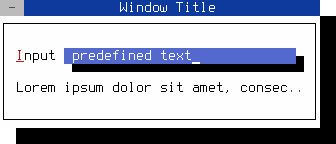
Figure 4. FObject manages its child objects
Note
You can close the dialog with the mouse, Shift+F10 or Ctrl+^
After entering the source code in memory.cpp you can compile the above program with gcc:
g++ memory.cpp -o memory -O2 -lfinal