


The Godot In-app Review Plugin lets you trigger native in‑app review prompts on Android (Google Play Store) and iOS (Apple App Store) using a single, unified GDScript API. This allows players to leave ratings and reviews without ever leaving your game, following each platform’s official guidelines.
Features
- Native in‑app review flow for Google Play (Android)
- Native in‑app review flow for Apple App Store (iOS)
- Unified, platform‑agnostic GDScript interface
Try the demo app located in the demo directory.
Important: Uninstall any previous versions of the plugin before installing a new one. If you are targeting both Android and iOS, make sure the addon interface version matches for both platforms.
- Open the Godot AssetLib and search for
In-app Review - Click Download → Install
- Install to the project root with Ignore asset root enabled
- Enable the plugin via Project → Project Settings → Plugins
- For iOS, also enable the plugin in the export settings
- If installing both Android and iOS versions, you may safely ignore file conflict warnings for shared GDScript interface files
- Download the latest release from GitHub
- Extract the archive into your project root
- Enable the plugin via Project → Project Settings → Plugins
- For iOS, also enable the plugin in the export settings
-
Add an
InappReviewnode to your scene. -
Connect to the relevant signals emitted by the
InappReviewnode. -
Call
generate_review_info()to prepare the review flow. -
When the
review_info_generatedsignal is emitted, calllaunch_review_flow().- Depending on the platform, either the Google Play or App Store review dialog will be shown.
- The dialog may not appear if the review flow was triggered recently (this is controlled by the platform, not the plugin).
-
Resume normal app behavior once the
review_flow_launchedsignal is emitted.
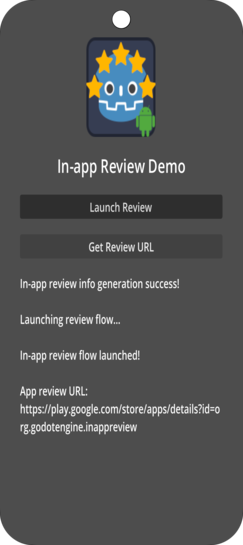
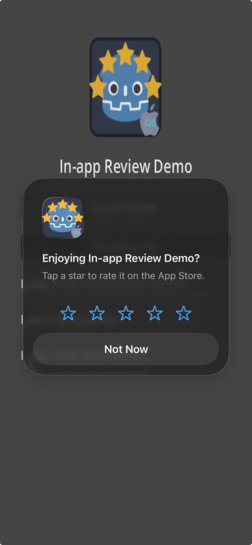
The demo project exists solely to demonstrate usage and provide sample code. Because the demo app is not registered on the Google Play Store or Apple App Store, the actual in‑app review dialog will not be displayed when running the demo.
review_info_generated— Emitted when review information is successfully generated.review_info_generation_failed— Emitted when review information generation fails.review_flow_launched— Emitted when the review flow is successfully launched.review_flow_launch_failed— Emitted when the review flow fails to launch.app_review_url_ready(url: String)— Emitted when a store review URL has been successfully generated.get_app_review_url_failed— Emitted when generating the store review URL fails.
generate_review_info()— Prepares and fetches the data required to start the in‑app review flow.launch_review_flow()— Launches the native review dialog using the previously generated review info.get_app_review_url()— Asynchronously generates a platform‑specific store review URL.
- Build: Create custom Android gradle build.
- Registration: App must be registered with the Google Play Store.
- Troubleshooting:
- Logs:
adb logcat | grep 'godot'(Linux),adb.exe logcat | select-string "godot"(Windows) - No review dialog shown: Check Google Play quotas
- Logs:
- Registration: App must be registered with the App Store.
- Troubleshooting:
- View XCode logs while running the game for troubleshooting.
- See Godot iOS Export Troubleshooting.
- Export settings: Plugin must be enabled also in the export settings.
| Plugin | Android | iOS | Free | Open Source | License |
|---|---|---|---|---|---|
| Admob | ✅ | ✅ | ✅ | ✅ | MIT |
| Notification Scheduler | ✅ | ✅ | ✅ | ✅ | MIT |
| Deeplink | ✅ | ✅ | ✅ | ✅ | MIT |
| Share | ✅ | ✅ | ✅ | ✅ | MIT |
| In-App Review | ✅ | ✅ | ✅ | ✅ | MIT |
| Native Camera | ✅ | ✅ | ✅ | ✅ | MIT |
| Connection State | ✅ | ✅ | ✅ | ✅ | MIT |
| OAuth 2.0 | ✅ | ✅ | ✅ | ✅ | MIT |
| QR | ✅ | ✅ | ✅ | ✅ | MIT |
Google Play Reviews with the In-app Review Plugin -- by Code Artist
Developed by Cengiz
Based on Godot Mobile Plugin Template
Original repository: Godot In-app Review Plugin