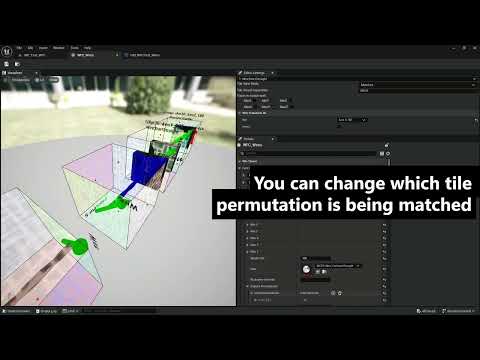
An extension to my WFCpp library to integrate its Tiled3D module with Unreal Engine 5.
This allows you to quickly generate a grid of tiles from some 3D tileset,
including automatic rotations and inversions of your tiles with partly-automated detection of symmetries.
The core WFCpp library is in a git submodule, in the folder "Core". This repo should live as a folder named "WFCpp2" inside your unreal project's "Plugins" folder.
This plugin adds USTRUCT, UENUM, and UCLASS types which wrap the plain C++ types of the core WFC library.
You can usually Unwrap them to get the original, by calling auto libraryData = unrealData.Unwrap().
Unwrapping a whole UWfcTileset is not a cheap operation, so try not to do it every frame
(or at least own and re-use a single UWfcTileset::Unwrapped instance).
This plugin adds a new kind of asset, a Wfc Tileset, with a custom 3D editor to help you define the tiles. The editor provides a lot of helpful view options to visualize each tile as you're configuring it.
First you need to define the "face prototypes" of your tileset. These are the kinds of faces that tiles can have. Each face prototype can only match up with other instances of itself.
Next, add each tile to the tileset and assign a face prototype to each of its faces.
Each tile may have an associated UObject, such as an Actor or Static Mesh.
The 3D editor has built-in logic to visualize Static Mesh tile data,
but for other cases you are encouraged to register your own visualizer
by calling WfcTileVisualizer::RegisterVisualizer(), from the module WFCpp2UnrealEditor.
It's best to do this registration on startup of your own editor-only module.
Your visualization logic should make use of the plugin's utilities in WfcEditorScenes/EditorSceneComponents.h.
Finally, at runtime you can create a UWfcGenerator (available in both C++ and Blueprints).
Initialize it by calling g.Start() and update it with if (g.IsRunning()) g.Tick();.
The generator class offers all sorts of queries on its status and the grid it's generating into.
MIT license; go crazy.
Copyright 2017-2025 William A. Manning
Permission is hereby granted, free of charge, to any person obtaining a copy of this software and associated documentation files (the "Software"), to deal in the Software without restriction, including without limitation the rights to use, copy, modify, merge, publish, distribute, sublicense, and/or sell copies of the Software, and to permit persons to whom the Software is furnished to do so, subject to the following conditions:
The above copyright notice and this permission notice shall be included in all copies or substantial portions of the Software.
THE SOFTWARE IS PROVIDED "AS IS", WITHOUT WARRANTY OF ANY KIND, EXPRESS OR IMPLIED, INCLUDING BUT NOT LIMITED TO THE WARRANTIES OF MERCHANTABILITY, FITNESS FOR A PARTICULAR PURPOSE AND NONINFRINGEMENT. IN NO EVENT SHALL THE AUTHORS OR COPYRIGHT HOLDERS BE LIABLE FOR ANY CLAIM, DAMAGES OR OTHER LIABILITY, WHETHER IN AN ACTION OF CONTRACT, TORT OR OTHERWISE, ARISING FROM, OUT OF OR IN CONNECTION WITH THE SOFTWARE OR THE USE OR OTHER DEALINGS IN THE SOFTWARE.