


Slim Neovim config for 0.11+ with minimal plugins.
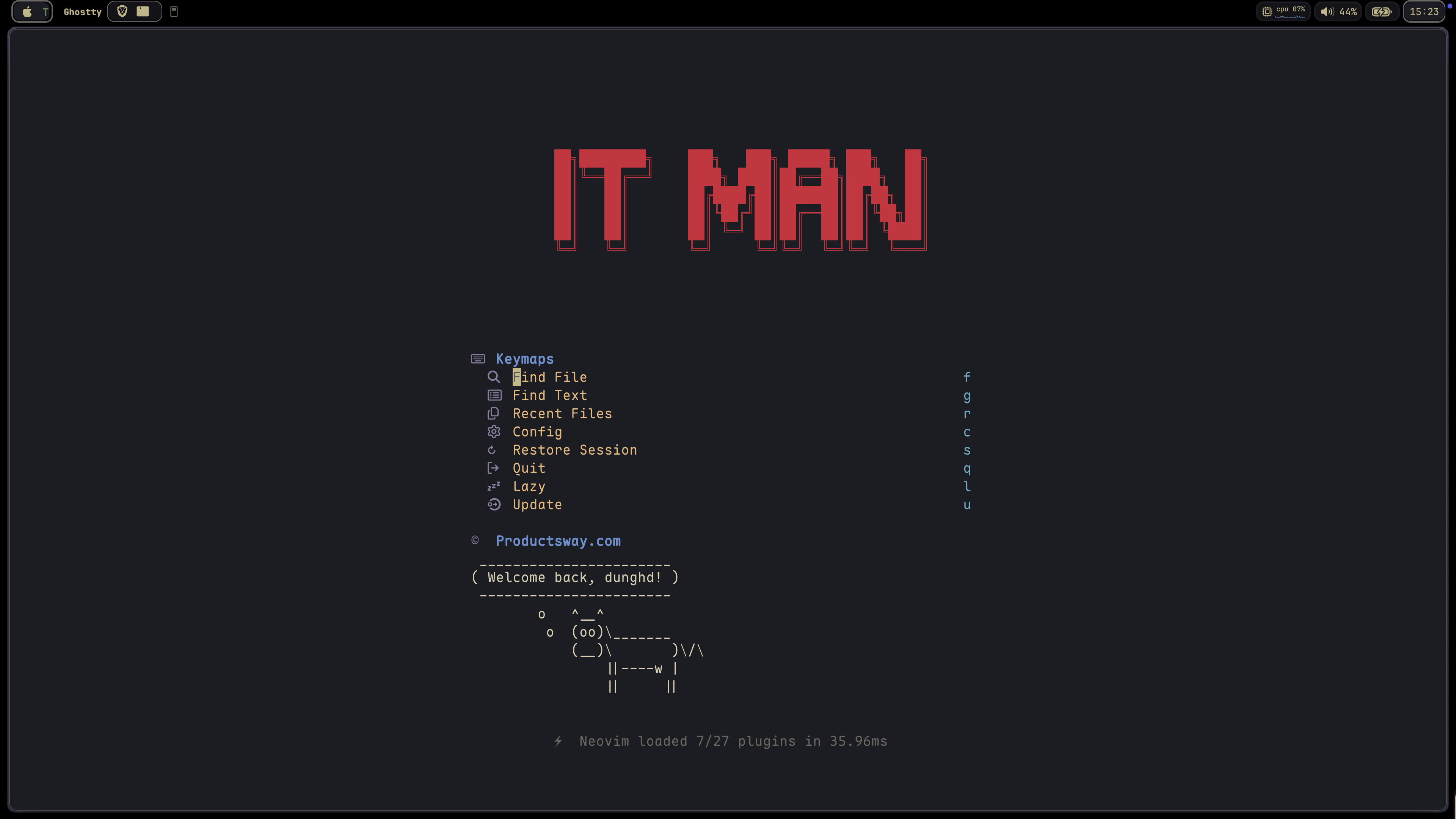
This configuration is a migration from my-nvim-ide with two main goals:
-
Leverage Neovim 0.11+ Built-in Features:
-
Optimize Plugin Selection:
- Trim down the plugin list to only essential ones
- Use
blink.cmpfor completion instead of built-in completion for better UX - Maintain a minimal yet powerful development environment
-
Adopt mini.nvim as Core UI Framework:
- Migrate from snacks.nvim to mini.nvim for better integration
- Use consistent plugin ecosystem from the same author
- Reduce dependencies while maintaining feature parity
The result is a faster, more maintainable configuration that still provides all the necessary features for modern development.
🏠 Homepage
# Install with default app name (tiny-nvim)
curl -s https://raw.githubusercontent.com/jellydn/tiny-nvim/main/install.sh | bash

# Or install with custom app name
curl -s https://raw.githubusercontent.com/jellydn/tiny-nvim/main/install.sh | bash -s -- --appname my_nvim
This will:
- Backup your existing Neovim configuration (if any)
- Clone the repository
- Install all required tools
- Install all plugins in headless mode
- Set up your complete Neovim environment
After installation, you can start Neovim with:
# If using default app name
NVIM_APPNAME=tiny-nvim nvim

# If using custom app name
NVIM_APPNAME=my_nvim nvimTo completely remove this configuration, run:
# Replace APPNAME with your chosen name (tiny-nvim or custom name)
rm -rf ~/.config/APPNAME
rm -rf ~/.local/share/APPNAME
rm -rf ~/.cache/APPNAME
rm -rf ~/.local/state/APPNAMEIf you prefer to install manually:
- Clone this repository:
git clone https://github.com/jellydn/tiny-nvim.git ~/.config/tiny-nvim- Run the installation script to set up all required tools:
cd ~/.config/tiny-nvim
./scripts/install-tools.sh- Launch Neovim with this configuration:
NVIM_APPNAME=tiny-nvim nvimAfter installation, run the following commands to ensure everything is set up correctly:
- Check overall Neovim health:
:checkhealth- Verify LSP configuration:
:check vim.lsp- For formatting issues, check conform.nvim status:
:ConformInfoFor more detailed debugging information, refer to conform.nvim debugging guide.
This config includes custom filetype mappings to help LSPs attach cleanly and avoid :checkhealth warnings
for uncommon extensions and templates. The mappings live in lua/config/autocmds.lua.
Click to expand features
This configuration has migrated from snacks.nvim to mini.nvim as its core UI framework.
Why mini.nvim?
- Consistent ecosystem from a single author
- Better integration between plugins
- Reduced dependencies while maintaining feature parity
- Optimized for Neovim 0.11+
| Feature | Previously (snacks) | Now (mini.nvim) |
|---|---|---|
| Fuzzy Picker | Snacks.picker | mini.pick + mini.extra |
| Dashboard | Snacks.dashboard | mini.starter |
| Git Diff | Snacks.git | mini.diff |
| Icons | nvim-web-devicons | mini.icons |
Note:
snacks.nvimis still available as an optional extra plugin if you prefer it.
This configuration leverages the mini.nvim plugin suite as its core UI framework:
- mini.pick: Fuzzy finder for files, buffers, git, and more
- mini.starter: Beautiful start screen dashboard
- mini.diff: Git diff integration with hunk navigation
- mini.statusline: Lightweight, informative statusline
- mini.tabline: Smart buffer/tabline with buffer management
- mini.icons: Comprehensive icon support
- mini.files: File explorer with a consistent mini.nvim UI
- mini.ai: Enhanced text objects for code
- mini.pairs: Automatic bracket and quote pairing
- mini.bufremove: Cleaner buffer deletion
- mini.extra: Additional pickers and utilities
-
LSP & Completion
- Built-in LSP support (Neovim 0.11+)
- blink.cmp (v1.*): Enhanced completion menu
- conform.nvim: Code formatting
- nvim-lint: Linting support
-
AI & Code Assistance
- Enabled by default: sidekick.nvim for AI CLI tools + Copilot NES
- Extra plugins: blink-copilot, copilot.vim, claudecode.nvim
Usage Tips:
- Sidekick (
<leader>a*): AI CLI integration with Claude, Gemini, Copilot CLI and more. Includes Next Edit Suggestions (NES) for multi-line refactorings - Claude Code (
<C-,>): Quick access to Claude in a floating window (when enabled) - Both can be used simultaneously without conflicts - different keybindings and use cases
Alternative: CopilotChat.nvim is available as an extra plugin if you prefer the traditional chat interface
-
Code Generation & Documentation
- LuaSnip (v2.*): Snippet engine
- friendly-snippets: Snippet collection
- neogen: Documentation generator
- ts-comments.nvim: Comment utilities
-
Git Integration
- Git hunks and signs via mini.diff
- neotest: Testing framework
- vim-test: Testing framework
- trouble.nvim: Diagnostics and quickfix management
- kanagawa.nvim: Beautiful theme inspired by Kanagawa wave
- mini.nvim: Buffer management via mini.tabline/mini.bufremove
- Statusline, tabline, icons, and starter via mini.nvim ecosystem
- noice.nvim: Improved notifications and command-line UI
- tiny-term.nvim: Lightweight terminal manager with simple toggles
Theme switching:
- Default theme:
kanagawa - Switch theme:
:Theme kanagawa - Check current theme:
:Theme
- flash.nvim: Navigation and search enhancements
- which-key.nvim: Keybinding hints and management
- Fuzzy finder and extra pickers via mini.nvim ecosystem
- better-escape.nvim: Better escape functionality
- grug-far.nvim: Advanced search and replace functionality
- hurl.nvim: Run HTTP requests directly from
.hurlfiles - overseer.nvim: Task runner and job management
- persistence.nvim: Session management
- quick-code-runner.nvim: Quick code execution
- refactoring.nvim: Code refactoring tools
- todo-comments.nvim: Highlight and search for todo comments
- render-markdown.nvim: Markdown rendering and preview
- previm: Markdown preview in browser
- ts-error-translator.nvim: TypeScript error translation
- typecheck.nvim: Type checking for TypeScript
This configuration works seamlessly with VSCode through the vscode-neovim extension. The configuration includes:
- VSCode-specific keymaps for enhanced productivity
- Integration with VSCode's built-in features
- Support for multiple cursors and fast cursor movement
- Git integration and file navigation
- Task running and debugging support
To use this configuration in VSCode:
-
Install the vscode-neovim extension
-
Set your Neovim configuration path to point to this config:
"vscode-neovim.NVIM_APPNAME": "tiny-nvim",
-
Restart VSCode
You'll get the same Neovim experience in VSCode, including all the plugins and keybindings.
The configuration includes specialized support for various programming languages in the lua/langs directory:
- TypeScript: Enhanced TypeScript development with type checking and error translation
- Lua: Lua development with syntax highlighting and completion
- Go: Go development with gopls LSP integration
- Python: Python development support with LSP integration
- Markdown: Markdown editing with preview support
Each language configuration is modular and can be customized according to your needs.
This configuration uses kanagawa.nvim as the default theme. The theme is inspired by the Kanagawa wave and provides a beautiful, elegant color scheme that's easy on the eyes while maintaining good contrast and readability.
Click to expand keymaps
| Key | Description |
|---|---|
<leader>bo |
Delete Other Buffers |
<leader>br |
Delete Buffers to the Right |
<leader>bl |
Delete Buffers to the Left |
<S-h> or [b |
Previous Buffer |
<S-l> or ]b |
Next Buffer |
<leader>bb |
Switch to Other Buffer |
<leader> |
Switch to Other Buffer |
| Key | Description |
|---|---|
<C-h> |
Go to Left Window |
<C-j> |
Go to Lower Window |
<C-k> |
Go to Upper Window |
<C-l> |
Go to Right Window |
<C-Up> |
Increase Window Height |
<C-Down> |
Decrease Window Height |
<C-Left> |
Decrease Window Width |
<C-Right> |
Increase Window Width |
<leader>ww |
Other Window |
<leader>wd |
Delete Window |
<leader>w- |
Split Window Below |
<leader>w| |
Split Window Right |
<leader>- |
Split Window Below |
<leader>| |
Split Window Right |
| Key | Description |
|---|---|
<leader><tab>l |
Last Tab |
<leader><tab>o |
Close Other Tabs |
<leader><tab>f |
First Tab |
<leader><tab> |
New Tab |
<leader><tab>] |
Next Tab |
<leader><tab>d |
Close Tab |
<leader><tab>[ |
Previous Tab |
| Key | Description |
|---|---|
j |
Down (with gj for wrapped lines) |
k |
Up (with gk for wrapped lines) |
<A-j> |
Move Line Down |
<A-k> |
Move Line Up |
gl |
Go to end of line |
gh |
Go to start of line |
<A-a> |
Select all text |
| Key | Description |
|---|---|
]h |
Next Hunk |
[h |
Previous Hunk |
]H |
Last Hunk |
[H |
First Hunk |
<leader>ghs |
Stage Hunk |
<leader>ghr |
Reset Hunk |
<leader>gc |
Git Log |
<leader>gs |
Git Hunks |
<leader>gS |
Git Stash |
<leader>gg |
Lazygit |
| Key | Description |
|---|---|
<leader>ca |
Code Action |
<leader>cr |
Rename |
<leader>cf |
Format Document |
<leader>. |
Quick Fix / Code Action |
gd |
Go to Definition |
K |
Show Documentation |
| Key | Description |
|---|---|
<C-y> |
Accept Suggestion |
<C-i> |
Accept Line |
<C-j> |
Next Suggestion |
<C-k> |
Previous Suggestion |
<C-d> |
Dismiss Suggestion |
| Key | Description |
|---|---|
<leader>sr |
Search and Replace (with file type filtering) |
n |
Next Search Result |
N |
Previous Search Result |
<leader>ur |
Redraw / Clear hlsearch / Diff Update |
| Key | Description |
|---|---|
<leader>xx |
Toggle Diagnostics |
<leader>xX |
Toggle Buffer Diagnostics |
<leader>cs |
Toggle Symbols |
<leader>cl |
Toggle LSP Definitions/References |
<leader>xL |
Toggle Location List |
<leader>xQ |
Toggle Quickfix List |
[q |
Previous Quickfix |
]q |
Next Quickfix |
<leader>cd |
Line Diagnostics |
]d |
Next Diagnostic |
[d |
Previous Diagnostic |
]e |
Next Error |
[e |
Previous Error |
]w |
Next Warning |
[w |
Previous Warning |
| Key | Description |
|---|---|
<C-s> |
Save File |
<leader>fn |
New File |
<leader>qq |
Quit All |
<C-c> |
Copy whole file content |
<leader>m |
Markdown preview (Previm) |
<leader>tm |
Toggle Markdown preview (Render) |
<leader>e |
File Explorer (mini.files) |
<leader>E |
File Explorer (cwd) |
. |
Toggle hidden files (mini.files) |
<C-c> |
Copy path (mini.files) |
<M-h> |
Toggle hidden files (mini.pick) |
<M-u> |
Toggle gitignored files (mini.pick) |
| Key | Description |
|---|---|
<leader><space> |
Find Files (normal picker) |
<leader>ff |
Find Files (with hidden toggle) |
<leader>fA |
Find Files (all including gitignored) |
<leader>/ |
Live Grep (normal files only) |
<leader>sg |
Live Grep (hidden files, respects .gitignore) |
| Key | Description |
|---|---|
<leader>ui |
Inspect Position |
<leader>uI |
Inspect Tree |
<leader>uf |
Toggle Autoformat |
<leader>zz |
Open Lazy Plugin Manager |
<leader>? |
Show Buffer Keymaps |
| Key | Description |
|---|---|
<leader>st |
Show all todo comments |
<leader>sT |
Show todo/fix/fixme comments |
| Item | Description |
|---|---|
| Find File | Open file picker |
| Find Text | Live grep |
| Recent Files | Recently opened files |
| Config | Find files in config |
| Restore Session | Load last session |
| Lazy | Open lazy.nvim |
| Update | Update plugins |
| Quit | Quit Neovim |
| Key | Description |
|---|---|
<esc><esc> |
Enter Normal Mode |
<C-h> |
Go to Left Window |
<C-j> |
Go to Lower Window |
<C-k> |
Go to Upper Window |
<C-l> |
Go to Right Window |
<leader>ft |
Toggle Terminal |
<C-/> |
Toggle Terminal |
| Key | Description |
|---|---|
<C-space> |
Increment Selection |
<bs> |
Decrement Selection (in visual mode) |
| Key | Description |
|---|---|
zv |
Close all folds except the current one |
zj |
Close current fold when open, open next fold |
zk |
Close current fold when open, open prev fold |
| Key | Description |
|---|---|
<D-s> |
Save File |
<D-c> |
Copy (in visual mode) |
<D-v> |
Paste (in all modes) |
| Key | Description |
|---|---|
<leader>aa |
Sidekick - Toggle CLI |
<leader>as |
Sidekick - Select CLI tool |
<leader>ad |
Sidekick - Detach CLI session |
<leader>at |
Sidekick - Send "this" context |
<leader>af |
Sidekick - Send file |
<leader>av |
Sidekick - Send visual selection |
<leader>ap |
Sidekick - Select prompt |
<leader>ac |
Sidekick - Toggle Claude |
<leader>am |
Sidekick - Generate commit message |
<Tab> |
Next Edit Suggestion - Jump/Apply |
<C-.> |
Sidekick - Switch focus to/from CLI |
| Key | Description |
|---|---|
<C-,> |
Toggle Claude |
<leader>Cc |
Toggle Claude |
<leader>Cf |
Focus Claude |
<leader>Cs |
Send selection to Claude |
<leader>Cb |
Add buffer to Claude |
<leader>Ca |
Accept diff |
<leader>Cd |
Deny diff |
<leader>Cp |
Select prompt |
<leader>Ce |
Explain code |
<leader>Cr |
Review code |
<leader>Ct |
Write tests |
<leader>Cm |
Generate commit message |
<leader>Co |
Optimize code |
<leader>Cx |
Fix issues |
<leader>CR |
Refactor code |
<leader>CD |
Add documentation |
<leader>CS |
Security review |
| Key | Description |
|---|---|
<leader>cjt |
Run Test Nearest |
<leader>cjT |
Run Test File |
<leader>cjS |
Run Test Suite |
<leader>ctt |
Run File |
<leader>ctT |
Run All Test Files |
<leader>ctr |
Run Nearest |
<leader>ctl |
Run Last |
<leader>cts |
Toggle Summary |
<leader>cto |
Show Output |
<leader>ctO |
Toggle Output Panel |
<leader>ctS |
Stop |
<leader>ctw |
Toggle Watch |
| Key | Description |
|---|---|
<leader>ot |
Run Task |
<leader>oq |
Quick Action |
<leader>or |
Rerun Last Task |
<leader>oo |
Toggle at bottom |
<leader>cp |
Quick Code Runner/Pad |
| Key | Description |
|---|---|
<leader>hA |
Run All requests |
<leader>ha |
Run Api request |
<leader>he |
Run Api request to entry |
<leader>hE |
Run Api request from entry to end |
<leader>hv |
Run Api in verbose mode |
<leader>hV |
Run Api in very verbose mode |
<leader>hr |
Rerun last command |
<leader>hh |
Hurl Runner/Show Last Response |
<leader>hg |
Add global variable |
<leader>hG |
Manage global variable |
<leader>tH |
Toggle Hurl Split/Popup |
<leader>hd |
Debug Info |
# .config/neovide/config.toml
fork = true # Detach from the terminal instead of waiting for the Neovide process to terminate.
frame = "buttonless" # Transparent decorations including a transparent bar.
maximized = true # Maximize the window on startup, while still having decorations and the status bar of your OS visible.
title-hidden = trueClick to expand font recommendations
I recommend using the following repo to get a "Nerd Font" (Font that supports icons)
Click to expand project configuration details
This configuration supports project-specific settings through .nvim-config.lua files. When Neovim starts, it will automatically look for a .nvim-config.lua file in the current working directory and load it if available.
You can quickly create a .nvim-config.lua file using the :ProjectSettings command. This interactive command will:
- Show available plugins and LSP servers
- Let you select which ones to enable
- Create a
.nvim-config.luafile with your selections
Example usage:
:ProjectSettingsAvailable options:
-
Plugins:
no-neck-pain: Additional UI plugincodecompanion: AI code companionavante: Alternative AI assistantmcphub: Minecraft Plugin Hub
-
LSP Servers:
eslint: ESLint language serverlua_ls: Lua language serverbiome: Biome = Eslint + Prettierjson: JSON language serverpyright: Python language servergopls: Go language servertailwindcss: Tailwind CSS language server
When prompted, enter your selections as comma-separated values:
Plugins: no-neck-pain,codecompanion
LSP: eslint,biome
You can also manually create a .nvim-config.lua file:
-- Project-specific Neovim configuration

-- Set TypeScript LSP server
vim.g.lsp_typescript_server = "ts_ls"

-- Enable additional LSP servers
vim.g.lsp_on_demands = {
  "eslint",        -- ESLint language server
}

-- Enable extra plugins
vim.g.enable_extra_plugins = {
  "no-neck-pain",  -- Additional UI plugin
  "nvim-eslint"    -- ESLint integration
}

-- Set any other project-specific settings
vim.opt.tabstop = 2
vim.opt.shiftwidth = 2
This file is not tracked by git, making it perfect for project-specific customizations.
Click to expand extra plugins
This configuration includes several extra plugins that can be enabled on demand through your project-specific configuration. These plugins provide additional functionality without bloating the core configuration.
-
- Distraction-free writing mode with customizable width
- Alternative to zen-mode with a focus on reducing neck strain
- Keymaps:
<leader>cz: Toggle No Neck Pain mode<leader>zu: Increase width<leader>zd: Decrease width
-
- AI code companion with GitHub Copilot integration
- Rich set of features including code explanation, refactoring, and inline documentation
- Supports slash commands for context-aware actions
- Keymaps prefix:
<leader>A - Visual mode selections:
<leader>Ae: Explain selected code<leader>Af: Fix selected code<leader>At: Generate unit tests for selected code<leader>Ar: Refactor selected code<leader>Ad: Add inline documentation<leader>An: Suggest better naming
-
- Alternative AI code assistant using Copilot
- Replaces the standard Copilot implementation
- Provides a more streamlined interface
-
- Minecraft Plugin Hub integration
- Access Minecraft plugins directly from Neovim
- Command:
:MCPHub
-
- File explorer that lets you edit your filesystem like a buffer
- Replace netrw with a more intuitive file management experience
- Built-in git integration and smart file hiding
- Keymaps:
<leader>e: Toggle floating file explorer (overrides mini.files)<C-s>: Save all changes in oil bufferq: Close oil buffer
-
- Ultra-fast folding with treesitter and indent providers
- Enhanced fold text with line count display
- Improves code navigation and readability
- Keymaps:
zR: Open all foldszM: Close all folds
-
- Preview folded code without opening the fold
- Includes pretty-fold.nvim for better fold text formatting
- Smart fold navigation with h/l keys
- Shows fold level indicators and line counts
8a. copilot-chat.nvim - Traditional AI chat interface with GitHub Copilot - Interactive conversations, code explanations, and commit message generation - Alternative to sidekick.nvim if you prefer a dedicated chat window - Automatically disables sidekick.nvim when enabled - Keymaps (when enabled): - <leader>ap: Prompt actions - <leader>am: Generate commit message - <leader>af: Fix diagnostic - <leader>al: Clear buffer and chat history - <leader>av: Toggle chat window - <leader>a?: Select models
8b. copilot.vim - GitHub Copilot integration moved to extra plugins - Provides AI-powered code completion and suggestions - Keymaps (when enabled): - <C-y>: Accept suggestion - <C-i>: Accept line - <C-j>: Next suggestion - <C-k>: Previous suggestion - <C-d>: Dismiss suggestion - Note: This plugin is disabled by default and can be enabled via extra plugins
8c. blink-copilot - Copilot source for blink.cmp - Note: This plugin is disabled by default and can be enabled via extra plugins
8d. claudecode.nvim - Claude Code integration (floating terminal + prompt shortcuts) - Note: This plugin is disabled by default and can be enabled via extra plugins
-
- Beautiful structural diffs using difft
- Shows git diffs with better syntax highlighting and structure awareness
- Supports multiple layouts: buffer, float, or ivy_taller
- Keymaps:
<leader>gd: Toggle Difft viewer
-
- Blazingly fast file search and navigation
- Alternative to grug-far with better performance
- Interactive fuzzy search with file preview
- Automatically disables grug-far.nvim when enabled
- Keymaps:
<leader>sr: Open scooter (normal mode)<leader>sr: Search selected text in scooter (visual mode)
To enable any of these plugins, add them to your .nvim-config.lua file:
vim.g.enable_extra_plugins = {
  "no-neck-pain",
  "codecompanion",
  "avante",
  "mcphub",
  "oil",
  "nvim-ufo",
  "fold-preview",
  "copilot-chat",  -- Alternative to sidekick.nvim
  "copilot",       -- GitHub Copilot integration
  "blink-copilot", -- Copilot source for blink.cmp
  "claudecode",    -- Claude Code integration
  "difft",
  "scooter"        -- Alternative to grug-far.nvim
}
Note that some plugins like avante.nvim, copilot-chat, and scooter will disable conflicting plugins when enabled.
  rm -rf ~/.config/nvim
  rm -rf ~/.local/share/nvim
  rm -rf ~/.cache/nvim
rm -rf ~/.local/state/nvimClick to expand helpful tips
- Improve key repeat on Mac OSX, need to restart
defaults write NSGlobalDomain KeyRepeat -int 1
defaults write NSGlobalDomain InitialKeyRepeat -int 14- VSCode on Mac
To enable key-repeating, execute the following in your Terminal, log out and back in, and then restart VS Code:
# For VS Code
defaults write com.microsoft.VSCode ApplePressAndHoldEnabled -bool false
# For VS Code Insider
defaults write com.microsoft.VSCodeInsiders ApplePressAndHoldEnabled -bool false
# If necessary, reset global default
defaults delete -g ApplePressAndHoldEnabled
# For Cursor
defaults write com.todesktop.230313mzl4w4u92 ApplePressAndHoldEnabled -bool false
Also increasing Key Repeat and Delay Until Repeat settings in System Preferences -> Keyboard.

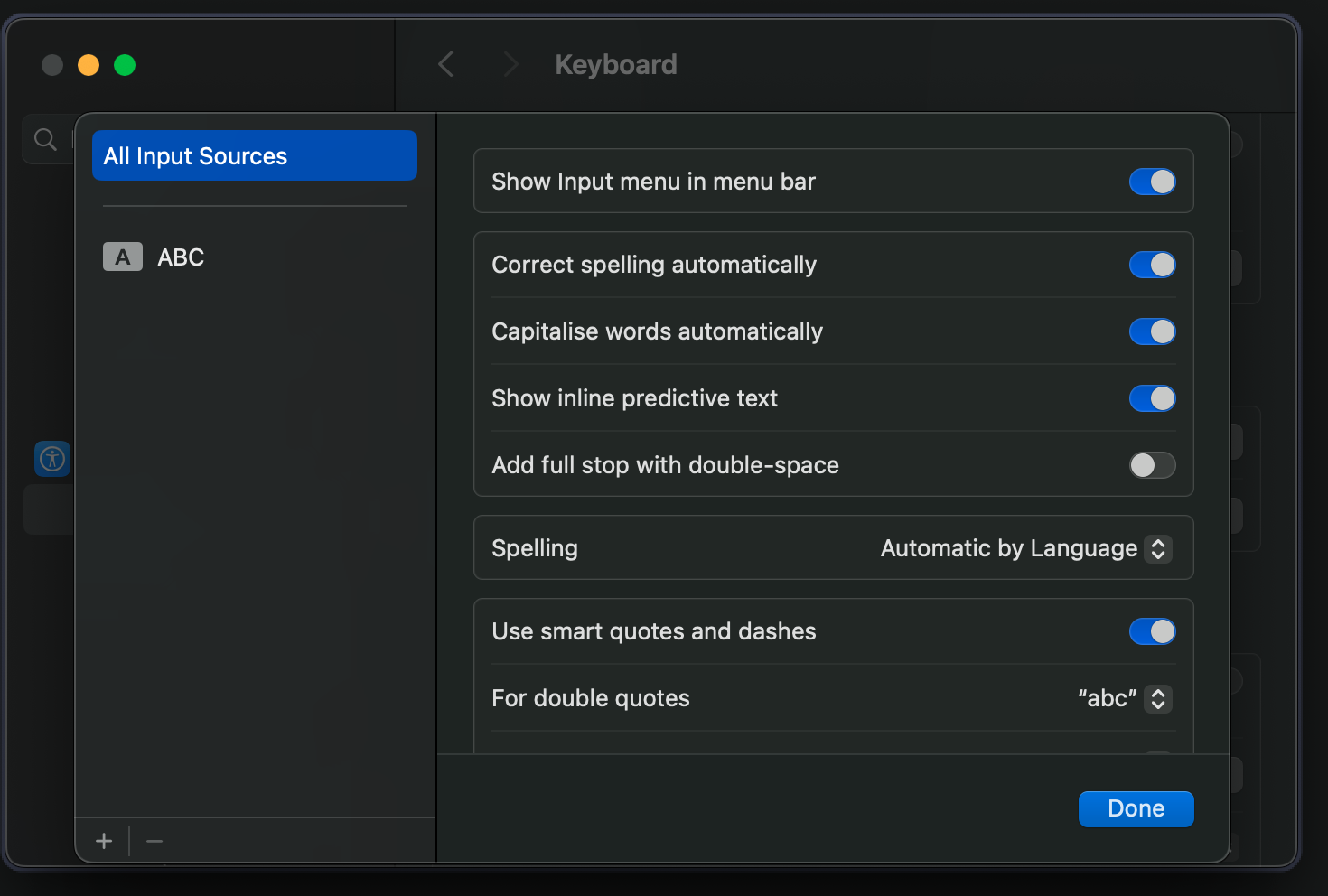
- Disable
full stop with double-spaceif you see the delay with<space>-<space>
Click to expand learning resources
- What's New in Neovim 0.11: A detailed overview of the latest features and improvements in Neovim 0.11.
- Neovim 0.11 Built-in Completion Setup: A comprehensive guide for setting up built-in completion in Neovim 0.11+.

![IT Man - Talk #33 NeoVim as IDE [Vietnamese]](https://i.ytimg.com/vi/dFi8CzvqkNE/hqdefault.jpg)

![IT Man - Step-by-Step Guide: Integrating Copilot Chat with Neovim [Vietnamese]](https://i.ytimg.com/vi/By_CCai62JE/hqdefault.jpg)




👤 Dung Huynh Duc
- Website: https://productsway.com/
- Twitter: @jellydn
- Github: @jellydn
Give a ⭐️ if this project helped you!
Thanks goes to these wonderful people (emoji key):
 Dung Duc Huynh (Kaka) 📖 💻 |
 Zak Hargreaves 💻 |
This project follows the all-contributors specification. Contributions of any kind welcome!


