Downloading bathymetry and topography tiles from the
Global Multi-Resolution Topography (GMRT) synthesis.




- Features
- Installation
- Quick Start
- Example: La Réunion Island Relief
- Example: Colombia Relief
- API Reference
- Development
- Contributing
- License
- Acknowledgments
PyGMRT provides a simple Python interface to access bathymetry and topography data from the Global Multi-Resolution Topography (GMRT) synthesis. The package handles all the complexity of downloading and processing geographic tiles, letting you focus on your analysis.
The core functionality centers around a single function that downloads tiles for any region on Earth. You can choose between three resolution levels: high resolution at 1 arc-second (about 30 meters at the equator), medium resolution at 4 arc-seconds, or low resolution at 16 arc-seconds. All data comes in GeoTIFF format, which works directly with rasterio and other geospatial tools.
The package automatically handles regions that cross the antimeridian (the 180° longitude line). This is often painful when working with global data, but PyGMRT takes care of it transparently. Since the package connects directly to the GMRT GridServer, you don't need API keys or authentication.
We recommend using UV, a modern Python package installer that handles dependencies efficiently. Traditional pip works just as well.
If you're using UV, add PyGMRT to your project:
uv add pygmrtOr install from the latest development version:
git clone https://github.com/leonard-seydoux/pygmrt.git
cd pygmrt
uv sync
For pip users, install directly from PyPI:
pip install pygmrtOr install from source:
git clone https://github.com/leonard-seydoux/pygmrt.git
cd pygmrt
pip install -e .The simplest way to download topography data is with a single function call. Here we'll download data for La Réunion Island, a volcanic island in the Indian Ocean. The bounding box is specified as [west, south, east, north] in degrees.
# Configure matplotlib to output SVG format for better quality
%config InlineBackend.figure_format = 'svg'
from pygmrt.tiles import download_tiles
# Get tiles for La Réunion Island [west, south, east, north]
tiles = download_tiles(bbox=[55.05, -21.5, 55.95, -20.7], resolution="low")
# Print tiles
print(f"Downloaded tiles at: ./{tiles.name}")
print(f"CRS: {tiles.crs}")
print(f"Tiles array shape: {tiles.shape}")Downloading https://www.gmrt.org/services/GridServer?format=geotiff&west=55.05&east=55.95&south=-21.5&north=-20.7&resolution=low to geotiff/gmrt_low_55.050_-21.500_55.950_-20.700.tif ...
Downloaded tiles at: ./geotiff/gmrt_low_55.050_-21.500_55.950_-20.700.tif
CRS: EPSG:4326
Tiles array shape: (783, 821)
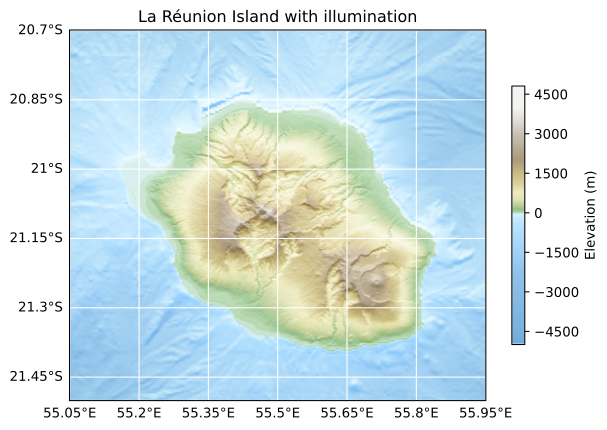
La Réunion Island is home to one of the world's most active volcanoes. Its dramatic topography makes an excellent demonstration of PyGMRT's capabilities combined with matplotlib's hillshading.
In this example, we download medium-resolution data and apply illumination effects to create a 3D relief map. We use pycpt-city for the color palette and Cartopy to handle the geographic projection.
import cartopy.crs as ccrs
import matplotlib.pyplot as plt
import numpy as np
import pycpt
from matplotlib.colors import LightSource
from pygmrt.tiles import download_tiles

# La Réunion bbox [west, south, east, north]
bbox = [55.05, -21.5, 55.95, -20.7]

# Download
tiles = download_tiles(bbox=bbox, resolution="medium")

# Remove NaNs and smooth a bit for better visualization
topo = tiles.read(1)
topo[np.isnan(topo)] = 0
vmax = abs(topo).max()
bbox = tiles.bounds
extent = (bbox.left, bbox.right, bbox.bottom, bbox.top)
palette = pycpt.read("wiki-france")
palette.interpolate(256)

# Create figure
fig = plt.figure(figsize=(7, 7))
ax = plt.axes(projection=ccrs.PlateCarree())

# Hillshade
sun = LightSource(azdeg=0, altdeg=20)
shade = sun.shade(
    topo,
    cmap=palette.cmap,
    norm=palette.norm,
    vert_exag=0.05,
    blend_mode="soft",
)
ax.imshow(shade, extent=extent, origin="upper", transform=ccrs.PlateCarree())

# Extra map features
palette.colorbar(ax=ax, label="Elevation (m)", shrink=0.5)
ax.set_extent(extent)
gridlines = ax.gridlines(draw_labels=True, color="white")
gridlines.top_labels = False
gridlines.right_labels = False
ax.set_title("La Réunion Island with illumination")

plt.show()
Downloading https://www.gmrt.org/services/GridServer?format=geotiff&west=55.05&east=55.95&south=-21.5&north=-20.7&resolution=med to geotiff/gmrt_medium_55.050_-21.500_55.950_-20.700.tif ...
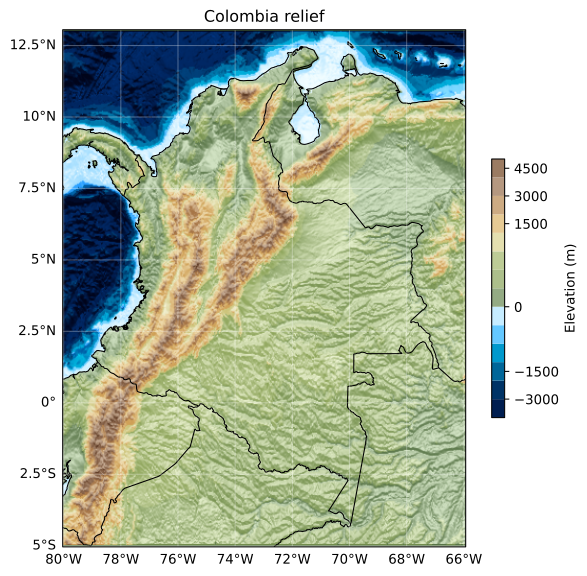
Colombia offers a fascinating study in topographic diversity. From the Andes mountains to the Pacific and Caribbean coasts, and the Amazon basin in the southeast. This example shows how PyGMRT handles larger geographic areas.
We use low resolution here since we're covering a substantial area. The custom color palette works well for showing both underwater features and mountain ranges. Notice how the hillshading brings out the texture of the seafloor and the terrestrial topography.
import cartopy.crs as ccrs
import matplotlib.pyplot as plt
import numpy as np
import pycpt
from cartopy import feature as cfeature
from matplotlib.colors import LightSource
from pygmrt.tiles import download_tiles

# Colombia bbox [west, south, east, north]
bbox = [-80.0, -5.0, -66.0, 13.0]

# Download
tiles = download_tiles(bbox=bbox, resolution="low")

# Remove NaNs and smooth a bit for better visualization
topo = tiles.read(1)
topo[np.isnan(topo)] = 0
vmax = abs(topo).max()
bbox = tiles.bounds
extent = (bbox.left, bbox.right, bbox.bottom, bbox.top)
palette = pycpt.read("colombia")

# Create figure
fig = plt.figure(figsize=(7, 7))
fig.patch.set_facecolor("#00000000")
ax = plt.axes(projection=ccrs.PlateCarree())

# Hillshade
sun = LightSource(azdeg=0, altdeg=60)
shade = sun.shade(
    topo,
    cmap=palette.cmap,
    norm=palette.norm,
    vert_exag=0.5,
    blend_mode="soft",
)
ax.imshow(shade, extent=extent, origin="upper", transform=ccrs.PlateCarree())

# Extra map features
palette.colorbar(ax=ax, label="Elevation (m)", shrink=0.5)
ax.set_extent(extent)
ax.coastlines(color="k", linewidth=0.8)
ax.add_feature(cfeature.BORDERS, edgecolor="k", linewidth=0.8)
gridlines = ax.gridlines(draw_labels=True, color="white", alpha=0.3)
gridlines.top_labels = False
gridlines.right_labels = False
ax.set_title("Colombia relief")

plt.show()
Downloading https://www.gmrt.org/services/GridServer?format=geotiff&west=-80.0&east=-66.0&south=-5.0&north=13.0&resolution=low to geotiff/gmrt_low_-80.000_-5.000_-66.000_13.000.tif ...
The download_tiles function is the main entry point. Here's the complete documentation:
help(download_tiles)Help on function download_tiles in module pygmrt.tiles:
download_tiles(*, bbox: 'Sequence[float]' = None, save_directory: 'str | Path' = './geotiff', resolution: 'Resolution' = 'medium', overwrite: 'bool' = False) -> 'rasterio.DatasetReader'
Download tiles and return the rasterio dataset.
Parameters
----------
bbox : sequence of float
Bounding box in WGS84 degrees as ``[west, south, east, north]``.
save_directory : str or pathlib.Path
Destination directory path where files will be written. Created if
needed.
resolution : {"low", "medium", "high"}, default "medium"
Named resolution level; mapped internally to provider-specific datasets.
overwrite : bool, default False
If ``False``, reuse existing files. If ``True``, force re-download.
Returns
-------
rasterio.DatasetReader
Opened rasterio dataset for the downloaded GeoTIFF. The caller is
responsible for closing the dataset.
Raises
------
ValueError
If invalid argument combinations or bbox values are provided.
PermissionError
If the destination directory is not writable.
RuntimeError
If download attempts ultimately fail.
To contribute or experiment with the code, start by cloning the repository:
git clone https://github.com/leonard-seydoux/pygmrt.git
cd pygmrt

# Install with UV (includes all development dependencies)
uv sync --all-extras

# Or use pip
pip install -e ".[dev,docs]"
Run the test suite to verify everything works:
# With UV
uv run pytest

# Or directly
pytest
This documentation is generated from docs/readme.ipynb. To rebuild it:
cd docs
make              # Build logo and README
make logo         # Generate logo only
make readme       # Convert notebook to README
The build process handles image generation and ensures URLs point to GitHub for proper display on PyPI.
PyGMRT is open source and welcomes contributions! Found a bug or have an idea? Open an issue or submit a pull request on GitHub.
This project is licensed under the MIT License. See the LICENSE file for details.
This package builds on the work of several organizations and projects:
- The Global Multi-Resolution Topography Synthesis by Lamont-Doherty Earth Observatory for providing free access to global bathymetry data.
- The cpt-city project for beautiful color palettes, accessible via pycpt-city.