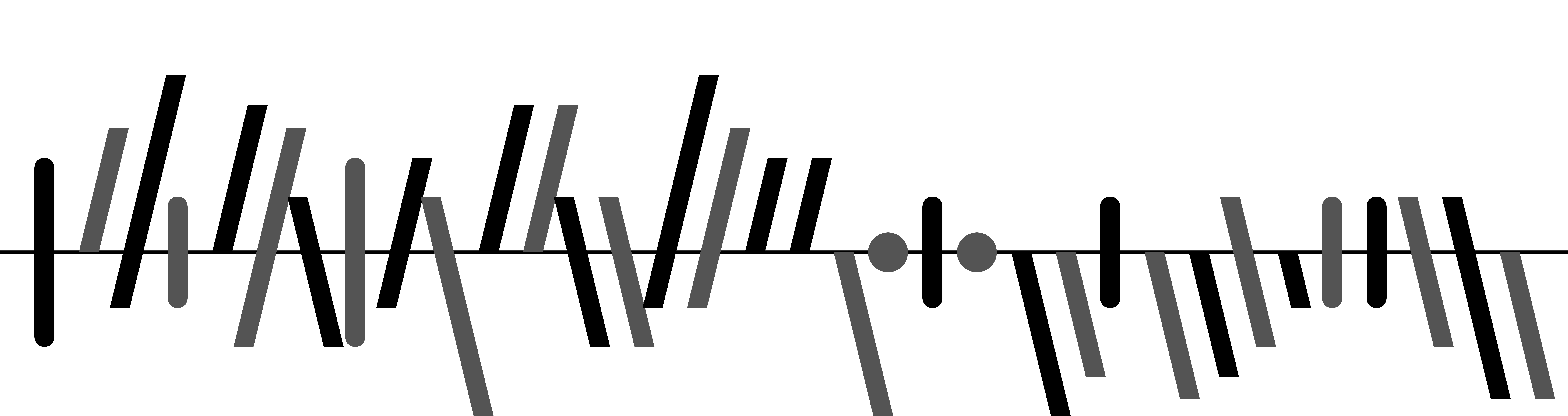


Word-sized tallies of association football results using multivariate sparklines based on Gestalt theory (gestaltlines).
This repository contains a Python package, an R package, and a command line tool based on Python.
Soccerbars is created by Prof. Dr. Ulrik Brandes of ETH Zürich and this repository is a port of his LaTeX package. An introduction to the theory behind this work can be found here.
The signature of the main function soccerbar is identical in both Python and R implementations. The input (scores argument) can be either a list of matches in the form (home_team_score: integer, away_team_score: integer, away_game: boolean), a list of three same-length score lists with the same types as the previous scheme, or common data frame objects of each language (pandas.DataFrame in Python and data.frame in R). A list of these entities can also be given as input if multiple leagues/tournaments are wanted to be plotted.
Both languages preserve the flags and the color arguments from the LaTeX package, and also expose a series of common parameters as keyword arguments. output_path and show arguments can be used to determine whether the call is to save the resulting image to the given path(s), or just to show it via the available graphical interface (not possible in Python if the function is called from the command line). In both cases, the functions return the plotted objects (matplotlib.Axes object(s) in Python and ggplot object(s) in R).
For color and output_path arguments, the function expects the structure of these to be consistent with the scores argument: if multiple lists of match lists are given, then for each such list an output path and a list of colors must be specified, therefore the lengths must be equal in all levels. These arguments are optional, when not provided the configuration will use the LaTeX defaults. Also, the color argument should not be necessary in most cases, as the color-related keyword arguments provide sufficient flexibility with much easier usage in both languages (see Parameters below for more details).
Give the matches to the soccerbar function as an iterable of matches in row-wise, column-wise or DataFrame format. A list of values following these formats (e.g. in the context of multiple leagues) are also accepted without mixing.
from soccerbars import soccerbar

# Row-wise format
soccerbar([
    (1, 2, True), (3, 4, False), (5, 6, True), (7, 8, False)
])
# Column-wise format
soccerbar([
    (1, 3, 5, 7),
    (2, 4, 6, 8),
    (True, False, True, False)
], outlined=True, output_path="matches.png")
# List of row-wise inputs: observe that both color and output_path
# parameters match with the scores
soccerbar([
    [(1, 2, True), (3, 4, False)],
    [(5, 6, True), (7, 8, False)]
    ],
    color=[("r", "b"), ("g", "y")],
    output_path=["league1.png", "league2.png"]
)
# Input as pandas DataFrame
import pandas as pd

soccerbar(pd.DataFrame([
    (1, 2, True), (3, 4, False), (5, 6, True), (7, 8, False)
]), home_color="red")Similarly with its Python counterpart, soccerbar admits both list of match score lists, and a list of three vectors, along with data.frame objects. A list of these (e.g. in the context of multiple leagues) are also allowed.
library(soccerbars)

# Row-wise format
soccerbar(list(
    list(1, 2, TRUE), list(3, 4, FALSE), list(5, 6, TRUE), list(7, 8, FALSE)
))
# Column-wise (vector) format
soccerbar(list(
    c(1, 3, 5, 7),
    c(2, 4, 6, 8),
    c(TRUE, FALSE, TRUE, FALSE)
), outlined = TRUE, output_path = "matches.png")
# List of column-wise inputs: observe that both color and output_path
# parameters match with the scores
soccerbar(list(
    list(c(1, 3), c(2, 4), c(TRUE, FALSE)),
    list(c(5, 7), c(6, 8), c(TRUE, FALSE))
    ),
    color = list(c("red", "blue"), c("green", "yellow")),
    output_path = c("league1.png", "league2.png")
)
# Input as data.frame object
soccerbar(data.frame(
    c(1, 3, 5, 7),
    c(2, 4, 6, 8),
    c(TRUE, FALSE, TRUE, FALSE)
), home_color = "red")After installing the package (see the instructions below), navigate into the folder and run
poetry run soccerbars --helpto see the available options. The CLI is a thin wrapper around the Python API, and writes the output image to the specified location with the --output-path argument. Input syntax is identical with the LaTeX package. In addition to the capabilities of the Python core, CLI can also admit a glob pattern to match with .csv files.
# Vanilla usage
poetry run soccerbars "(1-2) (3-1)* (2-2)"
# Specifying the output path (default is "output.png")
poetry run soccerbars -o out.tiff "(1-2) (3-1)* (2-2)"
# Reading from a .csv file and specifying an output file
poetry run soccerbars matches.csv -o matches.pdf
# Reading from a glob of csv files and saving the output images to a directory
poetry run soccerbars *.csv -o ".\output-dir"
# `-t`, `-z`, `-ol` flags stand for twogoalline, zerodots and outlined options
# `-p` option can be used to specify additional parameters with syntax key:value
poetry run soccerbars -z -ol -p fill_color:"(1,1,1,1)" -p home_color:red *.csvThese parameters can be used to customize the output images in all components.
| Parameter | Description | Default |
|---|---|---|
| dpi | Dots per inch resolution | 300 |
| thickness | Line thickness in cartesian coordinates | 0.36 |
| edge_thickness | Edge thickness for outlined patches (when outlined=True) as the ratio to the line thickness | 0.35 |
| goalless_edge_thickness | Edge thickness for outlined no-goal patches (when outlined=True) as the ratio to the line thickness | 0.5 |
| zerodot | Zero-dot diameter ratio to thickness (when zerodots=True) | 0.6 |
| slant | Slope for unbalanced scores in degrees | 14 |
| spacing | Spacing between matches in cartesian coordinates | 0.9 |
| padding | Padding before and after the matches in cartesian coordinates | 0.2 |
| baseline_factor | Thickness of baseline with respect to line thickness | 0.2 |
| away_brighter | Set away game colors 33% brighter (when outlined=False) | True |
| away_darker | Set away game colors 33% darker (when outlined=False, setting this flag will turn "away_brighter" off) | False |
| transparent_background | Set the background transparent instead of white | False |
| home_color | Color of home match lines (in Python: matplotlib-acceptable formats, in R: any of the three kinds of R color specifications; either a color name as listed by colors(), a hexadecimal string of the form "#rrggbb" or "#rrggbbaa", or a positive integer i meaning palette()[i]) |
#000000FF |
| away_color | Color of away match lines | #000000FF |
| baseline_color | Color of baselines | #000000FF |
| fill_color | Fill color for the outlined sparklines | #00000000 |
| clip_slanted_lines | Clip the ends of the slanted lines | True |
pip install soccerbarsFor command line usage, you need to install the package with the cli extra.
pip install soccerbars[cli]This package is not published in CRAN yet, so you need to use the Github installation functionality of devtools.
devtools::install_github("meakbiyik/soccerbars")Although it is possible to use the command line interface after installing the Python package into the current environment and running python -m soccerbars, installation as an isolated tool might be preferrable to keep the environment clean. Following steps will create a new environment and install soccerbars for this purpose.
-
Install Python from here
-
Install Poetry, a dependency management tool for Python, via the following command
curl -sSL https://raw.githubusercontent.com/python-poetry/poetry/master/get-poetry.py | python -
Clone this repository to your local, navigate into the folder and run
poetry install --no-dev --extras cli