✨ Lightweight Minecraft CLI Launcher — beautiful, fast, and scriptable.
Origami is a terminal-first Minecraft launcher that supports authentication, installation, and launching of Minecraft versions — with built-in support for Microsoft accounts, mod loaders, profile management, and more. Designed for power users, modders, and anyone who loves minimalism and productivity.



Before installing Origami, you need Node.js and npm (Node's package manager) installed.
-
Download the LTS version of Node.js from the official website.
-
Run the installer and follow the setup instructions.
-
Open Command Prompt and verify installation:
node -v
npm -v
You can use Homebrew:
brew install nodeOr download the LTS installer from nodejs.org.
Verify installation:
node -v
npm -vsudo apt update
sudo apt install nodejs npmAlternatively, for newer versions:
curl -fsSL https://deb.nodesource.com/setup_lts.x | sudo -E bash -
sudo apt install -y nodejs
Then check versions:
node -v
npm -vNVM allows you to easily switch between Node.js versions:
curl -o- https://raw.githubusercontent.com/nvm-sh/nvm/v0.39.7/install.sh | bash
source ~/.nvm/nvm.sh
nvm install --ltsUse nvm-windows:
-
Download the latest
nvm-setup.exefrom the releases page. -
Install and open Command Prompt:
nvm install lts
nvm use lts
node -v
npm -v
✅ Make sure you're using Node.js v18 or higher for best compatibility.
Install the latest stable version from NPM:
npm install -g @origami-minecraft/stableOnce installed, you can use the origami command anywhere in your terminal.
🚧 Development builds are experimental. These builds may include experimental features and are considered unstable.
You can install them directly from NPM:
npm install -g @origami-minecraft/devbuildsPrefer Yarn over npm? Origami supports it too!
Install with:
yarn global add @origami-minecraft/stableOr for dev builds:
yarn global add @origami-minecraft/devbuilds✅ Make sure Yarn is installed globally:
corepack enable
See what's new in stable builds in the Changelog.
-
🎨 Beautiful terminal UI with gradient animations and ASCII art
-
🔐 Microsoft, Mojang & Custom Auth support (Littleskin, Ely.by, etc)
-
📂 Profile system - create, select, and configure per-profile settings
-
⬇️ Install and manage Minecraft versions (Vanilla, Forge, NeoForge, Fabric, Quilt)
-
🧪 Experimental Modpack Installer
- Installs mods, sets up loaders automatically via
origami menu
- Installs mods, sets up loaders automatically via
-
🌐 Universal Game Directory Mode
- Enable globally or per profile, great for switching between traditional
.minecraftand isolated setups
- Enable globally or per profile, great for switching between traditional
-
⚙️ Per-Profile JVM & Java Runtime config
- Control memory, JVM flags, and choose Java binary per profile
-
📦 Modrinth browser with filters
- Browse mods, resource packs, and shaders with pagination and custom filters
-
💬 Friendly error prompts and CLI feedback
- Errors are shown clearly, with retry logic and detailed messages
-
✨ Supports GraalVM, Zulu, Corretto, Temurin, install JDKs right in the launcher
-
💨 Launch Minecraft directly from terminal
After installation, just run:
origami menu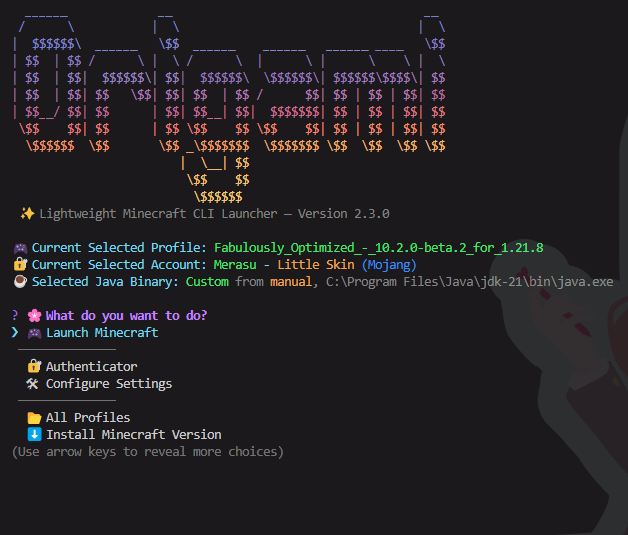
Navigate using your keyboard to log in, manage accounts, install versions, or launch the game.
Curious what all those launcher settings actually do?
🧠 Check out the full settings breakdown in Settings Guide It explains every toggle and feature, like memory usage, window modes, safe exit, and more!
See the full CLI documentation here: 📖 CLI.md
This project is licensed under the GPL-3.0-only license.
git clone https://github.com/merasugd/origami-launcher.git
cd origami-launcher
npm install

# testing
npm run compile
npm run origami- Inquirer for interactive menus
- Figlet for ASCII banners
- Gradient-string for rainbow text
- MCLC for the back bone of the launcher
- Temurin for JDK base
- Minecraft is copyright Mojang
- 📁 GitHub: Click Here
- 📦 NPM Stable: Click Here
- 📦 Yarn Stable: Click Here
Found a bug or want to suggest a feature? Open an issue or submit a PR!
We welcome contributions of all kinds — from bug fixes and documentation to new features.
- 📖 See our CONTRIBUTING.md guide to get started.
- 📜 Please review our Code of Conduct before participating in discussions or contributing.
Enjoy the terminal. Happy crafting :D 🧵