

一个轻量级、易用的 Windows 系统时间同步工具,支持自定义 NTP 服务器和定时自动同步功能(支持定时同步和时间偏移设置)。
A lightweight and easy-to-use Windows system time synchronization tool with support for custom NTP servers and scheduled auto-sync.
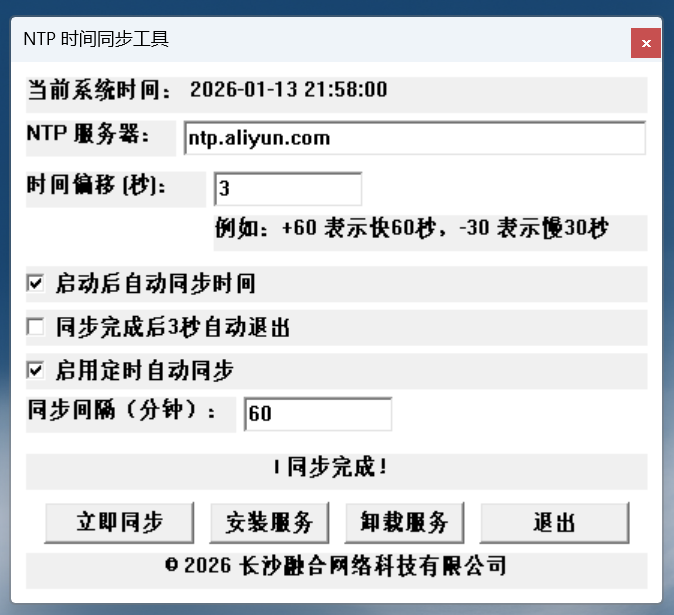
- 🕐 精确时间同步 - 通过 NTP 协议精确同步系统时间
- 🌐 自定义服务器 - 支持使用任意 NTP 服务器地址
- ⏱️ 时间偏移补偿 - 可设置时间偏移量进行补偿调整
- ⏰ 定时自动同步 - 支持设置同步间隔(1-1440分钟),自动定期同步
- 🚀 系统服务模式 - 可安装为 Windows 服务,开机自动启动
- 📱 系统托盘运行 - 最小化到系统托盘,不占用任务栏
- 🌍 中英文双语 - 完整的中英文界面支持
https://github.com/miaolink/ntp_time_sync/blob/main/ntp_time_sync.exe
从https://wwaph.lanzouu.com/b00uzrqe2b 密码:c8ie页面下载最新版本。
Download the latest version from the https://wwaph.lanzouu.com/b00uzrqe2b password:c8ie page.
右键 ntp_time_sync.exe,选择"以管理员身份运行"。
Right-click ntp_time_sync.exe and select "Run as administrator".
- NTP 服务器 - 输入 NTP 服务器地址(默认:
pool.ntp.org) - 时间偏移 - 设置时间偏移量(如:
+60表示快 60 秒) - 同步间隔 - 设置定时同步间隔(分钟)
- 点击"立即同步"按钮手动同步
- 或勾选"启用定时自动同步"启用自动同步
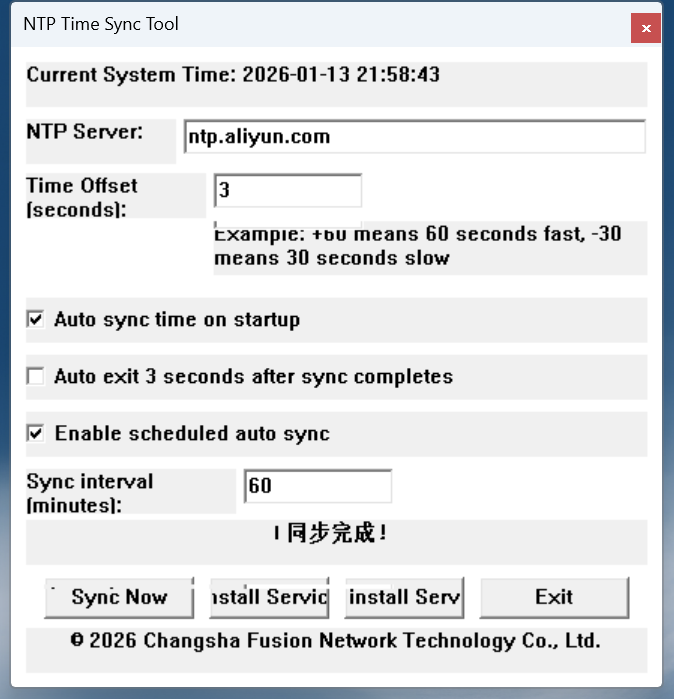
-
操作系统 - Windows 7 或更高版本
-
权限 - 管理员权限(用于修改系统时间)
-
网络 - 需要能够访问 NTP 服务器
-
OS - Windows 7 or higher
-
Permissions - Administrator privileges (required to modify system time)
-
Network - Internet access to NTP servers
- 立即同步 - 点击"立即同步"按钮执行一次时间同步
- 定时同步 - 勾选"启用定时自动同步"并设置间隔
- 系统服务 - 点击"安装服务"将程序安装为系统服务
- 托盘操作 - 双击托盘图标恢复窗口,右键显示菜单
- 启动后自动同步 - 程序启动时自动执行一次同步
- 同步后自动退出 - 同步完成后自动退出(适用于一次性同步)
- 自动禁用 Windows 时间同步 - 程序启动时自动禁用 W32Time 服务
A: 修改系统时间需要管理员权限,这是 Windows 系统的安全限制。
A: 由于程序需要修改系统时间和创建服务,部分杀毒软件可能报警。这是正常现象,请将程序添加到白名单。
A: 支持所有标准的 NTP 服务器,如 pool.ntp.org、time.windows.com 等。
欢迎提交 Issue 和 Pull Request!
Contributions are welcome! Please feel free to submit Issues and Pull Requests.
本项目采用开源许可证,详见 LICENSE 文件。
This project is licensed under an open source license. See the LICENSE file for details.
长沙融合网络科技有限公司
Changsha Fusion Network Technology Co., Ltd.
Copyright © 2026
感谢所有使用和贡献本项目的用户!
Thanks to all users and contributors!
如有问题或建议,请通过以下方式联系:
- 📧 Email: iosdiy@outlook.com
⭐ 如果这个项目对你有帮助,请给个 Star!
⭐ If this project helps you, please give it a Star!