Documentation: Markdown • Changelog
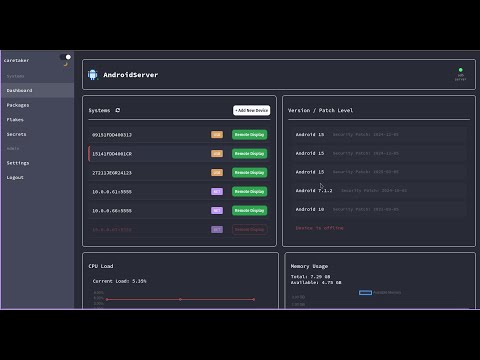
Web dashboard to manage ADB enabled Android devices.
Only tested on Linux X11 currently Wayland support close behind. The only command I see failing on local Mac or Windows installs is when calling remote display commands. I'm currently using wmctrl to query window titles and raise an alert rather than spawning a new window if a remote display for that device is active already.
If you are running locally without Docker or MicroVM you must install the following dependencies:
adbfastbootscrcpywmctrl
Optional:
ssh- If you decide to install Termux or nix-on-droid
Note: When installing scrcpy most package managers have outdated versions and remote display will fail on newer devices. See the install script I use for the Docker build for a reference of how I install the latest build on Ubuntu. Or check out the projects install docs for linux, mac, and windows.
To run the dashboard first enter the app directory and install the Node dependencies.
npm installto install dependencies
Now you can run the dashboard in its early Alpha stages.
npm run devto start the dashboard
Current base image is Ubuntu 22.04, build with Docker and run the dashboard locally.
-
docker build -t dashdroid:latest .to build the image -
Run the image or use the supplied compose file
Note: I have yet to overwrite my adb keys with this project, I suggest backing your local keys up (If you have any).
docker run \
  --name dashdroid \
  --restart unless-stopped \
  --privileged \
  -v ./settings.cfg:/app/settings.cfg \
  -v /path/to/adb/keys/.android:/root/.android:rw \
  -v /dev/bus/usb:/dev/bus/usb:ro \
  -v /tmp/.X11-unix:/tmp/.X11-unix:ro \
  -v /run/user/1000/pulse:/run/user/1000/pulse \
  -p 3000:3000 \
  -e NODE_ENV=development \
  -e DISPLAY=${DISPLAY} \
  -e QT_X11_NO_MITSHM=1 \
  -e PULSE_SERVER=unix:/run/user/1000/pulse/native \
  -e SDL_AUDIODRIVER=pulseaudio \
dashdroidIs not currently building and running the service, work in progress. Check out alternate ways to run with Nix, direnv working perfectly.
If using Nix or NixOS you need flakes enabled, default virtual machine is qemu easily change with your choice of supported hypervisor.
nix run .#dashdroidto build and run dashdroid with MicroVM
There are more ways of using the project with Nix / NixOS. View the documentation here for more examples.
Almost to many to list, this is early days
- GPU monitoring
- Commands differ depending on devices (create general solution)
- SSH isn't flushed out and I want to enable it from the dashboard
- Screen recording for demos
- Video / Audio codec selection support per device
- Mic and Camera features