Releases: opf/openproject
OpenProject 17.1.0

bdd7124 oliverguenther
Oliver Günther
oliverguenther
Oliver Günther
Release date: 2026-02-11
We released OpenProject 17.1.0. The release contains several bug fixes and we recommend updating to the newest version. In these Release Notes, we will give an overview of important feature changes. At the end, you will find a complete list of all changes and bug fixes.
Important feature changes
Take a look at our release video showing the most important features introduced in OpenProject 17.1.0:
Release video of OpenProject 17.1
Automated project initiation request with a guided wizard (Enterprise add-on)
OpenProject introduces a configurable wizard for project initiation requests. The wizard can be enabled per template project.
See our documentation to learn how to use the automated project initiation request with OpenProject.
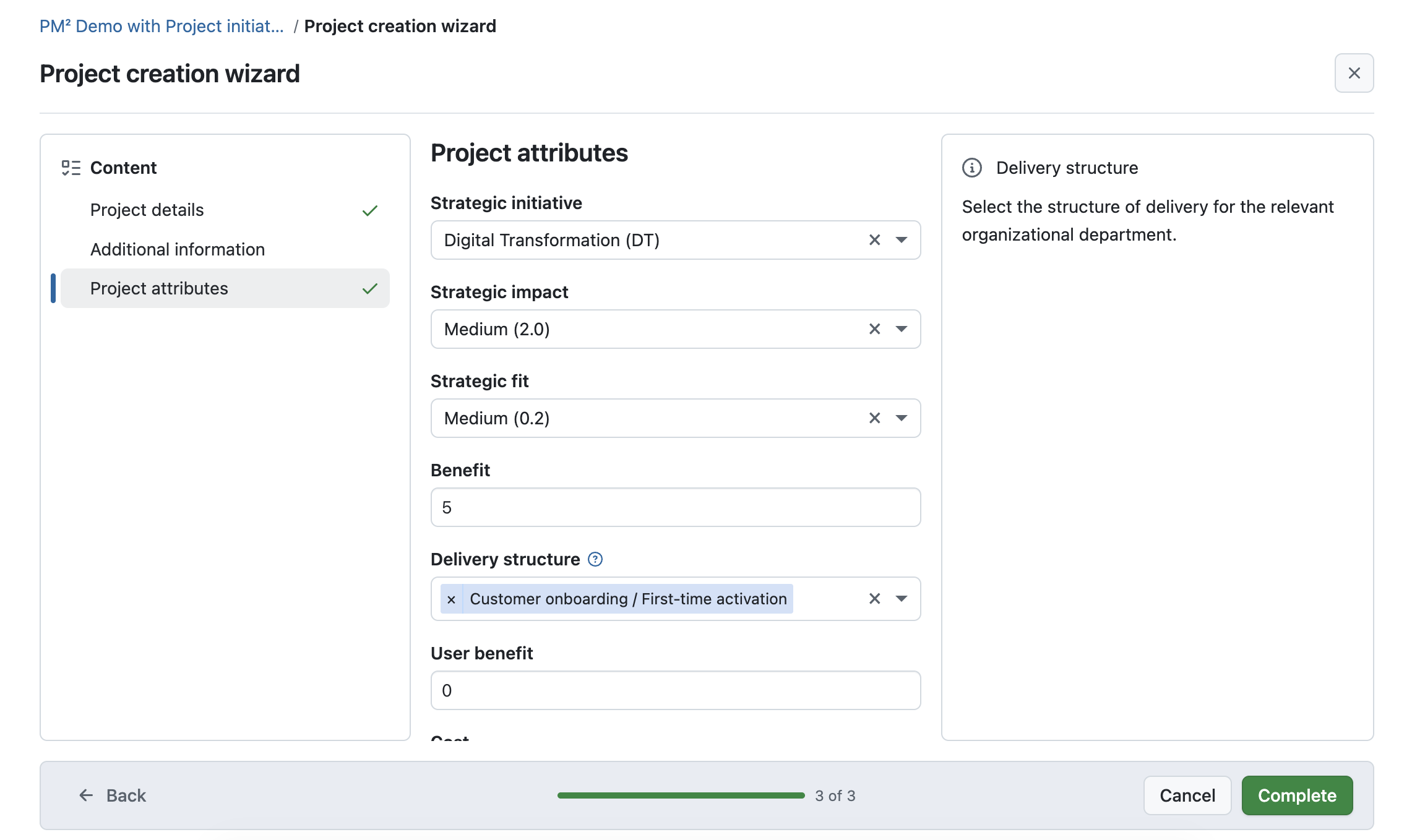
Configurable project initiation wizard
Administrators can configure a project initiation wizard to define how new project requests are submitted. This includes selecting which project attributes and sections are shown in the wizard, and which fields are required or optional.
The wizard guides users step by step through the initiation process using a fullscreen, three-column layout with section navigation, contextual help, and a progress indicator. Instead of completing required project attributes during project creation, users provide this information as part of the initiation request.
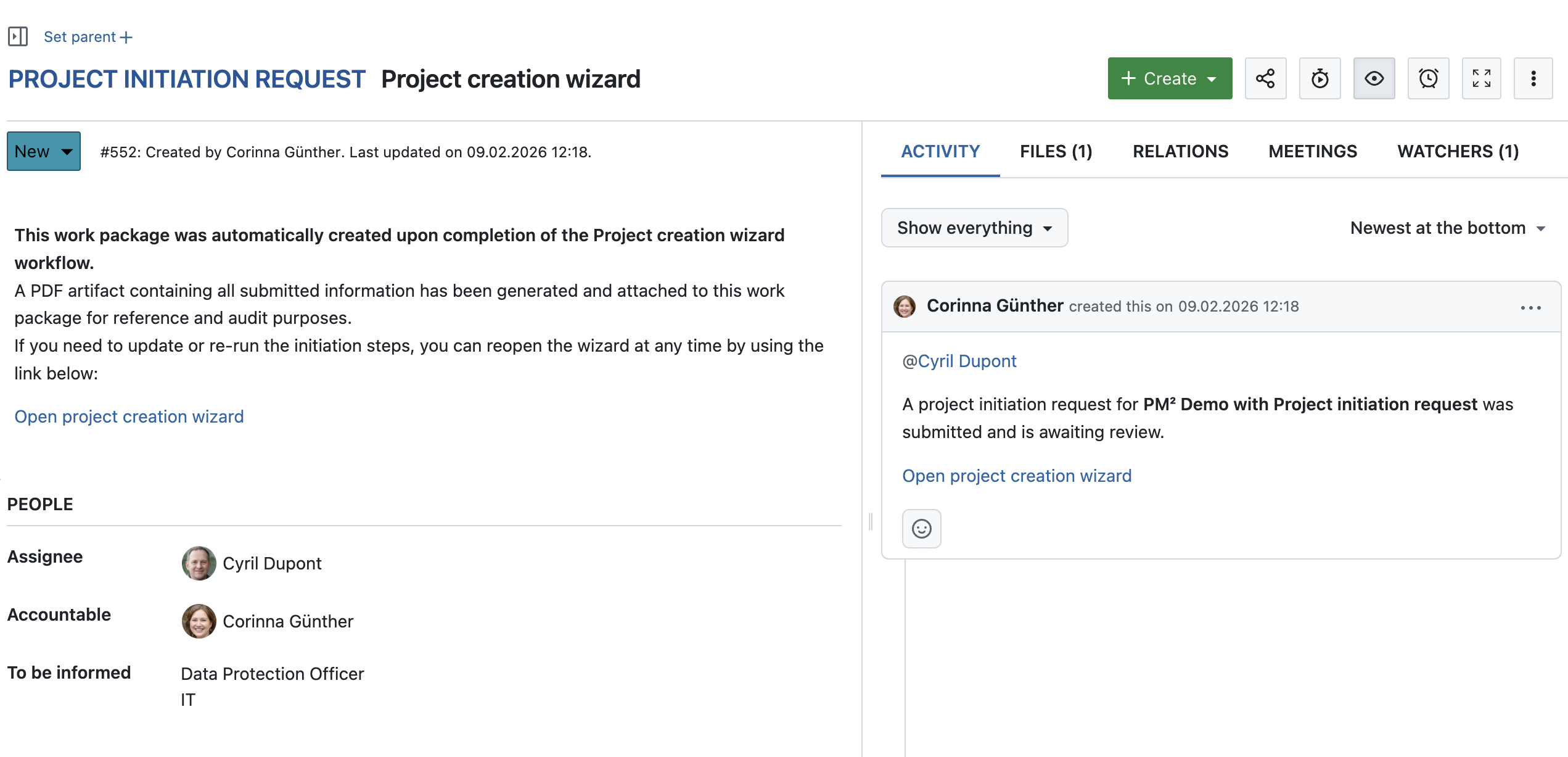
Work package created for a project initiation request
When a project initiation request is submitted for the first time, OpenProject automatically creates a work package that represents the request and serves as its central tracking artifact.
The work package is created once based on the wizard configuration at the time of the initial submission, including the work package type, status, and initial assignee. The assignee can be derived from a project attribute or a project role, such as a project owner.
Note
If the project initiation request is submitted again later, the changes (like different assignee) might not be automatically displayed in the work package and need to be manually updated. However, each submission generates a new PDF artifact, which is uploaded and linked to the existing work package. This allows changes to be reviewed and documented over time, while keeping the work package as the central place for processing the request using existing workflows.
Automatically generated project initiation artifact (PDF)
Upon submission of the project initiation request, a PDF artifact is automatically generated. The artifact contains all information entered in the wizard and is attached to the corresponding work package for documentation and audit purposes.
The artifact is updated automatically whenever the status of the project initiation request work package changes, ensuring that the documentation always reflects the current state.
Note
The project initiation request workflow is particularly well suited for structured frameworks such as PM² or PMflex, while remaining flexible enough to be used independently of any specific methodology. Read this blog article for more information.
Updates for the Meetings module
The Meetings module received several improvements that extend how meeting results are documented, reused, and shared.
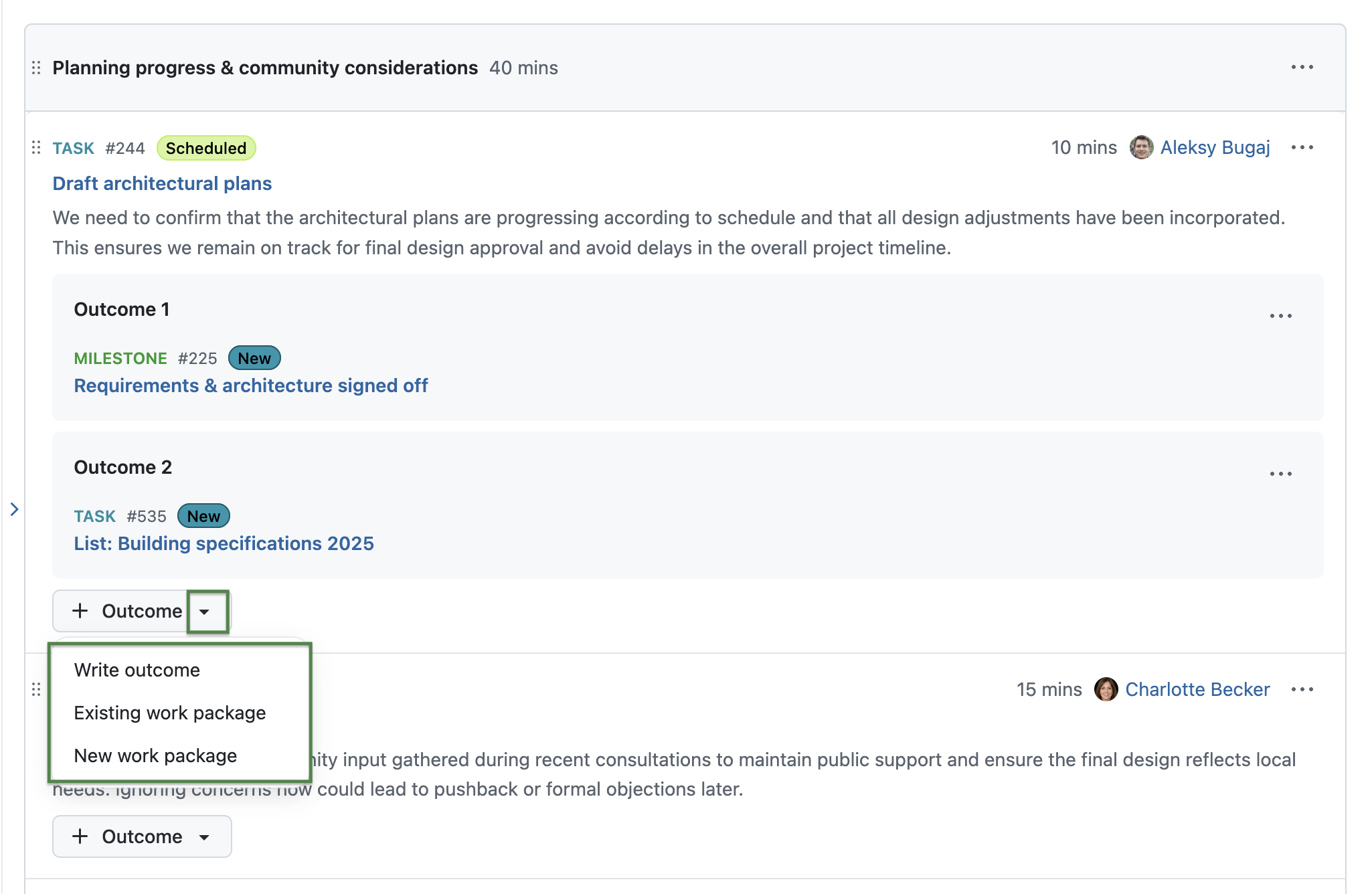
Add new or existing work packages as meeting outcomes
Users can now add work packages as meeting outcomes, allowing teams to turn meeting results into actionable follow-up items without leaving the meeting context. They can either:
- link an existing work package, or
- create a new work package as an outcome.
Each linked work package automatically shows a reference to the meeting in its Meetings tab, making the connection between the agenda item and the follow-up item explicit.
Since we already introduced multiple outcomes per agenda item in OpenProject 17.0, it is now also possible to link multiple work packages to the same agenda item.
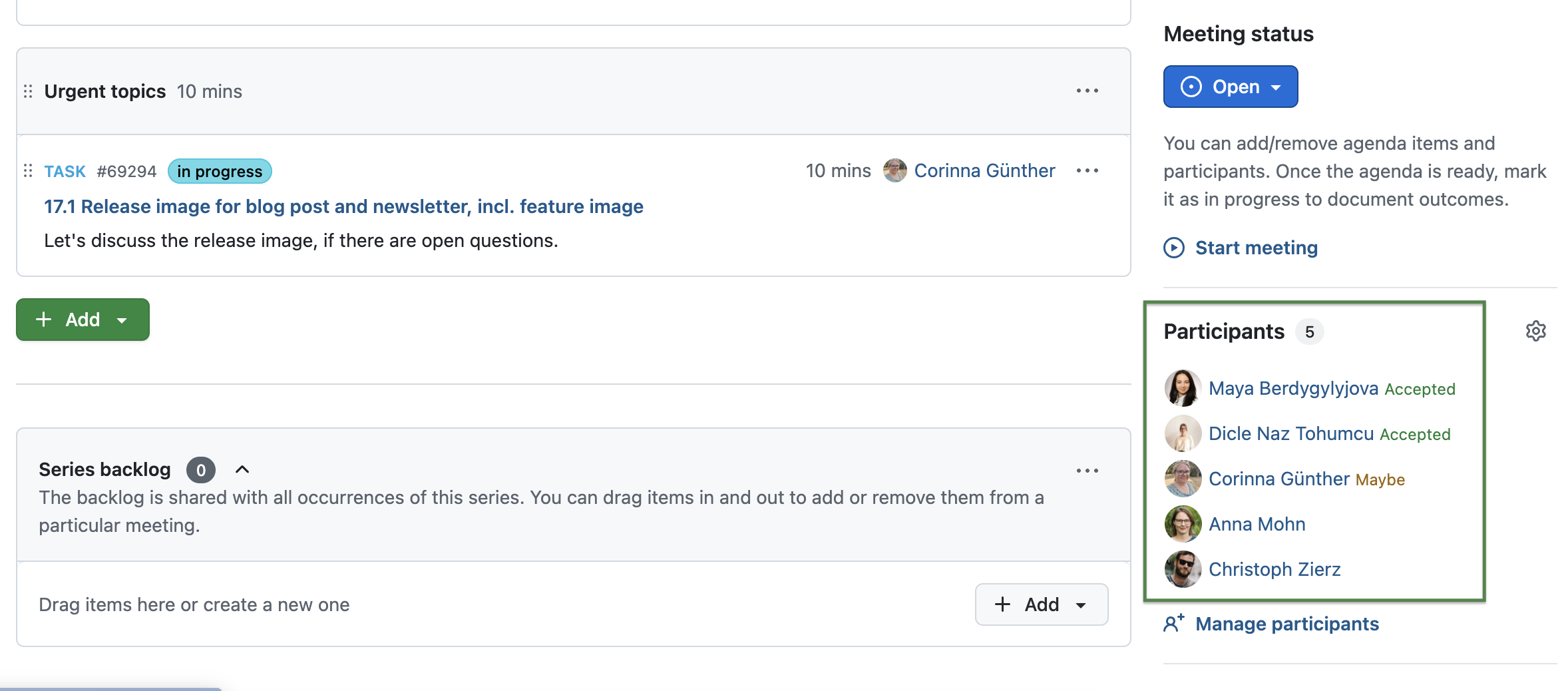
Show iCal responses in OpenProject
Meeting participant responses such as accepted, declined, or tentative are now visible directly in the meeting sidebar. These responses are collected from calendar invitations (for example when an ICS event is sent by email or downloaded and shared), making it easier to see the current participation status of all attendees in OpenProject.
Duplicate agenda items to the next recurring meeting occurrence
Users can now duplicate agenda items to the next occurrence of a recurring meeting. This makes it possible to carry over open topics or recurring discussion points without recreating them manually.
To duplicate an agenda item, users can select the corresponding option from the agenda item actions menu. The duplicated agenda item is added to the next meeting occurrence and can be edited independently.

Release Attribute highlighting to Community
The Attribute highlighting feature, previously available only as an Enterprise add-on, is now included in the free Community plan.
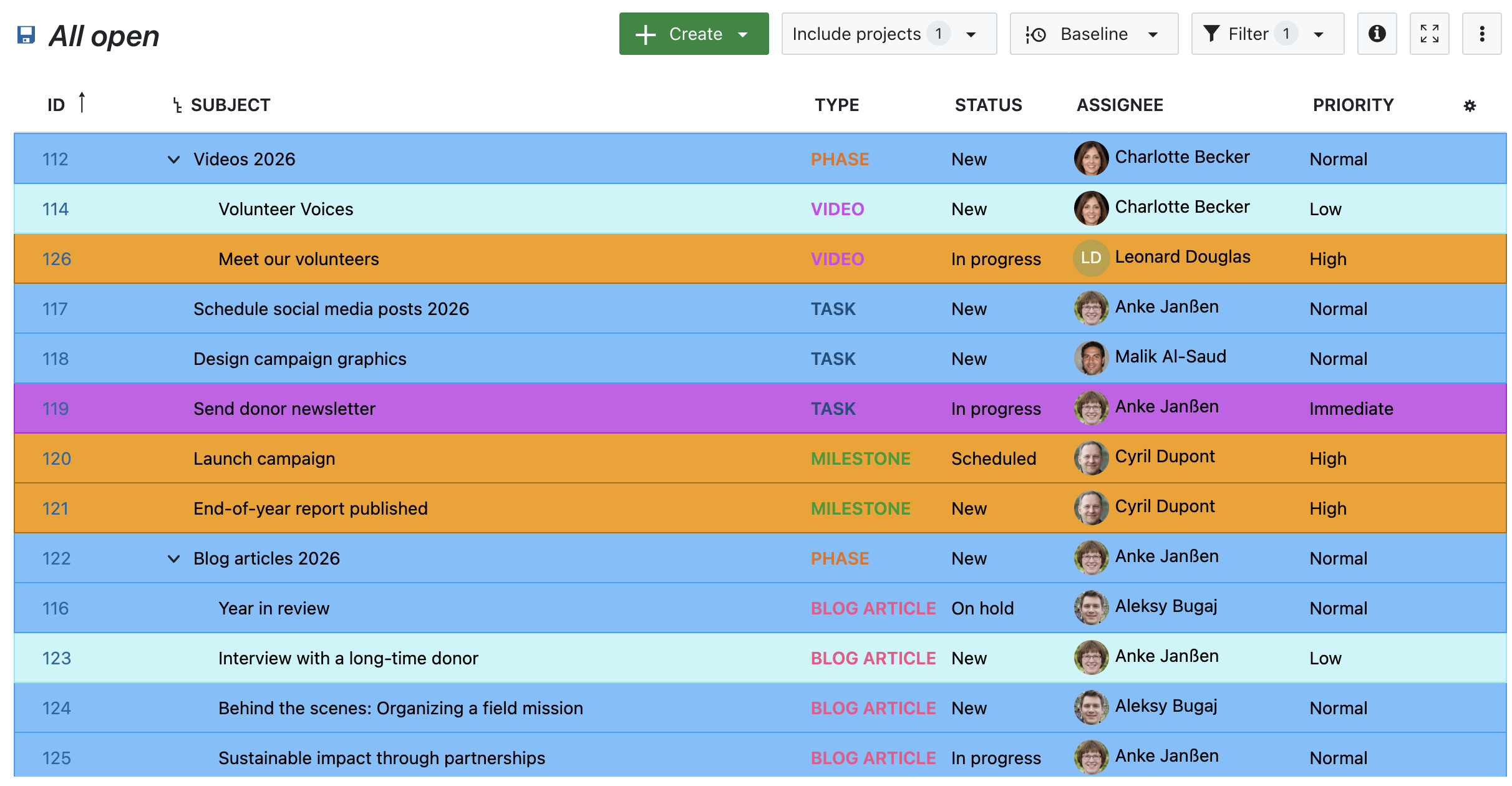
Users can configure attribute highlighting in work package table views by opening the table configuration and selecting the Highlighting tab. Attributes such as Status, Priority, and Finish date can be highlighted inline or applied as full-row highlights based on attribute values. This makes key attributes visually distinguishable directly in the work package list without opening individual items.
Read more about attribute highlighting in our documentation.
Here's an example of highlighting work packages by priority:
Capture external links (Enterprise add-on)
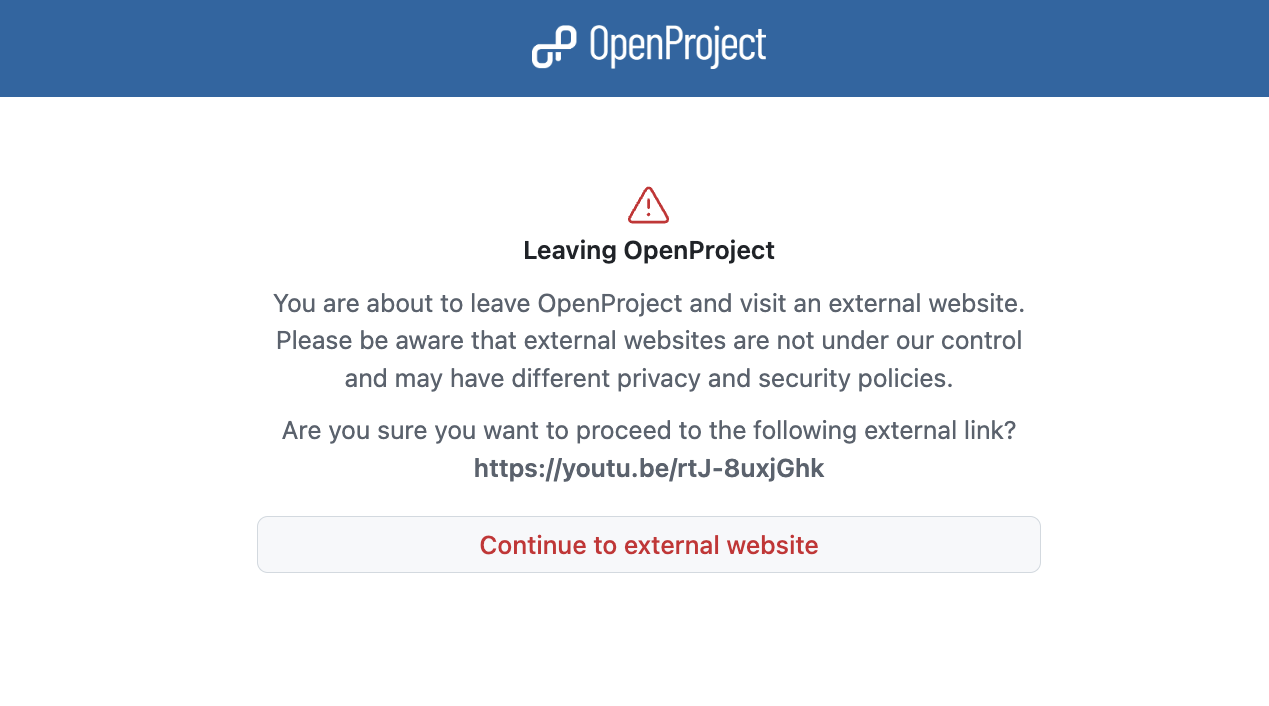
With 17.1 OpenProject introduces an option to add a warning when accessing external links from formatted text, such as project descriptions, comments or wiki pages. The warning adds an additional security layer by making users aware that they are about to leave OpenProject.
When users click on an external link, a confirmation dialog is displayed indicating that the link leads outside of OpenProject. This applies to links added by users, for example in descriptions, comments, or other text fields. In SaaS trial environments, external link handling is enforced to ensure that warnings for user-provided external links cannot be bypassed.
Read more about this warning on external links in our documentation.
Show short and weight values for Hierarchy and Weighted item list fields (Enterprise add-on)
Users now see an item’s short or weight wherever values from Hierarchy or Weighted item list custom fields (work packages) and project attributes are shown. This provides an extra hint to confirm that the right item was selected.
This information is displayed in:
- Work package details (for assigned values).
- Work package tables (for assigned values).
- Project attributes (for assigned values).
- The tree view selector while selecting a value (work packages and projects).
- The admin Items tab when editing the field, including the tree overview.
Read more about custom fields in OpenProject.
![OpenProject administration for custom fields, example of "Ben...
OpenProject 17.0.3
6ae0d8b
oliverguenther
Oliver Günther
Release date: 2026-02-06
We released OpenProject OpenProject 17.0.3.
The release contains several bug fixes and we recommend updating to the newest version.
Below you will find a complete list of all changes and bug fixes.
Security fixes
GHSA-q523-c695-h3hp - Stored HTML injection on time tracking
An HTML injection vulnerability occurs in the time tracking function of OpenProject version 17.0.2. The application does not escape HTML tags, an attacker with administrator privileges can create a work package with the name containing the HTML tags and add it to the Work package section when creating time tracking.
Responsibly disclosed by Researcher: Nguyen Truong Son (truongson526@gmail.com) through the GitHub advisory.
For more information, please see the GitHub advisory #GHSA-q523-c695-h3hp
GHSA-x37c-hcg5-r5m7 - Command Injection on OpenProject repositories leads to Remote Code Execution
An arbitrary file write vulnerability exists in OpenProject’s repository changes endpoint (/projects/:project_id/repository/changes) when rendering the “latest changes” view via git log.
By supplying a specially crafted rev value (for example, rev=--output=/tmp/poc.txt), an attacker can inject git log command-line options. When OpenProject executes the SCM command, Git interprets the attacker-controlled rev as an option and writes the output to an attacker-chosen path.
As a result, any user with the :browse_repository permission on the project can create or overwrite arbitrary files that the OpenProject process user is permitted to write. The written contents consist of git log output, but by crafting custom commits the attacker can still upload valid shell scripts, ultimately leading to RCE. The RCE lets the attacker create a reverse shell to the target host and view confidential files outside of OpenProject, such as /etc/passwd.
This vulnerability was reported by user sam91281 as part of the YesWeHack.com OpenProject Bug Bounty program, sponsored by the European Commission.
For more information, please see the GitHub advisory #GHSA-x37c-hcg5-r5m7
Bug fixes and changes
- Bugfix: Unable to change to earlier finish date for automatically scheduled successor [#65130]
- Bugfix: DPA/AVV cannot be downloaded [#67323]
- Bugfix: hocupocus logs [onAuthenticate] fetch failed and connection to collaboration server not possible [#70542]
- Bugfix: Wrong sidebar sort order in System Admin Guide -> Authentication [#70914]
- Bugfix: "form_configuration-status=422" Unable to Change Custom fields in Work Packages without Enterprise Plan [#71093]
Contributions
A big thanks to our Community members for reporting bugs and helping us identify and provide fixes.
This release, special thanks for reporting and finding bugs go to Stefan Weiberg, Christoph Withers.
OpenProject 16.6.7
30b5d2d
oliverguenther
Oliver Günther
Release date: 2026-02-06
We released OpenProject OpenProject 16.6.7.
The release contains several bug fixes and we recommend updating to the newest version.
Below you will find a complete list of all changes and bug fixes.
Security fixes
GHSA-q523-c695-h3hp - Stored HTML injection on time tracking
An HTML injection vulnerability occurs in the time tracking function of OpenProject version 17.0.2. The application does not escape HTML tags, an attacker with administrator privileges can create a work package with the name containing the HTML tags and add it to the Work package section when creating time tracking.
Responsibly disclosed by Researcher: Nguyen Truong Son (truongson526@gmail.com) through the GitHub advisory.
For more information, please see the GitHub advisory #GHSA-q523-c695-h3hp
GHSA-x37c-hcg5-r5m7 - Command Injection on OpenProject repositories leads to Remote Code Execution
An arbitrary file write vulnerability exists in OpenProject’s repository changes endpoint (/projects/:project_id/repository/changes) when rendering the “latest changes” view via git log.
By supplying a specially crafted rev value (for example, rev=--output=/tmp/poc.txt), an attacker can inject git log command-line options. When OpenProject executes the SCM command, Git interprets the attacker-controlled rev as an option and writes the output to an attacker-chosen path.
As a result, any user with the :browse_repository permission on the project can create or overwrite arbitrary files that the OpenProject process user is permitted to write. The written contents consist of git log output, but by crafting custom commits the attacker can still upload valid shell scripts, ultimately leading to RCE. The RCE lets the attacker create a reverse shell to the target host and view confidential files outside of OpenProject, such as /etc/passwd.
This vulnerability was reported by user sam91281 as part of the YesWeHack.com OpenProject Bug Bounty program, sponsored by the European Commission.
For more information, please see the GitHub advisory #GHSA-x37c-hcg5-r5m7
Bug fixes and changes
OpenProject 17.0.2
87a8cdc
oliverguenther
Oliver Günther
Release date: 2026-01-27
We released OpenProject OpenProject 17.0.2.
The release contains sa security fix and several bug fixes and we strongly recommend updating to the newest version.
Below you will find a complete list of all changes and bug fixes.
Security fixes
CVE-2026-24685 - Argument Injection on Repository Diff allows Arbitrary File Write and Remote Code Execution
An arbitrary file write vulnerability exists in OpenProject’s repository diff download endpoint (/projects/:project_id/repository/diff.diff) when rendering a single revision via git show. By supplying a specially crafted rev value (for example, rev=--output=/tmp/poc.txt), an attacker can inject git show command-line options. When OpenProject executes the SCM command, Git interprets the attacker-controlled rev as an option and writes the output to an attacker-chosen path.
As a result, any user with the :browse_repository permission on the project can create or overwrite arbitrary files that the OpenProject process user is permitted to write. The written contents consist of git show output (commit metadata and patch), but overwriting application or configuration files still leads to data loss and denial of service, impacting integrity and availability.
When the user has permissions to write into the repository, they can craft a specific commit to result in a RCE with permission scope of the OpenProject application.
This vulnerability was responsibly disclosed by sam91281 as part of the YesWeHack.com OpenProject Bug Bounty program, sponsored by the European Commission. Thank you for your collaboration.
For more information, please see the GitHub advisory #GHSA-74p5-9pr3-r6pw
CVE-2026-24772 - SSRF and CSWSH in Hocuspocus Synchronization Server
To enable the real time collaboration on documents, OpenProject 17.0 introduced a synchronization server. The OpenPrioject backend generates an authentication token that is currently valid for 24 hours, encrypts it with a shared secret only known to the synchronization server. The frontend hands this encrypted token and the backend URL over to the synchronization server to check user's ability to work on the document and perform intermittent saves while editing.
The synchronization server does not properly validate the backend URL and sends a request with the decrypted authentication token to the endpoint that was given to the server. An attacker could use this vulnerability to decrypt a token that he intercepted by other means to gain an access token to interact with OpenProject on the victim's behalf.
The vulnerability has been responsibly disclosed through the YesWeHack bounty program for OpenProject by Scott Curtis (syndrome_impostor). Thank you for the responsible disclosure and your collaboration in this report!
For more information, please see the GitHub advisory #GHSA-r854-p5qj-x974
CVE-2026-24775 - Forced Actions, Content Spoofing, and Persistent DoS via ID Manipulation in OpenProject Blocknote Editor Extension
In the new editor for collaborative documents based on BlockNote we added a custom extension that allows to mention OpenProject work packages in the document. To show work package details, the editor loads details about the work package via the OpenProject API. For this API call, the extension to the BlockNote editor did not properly validate the given work package ID to be only a number. This allowed an attacker to generate a document with relative links that upon opening could make arbitrary GET requests to any URL within the OpenProject instance.
The vulnerability has been responsibly disclosed through the YesWeHack bounty program for OpenProject by Scott Curtis (syndrome_impostor). Thank you two for the responsible disclosure and your collaboration in this report!
For more information, please see the GitHub advisory #GHSA-35c6-x276-2pvc
Bug fixes and changes
- Bugfix: Unable to change to earlier finish date for automatically scheduled successor [#65130]
- Bugfix: Meeting outcomes cannot be saved with ctrl/cmd+enter [#69974]
- Bugfix: AXe Accessibility error: invalid list structure [#70573]
- Bugfix: Fix AXe Accessibility error: Navigation toggler must have discernible text [#70574]
- Bugfix: Documents module is missing meaningfull html title [#70614]
- Bugfix: Users with the "Manage Users" permission did not see links to Lock/Unlock users [#70796]
- Bugfix: Cannot authorise OpenProject app with OpenProject when user has 2FA enabled [#70966]
- Bugfix: Running docker slim image, runs slim-bim one [#70980]
- Bugfix: 'For all projects' project attributes are not displayed during new project creation [#70982]
- Bugfix: Fix revision parsing in git diff output [#71020]
OpenProject 16.6.6
319164a
oliverguenther
Oliver Günther
Release date: 2026-01-27
We released OpenProject OpenProject 16.6.6.
The release contains security related bug fixes and we strongly urge you to update to the newest version.
Below you will find a complete list of all changes and bug fixes.
Security fixes
CVE-2026-24685 - Argument Injection on Repository Diff allows Arbitrary File Write and Remote Code Execution
An arbitrary file write vulnerability exists in OpenProject’s repository diff download endpoint (/projects/:project_id/repository/diff.diff) when rendering a single revision via git show. By supplying a specially crafted rev value (for example, rev=--output=/tmp/poc.txt), an attacker can inject git show command-line options. When OpenProject executes the SCM command, Git interprets the attacker-controlled rev as an option and writes the output to an attacker-chosen path.
As a result, any user with the :browse_repository permission on the project can create or overwrite arbitrary files that the OpenProject process user is permitted to write. The written contents consist of git show output (commit metadata and patch), but overwriting application or configuration files still leads to data loss and denial of service, impacting integrity and availability.
When the user has permissions to write into the repository, they can craft a specific commit to result in a RCE with permission scope of the OpenProject application.
This vulnerability was responsibly disclosed by sam91281 as part of the YesWeHack.com OpenProject Bug Bounty program, sponsored by the European Commission. Thank you for your collaboration.
For more information, please see the GitHub advisory #GHSA-74p5-9pr3-r6pw
Bug fixes and changes
- Bugfix: Fix revision parsing in git diff output [#71019]
OpenProject 17.0.1
f01b62f
oliverguenther
Oliver Günther
Release date: 2026-01-16
We released OpenProject OpenProject 17.0.1.
The release contains several bug fixes and we recommend updating to the newest version.
Below you will find a complete list of all changes and bug fixes.
Security fixes
CVE-2026-23646 - Users can delete other user's session, causing them to be logged out
Users in OpenProject have the ability to view and end their active sessions via Account Settings → Sessions. When deleting a session, it was not properly checked if the session belongs to the user. As the ID that is used to identify these session objects use incremental integers, users could iterate requests using DELETE /my/sessions/:id and thus unauthenticate other users.
Users did not have access to any sensitive information (like browser identifier, IP addresses, etc) of other users that are stored in the session.
This vulnerability was assigned as CVE-2026-23646.
For more information, please see the GitHub Advisory GHSA-w422-xf8f-v4vp).
The vulnerability has been responsibly disclosed through the YesWeHack bounty program for OpenProject. This bug bounty program is being sponsored by the European Commission.
CVE-2026-23721 - Users with "View Members" permission in any project can view all Group memberships
When using groups in OpenProject to manage users, the group members should only be visible to users that have the View Members permission in any project that the group is also a member of.
Due to a failed permission check, if a user had the View Members permission in any project, they could enumerate all Groups and view which other users are part of the group.
This vulnerability was assigned as CVE-2026-23721.
For more information, please see the GitHub Advisory GHSA-vj77-wrc2-5h5h).
The vulnerability has been responsibly disclosed through the YesWeHack bounty program for OpenProject. This bug bounty program is being sponsored by the European Commission.
CVE-2026-23625 - Stored XSS regression on OpenProject using attachments and script-src self
OpenProject versions >= 16.3.0, < 16.6.5, < 17.0.1 is affected by a stored XSS vulnerability in the Roadmap view. OpenProject’s roadmap view renders the “Related work packages” list for each version. When a version contains work packages from a different project (e.g., a subproject), the helper link_to_work_package prepends package.project.to_s to the link and returns the entire string with .html_safe. Because project names are user-controlled and no escaping happens before calling html_safe, any HTML placed in a subproject name is injected verbatim into the page.
This vulnerability was assigned as CVE-2026-23625.
For more information, please see the GitHub Advisory GHSA-cvpq-cc56-gwxx).
The vulnerability has been responsibly disclosed through the YesWeHack bounty program for OpenProject. This bug bounty program is being sponsored by the European Commission.
Bug fixes and changes
- Bugfix: BlockNote: OpenProject work packages are sorted by their ID instead of the last updated by [#67536]
- Bugfix: Required project attributes not enforced on POST /api/v3/projects [#70107]
- Bugfix: NoMethodError in Storages::Admin::AccessManagementController#update [#70492]
- Bugfix: Form Configuration for Work Package Types does not properly validate Enterprise Plan [#70503]
- Bugfix: PDF export with custom uploaded logo/fonts fails with some storage configurations (S3) [#70560]
OpenProject 16.6.5
99112f3
oliverguenther
Oliver Günther
Release date: 2026-01-16
We released OpenProject OpenProject 16.6.5.
The release contains several bug fixes and we recommend updating to the newest version.
Below you will find a complete list of all changes and bug fixes.
Security Fixes
CVE-2026-23646 - Users can delete other user's session, causing them to be logged out
Users in OpenProject have the ability to view and end their active sessions via Account Settings → Sessions. When deleting a session, it was not properly checked if the session belongs to the user. As the ID that is used to identify these session objects use incremental integers, users could iterate requests using DELETE /my/sessions/:id and thus unauthenticate other users.
Users did not have access to any sensitive information (like browser identifier, IP addresses, etc) of other users that are stored in the session.
This vulnerability was assigned as CVE-2026-23646.
For more information, please see the GitHub Advisory GHSA-w422-xf8f-v4vp).
The vulnerability has been responsibly disclosed through the YesWeHack bounty program for OpenProject. This bug bounty program is being sponsored by the European Commission.
CVE-2026-23721 - Users with "View Members" permission in any project can view all Group memberships
When using groups in OpenProject to manage users, the group members should only be visible to users that have the View Members permission in any project that the group is also a member of.
Due to a failed permission check, if a user had the View Members permission in any project, they could enumerate all Groups and view which other users are part of the group.
This vulnerability was assigned as CVE-2026-23721.
For more information, please see the GitHub Advisory GHSA-vj77-wrc2-5h5h).
The vulnerability has been responsibly disclosed through the YesWeHack bounty program for OpenProject. This bug bounty program is being sponsored by the European Commission.
CVE-2026-23625 - Stored XSS regression on OpenProject using attachments and script-src self
OpenProject versions >= 16.3.0, < 16.6.5, < 17.0.1 is affected by a stored XSS vulnerability in the Roadmap view. OpenProject’s roadmap view renders the “Related work packages” list for each version. When a version contains work packages from a different project (e.g., a subproject), the helper link_to_work_package prepends package.project.to_s to the link and returns the entire string with .html_safe. Because project names are user-controlled and no escaping happens before calling html_safe, any HTML placed in a subproject name is injected verbatim into the page.
This vulnerability was assigned as CVE-2026-23625.
For more information, please see the GitHub Advisory GHSA-cvpq-cc56-gwxx).
The vulnerability has been responsibly disclosed through the YesWeHack bounty program for OpenProject. This bug bounty program is being sponsored by the European Commission.
Bug fixes and changes
- Bugfix: Add default framework headers removed in secure_headers [#70384]
OpenProject 17.0.0
acbb059
oliverguenther
Oliver Günther
Release date: 2026-01-14
We released OpenProject 17.0.0.
The release contains several bug fixes and we recommend updating to the newest version.
In these Release Notes, we will give an overview of important feature changes. At the end, you will find a complete list of all changes and bug fixes.
Important feature changes
Take a look at our release video showing the most important features introduced in OpenProject 17.0.0:
Release video of OpenProject 17.0
Real-time documents collaboration
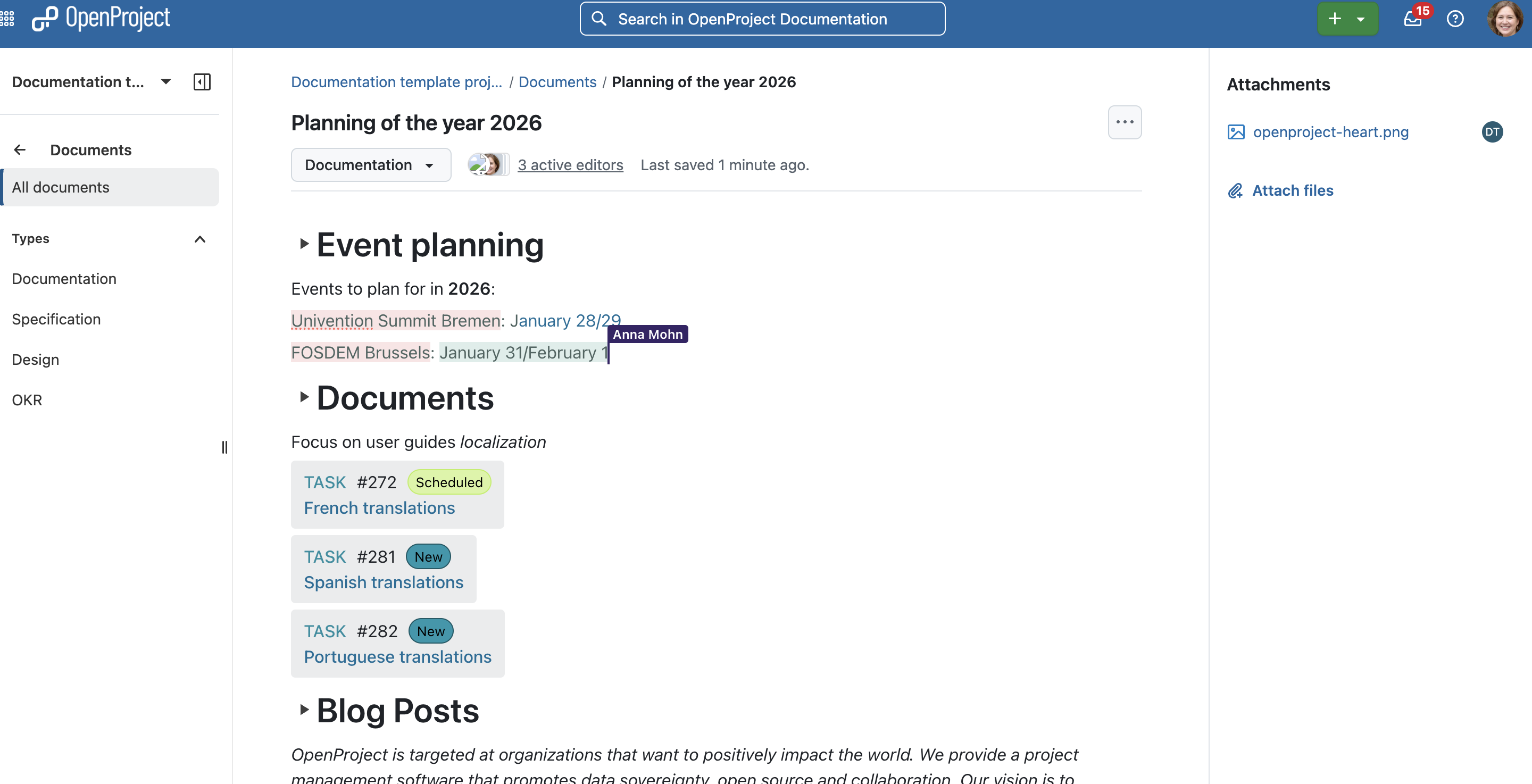
OpenProject 17.0 introduces real-time collaborative editing in the Documents module. Multiple users can work on the same document simultaneously, with live cursors, continuous updates, and automatic saving. The new BlockNote editor replaces the previous CKEditor-based documents for all installations where real-time collaboration is enabled.
Real-time collaboration requires a running Hocuspocus server:
- OpenProject Cloud: Real-time collaboration is enabled automatically for all Cloud instances.
- Container-based on-premises installations (Docker, Docker Compose, Helm/Kubernetes): Intended to work out of the box with 17.0. A Hocuspocus service will be automatically provided as part of the standard setup.
- Package-based installations (DEB/RPM): Does not include Hocuspocus. These installations will continue using CKEditor-based documents unless administrators set up their own Hocuspocus server and configure OpenProject accordingly.
When real-time editing is enabled, Documents support:
- Live collaborative editing with visible cursors from all connected users.
- Real-time updates in both edit and read-only mode.
- Work package integration via slash commands:
- Link or embed work packages as rich preview blocks.
- Users without access see secure ghost references.
- Continuously updating "last edited" timestamp.
- List of connected users, including read-only viewers.
- Automatic saving without a manual save button.
- Improved document layout with breadcrumbs, editable title, type selector, connected user avatars, and last-updated indicator.
- Inline file uploads by dragging files directly into the editor.
- Files panel that updates instantly and supports deleting attachments.
- Editor skeleton displayed while loading.
- Unified document URL (
/documents/<id>) for both editing and viewing.
Note
If real-time collaboration is enabled but no functioning Hocuspocus server is reachable, OpenProject does not fall back to CKEditor. Instead, the document editor is temporarily hidden and an error banner is shown with an option to retry. Once the connection to the collaboration server is restored, the editor becomes available again automatically.
See our system admin guide for detailed information on real time collaboration with OpenProject.
Programs and portfolios for strategic structuring (Enterprise add-on)
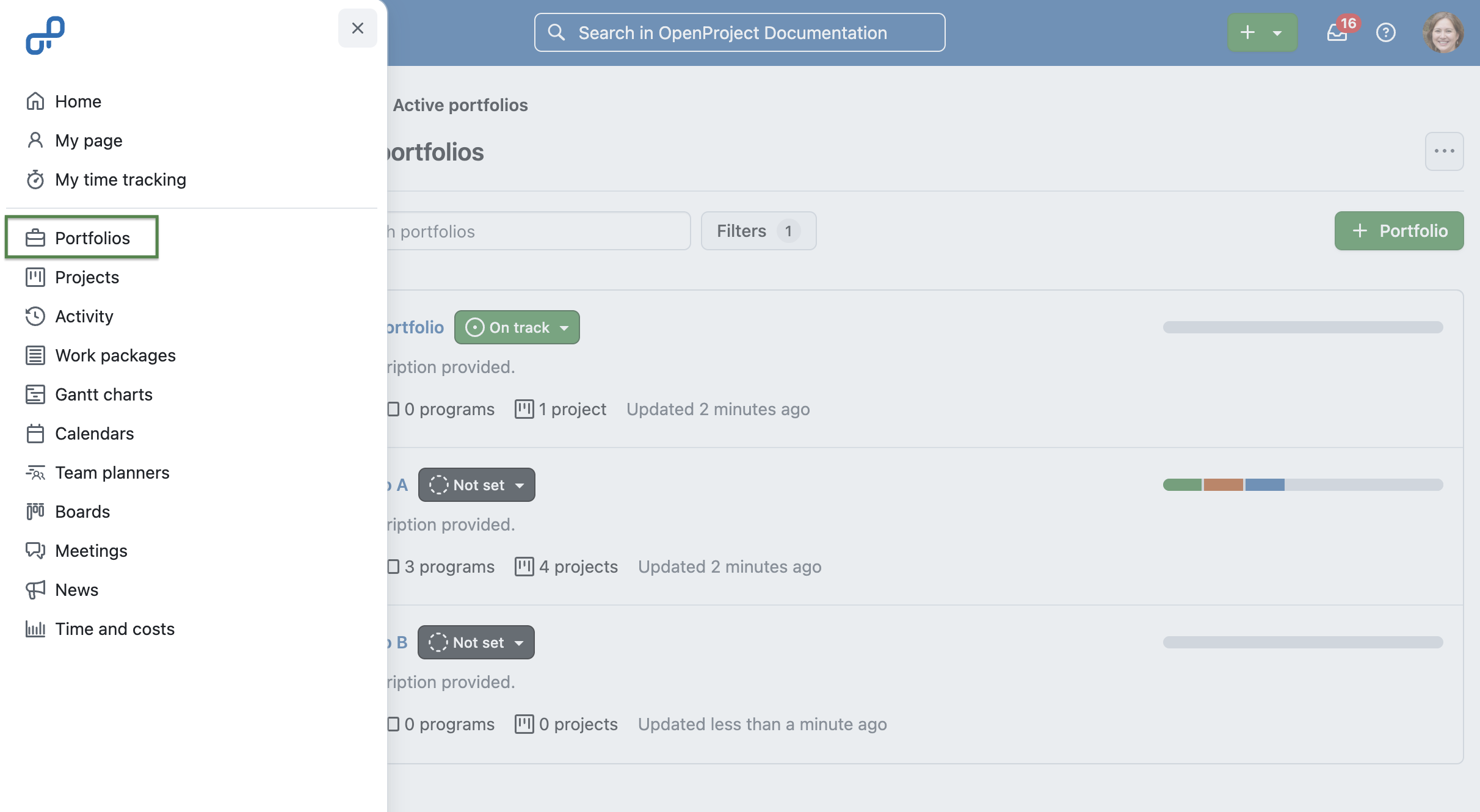
OpenProject 17.0 introduces hierarchical workspaces to better organize large project landscapes. Customers of the Enterprise Premium plan can now structure related items — projects, programs, and portfolios — to align operational work with strategic goals.
With this new hierarchy:
- Projects represent operational work.
- Programs group related projects into coordinated initiatives.
- Portfolios provide a higher-level view across multiple programs and projects.
Projects, programs, and portfolios all use the same familiar concept of an overview page with widgets, lifecycle dates and attributes. Portfolios and projects appear as top-level entries in the global navigation and project selector, while programs are accessed through portfolios.
Creating workspaces also becomes more consistent: administrators can define default templates for programs, portfolios, and projects so that new items follow the correct structure from the start. When users create new entries through the Subitems widget or other creation shortcuts, both the parent hierarchy and the appropriate template are prefilled automatically.
A dedicated global permission now controls who may create programs and portfolios, ensuring that the new hierarchy can be introduced in a controlled way.
This update lays the foundation for future portfolio-level and program-level capabilities in OpenProject. See our user guide to learn more about the portfolio module (Enterprise add-on) in OpenProject.
Note
This new hierarchy is especially valuable for organizations working with structured project management frameworks such as PM² or PMflex, where programs and portfolios play a central role.
Better meeting management with draft mode, presentation mode, multiple outcomes, and iCal subscription
OpenProject 17.0 introduces several great improvements that make meeting preparation and documentation more intuitive, structured, and efficient.
Draft mode
New meetings now open in draft mode, allowing moderators to prepare agendas, add participants, and structure content before sending out invitations or updates.
A banner clearly indicates draft mode, and invitations are only sent once the meeting is explicitly opened by clicking on the green "Open meeting" button. Only then, invitations can be sent and the usual update behaviour applies.
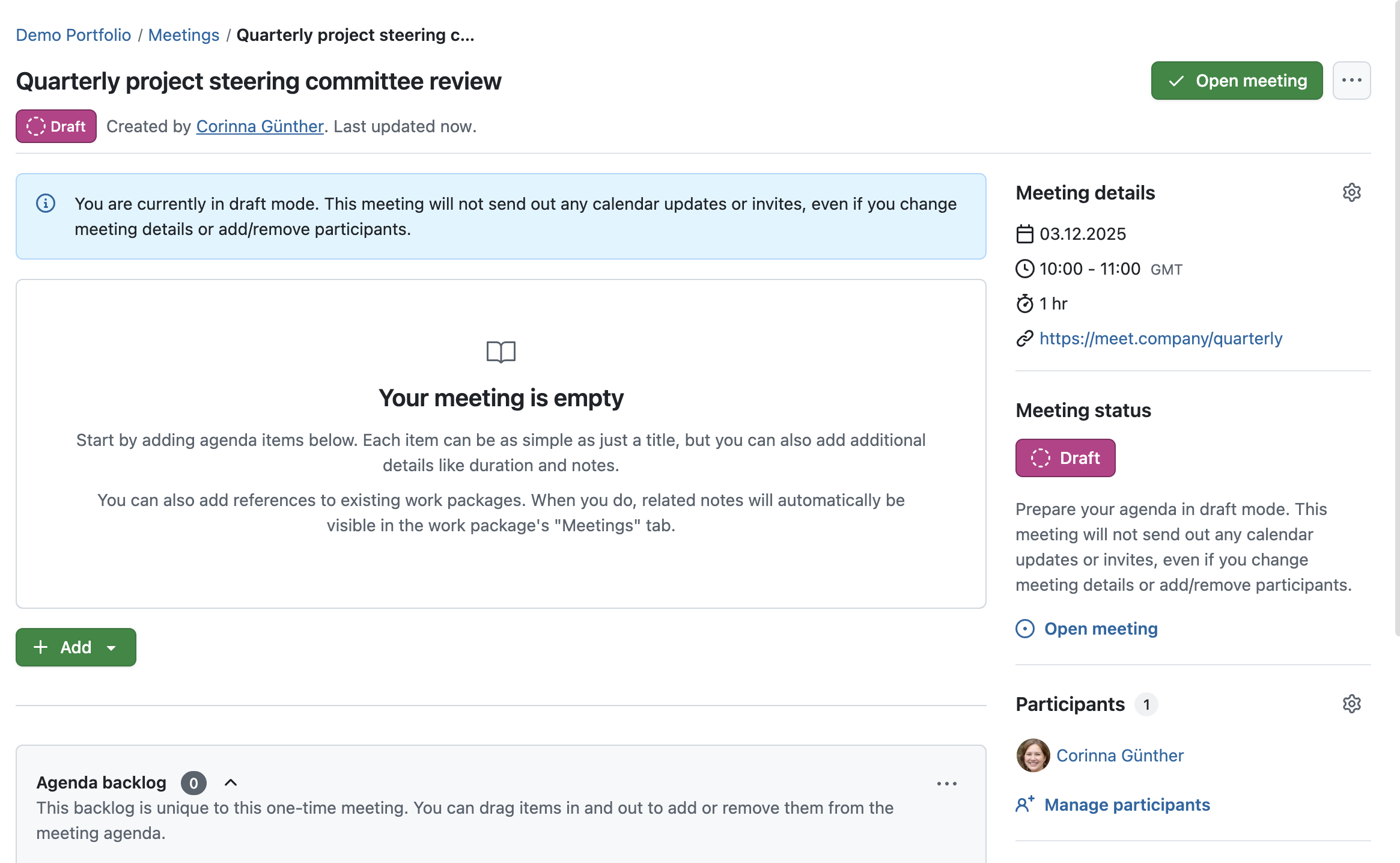
See our user guide to learn more about meeting draft mode in OpenProject.
Full-screen presentation mode
The new presentation mode offers a distraction-free, full-screen view that focuses on the current agenda item. It shows the meeting title, agenda item details, and navigation controls in a clear layout, including:
- a sticky header with the meeting title and exit button,
- a sticky footer with progress, previous/next navigation and a running timer.
Unlike the standard view, changes made by participants are reflected live in presentation mode, so moderators and attendees always see the current state of the agenda without additional pop-ups. Keyboard navigation using arrow keys is possible.
See our user guide to learn how to present a meeting in OpenProject.
Multiple text-based outcomes per agenda item
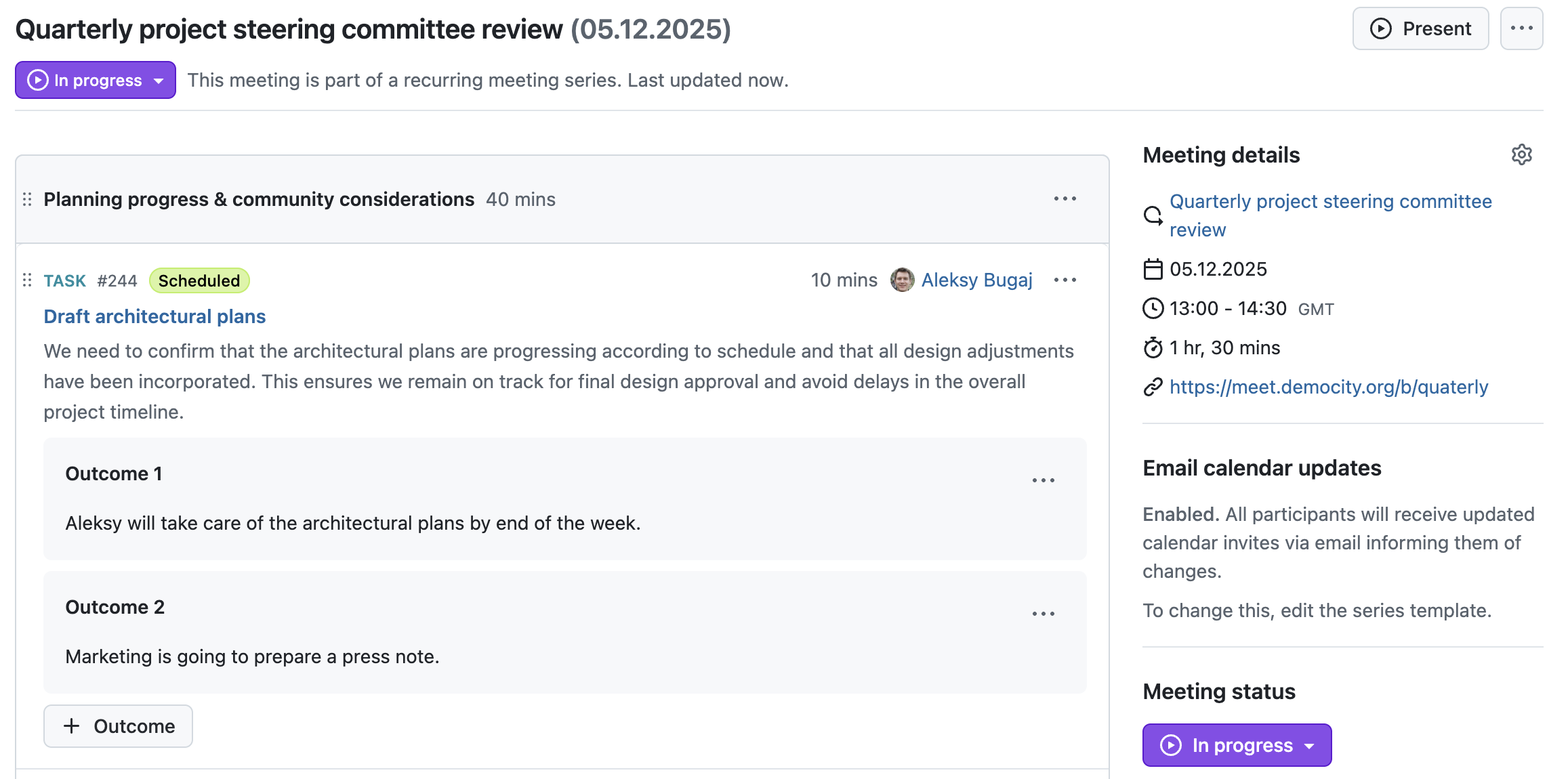
Agenda items can now hold multiple text-based outcomes: The + Outcome button remains available while the meeting is In progress and allows moderators to record more than one result for the same item. The first outcome is labelled "Outcome", additional ones are numbered ("Outcome 1", "Outcome 2", and so on). These outcomes are also supported in the PDF exports of meetings. This feature is a preparation for future improvements, such as creating work packages as outcomes.
Unified “My meetings” iCal subscription
To avoid duplicate or confusing calendar invites, users can now subscribe to all their meetings through a single iCal subscription URL from the My meetings page or settings. External calendars (for example Outlook, Apple Calendar, or Open-Xchange) stay in sync automatically. Individual .ics files remain available when needed, but sending them is now more clearly controlled via dedicated options when creating or updating meetings.
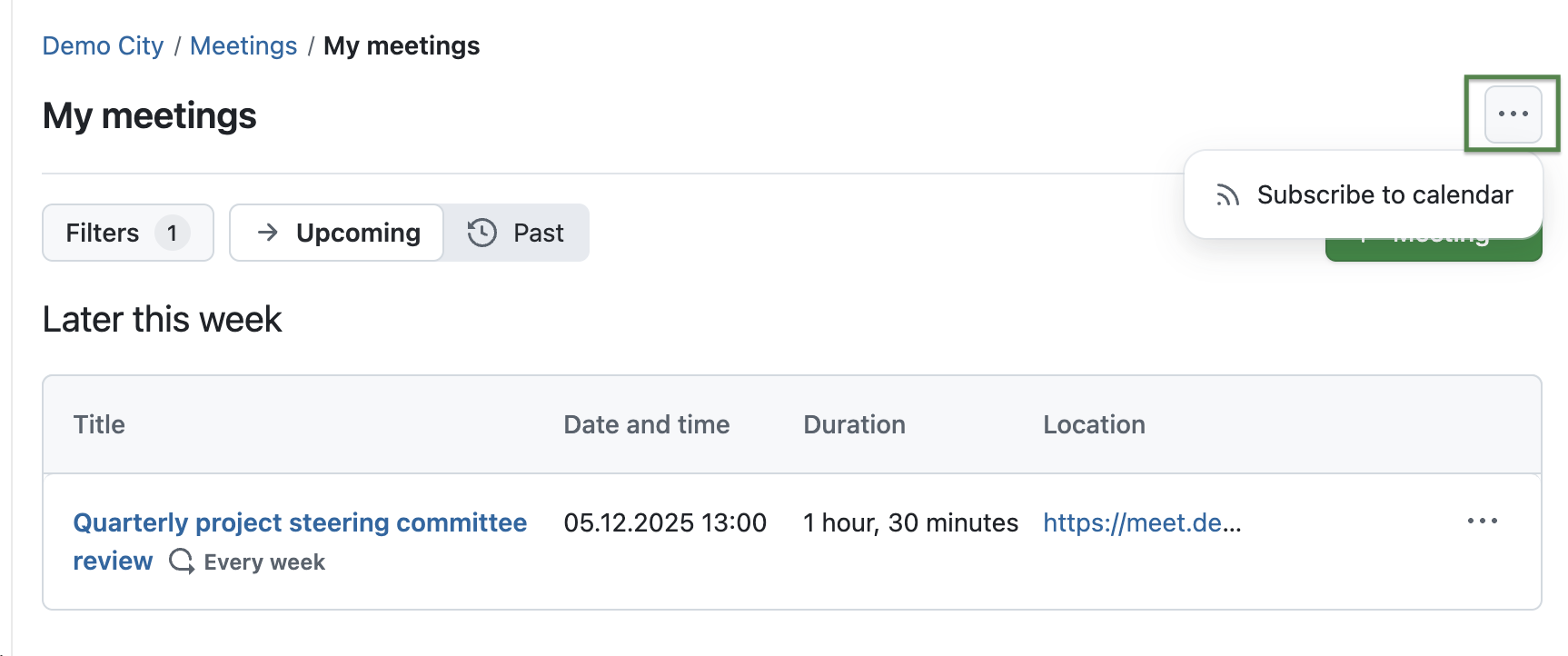
See our user guide to learn how to subscribe to OpenProject meetings.
Updated SharePoint integration with more restrictive permissions (Enterprise add-on)
Before OpenProject 17.0, the Microsoft 365 file storage integration was a single combined OneDrive/SharePoint integration available as an Enterprise add-on in the Professional plan. With this release, it is now split into two separate integrations — one for OneDrive and one for SharePoint — giving administrators clearer setup options and more flexibility.
For the SharePoint integration, OpenProject 17.0 introduces support for Microsoft's Sites.Selected permission model. This allows administrators to grant the OpenProject Entra ...
OpenProject 16.6.4
e7fc1ef
oliverguenther
Oliver Günther
Release date: 2026-01-08
We released OpenProject OpenProject 16.6.4.
The release contains several bug fixes and we recommend updating to the newest version.
Below you will find a complete list of all changes and bug fixes.
Bug fixes and changes
- Bugfix: SVG attachments are interpreted as PNG [#70349]
OpenProject 16.6.3
3aeec0b
oliverguenther
Oliver Günther
Release date: 2025-12-11
We released OpenProject OpenProject 16.6.3.
The release contains several bug fixes and we recommend updating to the newest version.
Below you will find a complete list of all changes and bug fixes.