An intelligent stock portfolio analysis agent built with Composio Tool Router, OpenAI GPT-4o-mini, and yFinance. The agent analyzes hypothetical investment opportunities, tracks stock performance, simulates portfolio allocations, and generates AI-powered bull/bear insights.
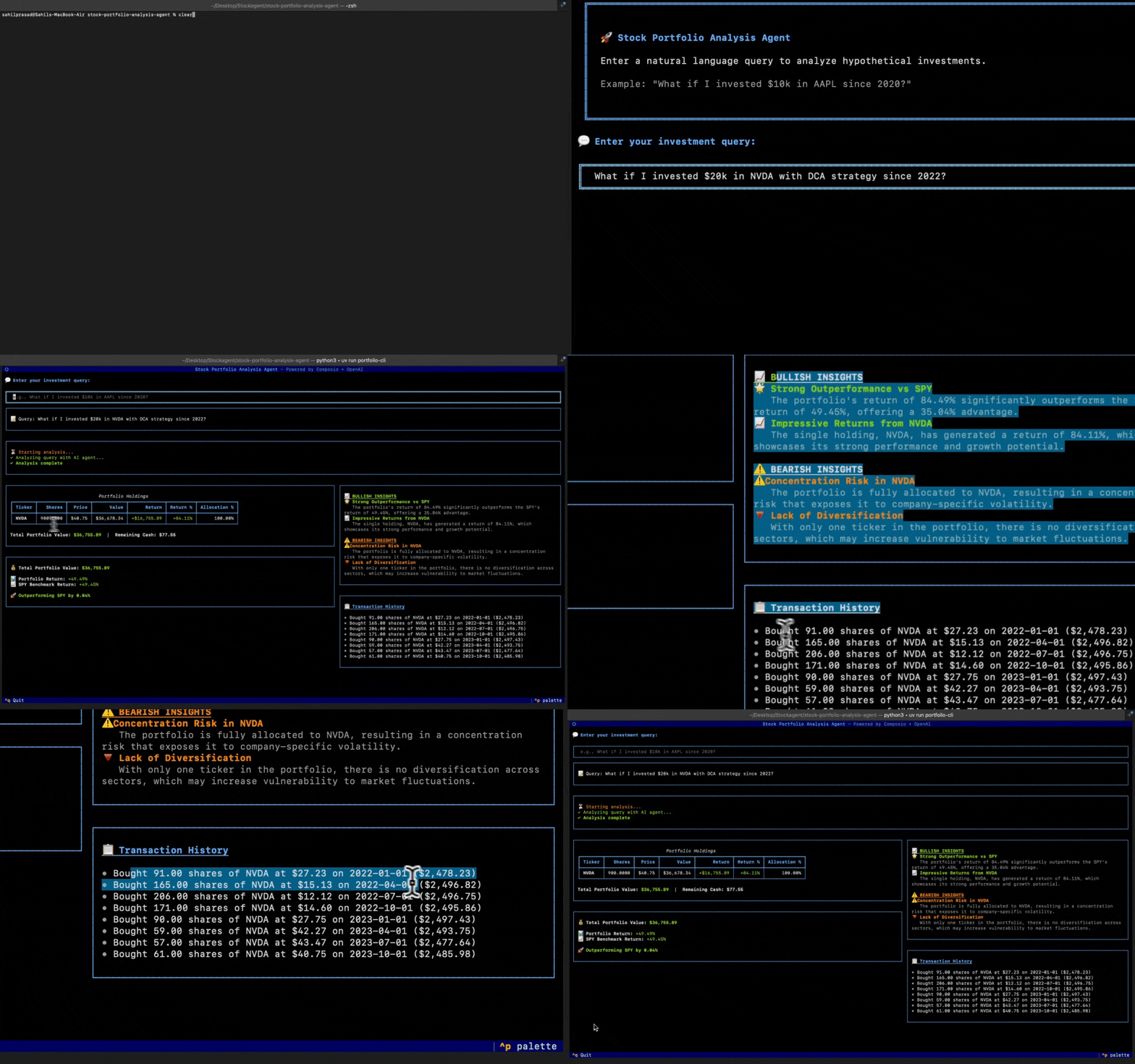
- 🗣️ Natural Language Queries - Ask investment questions in plain English
- 📊 Historical Stock Data - Fetch up to 4 years of stock data via yFinance
- 💰 Portfolio Simulation - Single-shot or DCA (Dollar-Cost Averaging) strategies
- 📈 Performance Metrics - Calculate returns, allocations, and total value
- 📉 S&P 500 Benchmark - Compare your portfolio against SPY
- 🐂🐻 AI Insights - Generate bull (positive) and bear (risk) analysis
- 🖥️ Interactive CLI - Beautiful terminal interface built with Textual
- 🌐 REST API - FastAPI backend with real-time SSE streaming
flowchart TB
    subgraph User["👤 User Interface"]
        CLI["🖥️ CLI (Textual App)"]
        API["🌐 REST API (FastAPI)"]
    end

    subgraph Agent["🤖 Agent Layer"]
        Orchestrator["Agent Orchestrator"]
        PortfolioAgent["Portfolio Analysis Agent"]
        InsightsAgent["Insights Generator Agent"]
    end

    subgraph Composio["🔧 Composio Tool Router"]
        ToolRouter["Tool Router"]
        FetchStock["fetch_stock_data"]
        FetchBenchmark["fetch_benchmark_data"]
        SimulatePortfolio["simulate_portfolio"]
        SimulateSPY["simulate_spy_investment"]
        CalcMetrics["calculate_metrics"]
    end

    subgraph External["🌍 External Services"]
        OpenAI["OpenAI API\n(GPT-4o-mini)"]
        YFinance["yFinance API\n(Yahoo Finance)"]
    end

    subgraph Data["💾 Data Layer"]
        Session["Session Manager"]
        Portfolio["Portfolio Manager"]
        Models["Pydantic Models"]
    end

    CLI --> Orchestrator
    API --> Orchestrator

    Orchestrator --> PortfolioAgent
    Orchestrator --> InsightsAgent

    PortfolioAgent --> ToolRouter
    InsightsAgent --> OpenAI

    ToolRouter --> FetchStock
    ToolRouter --> FetchBenchmark
    ToolRouter --> SimulatePortfolio
    ToolRouter --> SimulateSPY
    ToolRouter --> CalcMetrics

    FetchStock --> YFinance
    FetchBenchmark --> YFinance

    PortfolioAgent --> OpenAI

    Orchestrator --> Session
    Session --> Portfolio
    Portfolio --> Models

- Python 3.11+
- uv (Python package manager)
git clone https://github.com/your-username/stock-portfolio-analysis-agent.git
cd stock-portfolio-analysis-agentuv venv
source .venv/bin/activate # On macOS/Linux
# or
.venv\Scripts\activate # On Windowsuv syncCopy the example environment file and add your API keys:
cp .env.example .envEdit .env and add your keys:
# Composio API Key - Get from https://platform.composio.dev
COMPOSIO_API_KEY=your_composio_api_key_here

# OpenAI API Key - Get from https://platform.openai.com
OPENAI_API_KEY=your_openai_api_key_here

# Server Configuration (optional)
HOST=0.0.0.0
PORT=8000
RELOAD=false
WORKERS=1

# Logging Configuration (optional)
LOG_LEVEL=INFO- Go to Composio Platform
- Sign up or log in to your account
- Navigate to Settings → API Keys
- Create a new API key and copy it
- Paste it in your
.envfile asCOMPOSIO_API_KEY
- Go to OpenAI Platform
- Sign up or log in to your account
- Navigate to API Keys section
- Click Create new secret key
- Copy the key and paste it in your
.envfile asOPENAI_API_KEY
⚠️ Note: Ensure you have sufficient credits in your OpenAI account. The agent usesgpt-4o-miniwhich is cost-effective but still requires API credits.
Launch the beautiful terminal interface:
uv run portfolio-cli Or using the main entry point:
uv run python main.py # Starts the API serverThe API will be available at http://localhost:8000
# Build
docker build -t spa-agent .

# Run (set your API keys)
docker run \
  -e COMPOSIO_API_KEY=your_composio_api_key \
  -e OPENAI_API_KEY=your_openai_api_key \
  -e PORT=8000 -e HOST=0.0.0.0 \
  -p 8000:8000 \
  spa-agent
Test the API:
# Health check
curl http://localhost:8000/health

# Analyze a portfolio (sync)
curl -X POST http://localhost:8000/analyze/sync \
  -H "Content-Type: application/json" \
  -d '{"query": "What if I invested $10,000 in AAPL since 2020?"}'
Available Endpoints:
GET /health— Check if API is runningPOST /analyze/sync— Analyze query (wait for full response)POST /analyze— Analyze with SSE streaming (real-time)
Set CORS_ORIGINS env var (comma-separated) to restrict cross-origin access in production.
flowchart LR
    A[🧑 User opens CLI] --> B[💬 Types investment query]
    B --> C[🔄 Agent processes query]
    C --> D[📊 Fetches stock data]
    D --> E[💰 Simulates portfolio]
    E --> F[📈 Calculates metrics]
    F --> G[🐂🐻 Generates insights]
    G --> H[📋 Displays results]
    H --> I{New query?}
    I -->|Yes| B
    I -->|No| J[👋 Exit with Ctrl+Q]
- Launch the CLI - Start the application with
uv run portfolio-cli - Enter your query - Type a natural language investment question
- Wait for analysis - The agent fetches data and processes your request
- View results - See holdings, performance metrics, and AI insights
- Exit - Press
Ctrl+Qto quit the application
What if I invested $10,000 in AAPL since 2020?
How would $5k in Tesla perform from January 2022?
Analyze a $20,000 investment in Microsoft starting 2021
What if I invested $15,000 split between GOOGL and AMZN since 2021?
Compare investing $10k equally in AAPL, MSFT, and NVDA from 2022
Simulate $50,000 portfolio: 40% TSLA, 30% AAPL, 30% META since 2020
What if I DCA'd $1,000 monthly into AAPL since 2020?
Simulate monthly investments of $500 in SPY from 2021
Compare lump sum vs DCA for $12,000 in NVDA over 2022
Would AAPL or GOOGL have been a better investment since 2020?
How does a tech portfolio compare to S&P 500 since 2021?
Compare returns: $10k in TSLA vs $10k in SPY from 2020
How much would $10k in AAPL be worth if invested on March 15, 2020?
Analyze NVDA performance from the start of 2023 to now
What's the return on $5k in Amazon for the last 2 years?
stock-portfolio-analysis-agent/
├── agent/
│   ├── __init__.py           # Package initialization
│   ├── agent_config.py       # Agent setup & orchestration
│   ├── api.py                # FastAPI endpoints
│   ├── cli/
│   │   ├── __init__.py
│   │   ├── app.py            # Textual CLI application
│   │   ├── client.py         # API client for CLI
│   │   └── widgets.py        # Custom UI widgets
│   ├── errors.py             # Custom error definitions
│   ├── insights.py           # AI insights generation
│   ├── models.py             # Pydantic data models
│   ├── portfolio.py          # Portfolio management
│   ├── prompts.py            # System prompts for agents
│   ├── session.py            # Session management
│   └── tools.py              # Composio custom tools
├── tests/
│   ├── __init__.py
│   └── test_*.py             # Unit and property tests
├── .env.example              # Environment variables template
├── .gitignore
├── main.py                   # API server entry point
├── pyproject.toml            # Project dependencies
├── README.md
└── uv.lock                   # Dependency lock file
The agent uses the following custom tools registered with Composio:
| Tool | Description |
|---|---|
fetch_stock_data |
Fetches historical closing prices from yFinance |
fetch_benchmark_data |
Fetches SPY prices aligned to portfolio dates |
simulate_portfolio |
Simulates stock purchases (single-shot or DCA) |
simulate_spy_investment |
Simulates equivalent SPY investment |
calculate_metrics |
Computes returns, allocations, and performance |
| Shortcut | Action |
|---|---|
Enter |
Submit query |
Ctrl+C |
Cancel current analysis / Clear input |
Ctrl+Q |
Quit the application |
uv run pytest tests/ -v| Variable | Required | Default | Description |
|---|---|---|---|
COMPOSIO_API_KEY |
✅ Yes | - | Your Composio API key |
OPENAI_API_KEY |
✅ Yes | - | Your OpenAI API key |
HOST |
No | 0.0.0.0 |
Server host address |
PORT |
No | 8000 |
Server port |
RELOAD |
No | false |
Enable hot reload for development |
WORKERS |
No | 1 |
Number of uvicorn workers |
LOG_LEVEL |
No | INFO |
Logging level (DEBUG, INFO, WARNING, ERROR) |
Contributions are welcome! Please feel free to submit a Pull Request.
This project is licensed under the MIT License.