This grabs data from an airtable form and pairs every person with somebody.
install packages:
$ npm installwhen you need to run, just run:
$ npm startYou can copy
.env.exampleand rename it to.envand add the following
AIRTABLE_API_KEY: your airtable api key, find yours in the settings tab in airtable.AIRTABLE_BASE_ID: your airtable base id, find yours at https://airtable.com/api; select your base, and the baseID should be listed.SLACK_WORKFLOW_URL: the url from the first slack workflow as mentioned below
[
  "Region1",
  "Region2",
  "Region3",
]
You can edit this on lines 17-24 of index.js.
[
    {
        id: String, // Slack ID
        region: String, // User Region
        address: String,
        likes: String,
    }
]
Everything above is mandatory for pairing. If something is blank, be sure to replace with an empty string.
If using Airtable, you can do the following which is already enabled in the script:
async function getUsers(region) {
  const userRes = await usersTable.read({
    filterByFormula: `region = "${region}"`
  });
  const users = [];
  userRes.forEach(user => {
    users.push({
      id: user.fields.id,
      region: user.fields.region,
      address: user.fields.address,
      likes: user.fields.likes,
    });
  });
  return (users);
}The base MUST be formatted with the following columns, you can add more, but these are the bare minimum. Case-sensitive, they must be named exactly unless you change the code.
Users(table 1)- id (single line text)
- region (single select) [must be the same regions as above]
- address (long text)
- likes (long text)
Matching(table 2)- id (single line text) [main field]
- match (single line text)
- regionmatch (checkbox)
- region (single select) [must be the same regions as the
Userstable field: region] - sent (lookup) [configures to
linkandcheck] - Remind Them Button (button) [runs script below]
- link (linked to another record) [link this to the
checkedtable, it can and should be a hidden field]
Checked(table 3)- id (single line text)
- check (checkbox)
- Matched (linked to another record) [link this to the
matchedtable, it can and should be a hidden field]
You must have the Scripting app enabled.
const webhookLink = "set this to the second slack workflow as mentioned below"

let table = base.getTable('Matching');
let record = await input.recordAsync('Select a record', table);
let params = {
  userId: record.name,
  recordId: record.id,
  userIdLiteral: record.name,
};

await fetch(webhookLink, {
    method: 'POST',
    body: JSON.stringify(params),
  });
console.log(`Sent a reminder to ${record.name}`);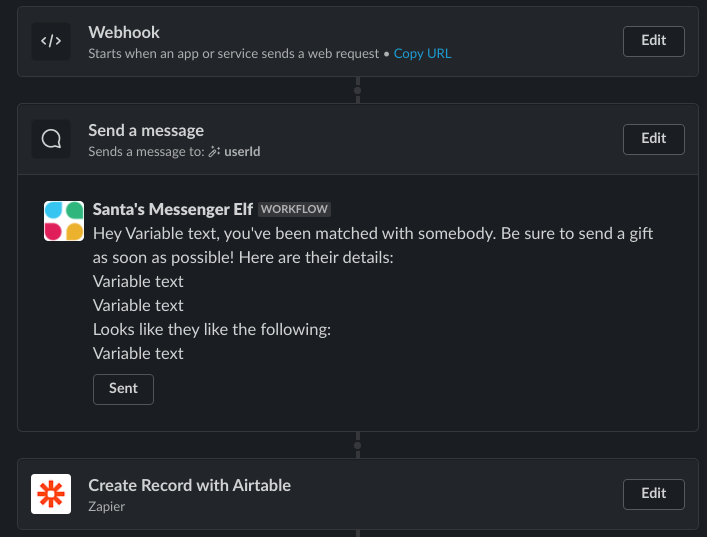
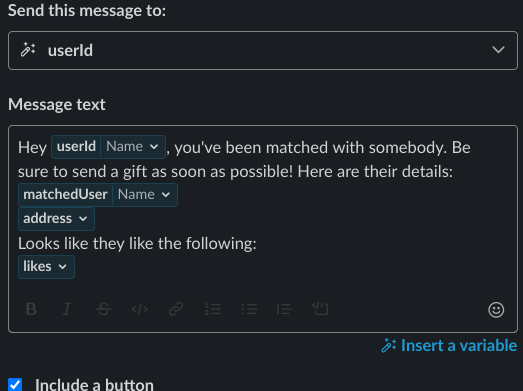
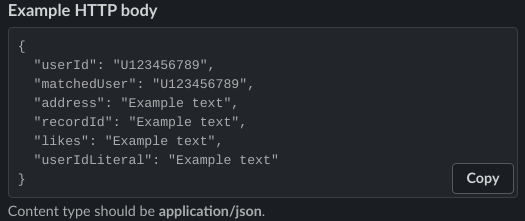
Create a button which moves on to a Zapier Integration that creates a new airtable record using the following config:
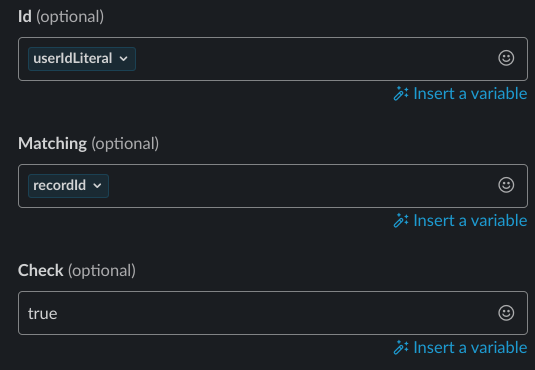
Now the integration asks for table name. Use the
Checkedtable.
This one sends a user a reminder.
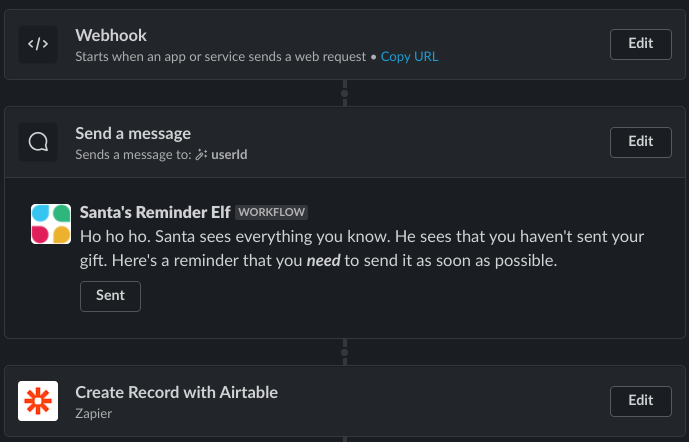
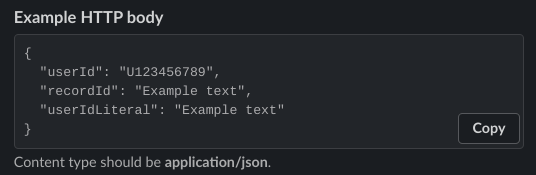
Create a button which moves on to a Zapier Integration that creates a new airtable record using the following config:
Now the integration asks for table name. Use the
Checkedtable.
Create an issue if you have any trouble creating these!
© Sarthak Mohanty 2020. Licensed under MIT, see LICENSE for more info.