


whatsapp-business-rs is a type-safe, async-ready toolkit for the complete WhatsApp Business Platform — built with love in Rust 🦀.
Send messages, handle webhooks, manage catalogs, or batch thousands of API calls in one shot. This crate brings it all together in a blazing-fast, developer-first package.
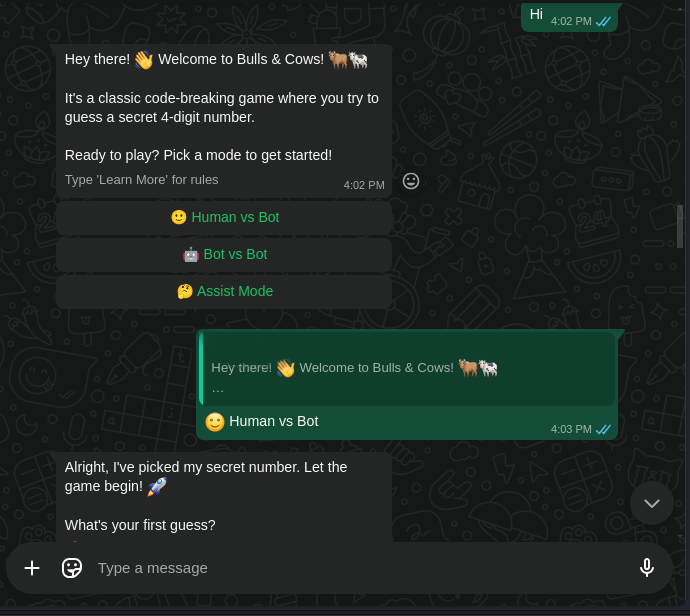
Check out our Bulls & Cows Game Bot example, built entirely with this crate. It showcases an interactive, stateful bot using a state machine pattern.
- 📩 Messaging — Send text, media, interactive buttons, templates, replies, and reactions.
- 📦 Batch Requests — Compose and chain dependent API calls in a single round-trip.
- ⚡ Webhook Server — Spin up an async webhook server with built-in signature validation.
- 👥 Onboarding & Registration — Guide new numbers safely through setup.
- 🛒 Catalog & Orders — Manage products and commerce flows.
- 🧑🤝🧑 Multi-Tenant Ready — Easily serve multiple WhatsApp Business Accounts. Attach per-request auth tokens instead of re-initializing clients. Ideal for SaaS platforms.
- 🧩 Feature Flags — Enable only what you need:
batch,server,onboarding.
# Add the crate and enable the server + message reply extensions
cargo add whatsapp-business-rs --features "server incoming_message_ext"
(Disable features you don’t need for smaller builds.)
Before diving in, you’ll need a few things from the Meta for Developers dashboard:
- Access Token
- Phone Number ID
- Business Account ID
use whatsapp_business_rs::Client;

#[tokio::main]
async fn main() -> Result<(), Box<dyn std::error::Error>> {
    let client = Client::new("YOUR_ACCESS_TOKEN").await?;
    let business_phone_id = "YOUR_BUSINESS_NUMBER_ID";
    let recipient_number = "+16012345678";

    client.message(business_phone_id)
        .send(recipient_number, "Hello from Rust! 🦀")
        .await?;

    println!("Text message sent!");
    Ok(())
}This example uses the incoming_message_ext feature for easy replies.
use whatsapp_business_rs::{
    client::Client,
    server::{Server, WebhookHandler, EventContext, IncomingMessage},
    app::SubscriptionField,
};
use std::error::Error;

// Define a simple handler struct
#[derive(Debug, Clone)]
struct EchoHandler;

impl WebhookHandler for EchoHandler {
    async fn handle_message(&self, _ctx: EventContext, msg: IncomingMessage) {
        println!("Received message from: {}", msg.sender.wa_id);

        // Echo the received message back to the sender
        msg.reply(msg.clone()).await;
    }
}

#[tokio::main]
async fn main() -> Result<(), Box<dyn Error>> {
    // Client is needed for registering the webhook
    let client = Client::new("YOUR_APP_OR_SYSTEM_USER_TOKEN").await?;

    // Build and start the webhook server
    Server::builder()
        .endpoint("127.0.0.1:8080".parse().unwrap()) // Local address
        .verify_payload("YOUR_APP_SECRET") // For payload verification
        .build()
        .serve(EchoHandler, client.clone()) // Pass client for replying
        .register_webhook( // One-time webhook registration
            client
                .app("YOUR_APP_ID")
                .configure_webhook(("YOUR_VERIFY_TOKEN", "https://your-public-url.com"))
                .events([SubscriptionField::Messages].into())
                .with_auth(client.auth().clone()), // Use client's auth
        )
        .await?;

    Ok(())
}Batching reduces round-trips and lets you chain dependent requests.
use whatsapp_business_rs::Client;

#[tokio::main]
async fn main() -> Result<(), Box<dyn std::error::Error>> {
    let client = Client::new("YOUR_ACCESS_TOKEN").await?;
    let sender = client.message("YOUR_BUSINESS_PHONE_ID");

    client
        .batch()
        .include(sender.send("+1234567890", "Hi A!"))
        .include(sender.send("+1234667809", "Hi B!"))
        .include(sender.send("+1224537891", "Hi C!"))
        .execute()
        .await?;

    Ok(())
}use whatsapp_business_rs::message::Draft;
use whatsapp_business_rs::Client;
async fn send_cta_example() -> Result<(), Box<dyn std::error::Error>> {
let client = Client::new("YOUR_ACCESS_TOKEN").await?;
let draft = Draft::text("Would you like to continue?")
.add_reply_button("yes_callback", "Yes")
.add_reply_button("no_callback", "No")
.footer("Please select an option.");
client.message("YOUR_BUSINESS_PHONE_ID").send("+16012345678", draft).await?;
Ok(())
}use whatsapp_business_rs::message::Draft;
use whatsapp_business_rs::Client;
async fn send_option_list_example() -> Result<(), Box<dyn std::error::Error>> {
let client = Client::new("YOUR_ACCESS_TOKEN").await?;
let draft = Draft::new()
.body("Please make a selection.")
.header("Main Menu 🍕")
.list("View Options") // The button text that opens the list
.add_list_option("buy_pepperoni", "Pepperoni", "Classic pepperoni pizza.")
.add_list_option("buy_margherita", "Margherita", "Simple and delicious.");
client.message("YOUR_BUSINESS_PHONE_ID").send("+16012345678", draft).await?;
Ok(())
}use whatsapp_business_rs::{Client, Media};
async fn send_video_example() -> Result<(), Box<dyn std::error::Error>> {
let client = Client::new("YOUR_ACCESS_TOKEN").await?;
let video = Media::from_path("path/to/your/video.mp4")
.await?
.caption("Check out this cool video!");
client.message("YOUR_BUSINESS_PHONE_ID").send("+16012345678", video).await?;
Ok(())
}use whatsapp_business_rs::{Client, Location};
async fn send_location_example() -> Result<(), Box<dyn std::error::Error>> {
let client = Client::new("YOUR_ACCESS_TOKEN").await?;
let location = Location::new(37.4421, -122.1615)
.name("Philz Coffee")
.address("101 Forest Ave, Palo Alto, CA 94301");
client.message("YOUR_BUSINESS_PHONE_ID").send("+16012345678", location).await?;
Ok(())
}use whatsapp_business_rs::{client::Client, Waba, waba::CatalogMetadataField};
use futures::TryStreamExt as _;
#[tokio::main]
async fn main() -> Result<(), Box<dyn std::error::Error>> {
let client = Client::new("YOUR_ACCESS_TOKEN").await?;
let mut catalogs = client
.waba("YOUR_WABA_ID")
.list_catalogs()
.into_stream();
println!("Listing catalogs:");
while let Some(catalog) = catalogs.try_next().await? {
println!("{:?}", catalog);
}
Ok(())
}use whatsapp_business_rs::catalog::{ProductData, Price};
use whatsapp_business_rs::Client;
#[tokio::main]
async fn main() -> Result<(), Box<dyn std::error::Error>> {
let client = Client::new("YOUR_ACCESS_TOKEN").await?;
let product = ProductData::default()
.name("Rust Programming Book")
.description("Learn Rust with this comprehensive guide")
.price(Price(39.99, "USD".into()))
.build("rust-book-001"); // Your retailer ID
let result = client.catalog("YOUR_CATALOG_ID")
.create_product(product)
.await?;
println!("Product created with ID: {}", result.product.product_id());
Ok(())
}- 🧠 Zero Guessing: Compile-time type safety ensures your integrations are robust.
- ⚙️ Built for Production: Powered by
reqwest,axum, andtokiofor high performance. - 🧪 Testable: A clean, fluent API design makes your code inherently testable.
- 🧑🤝🧑 Multi-Tenant Native: Built-in support for managing multiple business accounts from one app (see "Features").
- 💥 Extensible: Add your own layers or handlers, or fork and customize.
Contributions are very welcome! Open an issue, suggest features, or send a PR.
Tired of bloated SDKs, missing docs, or inconsistent behavior? With whatsapp-business-rs, you own the stack — fast, clean, and async-native. Perfect for bots, CRMs, and next-gen commerce apps.