Improvement: Use frosted glass effect for Navigationbar and Toolbar #1290
Conversation


 wutschel
force-pushed
the
improve_layout
branch
2 times, most recently
from
wutschel
force-pushed
the
improve_layout
branch
2 times, most recently
from
54bab06 to
3b76f42
Compare

|
The solution around |
|
While testing I now saw the the bottom inset behaves different (related to |
|
Best overall results I achieve when
With above I have
Overall, it became difficult as soon as the tables should extend underneath the navigation / status bar. I am quite sure the current path is not correct or desired. This will end up in more trouble, quite unsatisfying. Force pushed the code now, I hope you have a better idea how this should be done properly. |

|
tbh it's rather difficult to track the issue you're facing. Would it be possible to create a minimal reproducible example (a test app I mean)? It'd also be easier to investigate and find solution there. maybe it's time to start using AutoLayout, it may get the things right automatically. About the 1/3 px: maybe using value from safe area inset could help? |
wutschel
force-pushed
the
improve_layout
branch
2 times, most recently
from
ee484cc to
ffa6d54
Compare
wutschel
force-pushed
the
improve_layout
branch
from
ffa6d54 to
13b7594
Compare
|
With latest rebase this PR only changes behaviour of the navigation bar. All other changes related to coding styles, sticky header implementation and frosted glass toolbars were already merged via dedicated PRs. |
wutschel
force-pushed
the
improve_layout
branch
from
71c31cb to
90958f5
Compare
|
The 1/3 px issue seems to be yet another Some examples for the 1/3 px issue on iPhone 14 Pro iOS18 simulator: |
wutschel
force-pushed
the
improve_layout
branch
3 times, most recently
from
f967c34 to
adaf81c
Compare
wutschel
force-pushed
the
improve_layout
branch
from
adaf81c to
56da8c2
Compare
wutschel
force-pushed
the
improve_layout
branch
from
56da8c2 to
cc63d3d
Compare
wutschel
force-pushed
the
improve_layout
branch
3 times, most recently
from
24b2b6d to
50f86df
Compare
|
The fix/workaround for sticky headers does also fix layout problems on bottom toolbar on some devices (screenshot taken from iPhone 18 Pro Max simulator -- left before, right after). 
|
wutschel
force-pushed
the
improve_layout
branch
3 times, most recently
from
981fa3f to
a4c9ff8
Compare
wutschel
force-pushed
the
improve_layout
branch
from
a4c9ff8 to
5aefaa0
Compare
wutschel
force-pushed
the
improve_layout
branch
from
5aefaa0 to
7dbbee6
Compare
wutschel
force-pushed
the
improve_layout
branch
from
7dbbee6 to
2fcd950
Compare
wutschel
force-pushed
the
improve_layout
branch
4 times, most recently
from
53a2e45 to
414b189
Compare
wutschel
force-pushed
the
improve_layout
branch
2 times, most recently
from
199d41e to
110fed6
Compare
wutschel
force-pushed
the
improve_layout
branch
from
110fed6 to
47597e2
Compare
wutschel
force-pushed
the
improve_layout
branch
2 times, most recently
from
aaf0629 to
b863d45
Compare
wutschel
force-pushed
the
improve_layout
branch
from
b863d45 to
3c6b3fa
Compare

Using CGRectGetMaxY resolves a layout issue where otherwise the inset ends below the navbar (e.g. Phone 14 Pro iOS18), but at the same time it causes an issue with the inset not taking into account the status bar (e.g. iPod Touch iOS15.5). This seems to be caused by calling this method from viewDidLoad instead of willLayoutSubviews. This workaround avoids rework of DetailVC's delicate layout.
Make navbar transparent and add the desired blur effect. Let the table view and the collection view extend underneath the navbar and set the inset accordingly.
wutschel
force-pushed
the
improve_layout
branch
from
3c6b3fa to
55ee037
Compare
2 participants


Description
Frosted Glass Effect
Use frosted glass effect (
[UIBlurEffect effectWithStyle:UIBlurEffectStyleDark]) for navbar and toolbar. Let the table views extend underneath the frosted glass and adaptcontentInsetaccordingly.Special care is needed for the following areas:
SVPullToRefreshworking as expected it is important to explicitly setcontentInsetinstead of automatic adjustment.buttonsViewEffectwhile being in fullscreen library view.Glitch with Sticky Headers for collection view
When changing the layout for the table and collection view to extend underneath the navbar, an issue became visible on some devices (in my case the glitch shows on iPhone 14 Pro iOS 18.5 sim, but not on iPod Touch 7G iOS 15.5 sim). The issue is caused by how the app retrieves
contentInset.top, it follows the approachUIApplication.sharedApplication.statusBarFrame.size.height + navCtrl.navigationBar.frame.size.heightBut in fact, the navigation bar ends 1/3 px above, as it is also reported when using
CGRectGetMaxY(navCtrl.navigationBar.frameIssue (see small visible area between section header and navbar):
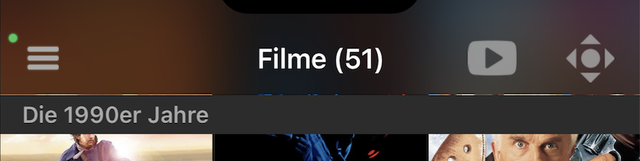
Solutions are either to use the
CGRectGetMaxYequation, or to increasecontentInset.topto slightly overlap with the navigation bar.Other
In addition, some smaller refactoring, more comments and coding style changes were added.
Screenshots
Screenshots (left = current, right = dark blur): https://ibb.co/zW9r4NRv
Video: link to video
Summary for release notes
Improvement: Use frosted glass effect for Navigationbar and Toolbar