




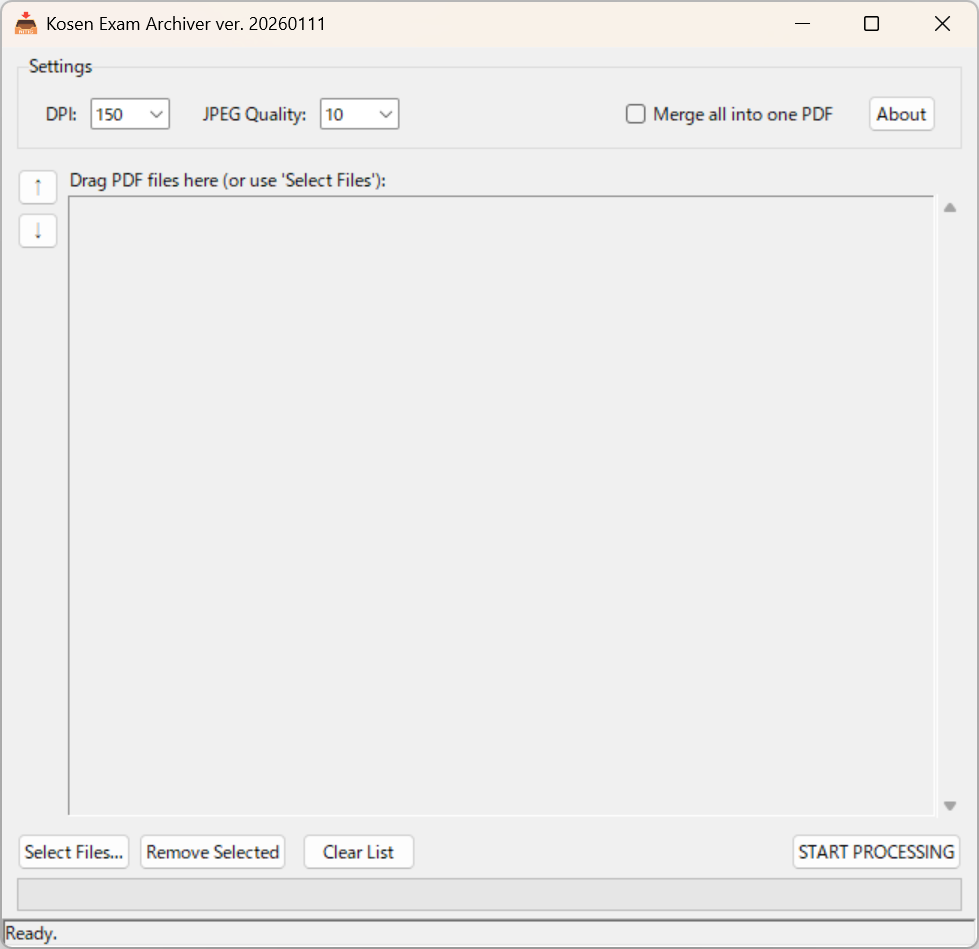
A specialized, drag-and-drop compression tool designed for preserving scanned exam answer sheets.
If you just want to use the tool, you do not need to install Python.
- Click here to download the latest KosenExamArchiver.exe
(This links to the pre-built executable in the
dist/folder) - Double-click the downloaded file to launch.
- Drag and drop your exam PDFs directly onto the window.
Kosen Exam Archiver is a desktop utility built to solve a specific problem faced by faculty members at Kosen (National Institute of Technology): Digital Evidence Preservation.
When archiving thousands of handwritten exam answer sheets, standard PDF compressors often blur the text or leave "dirty" gray artifacts from the scanner noise. This tool is engineered to produce High-Contrast, Low-Filesize archives that serve as perfect digital photocopies.
- 📄 "Smart Whitening" Algorithm: Automatically detects the paper background color and snaps it to pure white (RGB 255,255,255), removing scanner noise and reducing file size.
- 🔴 Handwriting Emphasis: Preserves the clarity of red ink (grading marks) and pencil strokes while aggressively compressing the rest.
- 🔗 Batch Merging: Includes an optional "Merge" mode that combines all processed documents into a single master PDF (e.g.,
Class_3I_Merged.pdf), ideal for archiving an entire class as one file. - 🧹 Flattening: Converts complex vector PDF layers into a single, robust raster image. This prevents "missing annotation" bugs in future PDF viewers.
- ⏱️ Auto-Timestamping: Injects ISO-compliant
CreationDateandModDatemetadata into the PDF for archival integrity. - 🖱️ Drag-and-Drop Workflow: Supports dropping individual files, folders, or even dragging files directly onto the
.exeicon.
If you wish to modify the code or build the application yourself, follow these steps.
- OS: Windows 10/11
- Language: Python 3.10 or newer
-
Clone the repository:
git clone https://github.com/zj13924/KosenExamArchiver.git cd KosenExamArchiver -
Install dependencies:
pip install pymupdf tkinterdnd2 pyinstaller
pymupdf: For PDF rendering and manipulation.tkinterdnd2: For native drag-and-drop GUI support.pyinstaller: For compiling into a standalone EXE.
To build the standalone executable (.exe) that includes the icon and necessary DLLs, run the following command in your terminal:
python -m PyInstaller --noconfirm --onefile --windowed --name "KosenExamArchiver" --icon="emoji_u1f4e5.ico" --add-data "emoji_u1f4e5.ico;." --collect-all tkinterdnd2 "KosenExamArchiver.py"Note: Ensure
emoji_u1f4e5.icois present in the source directory before compiling.
This project is licensed under the GNU Affero General Public License v3.0 (AGPL-3.0). See the LICENSE file for details.
This application stands on the shoulders of giants. We gratefully acknowledge the following libraries:
-
PyMuPDF (fitz)
- Role: Core PDF processing engine.
- License: GNU AGPL v3.0
- Source: https://pymupdf.readthedocs.io/
-
TkinterDnD2
- Role: Drag-and-drop functionality wrapper.
- License: MIT License
- Source: https://github.com/pmgagne/tkinterdnd2
- Application Icon:
- Based on
emoji_u1f4e5.png(📥 Inbox Tray) from the Google Noto Emoji project. - Modifications: Custom text overlay added.
- License: Apache License 2.0
- Source: https://github.com/googlefonts/noto-emoji
- Based on
Transparency Note: The source code for this application was fully generated by Google Gemini. The user (repository owner) prompted the logic and design requirements, but did not manually write the Python code. This project serves as a case study in AI-assisted software development for academic administrative tools.
THE SOFTWARE IS PROVIDED "AS IS", WITHOUT WARRANTY OF ANY KIND, EXPRESS OR IMPLIED, INCLUDING BUT NOT LIMITED TO THE WARRANTIES OF MERCHANTABILITY, FITNESS FOR A PARTICULAR PURPOSE AND NONINFRINGEMENT. IN NO EVENT SHALL THE AUTHORS OR COPYRIGHT HOLDERS BE LIABLE FOR ANY CLAIM, DAMAGES OR OTHER LIABILITY, WHETHER IN AN ACTION OF CONTRACT, TORT OR OTHERWISE, ARISING FROM, OUT OF OR IN CONNECTION WITH THE SOFTWARE OR THE USE OR OTHER DEALINGS IN THE SOFTWARE.