Automatically record discord calls on PMs, DM Groups and even guilds (servers)



This project is a proof-of-concept for educational purposes only. It is a direct violation of Discord's TOS and should not be used. Applying client modifications or "self-botting" (automating a user account) CAN AND WILL RESULT IN A PERMANENT BAN FROM DISCORD
LEGAL WARNING: Recording, intercepting, or saving conversations without the consent of all parties may be illegal in your country. You are responsible for complying with all applicable laws.
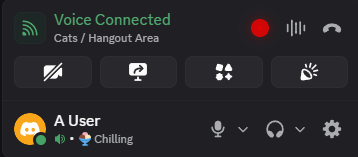
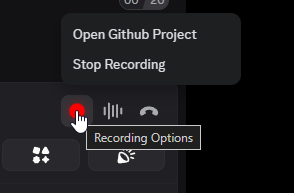
when you join and leave a discord call your client sends a request to a localserver that's running in background. recording your desktop audio and microphone and saving the records to the documents folder on your computer.
PS. Stable discord is the only supported build for this release!
- Clone the repository
git clone https://github.com/agamsol/discord-call-recorder.git - install the virtual-audio-capturer driver (for capturing desktop audio - aka person you are calling with):
run
install_virtual_audio_capturer.cmdAs administrator under\bin\install_virtual_audio_capturer.cmd) - run
choose_audio_device.exeand choose your microphone from the list - run
main.exe(kill discord.exe and start again if running)
- Create a shortcut of
main.exeand put that in the following directory %appdata%\Microsoft\Windows\Start Menu\Programs\Startup
Feel free to report any bugs and don't forget to give a star if you are enjoying this project 💖
- Added automatic plugin updates from GitHub (configurable via
config.env)- Set
FETCH_PLUGIN_UPDATES_FROM_GITHUBto a raw URL to enable auto-plugin-updates on startup. (not backend updates)
PS. This is done because discord updates elements very often and people end up running backend with outdated plugin
- Set
- Major: Updated Discord Classes
View older versions
-
Fixed discord startup with windows throwing an error (added handler to the injector)
-
More builds are now supported
stable,ptb,canaryModify under
config.env(example:DISCORD_BUILDS=stable, ptb, canary)
- Fixed a bug that crashes the application when swapping a call (fast join and leave)
- Syncronos print caused delay at printing logs (switched to the logger library)
- Patched the latest HTML Class element changes (Critical)
- Saving the current record even on a restart/crash (by changing the format to mkv)
- Pause & Resume the recording without leaving the call
- Thanks to Roger Pack for providing the amazing virtual-audio-capture driver
- Thanks to Jabka-M for providing the "idea" of the injection at repository DiscordInject (The idea was re-implamented by me in a pure pythonic way for higher compatibility)