Releases: agamsol/discord-call-recorder
Pre-Release 0.5 (Class Changes)

Pre-Release 0.5 (Class Changes)
📝 Release Notes:
Builds: Stable discord only!
Version: Pre-0.5
Screenshots (Preview)
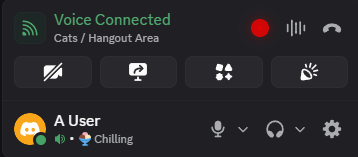
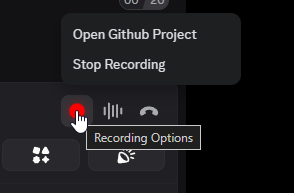
📰 Whats new in version 0.5
- Added automatic plugin updates from GitHub (configurable via
config.env)- Set
FETCH_PLUGIN_UPDATES_FROM_GITHUBto a raw URL to enable auto-plugin-updates on startup. (not backend updates)
PS. This is done because discord updates elements very often and people end up running backend with outdated plugin
- Set
- Major: Updated Discord Classes
⚙️ Installation And Deployment Process
- Clone the repository
git clone https://github.com/agamsol/discord-call-recorder.git - install the virtual-audio-capturer driver (for capturing desktop audio - aka person you are calling with):
runinstall_virtual_audio_capturer.cmdAs administrator under\bin\install_virtual_audio_capturer.cmd) - run
choose_audio_device.exeand choose your microphone from the list - run
main.exe(kill discord.exe and start again if running)
🌅 Adding to startup (Optional)
- Create a shortcut of
main.exeand put that in the following directory %appdata%\Microsoft\Windows\Start Menu\Programs\Startup
Feel free to report any bugs and don't forget to give a star if you are enjoying this project 💖
Pre-Release 0.4
📝 Release Notes:
Builds: Stable discord only!
Version: Pre-0.4
Screenshots (Preview)
📰 Whats new in version 0.4
-
Fixed discord startup with windows throwing an error (added handler to the injector)
-
More builds are now supported
stable,ptb,canaryModify under
config.env(example:DISCORD_BUILDS=stable, ptb, canary)
⚙️ Installation And Deployment Process
- Clone the repository
git clone https://github.com/agamsol/discord-call-recorder.git - install the virtual-audio-capturer driver (for capturing desktop audio - aka person you are calling with):
runinstall_virtual_audio_capturer.cmdAs administrator under\bin\install_virtual_audio_capturer.cmd) - run
choose_audio_device.exeand choose your microphone from the list - run
main.exe(kill discord.exe and start again if running)
🌅 Adding to startup (Optional)
- Create a shortcut of
main.exeand put that in the following directory %appdata%\Microsoft\Windows\Start Menu\Programs\Startup
Feel free to report any bugs and don't forget to give a star if you are enjoying this project 💖
Pre-Release 0.3 (Minor Backend Fixes)
📝 Release Notes:
Builds: Stable discord only!
Version: Pre-0.3
Screenshots (Preview)
📰 Whats new in version 0.3
- Fixed a bug that crashes the application when swapping a call (fast join and leave)
- Syncronos print caused delay at printing logs (switched to the logger library)
⚙️ Installation And Deployment Process
- Clone the repository
git clone https://github.com/agamsol/discord-call-recorder.git - install the virtual-audio-capturer driver (for capturing desktop audio - aka person you are calling with):
runinstall_virtual_audio_capturer.cmdAs administrator under\bin\install_virtual_audio_capturer.cmd) - run
choose_audio_device.exeand choose your microphone from the list - run
main.exe(kill discord.exe and start again if running)
🌅 Adding to startup (Optional)
- Create a shortcut of
main.exeand put that in the following directory %appdata%\Microsoft\Windows\Start Menu\Programs\Startup
Feel free to report any bugs and don't forget to give a star if you are enjoying this project 💖
Pre-Release 0.2 (Latest discord update patches)
📝 Release Notes:
Builds: Stable discord only!
Version: Pre-0.2
Screenshots (Preview)
📰 Whats new in version 0.2
- Patched the latest HTML Class element changes (Critical)
- Saving the current record even on a restart/crash (by changing the format to mkv)
- Pause & Resume the recording without leaving the call
⚙️ Installation And Deployment Process
- Clone the repository
git clone https://github.com/agamsol/discord-call-recorder.git - install the virtual-audio-capturer driver (for capturing desktop audio - aka person you are calling with):
runinstall_virtual_audio_capturer.cmdAs administrator under\bin\install_virtual_audio_capturer.cmd) - run
choose_audio_device.exeand choose your microphone from the list - run
main.exe(kill discord.exe and start again if running)
🌅 Adding to startup (Optional)
- Create a shortcut of
main.exeand put that in the following directory %appdata%\Microsoft\Windows\Start Menu\Programs\Startup
Feel free to report any bugs and don't forget to give a star if you are enjoying this project 💖
Pre-Release 0.1 (Installer not ready)
📝 Release Notes:
Builds: Stable discord only!
Version: Pre-0.1
⚙️ Installation And Deployment Process
- Clone the repository
git clone https://github.com/agamsol/discord-call-recorder.git - install the virtual-audio-capturer driver (for capturing desktop audio - aka person you are calling with):
runinstall_virtual_audio_capturer.cmdAs administrator under\bin\install_virtual_audio_capturer.cmd) - run
choose_audio_device.exeand choose your microphone from the list - run
main.exe(kill discord.exe and start again if running)
🌅 Adding to startup (Optional)
- Create a shortcut of
main.exeand put that in the following directory %appdata%\Microsoft\Windows\Start Menu\Programs\Startup
Feel free to report any bugs and don't forget to give a star if you are enjoying this project 💖
Full Changelog: https://github.com/agamsol/discord-call-recorder/commits/0.1