Important
Disclaimer (community project, not supported)
This repository is an independent, community-maintained project and is not an official product of any vendor. It is provided as-is, with no support obligations and no SLAs. Use at your own risk and test in a lab environment first.
This project is not affiliated with, endorsed by, or sponsored by any vendor. Any vendor and product names referenced in this repository are used for identification purposes only and may be trademarks of their respective owners. No trademark rights are granted by this repository.
Security note: Do not use this project against production systems unless you have reviewed the code and your security team has approved it. Do not upload logs, screenshots, or configuration files that contain credentials or customer data.
A Next.js 15 application providing a unified monitoring dashboard for data protection environments through an intuitive web interface.
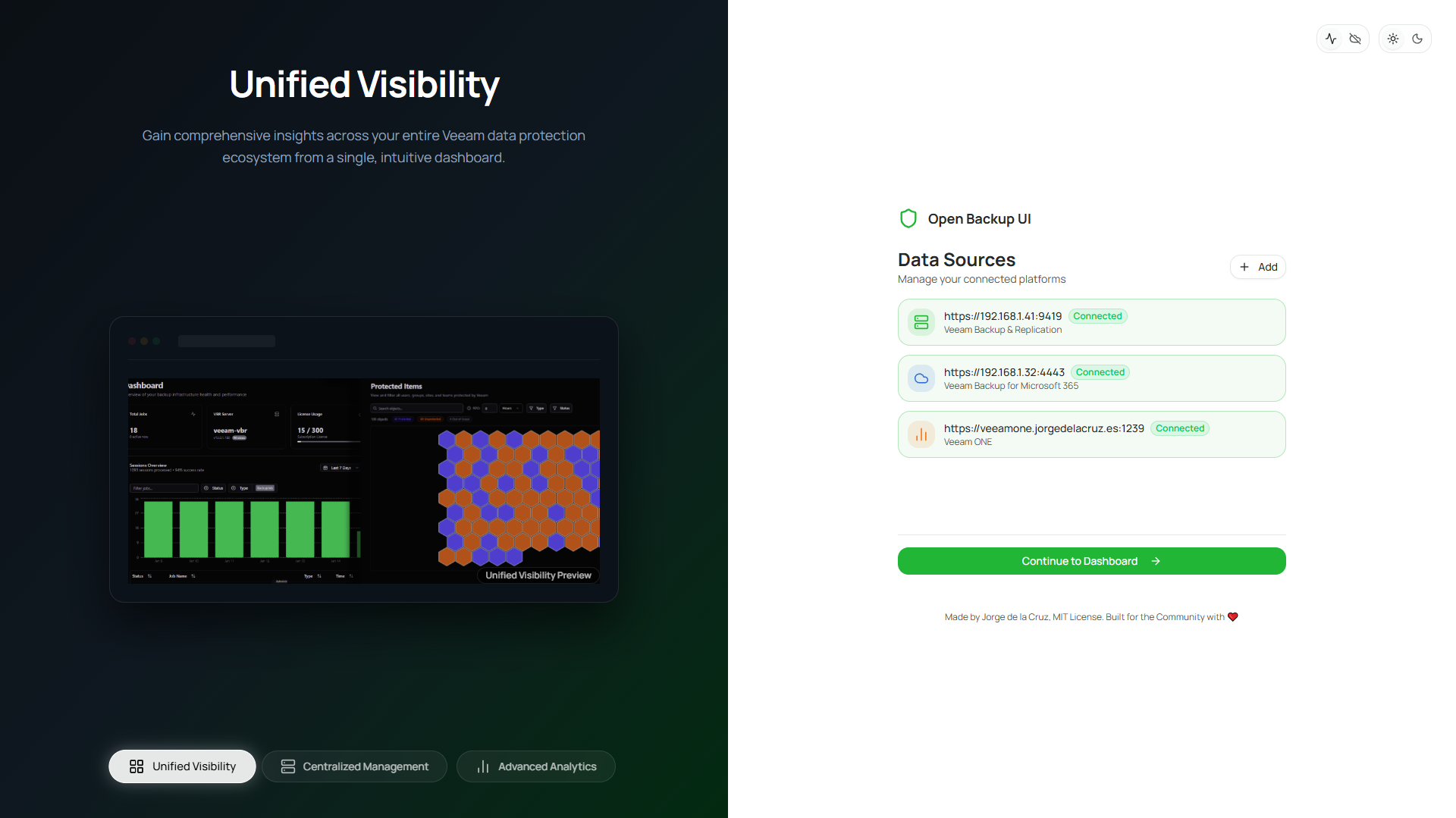
- New landing page: Onboarding experience with animated feature carousel
- Dynamic credentials: Add and manage data sources directly from the UI, no
.envfiles required - Auto-connect: Credentials are stored locally (encrypted); click Connect on subsequent visits
- Multi-source support: Connect multiple platforms from a single interface
- Administration > Data Sources: View, add, edit, and remove data sources
- Real-time status: See connection status (Connected/Ready/Setup) at a glance
- Platform types: Multi-platform support (see Compatibility)
- Report catalog: Browse and run reporting endpoints directly from the UI
- Saved reports: Access previously generated reports
- Dynamic configuration: Persisted credentials and auto-connect across supported platforms
- Security posture and best practices: Simplified top-level widget for immediate visibility
- Transferred data widget: Visual representation of data transfer rates over time
- Real-time statistics: Active jobs, success rate, storage usage, protected workloads, and data processed
- Malware events: Recent scan events and alerts (when available)
- Recent sessions: Overview of the latest sessions with status and details
- Time range dropdown: 7-day, 14-day, and 30-day views
- Export capability: Export filtered session data to CSV or JSON
- Type filtering: Default filtering to backup job sessions for clarity
- Comprehensive jobs table: All jobs with status, type, and schedule information
- Advanced filtering: Filter by job status (Running, Success, Warning, Failed)
- Job details: Click any job to view detailed session history
- Search capability: Quick search across job names
- Last/next run tracking: See when jobs last ran and when they will run next
- Enhanced session history: Complete history with default filtering for backup jobs
- Unified filtering: Filters apply to both the transfer rate chart and the sessions grid
- Task-level breakdown: Detailed task information for each session
- Transfer rates: Visual representation of transfer rates over time
- Session status: Success, Warning, Failed, and Running session tracking
- Time-based filtering: Filter sessions by time range
- Backup proxies:
- Performance monitoring: Track concurrent tasks
- Configuration: View transport modes, OS type, and details
- Status: Health indicators (Online/Offline) and maintenance mode status
- Backup repositories:
- Capacity planning: Visual capacity bars showing Used vs Free space
- Type support: Windows, Linux, NFS, SMB, and object storage repository support
- Properties: Monitor immutability settings, task limits, and overall health
- Managed servers:
- Infrastructure overview: View managed infrastructure servers
- Server details: Name, type, description, and version information
- Virtual infrastructure:
- Complete view of VMware vSphere, Microsoft Hyper-V, and Nutanix AHV virtual machines
- Protection status: Identify protected vs unprotected VMs with indicators
- Rich metadata: vCenter, datacenter, cluster, guest OS, and DNS names
- Advanced filtering: Faceted filtering by protection status, platform, and state
- Protected data:
- Rich grid view: Detailed list of protected workloads with sortable columns
- HexGrid visualization: Toggleable hexagonal protection map with RPO-based coloring
- Green (protected within RPO), Orange (unprotected or outside RPO)
- Hover effects and click-to-detail dialog
- Filters by type and status with search
- Calendar view: Monthly calendar view for restore point visualization
- Restore points: Deep dive into restore points with derived type (Full/Incremental) and size data
- Physical and cloud infrastructure:
- Protection groups: Monitor agent deployment and status
- Discovered entities: Track individual machines or cloud instances with agent status
- Agent health: Last connection time, version, and operation mode tracking
- Unstructured data:
- File shares: Monitor protected file servers and NAS devices
- Object storage: Track object storage repositories and credential mappings
- IO control: View processing limits and configurations
- Plans table: Overview of orchestration plans
- Plan status: Monitor plan state and configuration
- Plan details: Name, description, and workload counts
- Search and filter: Quick access to specific plans
- Dashboard: Platform-specific statistics and session overview (default filtering to backup sessions)
- Jobs: Monitor jobs, history, and status
- Calendar view: Visualize restore points availability
- Organizations/tenants: Track organizations and their storage usage
- Backup infrastructure:
- Proxies: Status, CPU/Memory usage, version, roles, and actions (when available)
- Repositories: Capacity visualization, retention settings, immutability, encryption status (when available)
- Data sources:
- Centralized management: Add, edit, and remove data sources from the UI
- Multi-platform: Multiple vendor platforms supported (see Compatibility)
- Connection status: Real-time status indicators (Connected/Ready/Setup)
- Secure storage: Credentials encrypted using AES-256 and stored locally
- Auto-connect: One-click re-authentication for stored credentials
- Licensing:
- Tabbed interface: Toggle between supported platforms
- License overview: Detailed reporting with PDF/HTML download (where APIs allow)
- Usage breakdown: Breakdown by workload type (where APIs allow)
- Theme customizer:
- Color presets: Blue, Green, Orange, Red, Violet, Yellow, and Default
- Radius control: Adjust UI corner roundness (0 to 1.0rem)
- Scaling: Adjust font and element scaling (90% to 110%)
- Mode: Dark/Light mode switching
- Cookie persistence: Theme settings persist across sessions via server-side cookies
- Identity management:
- User directory: View and filter users with metadata (where APIs allow)
- Security settings:
- MFA enforcement: Toggle with real-time API sync (where APIs allow)
- Service accounts: Per-user management with role assignment (where APIs allow)
- RBAC roles: View and manage role-based permissions (where APIs allow)
- Coming soon: Kubernetes backup platform monitoring
- Real-time updates: Automatic 30-second data refresh across supported views
- Unified global search: Search across jobs and plans from any page
- Responsive design: Optimized for desktop, tablet, and mobile devices
- Secure API proxy: Server-side API calls protect credentials from client exposure
- Interactive visualizations: Charts and graphs using Recharts
- Data tables: Sortable, filterable tables with TanStack Table
- Standardized headers: Consistent column toggle and search across tables
- Column visibility: Hide/show columns via dropdown menu
- Toast notifications: Error and success messages
- Node.js 20.x or later
- npm, yarn, pnpm, or bun package manager
- Access to at least one Veeam product REST API:
- Veeam Backup & Replication REST API (v1.3-rev1)
- Veeam Backup for Microsoft 365 REST API (v8)
- Veeam ONE REST API (v12.3)
- Veeam Recovery Orchestrator REST API (v7.21)
- Install dependencies and start the application:
npm install
npm run dev-
Open http://localhost:3000 in your browser
-
Add your first data source using the Landing Page:
- Click "Add Your First Data Source"
- Select platform type (VBR, VB365, Veeam ONE, etc.)
- Enter the server hostname/IP and port
- Click "Add Source", then "Connect"
- Enter your credentials and authenticate
-
Once connected, click "Continue to Dashboard" to access the monitoring interface
💡 Credentials are encrypted and stored locally. On your next visit, just click "Connect All Sources" to auto-authenticate!
After initial setup, you can manage your data sources from Administration > Data Sources:
- View all configured platforms with connection status
- Add new data sources
- Edit existing source URLs and names
- Remove data sources
- Re-authenticate when credentials expire
⚠️ Deprecated for v0.2.0+: We recommend using the UI-based Data Sources management instead of environment variables. Environment variables are still supported for backward compatibility and CI/CD deployments.
If you prefer environment-based configuration, create a .env.local file:
# Veeam Backup & Replication
VEEAM_API_URL=https://your-vbr-server:9419
VEEAM_USERNAME=your-username
VEEAM_PASSWORD=your-password

# Veeam Backup for Microsoft 365
VBM_API_URL=https://your-vbm-server:4443
VBM_USERNAME=your-vbm-username
VBM_PASSWORD=your-vbm-password

# Veeam ONE
VEEAM_ONE_API_URL=https://your-vone-server:1239
VEEAM_ONE_USERNAME=your-vone-username
VEEAM_ONE_PASSWORD=your-vone-password

# Veeam Recovery Orchestrator
VRO_API_URL=https://your-vro-server:9898
VRO_USERNAME=your-vro-username
VRO_PASSWORD=your-vro-password

# Allow self-signed certificates (development only)
NODE_TLS_REJECT_UNAUTHORIZED=0Note: Environment variables take precedence over UI-configured sources. If both are configured, the env var source will be used.
- Install dependencies:
npm install- Run the development server:
npm run devThe application uses Next.js 15 with Turbopack for fast development builds.
- Open http://localhost:3000 with your browser to see the application.
npm run build
npm startSee CONTAINER.md for detailed instructions on building and running this application as a container.
- API Version: v1.3-rev1
- Default Port: 9419
- Authentication: Basic Auth with session tokens
- Documentation: VBR REST API Reference
- Endpoints Used:
/api/v1/inventory- Virtual infrastructure inventory/api/v1/agents/protectionGroups- Protection groups (Physical/Cloud)/api/v1/agents/protectionGroups/{id}/discoveredEntities- Discovered agent status/api/v1/inventory/unstructuredDataServers- Unstructured data servers/api/v1/backupInfrastructure/jobs- Backup jobs list/api/v1/jobs/states- Advanced job monitoring/api/v1/backupInfrastructure/jobs/{id}/sessions- Job sessions/api/v1/backupInfrastructure/backupServers- Managed servers/api/v1/backupInfrastructure/backupProxies- Backup proxies/api/v1/backupInfrastructure/backupRepositories- Backup repositories/api/v1/backupInfrastructure/repositories/states- Repository states/api/v1/license- License information overview/api/v1/license/instances- License instance details/api/v1/license/capacity- License capacity details/api/v1/malware-detection- Malware events/api/v1/security/best-practices- Security best practices/api/v1/security/settings- MFA and security settings/api/v1/accounts/users- User accounts management/api/v1/roles- RBAC role definitions/api/v1/roles/{id}/permissions- Role permissions/api/v1/backupObjects- Backup objects lookup/api/v1/backups/{id}- Backup details/api/v1/backups/{id}/backupFiles- Backup files (sizes)/api/v1/restorePoints- Restore points inventory
- API Version: v7.21
- Default Port: 9898
- Authentication: Basic Auth
- Documentation: VRO REST API Reference
- Endpoints Used:
/api/v7.2/Plans- Recovery orchestration plans
- API Version: v8
- Default Port: 4443
- Authentication: Basic Auth
- Documentation: VBM REST API Reference
- Endpoints Used:
/v8/Jobs- Microsoft 365 backup jobs/v8/JobSessions- Job history and status/v8/Organizations- M365 Organizations/v8/ProtectedUsers- Protected Users inventory/v8/ProtectedGroups- Protected Groups inventory/v8/ProtectedSites- Protected Sites inventory/v8/ProtectedTeams- Protected Teams inventory/v8/RestorePoints- Global restore point search/v8/License- License status and info/v8/LicensedUsers- Licensed user management (GET/DELETE)/v8/Proxies- Backup proxy servers/v8/BackupRepositories- Backup repository management/v8/Reports/GenerateLicenseOverview- PDF report generation/v8/Health- API service health
├── app/
│   ├── administration/               # Administration Area
│   │   ├── branding/                 # Branding settings (Theme Customizer)
│   │   ├── licensing/                # Licensing reports & status
│   │   └── layout.tsx                # Administration layout
│   ├── api/                          # API routes (secure proxy to Veeam APIs)
│   │   ├── veeam/                    # VBR API routes
│   │   │   ├── auth/                 # VBR authentication
│   │   │   ├── jobs/                 # Backup jobs endpoint
│   │   │   ├── sessions/             # Job sessions endpoint
│   │   │   ├── backupInfrastructure/ # Infrastructure endpoints
│   │   │   ├── license/              # License endpoints (inc. reports)
│   │   │   ├── malware-detection/    # Malware events
│   │   │   └── security/             # Security best practices
│   │   ├── vro/                      # VRO API routes
│   │   └── vbm/                      # VBM API routes
│   │       ├── LicensedUsers/        # Licensed user management
│   │       ├── Proxies/              # Proxy servers
│   │       ├── Reports/              # PDF report generation
│   │       └── ...                   # Other VBM endpoints
│   ├── vbr/                          # VBR monitoring pages
│   │   ├── dashboard/                # VBR dashboard with stats
│   │   ├── jobs/                     # Jobs list and details
│   │   ├── inventory/                # Inventory management
│   │   ├── infrastructure/           # Infrastructure management
│   │   ├── protected-data/           # Restore points & calendar view
│   │   └── page.tsx                  # Redirects to dashboard
│   ├── vro/                          # VRO monitoring page
│   ├── vbm/                          # VBM monitoring pages
│   │   ├── dashboard/                # VBM dashboard with stats
│   │   ├── jobs/                     # M365 backup jobs list
│   │   ├── protected-items/          # Protected objects view
│   │   ├── organizations/            # M365 organizations
│   │   └── infrastructure/           # Backup infrastructure
│   │       ├── proxies/              # Backup proxies page
│   │       └── repositories/         # Backup repositories page
│   ├── k10/                          # K10 placeholder page
│   ├── layout.tsx                    # Root layout with sidebar & theme provider
│   └── page.tsx                      # Home (redirects to /vbr/dashboard)
├── components/
│   ├── ui/                           # shadcn/ui components (20+ components)
│   ├── theme-customizer/             # Branding components (Radius, Mode, Preset)
│   │   ├── color-mode-selector.tsx
│   │   ├── content-layout-selector.tsx
│   │   ├── preset-selector.tsx
│   │   └── theme-radius-selector.tsx
│   ├── app-header.tsx                # Application header with search
│   ├── app-sidebar.tsx               # Navigation sidebar
│   ├── active-theme.tsx              # Theme state management component
│   ├── administration-nav.tsx        # Administration sidebar
│   ├── dashboard-stats.tsx           # Dashboard statistics cards
│   ├── sessions-overview.tsx         # Recent sessions widget with chart
│   ├── transfer-rate-chart.tsx       # Transfer rate visualization
│   ├── job-details-header.tsx        # Job details header component
│   ├── vbr-restore-points-calendar.tsx # VBR Calendar View
│   ├── vbm-restore-points-calendar.tsx # VBM Calendar View
│   ├── hexgrid-protection-view.tsx   # HexGrid protection visualization
│   └── ...                           # Various data tables
├── lib/
│   ├── api/
│   │   └── veeam-client.ts           # API client utilities
│   ├── types/
│   │   ├── veeam.ts                  # VBR TypeScript types
│   │   └── vbm.ts                    # VBM TypeScript types
│   └── utils/
│       ├── utils.ts                  # General utilities
│       ├── transfer-rate.ts          # Transfer rate calculations
│       └── rate-limiter.ts           # API rate limiting
├── hooks/
│   └── use-mobile.ts                 # Mobile detection hook
└── public/
    ├── favicon.ico                   # Application favicon
    └── logo.webp                     # Application logo
- Framework: Next.js 15 with App Router and Turbopack
- Language: TypeScript 5
- UI Components: shadcn/ui built on Radix UI
- Styling: Tailwind CSS 4
- Charts: Recharts
- Data Tables: TanStack Table
- Icons: Lucide React
- Theme: next-themes
This project currently supports:
- Veeam Backup and Replication REST API (v1.3-rev1)
- Veeam Backup for Microsoft 365 REST API (v8)
- Veeam ONE REST API (v12.3)
- Veeam Recovery Orchestrator REST API (v7.21)
- Veeam Backup & Replication REST API
- Veeam Recovery Orchestrator REST API
- Veeam Backup for Microsoft 365 REST API
This project is provided on a best-effort basis via GitHub issues only. It is not supported by Veeam Support.
Veeam and related marks are trademarks of Veeam Software. This project is independent and not affiliated with, endorsed by, or sponsored by Veeam Software.
Credentials are stored locally (encrypted) by the application. You are responsible for reviewing whether this meets your security requirements.
- Container Deployment Guide
- Troubleshooting Guide - Solutions for common issues including 403 errors
This project was developed originally as part of the Veeam Community Hackathon 2025. With a limited and static subset of funcionality, it can be found here - https://github.com/VeeamCommunity/veeamcommunity-2025-Team-1/ Since then, many features have been added and the codebase has been refactored to be more maintainable and extensible.
If you are interested in contributing to this project, please see CONTRIBUTING.md and DCO.md for contribution guidelines.
See LICENSE file for details.