Releases: jorgedlcruz/open-backup-ui
v0.2.1

v0.2.1 [2026-01-22]
Release v0.2.1 of Open Backup UI introduces Veeam ONE Alarms Overview with world map visualization, Complete Rebranding to "Open Backup UI" with new OIU favicon, PostHog Telemetry for optional analytics, and Enhanced Restore Points UX with improved calendar integration.
Highlights
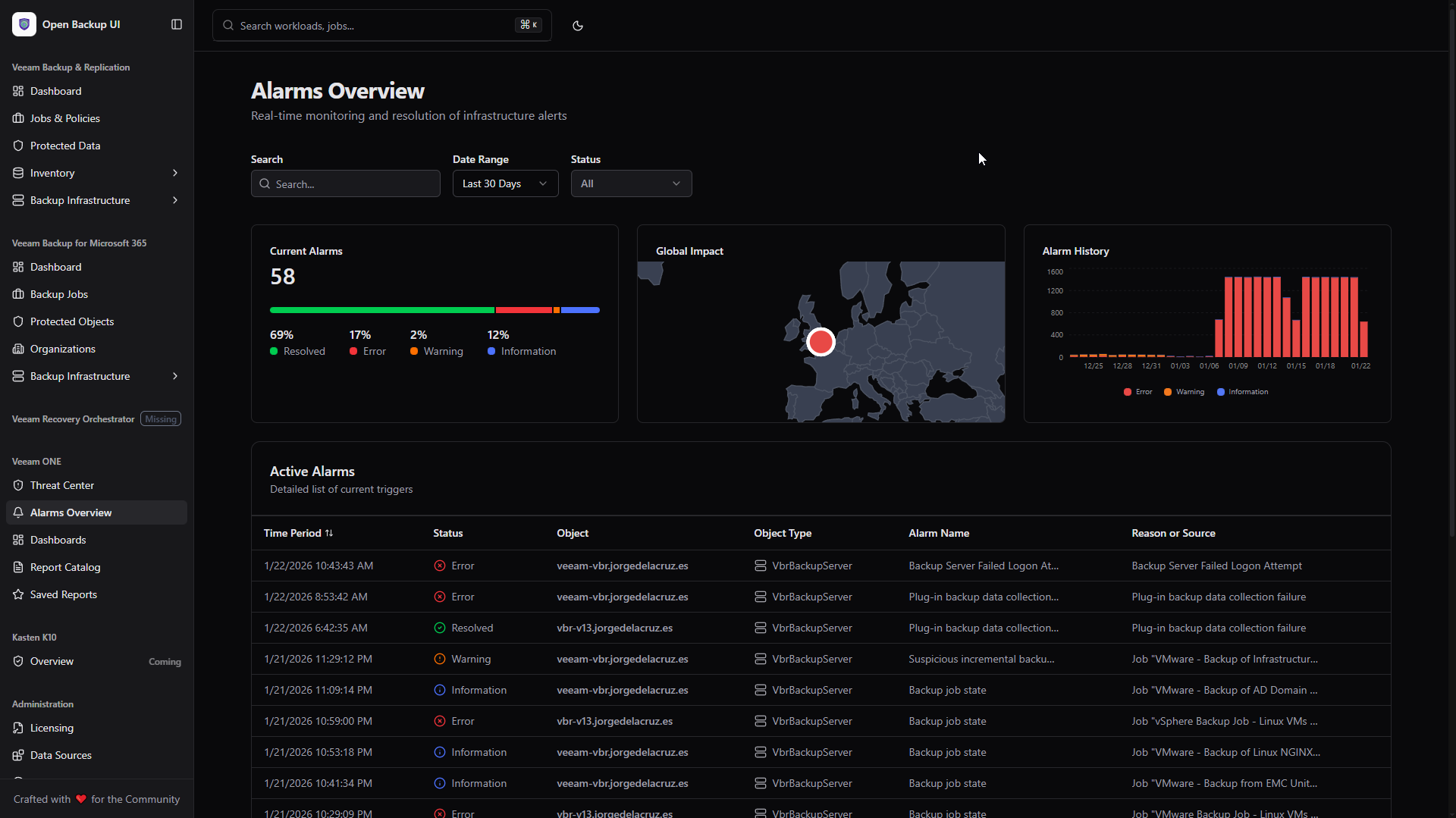
- Alarms Overview: Real-time Veeam ONE alarm monitoring with world map, severity filtering, and alarm history charts.
- Open Backup UI Rebranding: New OIU favicon.
- PostHog Telemetry: Optional analytics integration for usage insights (can be disabled).
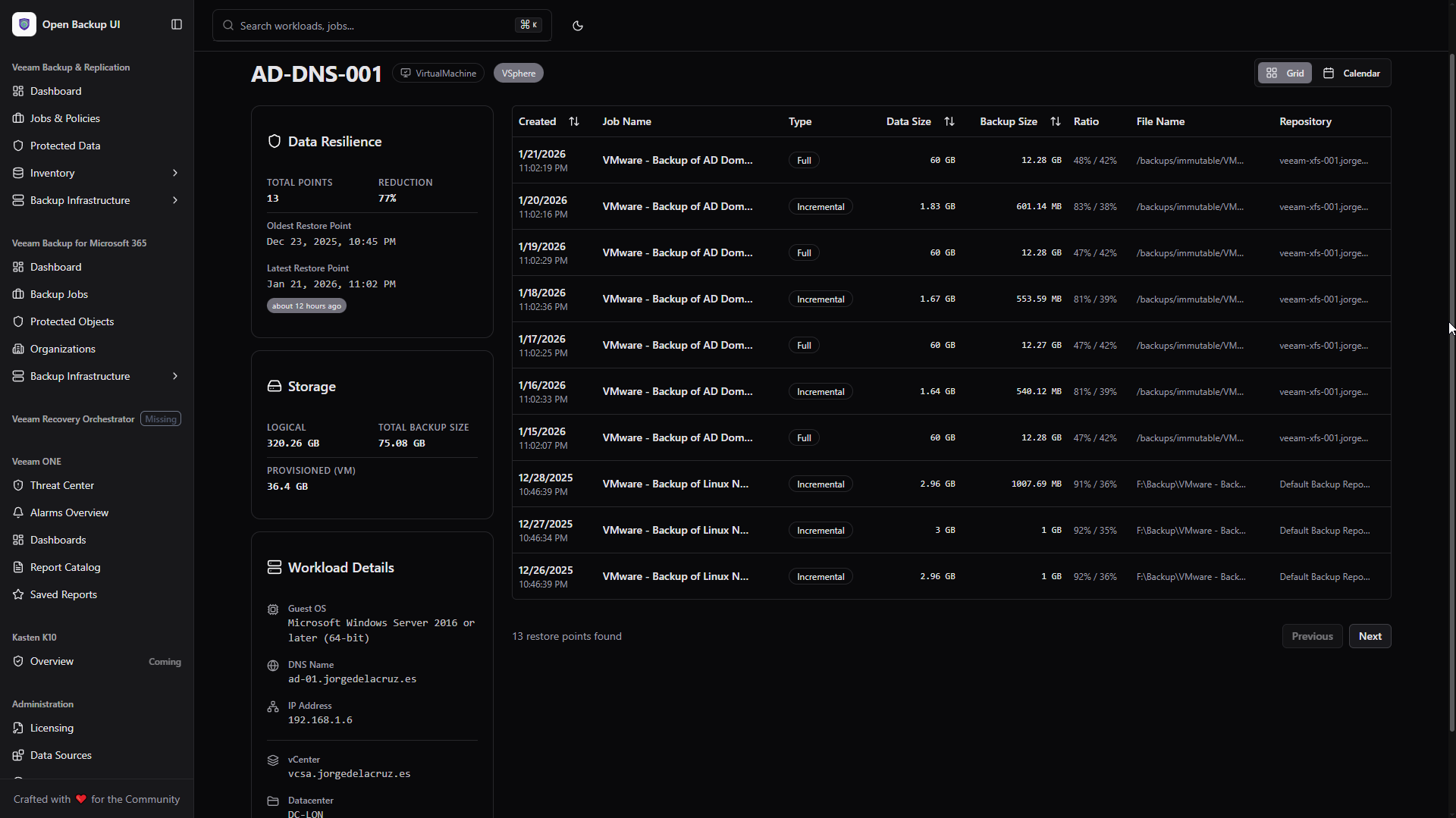
- Enhanced Restore Points: Improved UX with better calendar visualization and data source management.
- New UI Components: Added Tremor-style components including BarList, CategoryBar, and enhanced tooltips.
What's included (v0.2.1 Updates)
Alarms Overview (New)
World Map Visualization
- Geographic Distribution: See alarm locations on an interactive world map.
- Color-Coded Severity: Critical (red), Warning (orange), Info (blue) indicators.
Active Alarms Table
- Real-time Data: Live alarm feed from Veeam ONE REST API.
- Severity Filtering: Filter by Critical, Warning, or Informational.
- Sortable Columns: Sort by time, severity, object, or status.
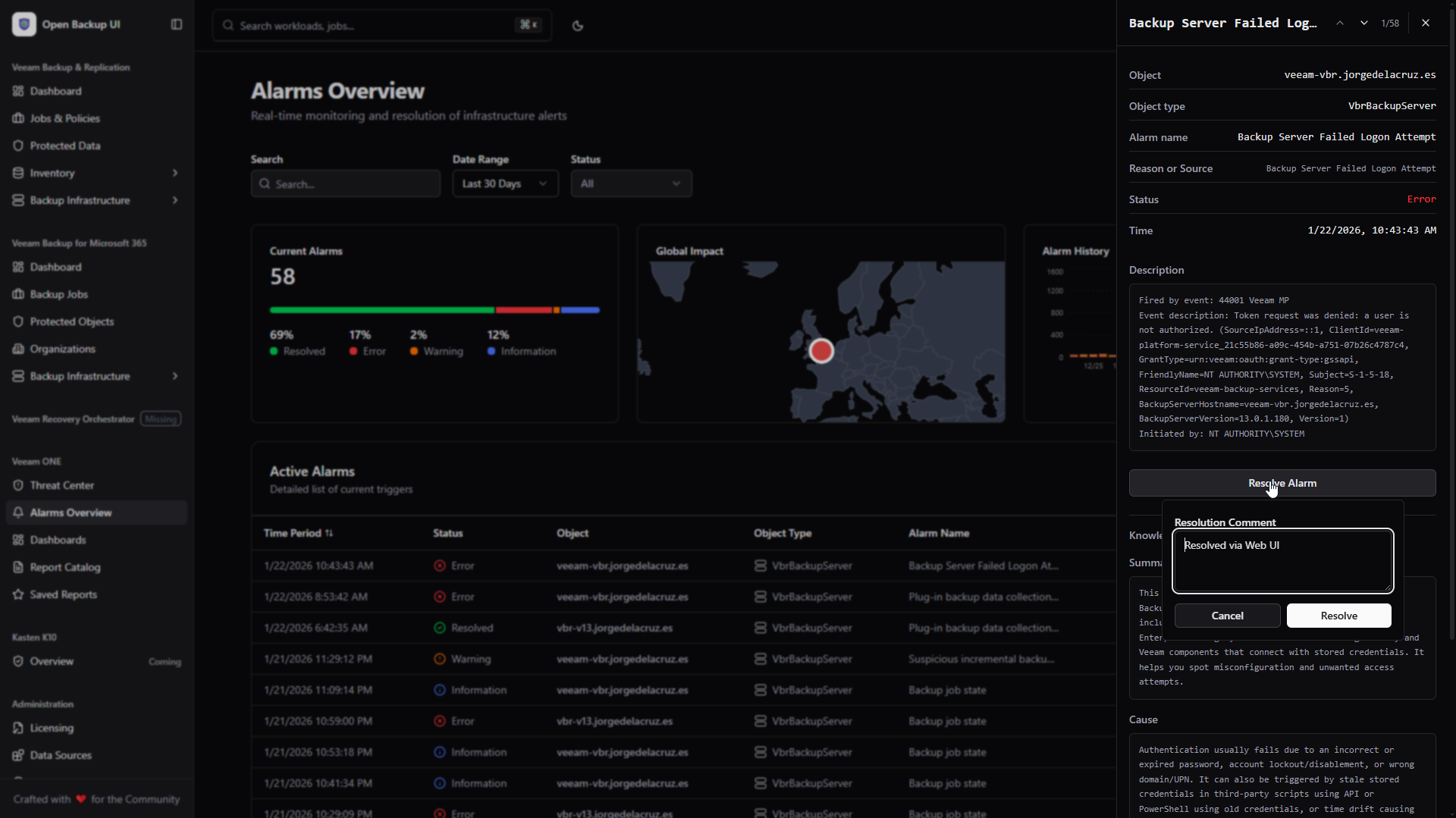
Alarm Details Sheet
- Full Context: Detailed alarm information in slide-out panel.
- History Chart: Visual alarm frequency over time.
- Status Bar: Quick severity breakdown with category bars.
Open Backup UI Rebranding (New)
New Favicon
- OIU Logo: Blue background with white "OIU" text
- Multi-format: ICO, PNG, Apple Touch Icon, and PWA icons (192px, 512px)
Enhanced Restore Points UX
Improved Calendar View
- Refined date-based restore point visualization
- Better hover interactions and tooltips
- Improved data source integration
Protected Data UI
- Enhanced HexGrid visualization
- Better color coding for protection status
- Refined hover effects
Theme & Styling
"Beeam" Theme
- New theme preset added to theme customizer
- Green-focused color palette
New UI Components
BarList: Horizontal bar charts for data visualizationCategoryBar: Segmented status barsTextarea: Form textarea component- Tremor-style tooltips
Technical Changes
Dependencies Added
| Package | Version | Purpose |
|---|---|---|
@tremor/react |
^3.18.7 | Dashboard components |
posthog-js |
^1.327.0 | Analytics telemetry |
react-simple-maps |
^3.0.0 | World map visualization |
New API Endpoints
GET /api/veeam/inventory/lookup-by-objectid- Inventory lookup by object ID
Notes
- Encryption Key Migration: Users upgrading from v0.2.0 may need to copy
.veeam-single-ui-keyto.open-backup-ui-keyin their home directory, or re-authenticate data sources. - SSL Fixes: Improved handling of self-signed certificates.
Full Changelog: v0.2.0...v0.2.1
What's Changed
- Alarms Overview Integration
- Small SSL Fix
- Implement telemetry, refine protected data UI, and add 'Beeam' theme
- Enhanced restore points UX and data source management
- Small fix for v0.2.0
Full Changelog: v0.2.0...v0.2.1
What's Changed
- Features/v0.2.1 by @jorgedlcruz in #6
Full Changelog: v0.2.0...v0.2.1
Contributors

Assets 3
v0.2.0
v0.2.0 [2026-01-16]
Release v0.2.0 of Open Backup UI introduces a Redesigned Landing Page with dynamic authentication, UI-Based Data Sources Management eliminating the need for .env files, and Encrypted Credential Storage with auto-connect functionality for seamless multi-platform orchestration.
Highlights
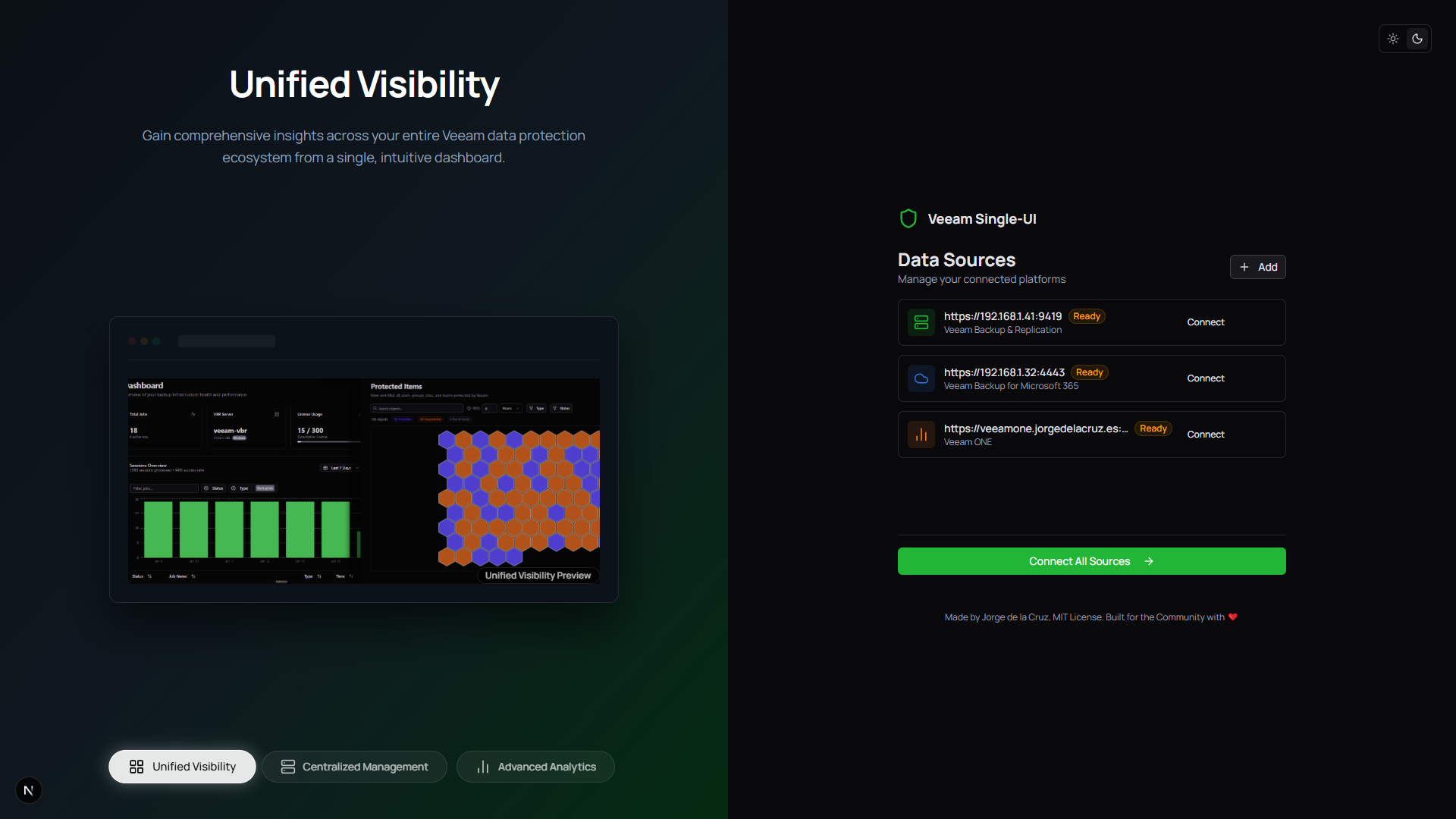
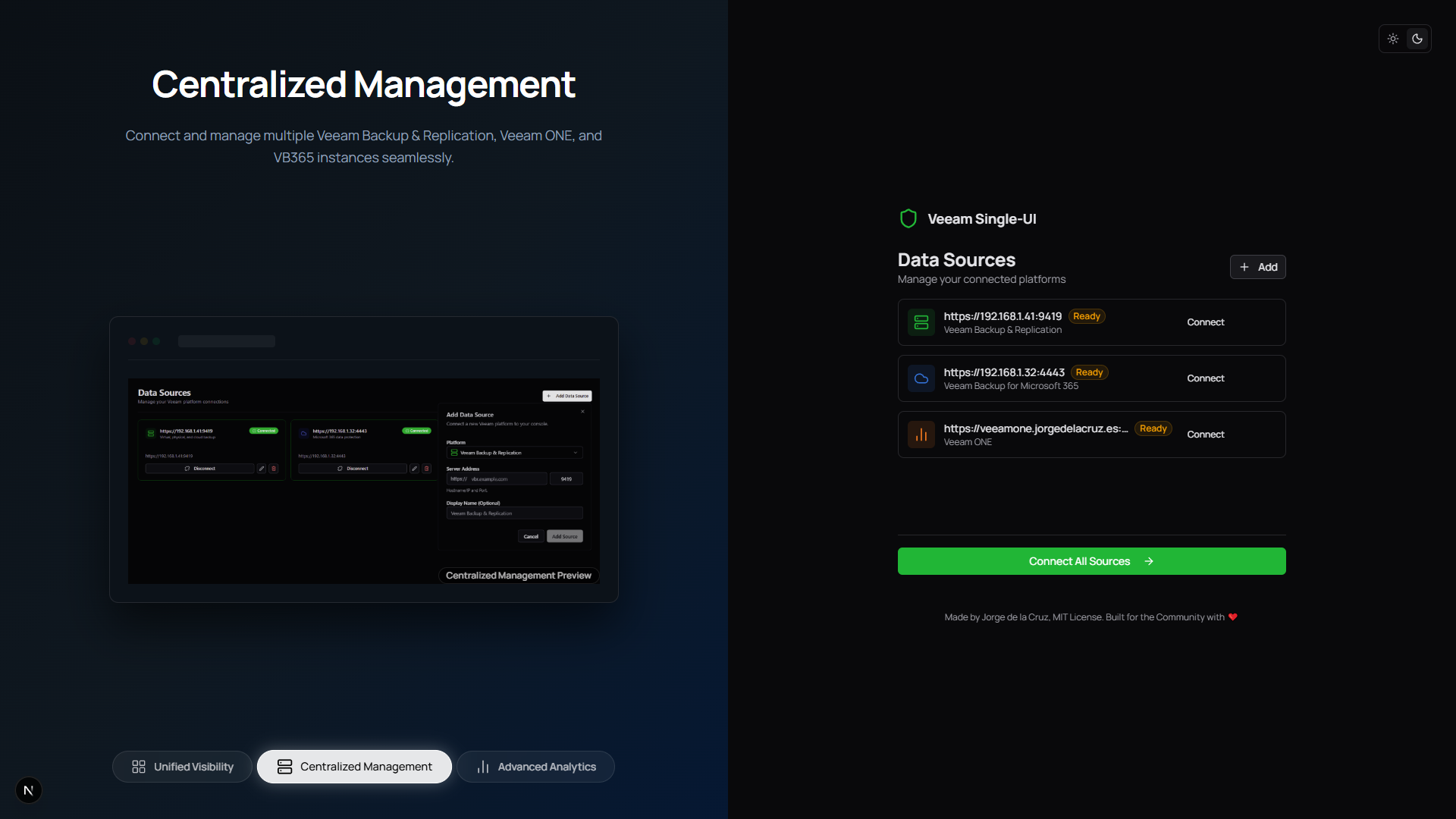
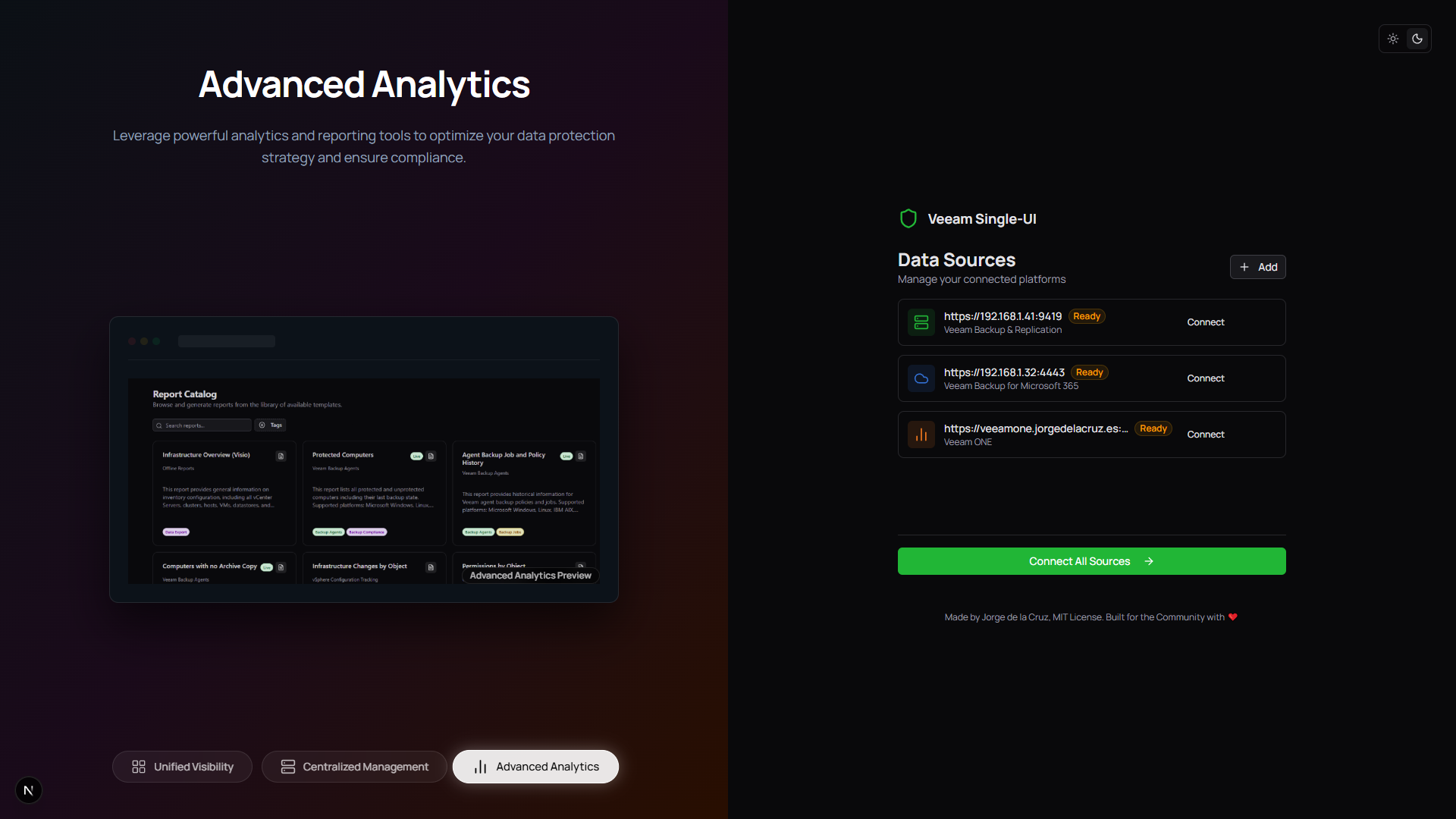
- New Landing Page: Beautiful onboarding experience with animated feature carousel and theme toggle.
- Dynamic Credentials: Add, edit, and manage data sources directly from the UI—no
.envfiles required! - Auto-Connect: Credentials are encrypted (AES-256) and stored locally; one-click re-authentication on return visits.
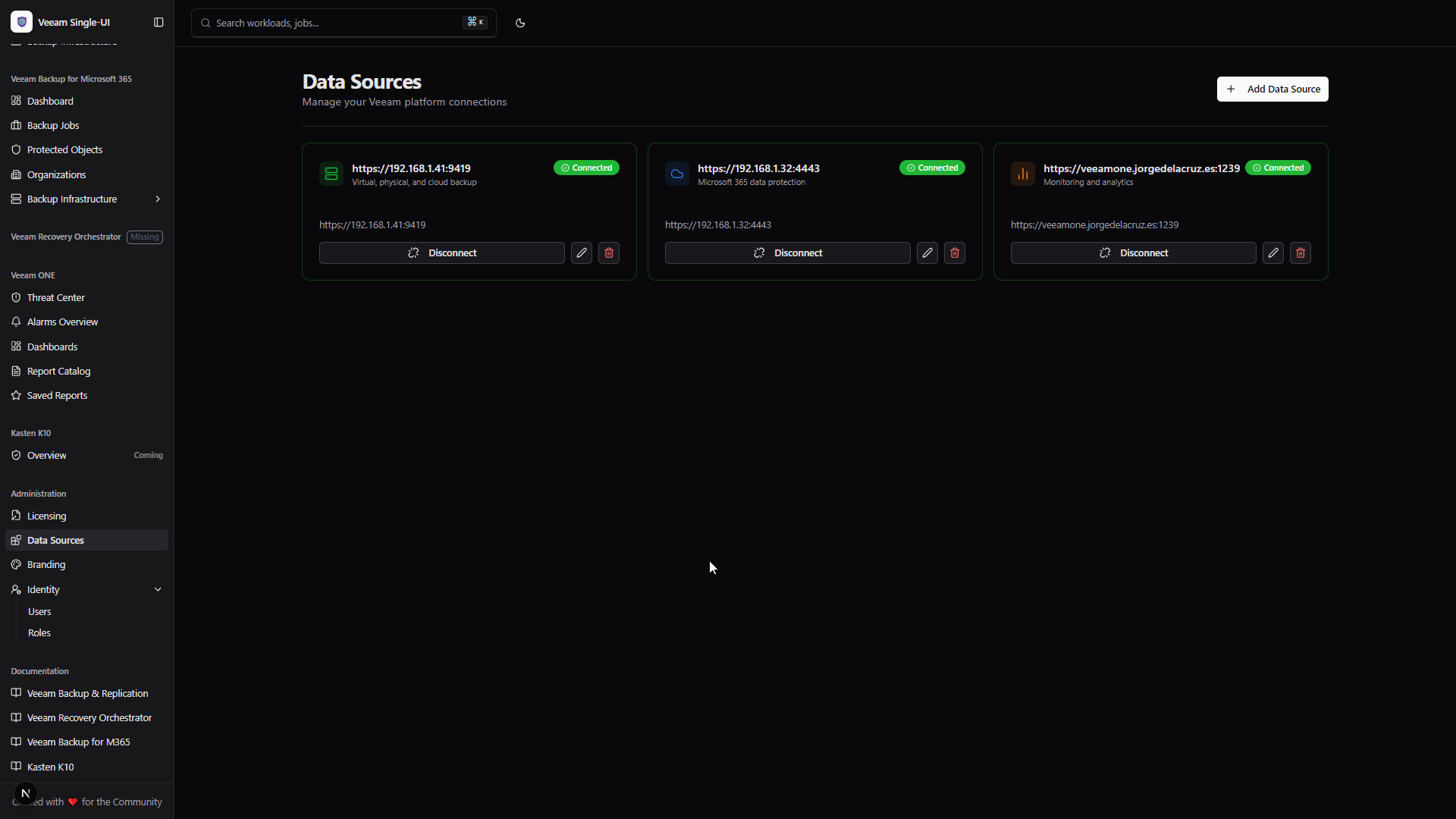
- Data Sources Administration: New dedicated page to view, manage, and troubleshoot all connected platforms.
- Veeam ONE Persistence: Full parity with VBR/VB365—credentials persist and auto-connect seamlessly.
What's included (v0.2.0 Updates)
Redesigned Landing Page (New)
Animated Feature Carousel
- Auto-Rotating Slides: Showcases VBR, VB365, Veeam ONE, and VRO capabilities.
- Progress Indicators: Visual progress bar and dot navigation.
Dynamic Authentication Flow
- Add Source Button: Prominent CTA to add first data source.
- Platform Selection: Choose VBR, VB365, Veeam ONE, VRO, or Kasten K10.
- Inline Connect/Setup: Action buttons visible per source card.
- Connect All Sources: One-click authentication for all configured platforms.
Data Sources Management (New)
Administration > Data Sources
- Centralized View: All configured platforms in one place.
- Add Dialog: Step-by-step source addition with platform picker.
- Edit/Remove: Modify URLs, names, or remove sources entirely.
- Real-time Status: Connection status updates after authentication.
Secure Storage
- AES-256 Encryption: Passwords encrypted at rest in
sources.json. - Local Storage: Credentials never leave your server.
- Cookie-Based Sessions: Tokens stored in HTTP-only cookies.
Configuration Methods
Recommended: UI-Based (New in v0.2.0)
- Start the application:
npm run dev - Open http://localhost:3000
- Click "Add Your First Data Source"
- Select platform, enter hostname/port, and connect
- Credentials are encrypted and stored for future sessions
Legacy: Environment Variables
⚠️ Deprecated: We recommend UI-based configuration for v0.2.0+.
| Variable | Description |
|---|---|
VEEAM_API_URL |
VBR REST API URL |
VBM_API_URL |
VB365 REST API URL |
VEEAM_ONE_API_URL |
Veeam ONE REST API URL |
VRO_API_URL |
VRO REST API URL |
*_USERNAME / *_PASSWORD |
Credentials for each platform |
Note: Environment variables take precedence over UI-configured sources.
Notes
- Credential Security: Passwords encrypted with AES-256 using a generated key stored in
sources.key. - Cookie Expiration: Session tokens expire based on platform defaults (typically 15-60 minutes).
- Multi-Source: Connect multiple instances of the same platform type (e.g., two VBR servers).
Full Changelog: v0.1.4...v0.2.0
What's Changed
- Features/v0.2.0 by @jorgedlcruz in #5
Full Changelog: v0.1.4...v0.2.0
What's Changed
- Features/v0.2.0 by @jorgedlcruz in #5
Full Changelog: v0.1.4...v0.2.0
Contributors
Assets 3
v0.1.4
v0.1.4 [2026-01-13]
Release v0.1.4 of Open Backup UI introduces Veeam ONE Analytics Integration with dynamic report rendering, Customizable Sidebar Section Names for organizational branding, and a fundamental Platform Independence architecture allowing deployment with any combination of VBR, VB365, VRO, or Veeam ONE.
Highlights
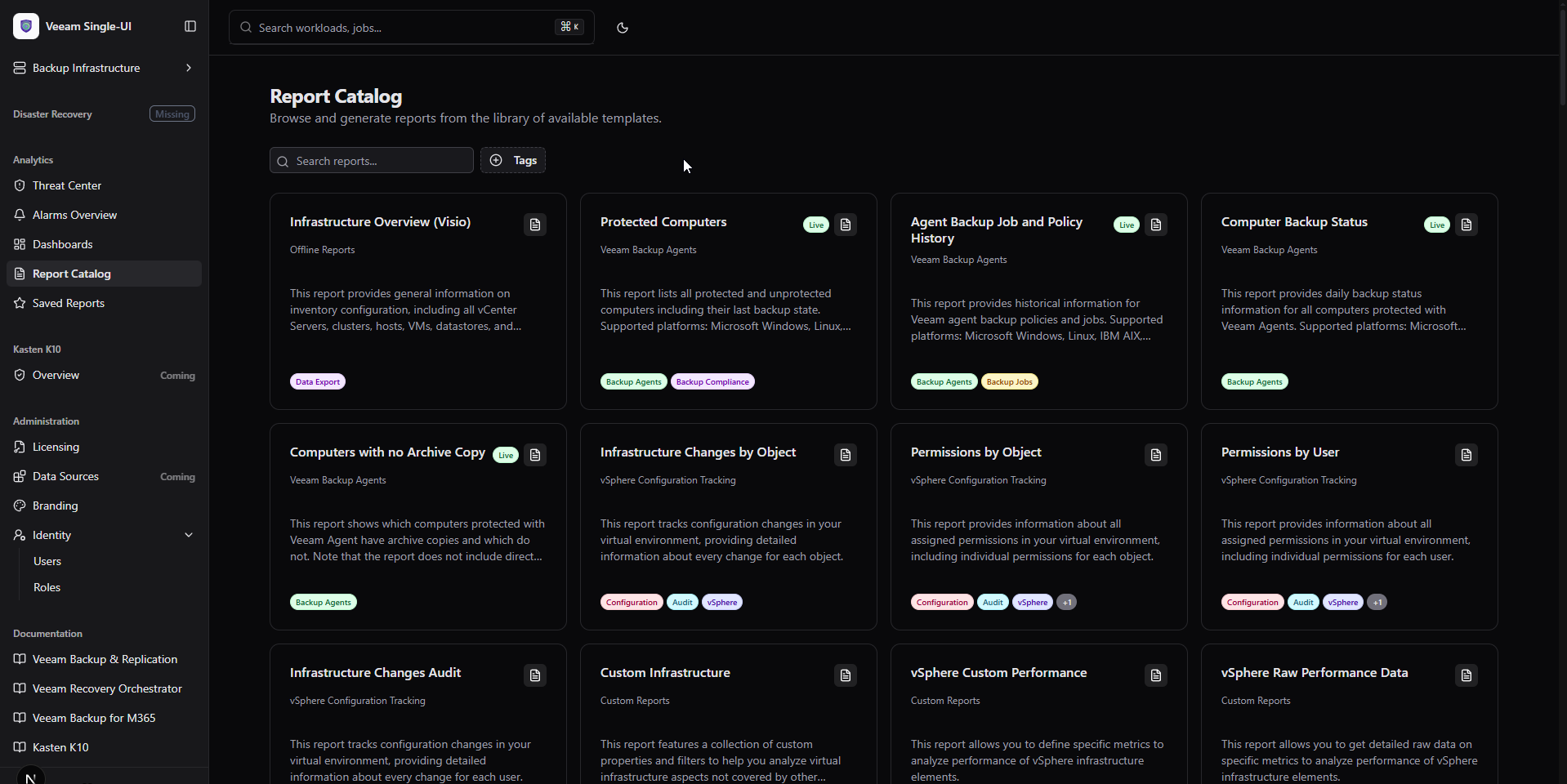
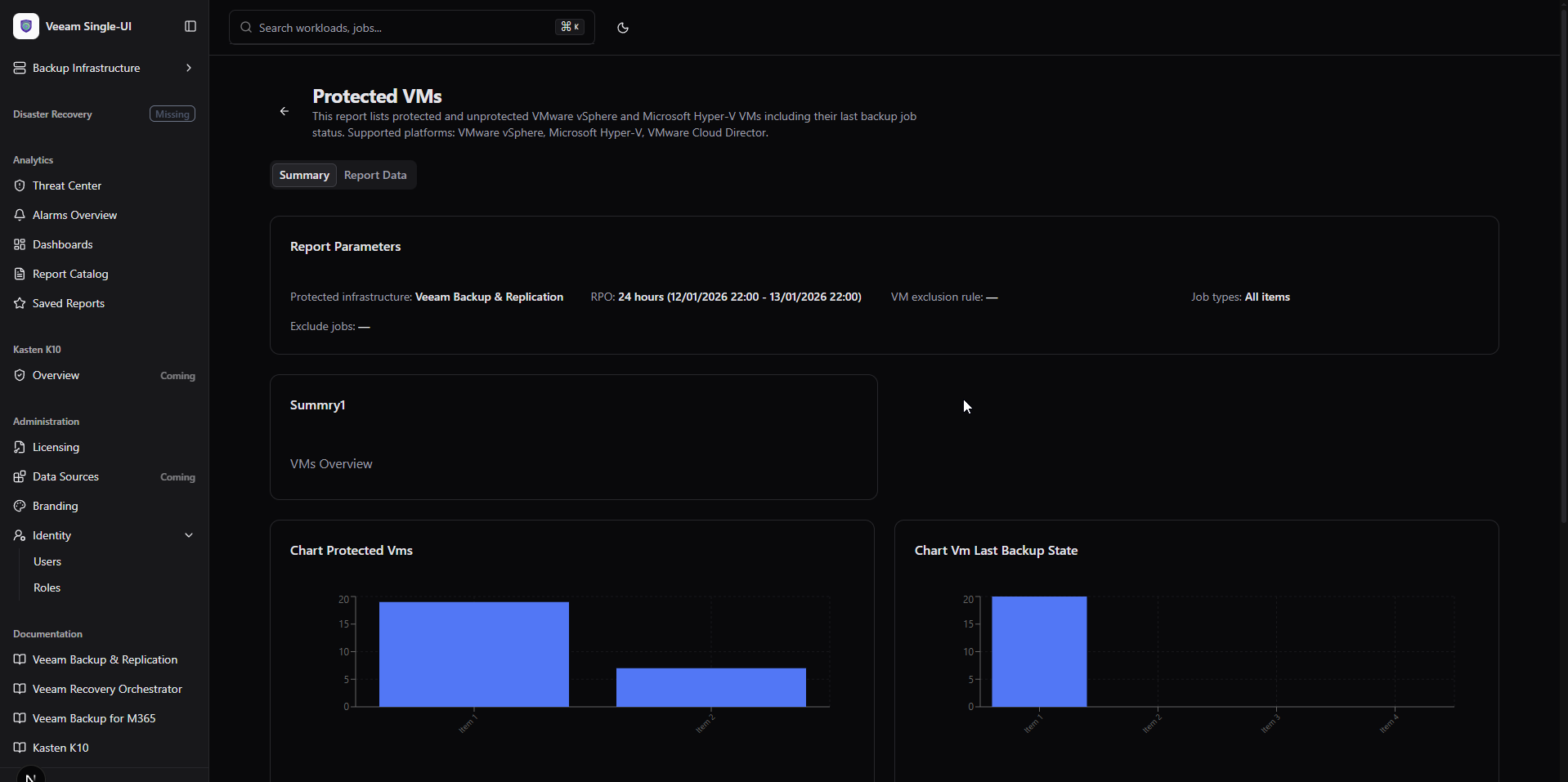
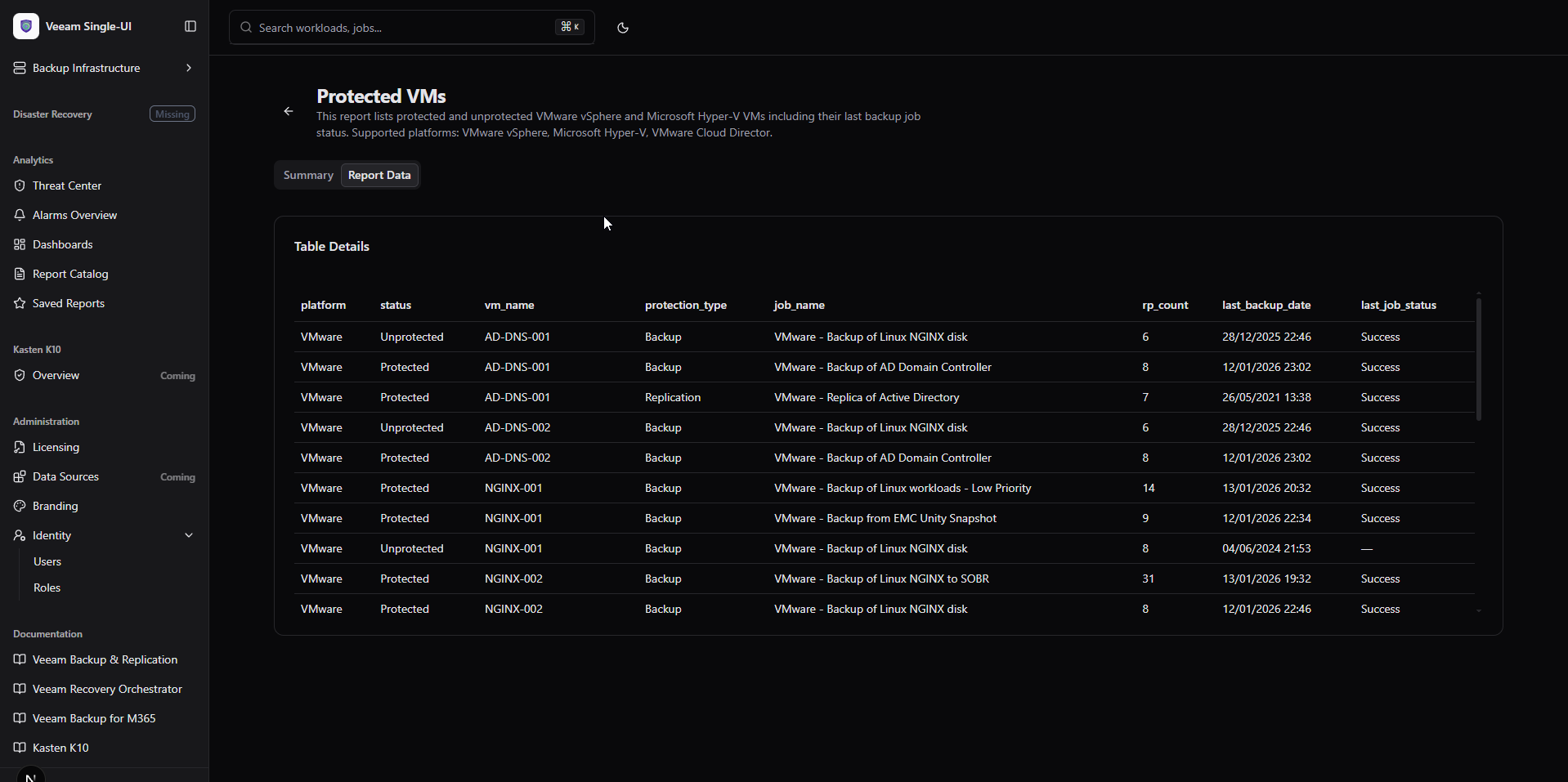
- Veeam ONE Analytics: Browse report catalog, render reports dynamically with charts, tables, and parameters.
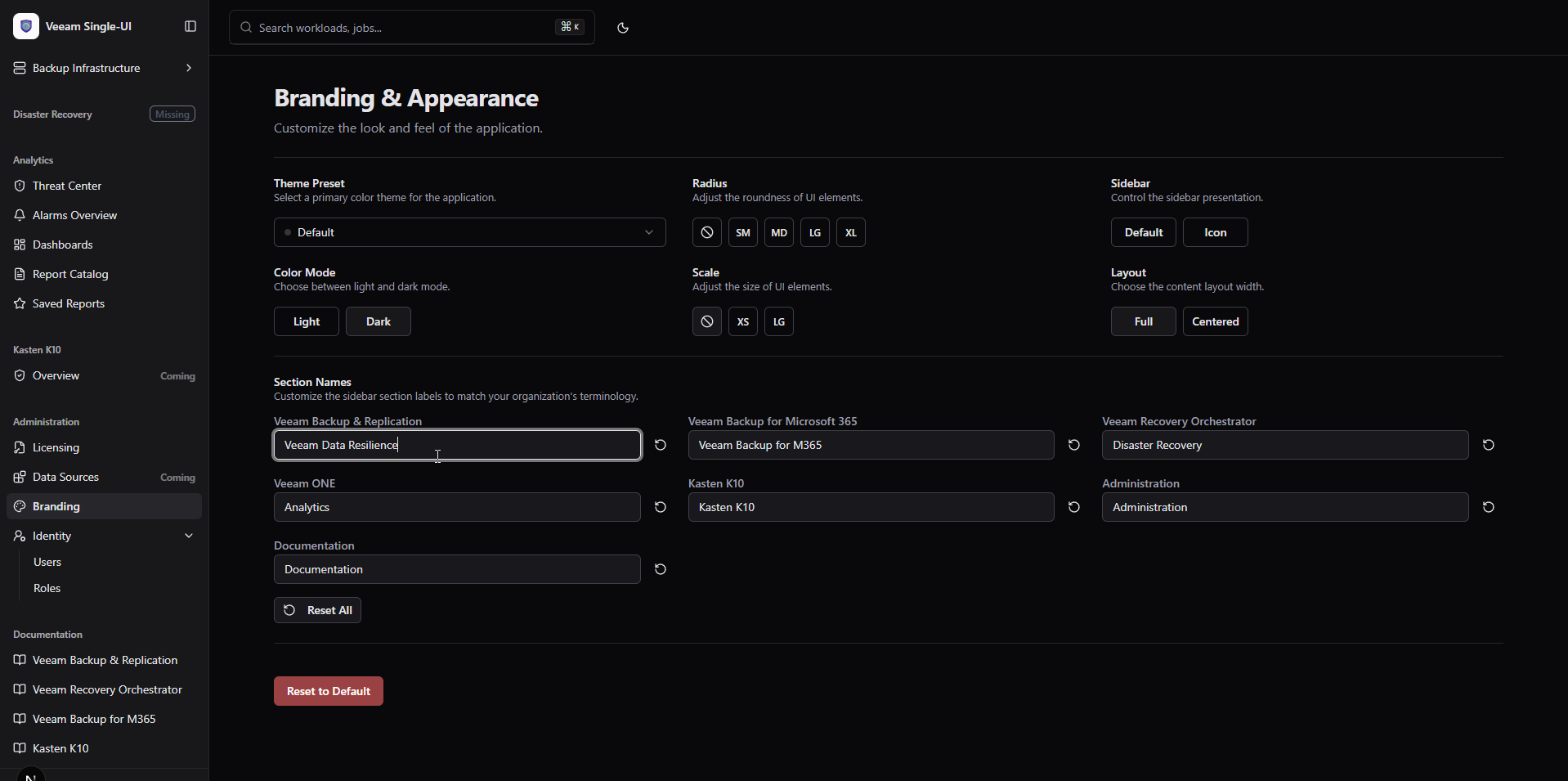
- Customizable Sidebar: Rename sidebar sections to match your organization's terminology, persisted in localStorage.
- Platform Independence: All platforms are now optional - deploy with any combination you need.
- Smart Conditional UI: Unconfigured platforms show "Missing" badge and skip API calls automatically.
What's included (v0.1.4 Updates)
Veeam ONE Analytics Integration (New)
Report Catalog
- Template Browser: Grid view of all available Veeam ONE report templates.
- Tag Filtering: Filter reports by category tags.
- Search: Quick search across report names and descriptions.
- Preview Badge: Visual indicator for reports supporting dynamic rendering.
Dynamic Report Rendering
- Charts: Area, Bar, Line, and Pie charts rendered with Recharts.
- Tables: Sortable data tables with column visibility controls.
- Parameters: Display report parameters with current values.
- Summaries: Key metric widgets with trend indicators.
Saved Reports
- Report Browser: Access previously generated reports.
- Folder Navigation: Browse report hierarchy.
Customizable Sidebar Section Names (New)
Branding Integration
- Section Names Editor: New section in Administration → Branding.
- 7 Configurable Sections: VBR, VB365, VRO, Veeam ONE, K10, Administration, Documentation.
- Responsive Grid: Clean 2-3 column layout matching other branding options.
Persistence
- localStorage: Custom names persist across browser sessions.
- Individual Reset: Reset each section name independently.
- Bulk Reset: One-click restore all defaults.
Platform Independence (New)
Optional Platforms
- VBR: Configure with
VEEAM_API_URL. - VB365: Configure with
VBM_API_URL. - VRO: Configure with
VRO_API_URL. - Veeam ONE: Configure with
VEEAM_ONE_API_URL.
Smart Sidebar
- Missing Badge: Unconfigured platforms display "Missing" indicator.
- Hidden Items: Sub-menu items hidden when platform not configured.
- Identity Visibility: Only shown when VBR is configured.
Conditional API Calls
- No 500 Errors: Pages check configuration before making API calls.
- Graceful Fallback: Informative alerts instead of error pages.
- Dynamic Licensing: Only shows tabs for configured platforms.
Licensing Page Enhancements
Refactored Architecture
- Platform-Aware: Licensing page adapts to configured platforms.
- VBR-Only Mode: When only VBR configured, shows VBR tab only.
- VB365-Only Mode: When only VB365 configured, shows VB365 tab only.
- Both Mode: Shows both tabs when both platforms configured.
Error Prevention
- No Unconfigured Calls: Never attempts to fetch from missing platforms.
- Clear Messaging: "No Platforms Configured" alert when neither configured.
Environment Variables
| Variable | Description |
|---|---|
VEEAM_API_URL |
VBR REST API URL (optional) |
VBM_API_URL |
VB365 REST API URL (optional) |
VRO_API_URL |
VRO REST API URL (optional) |
VEEAM_ONE_API_URL |
Veeam ONE REST API URL (optional) |
VEEAM_ONE_USERNAME |
Veeam ONE credentials (required if VONE) |
VEEAM_ONE_PASSWORD |
Veeam ONE credentials (required if VONE) |
Note: At least one platform should be configured for meaningful functionality.
Getting started
Prerequisites
- Node.js 20.x or later
- At least one Veeam platform REST API accessible
Quick run (dev)
npm install
npm run dev
Production
npm run build
npm start
Notes
- Veeam ONE Reports: Requires Veeam ONE v12+ with REST API v2.3 enabled.
- Dynamic Rendering: Only reports with
hasWebPreview: truesupport in-browser rendering. - Section Names: Stored in browser localStorage, not synchronized across devices.
Full Changelog: v0.1.3...v0.1.4
What's Changed
- Features/v0.1.4 by @jorgedlcruz in #4
Full Changelog: v0.1.3...v0.1.4
Contributors
Assets 3
v0.1.3
v0.1.3 [2026-01-07]
Release v0.1.3 of Open Backup UI introduces the innovative HexGrid Protection Visualization, complete VB365 Backup Infrastructure management, Licensing Tabs for both VBR and VB365, and powerful Session Export capabilities. This release also adds Identity Management foundations and significant UX improvements across all tables.
Highlights
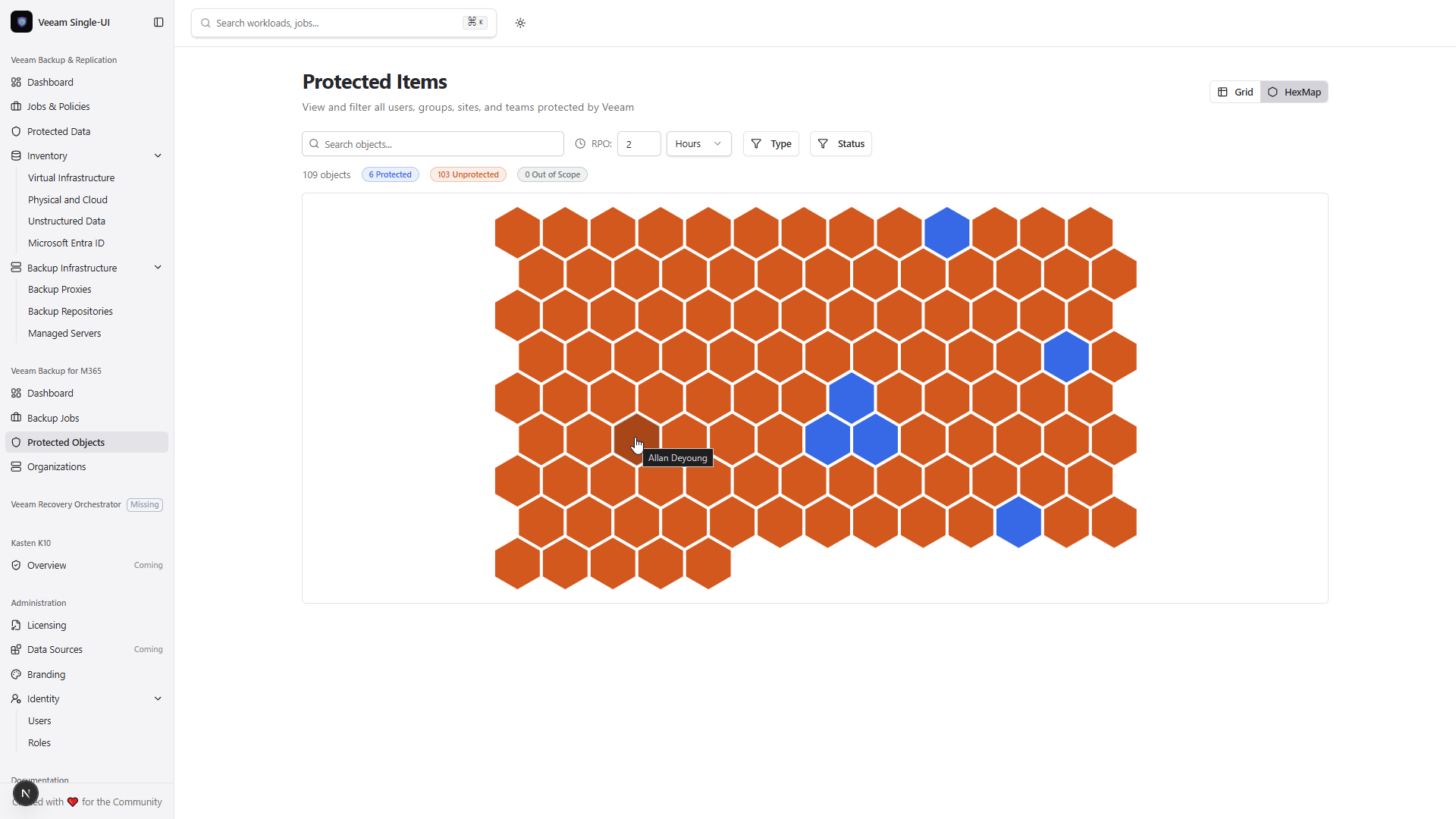
- HexGrid Visualization: Toggleable hexagonal protection map with RPO-based coloring for VBR and VB365.
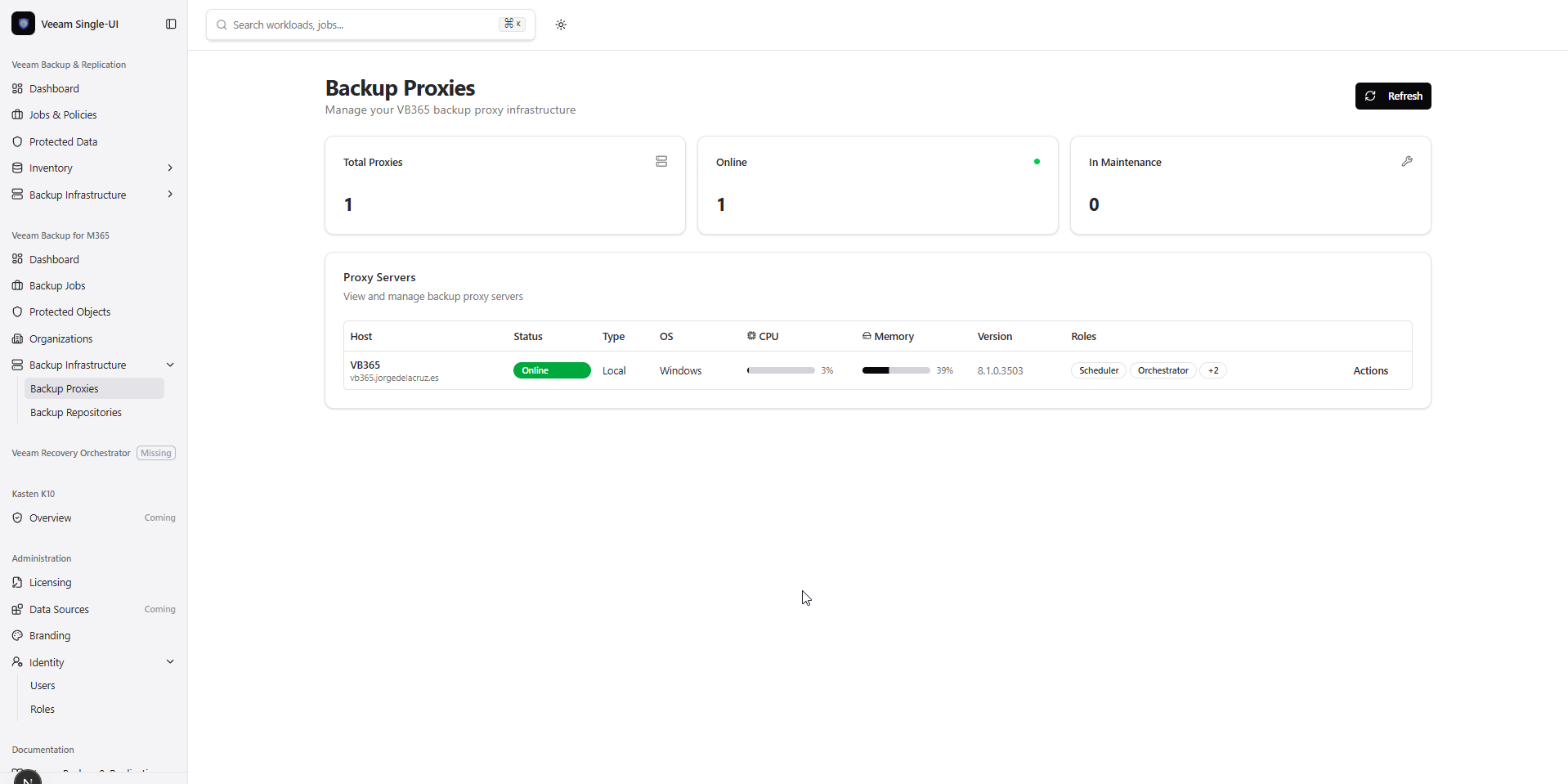
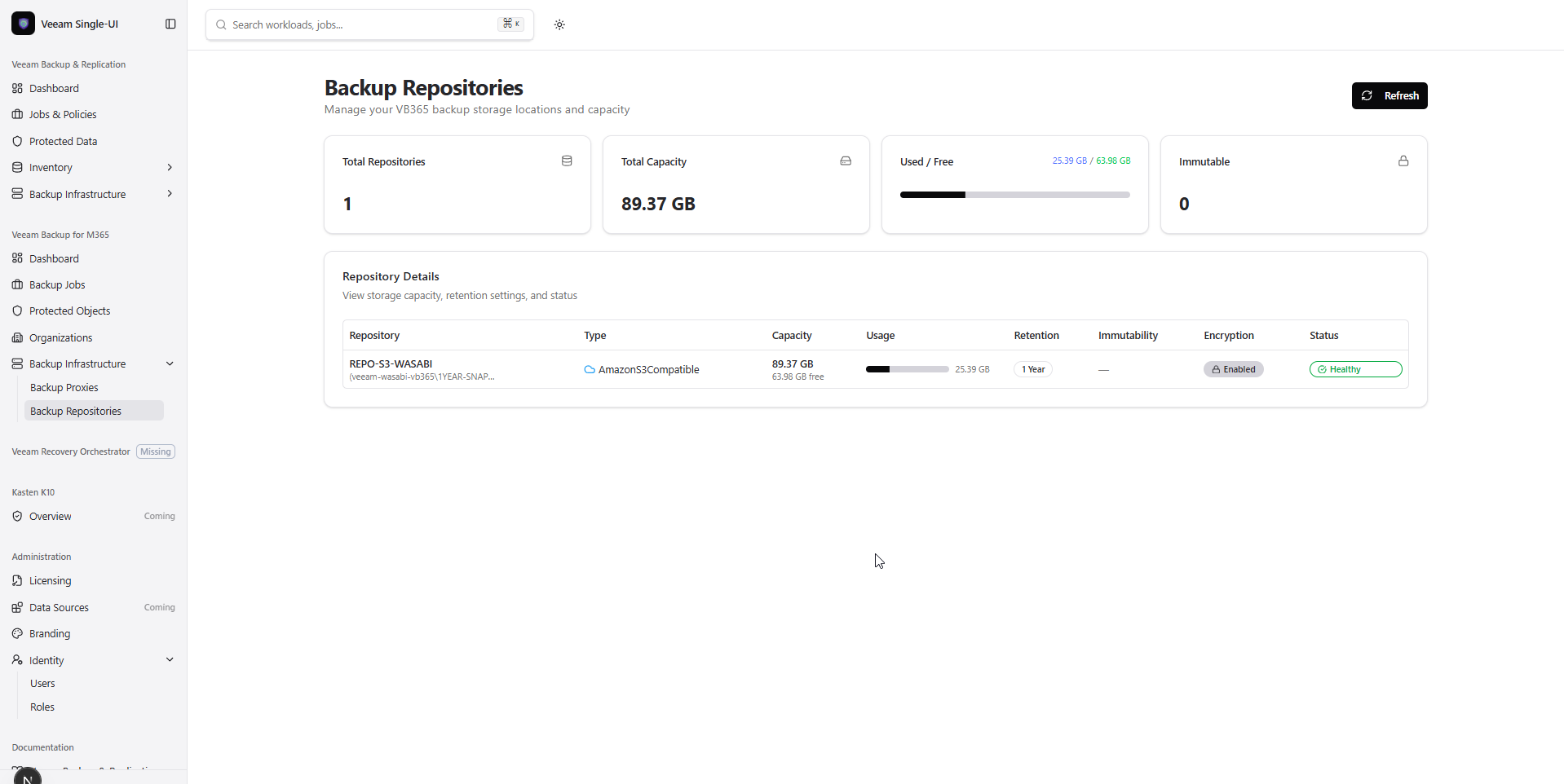
- VB365 Infrastructure: New Proxies and Repositories pages with actions and capacity visualization.
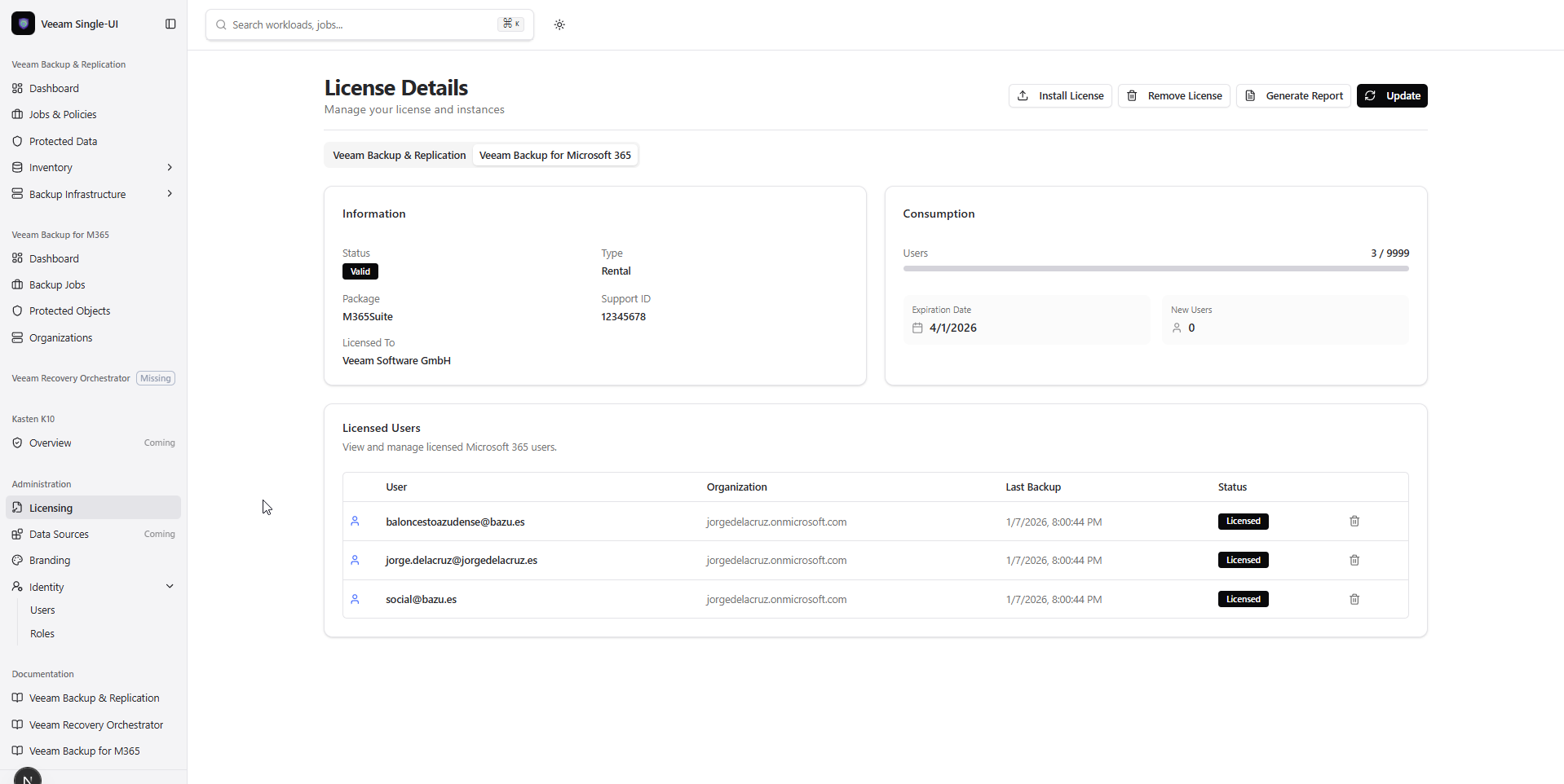
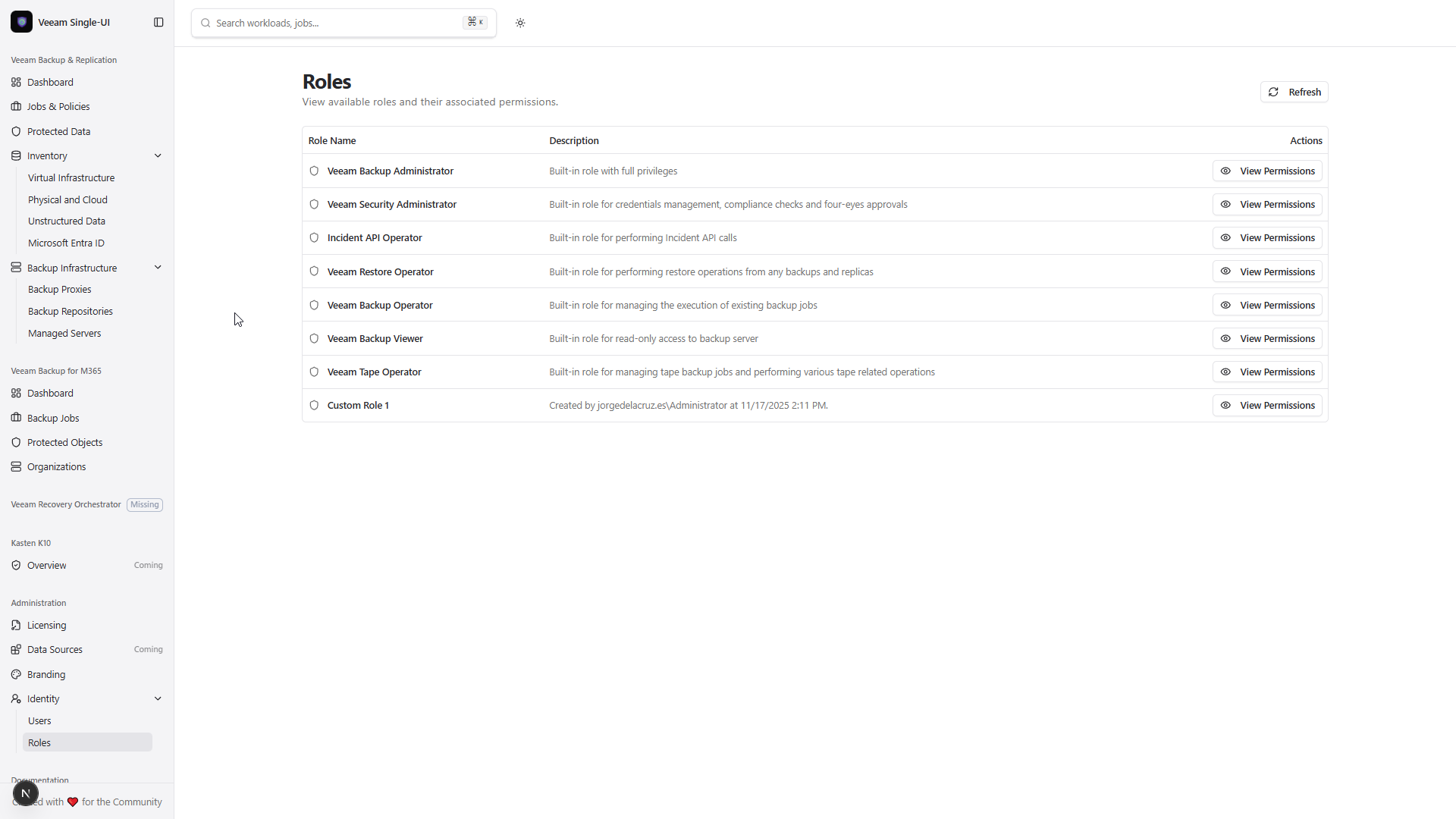
- Licensing Tabs: Unified tabbed interface for VBR and VB365 license management with user revocation.
- Session Export: Export filtered session data to CSV or JSON with improved time range selection.
What's included (v0.1.3 Updates)
HexGrid Protection Visualization (New)
Interactive Protection Map
- Hexagonal Grid View: Each hexagon represents one protected workload.
- RPO-Based Coloring: Green (protected within RPO), Orange (unprotected/outside RPO).
- Search & Filters: Filter by type and status, search by name.
- Hover & Click: Hover effects with 20% darkening, click for detailed dialog.
- Responsive: Automatically adapts to container width.
Available On
/vbr/protected-data- Toggle between Grid and HexMap views./vbm/protected-items- Toggle between Grid and HexMap views.
VB365 Backup Infrastructure (New)
Backup Proxies (/vbm/infrastructure/proxies)
- Summary Cards: Total proxies, Online count, In Maintenance count.
- Detailed Table: Host, Status, Type, OS, CPU/Memory usage bars, Version, Roles.
- Actions: Rescan proxy, Enable/Disable Maintenance Mode.
Backup Repositories (/vbm/infrastructure/repositories)
- Summary Cards: Total repositories, Capacity, Used/Free, Immutable count.
- Detailed Table: Capacity visualization, Retention settings, Immutability, Encryption, Health status.
- Smart Indicators: Color-coded usage bars (red >90%, yellow >75%).
Licensing Page Enhancements
Tabbed Interface
- VBR Tab: Existing license functionality preserved.
- VB365 Tab: New tab (visible only when VBM is configured).
VB365 License Management
- License Info Cards: Status, type, package, support ID, licensed to.
- Usage Stats: User consumption with progress bar.
- Licensed Users Table: Name, Organization, Last Backup, License State.
- Revoke Action: Remove license from individual users with confirmation.
- PDF Report: Generate and download license overview report.
Sessions Overview Improvements
Time Range Dropdown
- Replaced button group with dropdown menu (7d, 14d, 30d).
- Calendar icon for better visual distinction.
Export Capability
- Export to CSV with separate date/time columns.
- Export to JSON with full session data.
- Exports respect current filters.
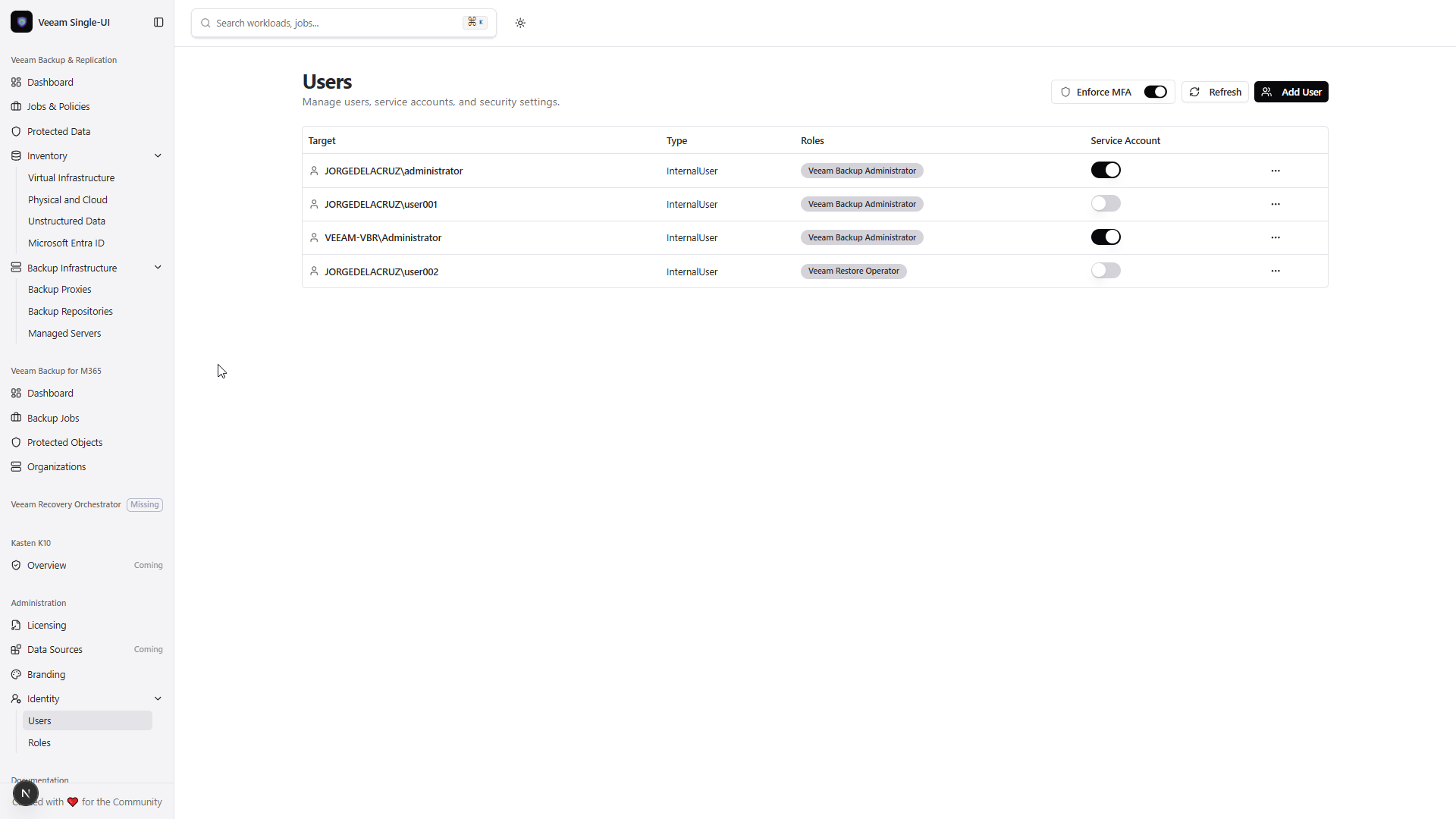
Identity Management & Security (New)
Administration > Data Sources
- User Directory: View and filter users with metadata.
- Security Settings: MFA enforcement toggle with real-time API sync.
- Service Accounts: Per-user management with role assignment.
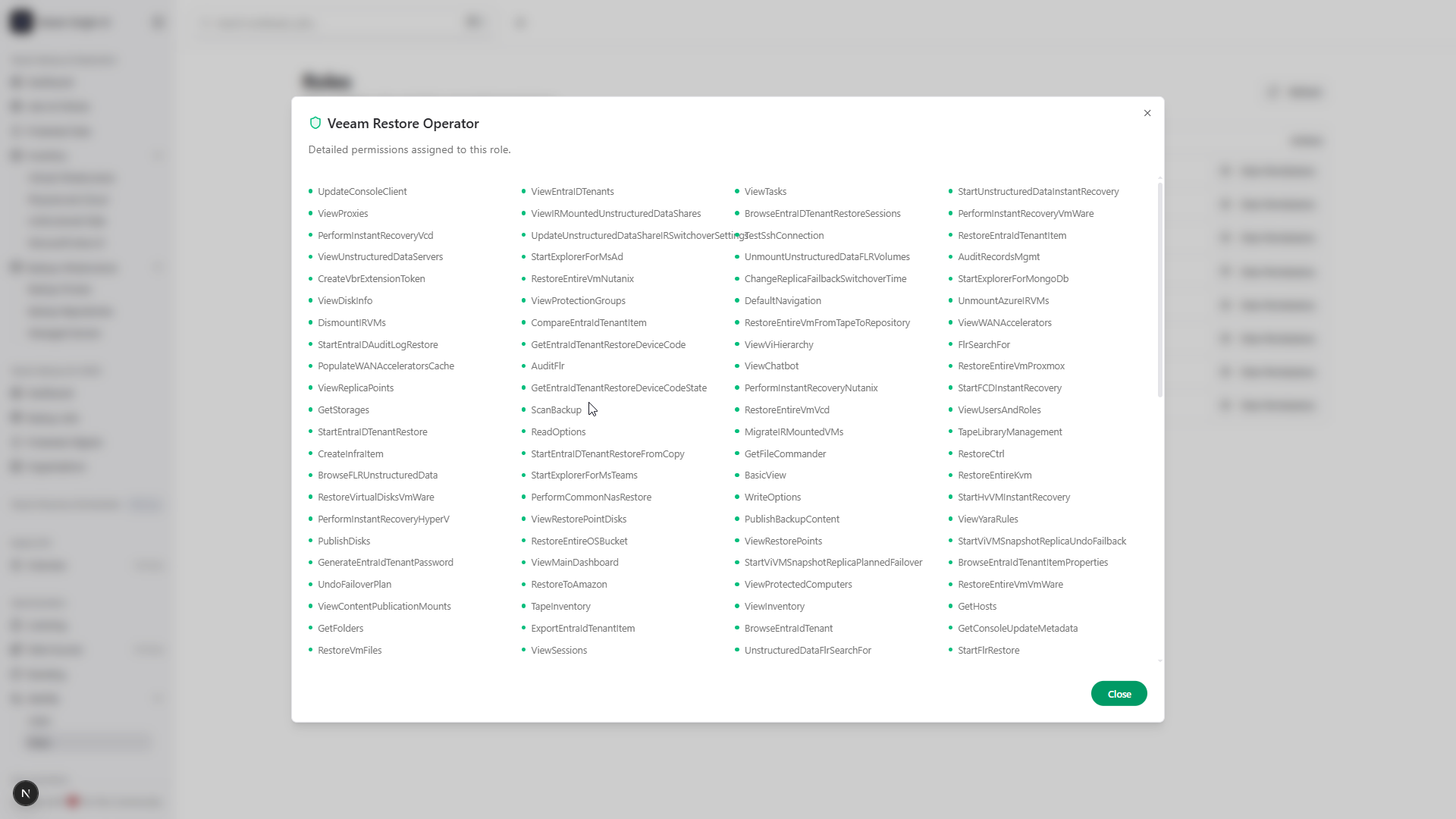
- RBAC Roles: View and manage role-based permissions.
UX Improvements
Standardized Tables
- Consistent column toggle button (Columns dropdown).
- Unified search input across all data tables.
Environment-Based Visibility
- VBM and VRO sidebar sections auto-hide when not configured.
- "Missing" badge displayed for unconfigured products.
Job Details Fix
- Enriched VBR job details fetching from
/jobs/statesendpoint. - Accurate Last Run, Next Run, Repository, and Objects Count.
Sidebar Updates
- VB365 Organizations icon changed to Building2.
- Collapsible Backup Infrastructure menu for VB365.
Getting started
Prerequisites
- Node.js 20.x or later
- Veeam Backup & Replication REST API (v1.3-rev1) is required
Quick run (dev)
npm install
npm run dev
Production
npm run build
npm start
Notes
- VB365 Features: Require
VBM_API_URLenvironment variable to be configured. - HexGrid Performance: Optimized for up to 1000+ workloads with virtualized rendering.
Full Changelog: https://github.com/jorgedlcruz/open-backup-ui/commits/v0.1.3
What's Changed
- Features/v0.1.3 by @jorgedlcruz in #3
Full Changelog: v0.1.2...v0.1.3
What's Changed
- Features/v0.1.3 by @jorgedlcruz in https://github.com/jorgedlcruz/open-backup/pull/3
Full Changelog: https://github.com/jorgedlcruz/open-backup/compare/v.0.1.2...v0.1.3
Contributors
Assets 3
v0.1.2
v0.1.2 [2026-01-04]
Release v0.1.2 of Open Backup UI introduces a fully featured Administration area with Licensing, and a complete Branding Engine for "White-Labeling" the UI, and significant enhancements to the Veeam Backup for Microsoft 365 (VB365) dashboard. This release also solidifies the stability of the build pipeline with Next.js 15.
Highlights
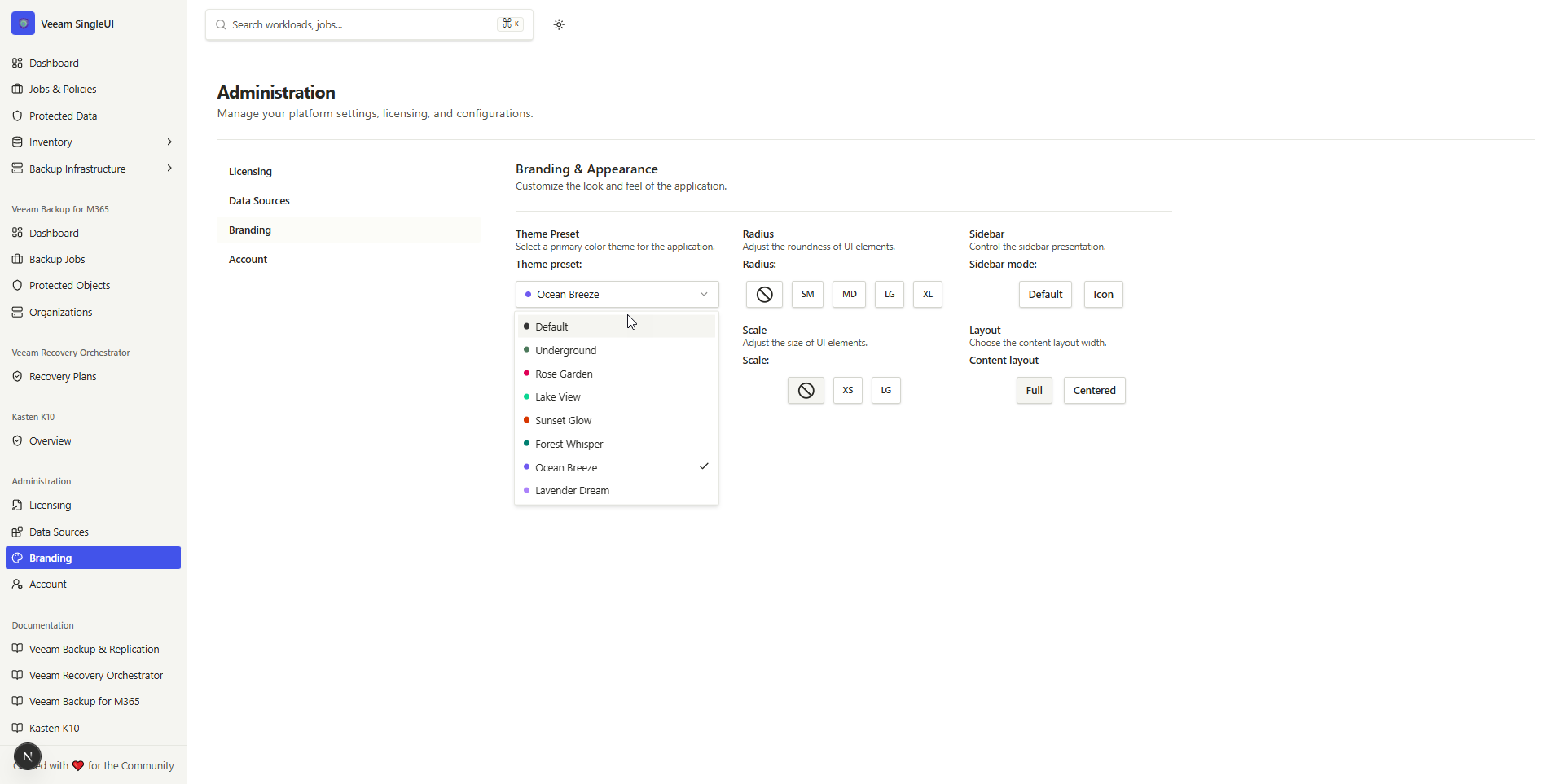
- Theme Customizer: Complete control over Primary Colors, Radius, and Scaling with Persistent Light/Dark modes.
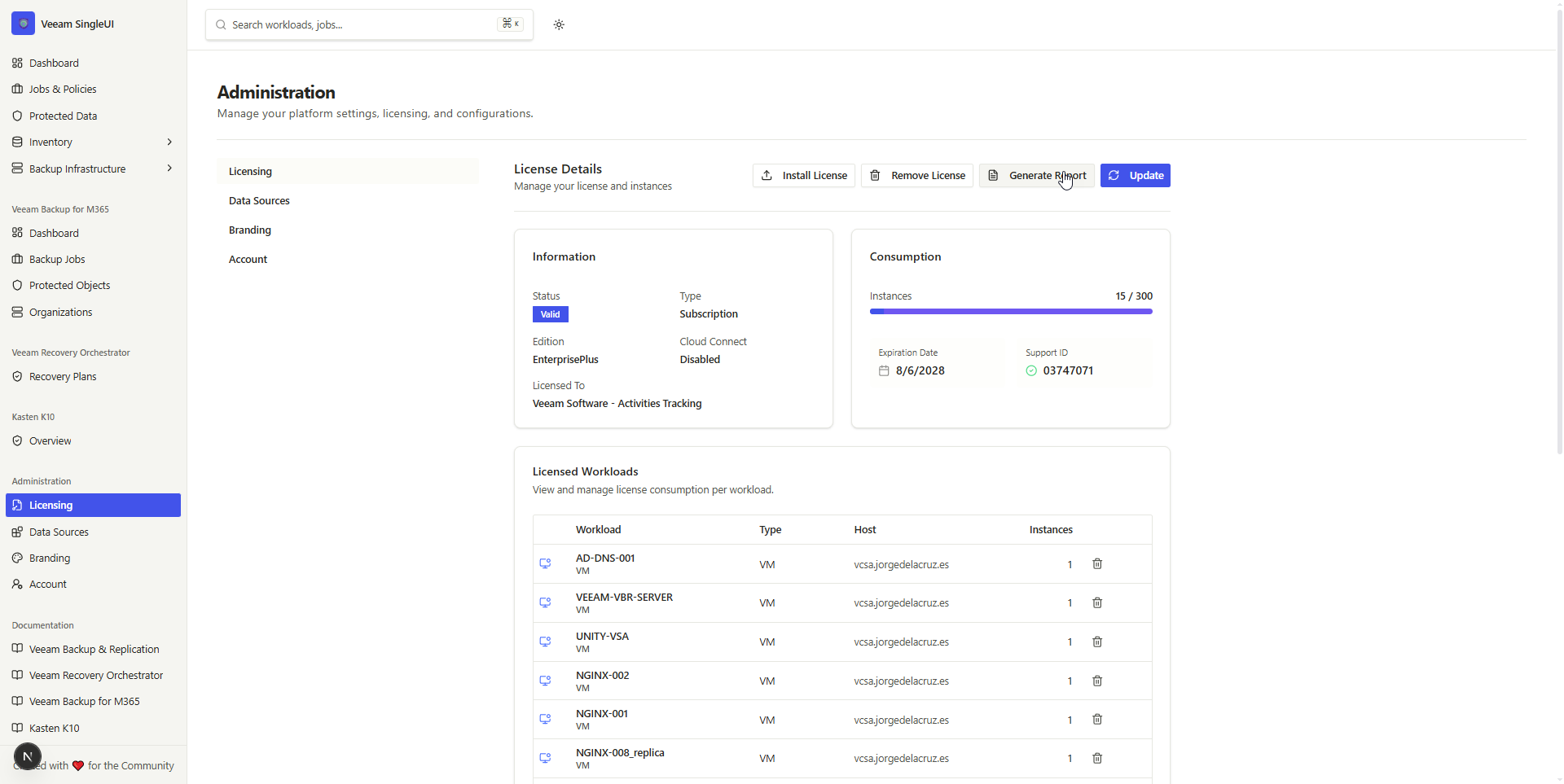
- Licensing Administration: Dedicated Administration view for VBR Licensing status and HTML Report Generation.
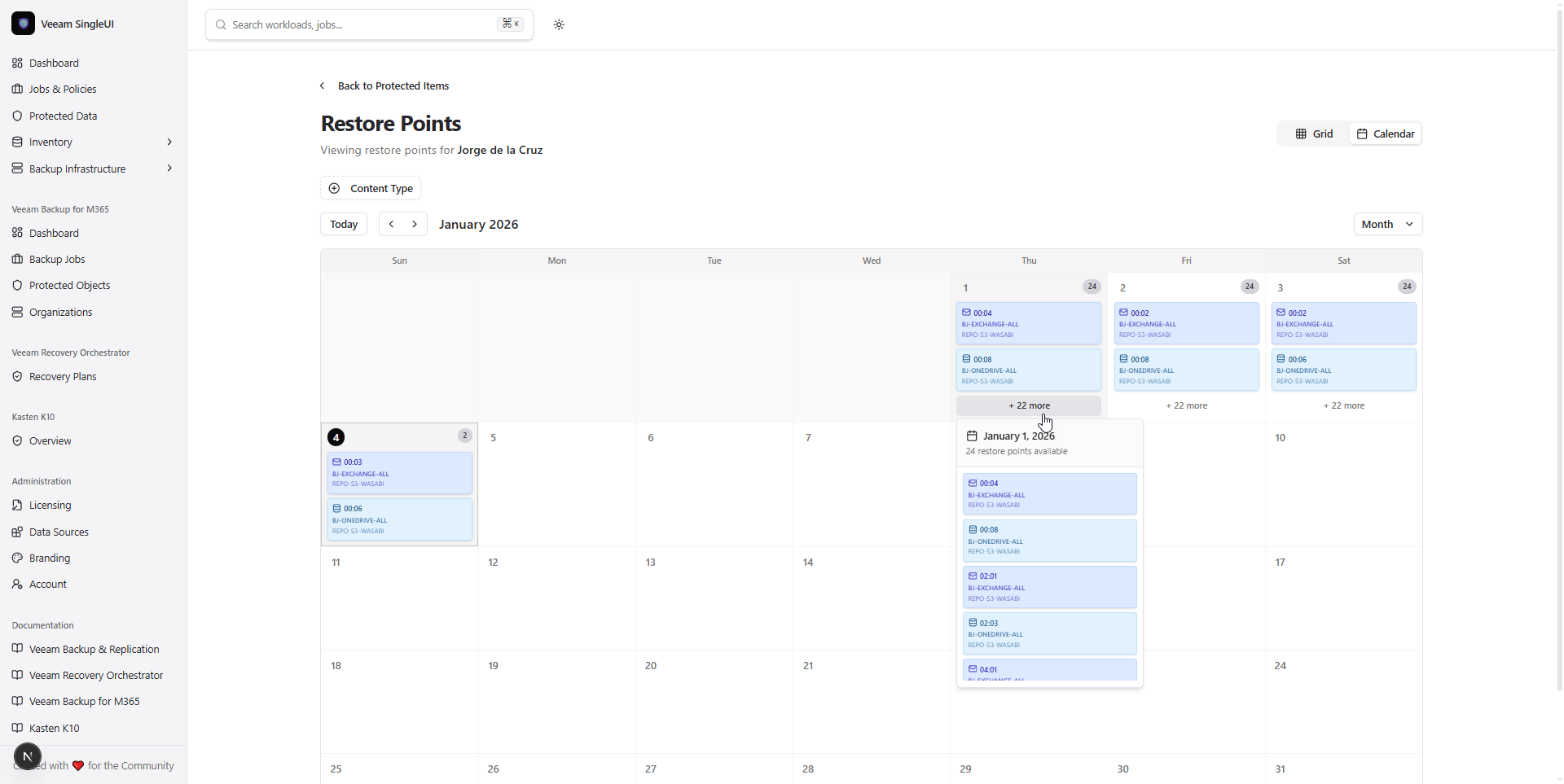
- Advanced Calendar Views: Restore Points Calendar now supports Month, Week, and Day granular views.
- VB365 Dashboard: Now features the interactive Sessions Overview chart with smart default filtering.
What's included (v0.1.2 Updates)
Administration & Branding (New)
Theme Customizer
- 7-Color Palette: Switch instantly between Blue, Green, Orange, Red, Violet, Yellow, and Default (Gray).
- Geometric Control: Adjust global UI roundness (Radius) from
0to1.0rem. - Accessibility Scaling: Scale the interface font and size from 90% to 110%.
- Persistence: All settings are saved via server-side cookies, preventing "flicker" on page reloads.
Licensing Hub
- Administration Area: New sidebar section for overarching configuration.
- License Revoke: You can comfortably revoke licenses of workloads.
- VBR License Reports: Generate detailed HTML reports showing:
- Instance consumption.
- Capacity usage (TB).
- Expiration dates and support IDs.
Veeam Backup & Replication (VBR)
Calendar Power
- Granular Views: Restore Points Calendar now supports toggling between Month, Week, and Day views.
- Detailed Tooltips: Hover over clustered events in Day view to see precise timestamps and backup sizes.
Veeam Backup for Microsoft 365 (VBM)
Dashboard & Sessions
- Sessions Chart Integration: Brought the rich Sessions Overview chart to the VB365 dashboard.
- Smart Filtering: Defaulted the session view filter to "Backup" jobs, ensuring the graph is populated immediately on load.
- Calendar View: Ported the interactive Restore Points Calendar to VB365 Protected Data.
Getting started
Prerequisites
- Node.js 20.x or later
- Veeam Backup & Replication REST API (v1.3-rev1) is required
Quick run (dev)
npm install
npm run dev
Production
npm run build
npm start
Notes
- Important: If upgrading from v0.1.1, please stop your dev server and restart it to pick up the new
next.config.jschanges.
Full Changelog: https://github.com/jorgedlcruz/open-backup-ui/commits/v0.1.2
What's Changed
- v.0.1.2 by @jorgedlcruz in #2
What's Changed
- Features/v0.1.2 by @jorgedlcruz in #2
Full Changelog: v0.1.1...v.0.1.2
Contributors
Assets 3
v0.1.1
v0.1.1 [2025-12-29]
Release v0.1.1 of Open Backup UI brings robust enhancements to data visualization, improved filtering capabilities, and expanded view options for protected data.
Highlights
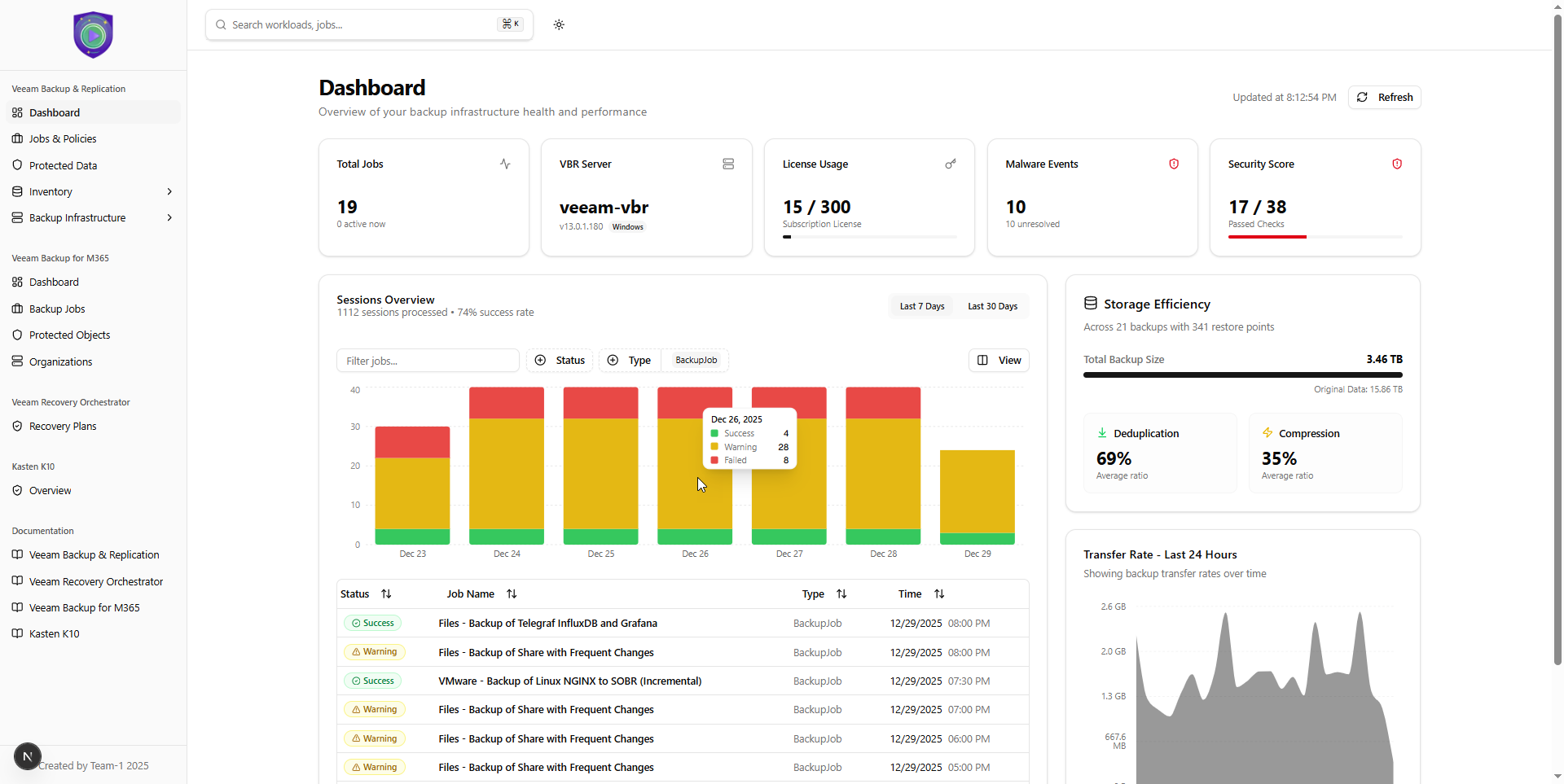
- Enhanced Dashboard Visualization: Transfer Rate chart is now front-and-center.
- Unified Filtering: Sessions Overview filters now drive both the chart and grid.
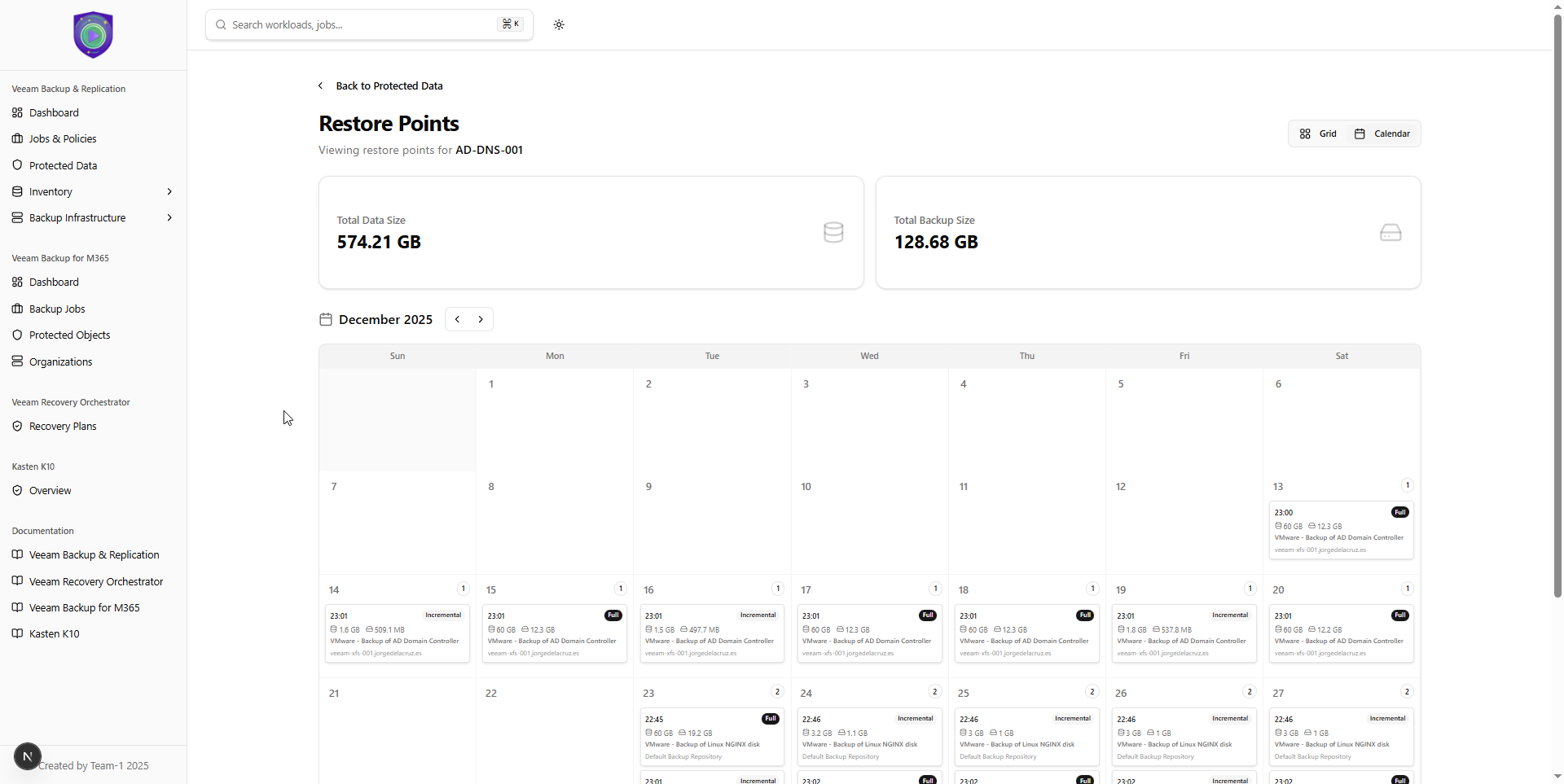
- Restore Points Calendar: A new monthly calendar view for navigating restore points.
- Improved Data Accuracy: Smarter detection of Full vs. Incremental restore point types.
What's included (v0.1.1 Updates)
Veeam Backup & Replication (VBR) monitoring (required)
Dashboard
- Transfer Rate Chart: Relocated to the main dashboard (right column) for immediate performance trend visibility.
- Simplified Layout: Security Score & Best Practices widget redesigned for clearer top-level visibility.
- Reliability: Resolved hydration errors to ensure timestamp accuracy across server/client rendering.
Sessions Overview
- Unified Filtering: "Name", "Status", and "Type" filters now apply globally to the Bar Chart and the Sessions Grid simultaneously.
- Rich Tooltips: Implemented a custom tooltip for the sessions chart featuring:
- Clean date headers.
- Color-coded status indicators (Success, Warning, Failed).
- Tabular value display for readability.
- Restored Header Elements: Added back summary statistics (total sessions, success rate) and 7-day/30-day time range toggles.
- Subtle Context: Added a Y-Axis to the chart for better scale estimation.
Protected Data & Restore Points
- Restore Points Calendar: Introduced a Monthly Calendar View for restore points.
- Toggle between Grid and Calendar modes.
- Visualizes restore points as daily events.
- Displays Job Name, sizes, and color-coded type badges.
- Data Fidelity: Restore Point types (Full vs. Incremental) are now accurately derived from underlying backup filenames (
.vbkvs.vib/.vrb), fixing previous display issues.
Documentation
- Updated README:
- Comprehensive list of all used API endpoints.
- Updated project structure with new components.
- Refined feature descriptions to match the current build.
Getting started
Prerequisites
- Node.js 20.x or later
- Veeam Backup & Replication REST API (v1.3-rev1) is required
Quick run (dev)
npm install
npm run dev
Production
npm run build
npm start
Notes
- This release is a direct update to v0.1.0.
- Ensure your
.env.localis correctly configured withVEEAM_API_URL. - Container deployment remains supported (see
CONTAINER.md).
Full Changelog: https://github.com/jorgedlcruz/open-backup-ui/commits/v0.1.1
What's Changed
- v.0.1.1 by @jorgedlcruz in #1
New Contributors
- @jorgedlcruz made their first contribution in #1
Full Changelog: v0.1.0...v0.1.1
Contributors
Assets 3
v0.1.0
v0.1.0 [2025-12-27]
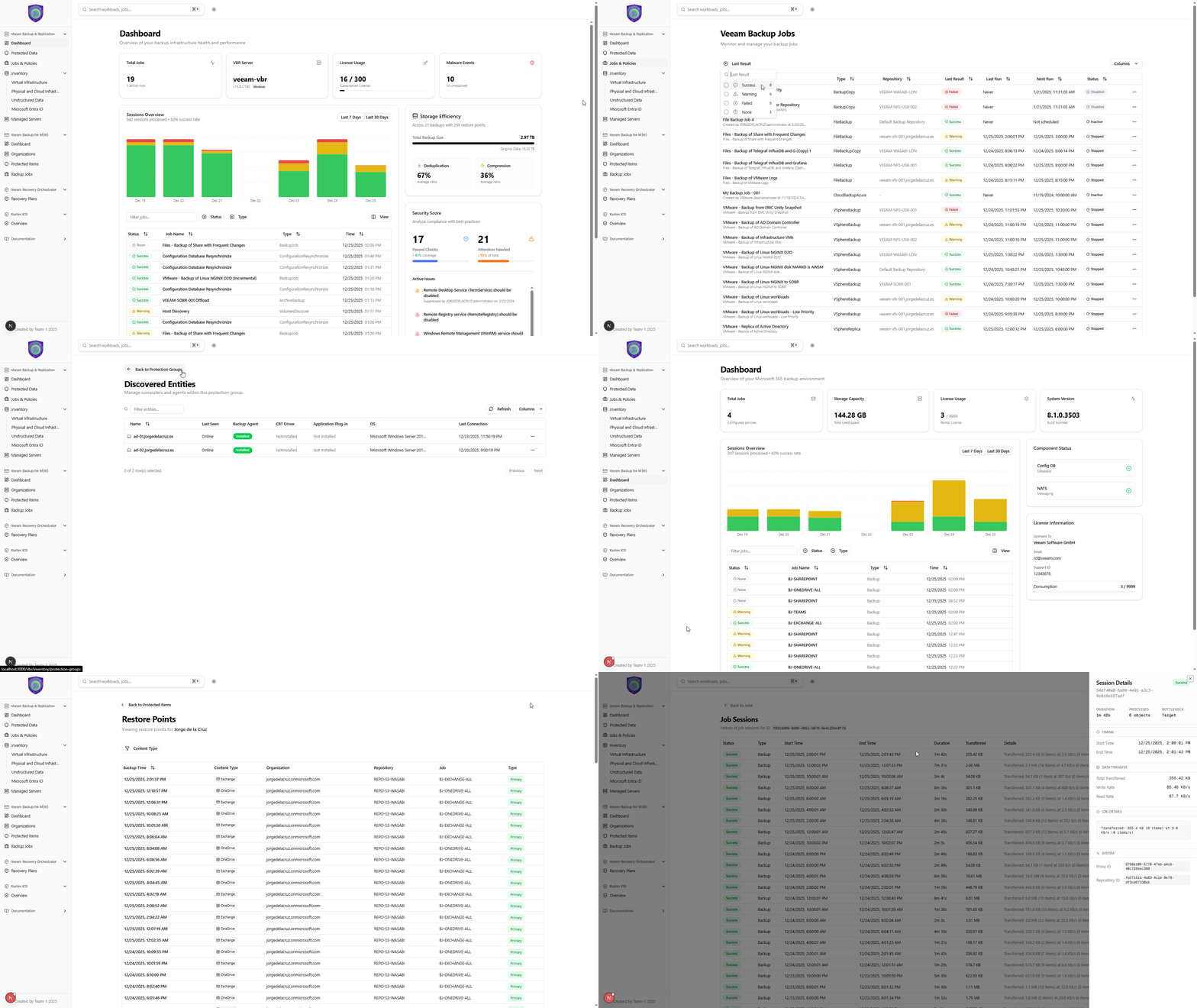
First public MVP release of Open Backup UI: an open-source, operator-friendly web dashboard for Day 2 backup operations that brings multiple Veeam products under one clean Next.js 15 UI.
Highlights
- Unified monitoring experience for Veeam Backup & Replication (required), with optional Veeam Recovery Orchestrator and Veeam Backup for Microsoft 365 integration.
- Real-time UX by default with an automatic 30-second refresh across views.
- Secure API proxy design: server-side API calls keep credentials off the client.
- No database, stateless by design: all views are generated from live API calls.
Product design and UX perks
Built with a Day 2 operations persona in mind, this MVP focuses on speed, clarity, and fewer clicks.
-
True Global Search (cross-product)
Search from anywhere in the UI. Type anything (job name, VM, user, site, share, "AD", etc.) and jump straight to relevant objects and views across supported products. -
Great filtering, everywhere
Fast table filtering and faceted filters help you slice large environments quickly (protected vs unprotected, platform, state, job status, and more). -
Click-to-drill, no dead ends
Jobs open into session history, sessions open into task details, and key objects are navigable so you can troubleshoot without hunting through multiple consoles. -
At-a-glance operational density
Key signals are surfaced directly in the main views (license usage, storage efficiency, repository properties like immutability, last and next run, health state), minimizing extra clicks. -
Dark and light theme
Dark mode support with automatic system preference detection for long operator sessions.
What's included
Veeam Backup & Replication (VBR) monitoring (required)
Dashboard
- Real-time statistics: active jobs, success rate, storage usage, protected VMs, data processed
- Security best practices monitoring for configuration compliance
- Malware detection visibility: recent scan events and alerts
- Recent sessions overview with status and key details
- Time range selection: 7-day and 30-day historical views
- License usage visibility for fast operational awareness
- Storage efficiency visibility (consumed space plus dedupe and compression context)
Jobs
- Comprehensive jobs table with status, type, and scheduling details
- Advanced filtering by job status: Running, Success, Warning, Failed
- Quick search across all job names
- Last run and next run tracking for fast operational context
- Job drill-down: click any job to open detailed session history
Job details
- Full session history for each job
- Task-level breakdown per session
- Transfer rate visualization over time
- Session status tracking: Success, Warning, Failed, Running
- Time-based session filtering for operational troubleshooting
Protected data
- A consolidated view of protected workloads with restore points and consumption at your fingertips
- Summary per workload across jobs and repositories, designed to avoid digging into policies just to answer “how many restore points do I have?”
Backup Infrastructure
- Backup Proxies
- CPU/Memory and concurrent task-slot utilization monitoring
- Transport mode, OS type, and configuration details
- Health indicators and maintenance mode visibility
- Backup Repositories
- Capacity planning bars (Used vs Free)
- Repository type support: Windows, Linux, NFS, SMB, Object Storage
- Key properties surfaced: immutability, task limits, and health
- Managed Servers
- Overview of all managed infrastructure servers
- Server details: name, type, description, version information
Inventory
- Virtual infrastructure
- VMware vSphere, Microsoft Hyper-V, and Nutanix AHV visibility
- Protected vs unprotected status with clear indicators
- Rich metadata: vCenter, Datacenter, Cluster, Guest OS, DNS names
- Faceted filtering by protection status, platform, and state
- Physical and cloud infrastructure
- Protection groups: deployment and status monitoring
- Discovered entities: agent status per machine or instance
- Agent health: last connection time, version, operation mode
- Unstructured data
- File shares and NAS monitoring
- Object storage repository and credential mapping visibility
- IO control and processing limit configuration visibility
Veeam Recovery Orchestrator (VRO) monitoring (optional)
- Recovery plans table with plan status and configuration state
- Plan details including name, description, and VM counts
- Search and filter for fast navigation
Veeam Backup for Microsoft 365 (VB365) monitoring (optional)
- Microsoft 365 jobs monitoring with status (success, warning, failure)
- Last run visibility
- Support for multiple M365 job types and configurations
- Dashboard-style visibility including license consumption and total backup size
- Protected items view with filtering, search, and restore point drill-down
Kasten K10
- Placeholder page: "Coming Soon" for Kubernetes backup monitoring
Platform and UX
- Responsive layout for desktop, tablet, and mobile
- Interactive charts (Recharts) and fast data tables (TanStack Table)
- Toast notifications for user-friendly success and error feedback
Getting started
Prerequisites
- Node.js 20.x or later
- Veeam Backup & Replication REST API (v1.3-rev1) is required
- VRO (v7.21) and VB365 (v8) are optional
Quick run (dev)
npm install
npm run dev
Production
npm run build
npm start
Configure environment variables in .env.local (VBR required). If VRO and/or VB365 are not configured, their pages will show an error message.
Notes and recommendations
- This is a community-driven project. Run it in a staging or trial environment first.
- The app is stateless and makes API calls on the fly. Deploy it close to your Veeam servers to keep latency low.
- If you use self-signed certificates in development, you can set
NODE_TLS_REJECT_UNAUTHORIZED=0(development only). - Container deployment is supported, see
CONTAINER.md.
Full Changelog: https://github.com/jorgedlcruz/open-backup-ui/commits/v0.1.0