Parley Settings
All Parley configuration options.
Open: Settings → Preferences or Ctrl+,
Configure game and module directories.
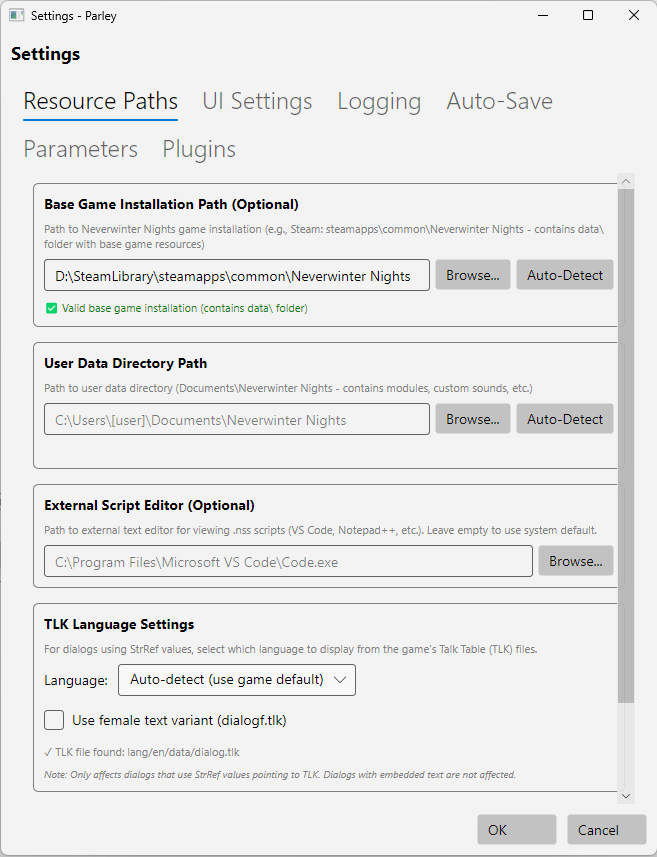
| Setting | Purpose |
|---|---|
| Module Directory | Script/sound browser default location |
| Base Game Installation | Base game resources, TLK file |
| External Editor | Program for editing scripts |

| Setting | Purpose |
|---|---|
| Language | Display language for StrRef strings |
| Female variant | Use gendered text variant |
Supported: English, German, French, Spanish, Italian, Polish.
Customize appearance.

| Setting | Options |
|---|---|
| Theme | Standard, Dark, accessibility variants |
| Font Size | Adjust text size |
| Font Family | Override theme default |
| Scrollbar Behavior | Always visible / Auto-hide |
| NPC Speaker Coloring | Enable/disable color coding |
| Spell Check | Enable/disable spell checking |
| Setting | Default | Description |
|---|---|---|
| Enable spell checking | On | Underlines misspelled words in Text and Comments fields |
Right-click misspelled words for suggestions, ignore, or add to dictionary.
Note: Currently English (US) only. Additional languages planned for future release.
See Spell Check for full documentation.

See Themes for available themes.

| Setting | Description |
|---|---|
| Enable | Toggle automatic saving |
| Interval | Minutes between saves |
Status bar shows last save time.
Script parameter system configuration.

| Setting | Description |
|---|---|
| Cache location | Where parameter data is stored |
| Auto-scan | Scan scripts for parameters automatically |
Debug and troubleshooting options.

| Setting | Description |
|---|---|
| Log Level | TRACE, DEBUG, INFO, WARN, ERROR |
| Log Location | Where logs are written |
Log Levels:
- ERROR: Only errors
- WARN: Warnings and errors
- INFO: Normal operation (default)
- DEBUG: Detailed operation info
- TRACE: Maximum detail (verbose)
See Troubleshooting for using logs.
- Getting Started - Initial configuration
- Spell Check - Dictionary and custom words
- Themes - Available themes
- Troubleshooting - Log analysis